Page 209 of 358

Maintenance menu
In the
Serv
Servmenu, you have the following
options:
R Calling up display messages in message
memory (Y page 213)
R Checking the tire pressure electronically
(Y page 321)
R Calling up the service due date
(Y page 286) Settings menu
Introduction In the
Sett Settmenu, you have the following
options:
R Changing the instrument cluster settings
R Changing the light settings
R Changing the vehicle settings
R Changing the convenience settings
R Restoring the factory settings Instrument cluster Selecting the unit of measurement for dis-
tance
You can determine whether the multifunction
display shows some messages in miles or
kilometers.
X Press the 0059or0065 button on the steer-
ing wheel to select the Sett Settmenu.
X Press the 0064or0063 button to select the
Instrument Cluster
Instrument Cluster submenu.
X Press 0076to confirm.
X Press the 0064or0063 button to select the
Display Unit Speed-/Odometer
Display Unit Speed-/Odometer func-
tion.
You will see the selected setting: km kmor
miles
miles.
X Press the 0076button to save the setting.
The selected unit of measurement for dis-
tance applies to: R the digital speedometer in the Trip Tripmenu
R the odometer and the trip odometer
R the trip computer
R the current consumption and the range
R navigation instructions in the Navi
Navimenu
R cruise control
R DISTRONIC PLUS
R ASSYST PLUS service interval display
Switching the additional speedometer
on/off
The Speedometer [km/h] Speedometer [km/h] orSpeedometer
Speedometer
[mph]
[mph] function allows you to choose whether
the multifunction display in the status area
always shows the speed in km/h
km/hor inmph
mph
instead of the outside temperature.
X Press the 0059or0065 button on the steer-
ing wheel to select the Sett
Settmenu.
X Press the 0064or0063 button to select the
Instrument Cluster
Instrument Cluster submenu.
X Press 0076to confirm. Menus and submenus
207On-board computer and displays Z
Page 238 of 358
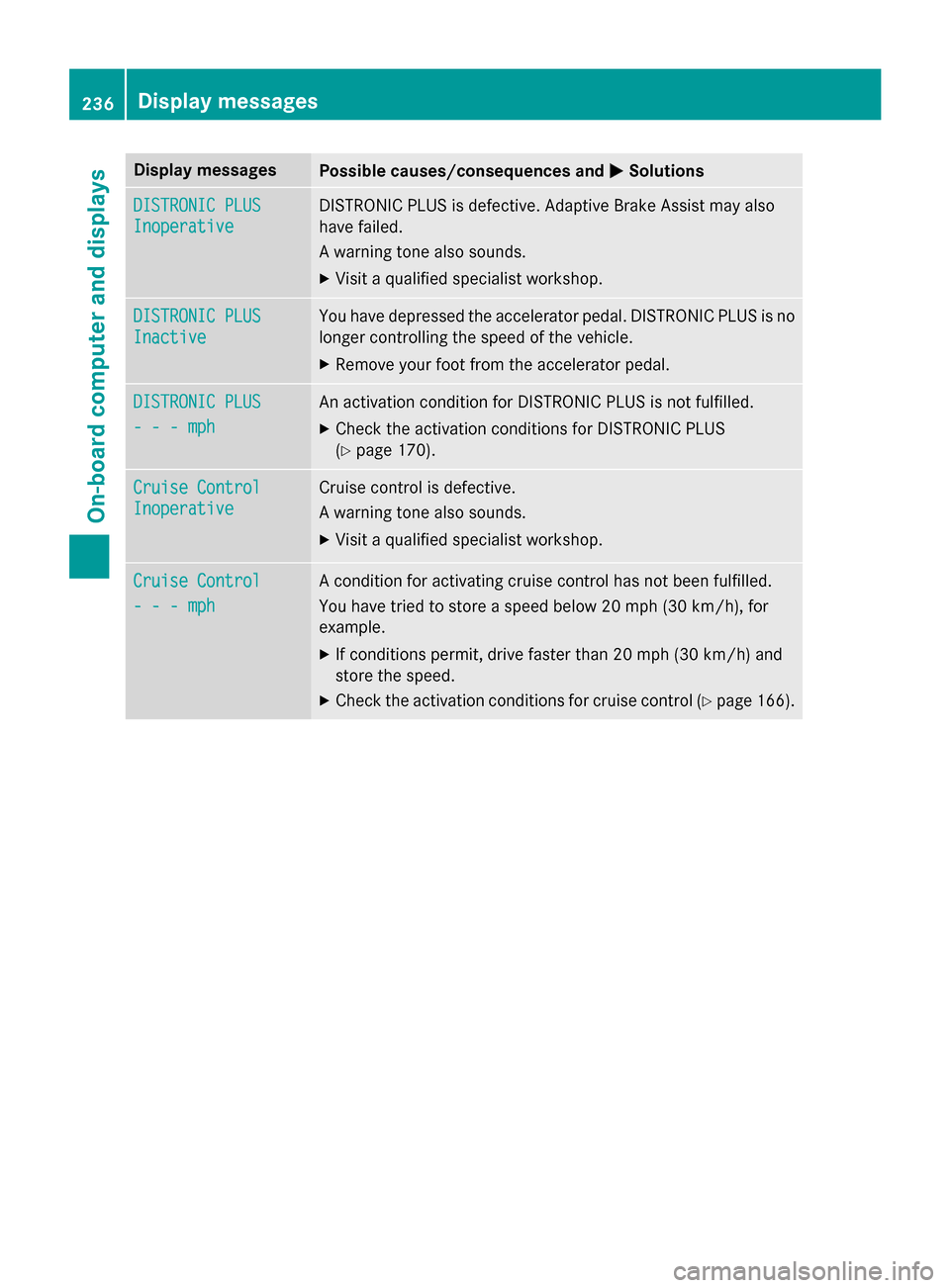
Display messages
Possible causes/consequences and
0050
0050Solutions DISTRONIC PLUS
DISTRONIC PLUS
Inoperative Inoperative DISTRONIC PLUS is defective. Adaptive Brake Assist may also
have failed.
A warning tone also sounds.
X Visit a qualified specialist workshop. DISTRONIC PLUS DISTRONIC PLUS
Inactive Inactive You have depressed the accelerator pedal. DISTRONIC PLUS is no
longer controlling the speed of the vehicle.
X Remove your foot from the accelerator pedal. DISTRONIC PLUS
DISTRONIC PLUS
- - - mph - - - mph An activation condition for DISTRONIC PLUS is not fulfilled.
X Check the activation conditions for DISTRONIC PLUS
(Y page 170). Cruise Control
Cruise Control
Inoperative Inoperative Cruise control is defective.
A warning tone also sounds.
X Visit a qualified specialist workshop. Cruise Control Cruise Control
- - - mph - - - mph A condition for activating cruise control has not been fulfilled.
You have tried to store a speed below 20 mph
(30 km/h), for
example.
X If conditions permit, drive faster than 20 mph (30 km/ h)and
store the speed.
X Check the activation conditions for cruise control (Y page 166).236
Display messagesOn-board computer and displays
Page 250 of 358

Problem
Possible causes/consequences and
0050
0050Solutions 00E5
The yellow ESP
®
warn-
ing lamp flashes while
the vehicle is in motion. ESP
®
or traction control has intervened because there is a risk of
skidding or at least one wheel has started to spin.
Cruise control or DISTRONIC PLUS is deactivated.
X When pulling away, only depress the accelerator pedal as far as
necessary.
X Ease off the accelerator pedal while the vehicle is in motion.
X Adapt your driving style to suit the road and weather conditions.
X Do not deactivate ESP ®
.
For exceptions, see: (Y page 68).00BB
The yellow ESP
®
OFF
warning lamp is lit while the engine is running. ESP
®
is deactivated. ESP ®
will not stabilize the vehicle if it starts to
skid or if a wheel starts to spin.
G WARNING
If ESP ®
is switched off, ESP ®
is unable to stabilize the vehicle.
There is an increased risk of skidding and an accident.
X Reactivate ESP ®
.
For exceptions, see: (Y page 68).
X Adapt your driving style to suit the road and weather conditions.
If ESP ®
cannot be activated:
X Have ESP ®
checked at a qualified specialist workshop. 0074
AMG vehicles only:
The yellow SPORT han-
dling mode warning
lamp is lit while the
engine is running. SPORT handling mode is activated.
G WARNING
When SPORT handling mode is switched on, ESP ®
is unable to
stabilize the vehicle.
There is an increased risk of skidding and an accident.
X Only switch on SPORT handling mode in certain situations
(Y page 69). 248
Warning and indicator lamps in the instrument clusterOn-board computer and displays
Page:
< prev 1-8 9-16 17-24