2014 MERCEDES-BENZ C-CLASS SALOON wipers
[x] Cancel search: wipersPage 6 of 489
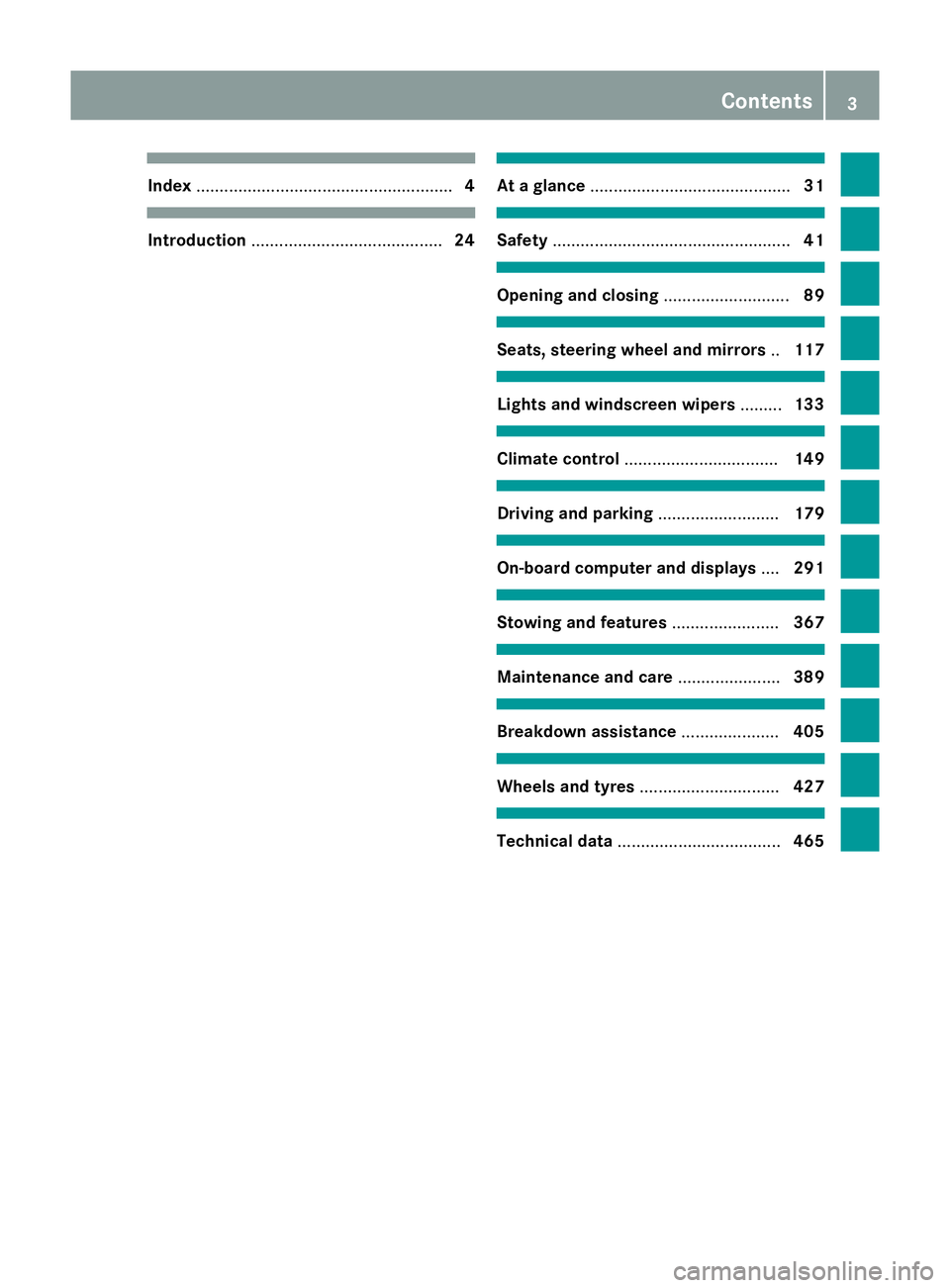
Index
....................................................... 4Introduction
......................................... 24 At a glance
........................................... 31 Safety
................................................... 41 Opening and closing
...........................89 Seats, steering wheel and mirrors
..117 Lights and windscreen wipers
.........133 Climate control
................................. 149 Driving and parking
..........................179 On-board computer and displays
....291 Stowing and features
.......................367 Maintenance and care
......................389 Breakdown assistance
.....................405 Wheels and tyres
.............................. 427 Technical data
................................... 465 Contents
3
Page 26 of 489

Warnings
Stickers .......................................... .42
Washer fluid
Display message ............................ 349
Wheel and tyre combinations
see Tyres
Wheel bolt tightening torque ........... 443
Wheel chock ...................................... 439
Wheels
Changing a wheel .......................... 437
Changing/replacing ....................... 438
Checking ........................................ 429
Cleaning ......................................... 399
Emergency spare wheel ................. 461
Fitting a new wheel ........................ 442
Fitting a wheel .............................. .438
Important safety notes .................. 428
Removing a wheel .......................... 442
Storing .......................................... .438
Tightening torque ........................... 443
Wheel size/tyre size ..................... .444
Windowbag
Display message ............................ 326
Operation ......................................... 53
Windows
Cleaning ......................................... 399
see Side windows
Windscreen
Demisting ...................................... 163
Windscreen washer fluid
see Windscreen washer system
Windscreen washer system
Notes ............................................. 476
Topping up ..................................... 394
Windscreen wipers
Problem (malfunction) ................... 148
Replacing the wiper blades ............ 145
Switching on/off ........................... 145
Winter operation
Important safety notes .................. 430
Radiator cover ............................... 392
Slippery road surfaces ................... 215
Snow chains .................................. 431
Summer tyres ................................ 430
Winter tyres
Limiting the speed (on-board com-
puter) ............................................. 313
M+S tyres ...................................... 430 Wiper blades
Cleaning ......................................... 400
Important safety notes .................. 145
Replacing ....................................... 145
Replacing (windscreen) .................. 146
Wooden trim (cleaning instruc-
tions) ................................................. .403
Workshop
see Qualified specialist workshop Index
23
Page 136 of 489

Useful information
............................134
Exterior lighting ................................ 134
Interior lighting ................................. 140
Replacing bulbs (vehicles with LED
headlamps) ........................................ 141
Replacing bulbs (vehicles with hal- ogen headlamps) ............................... 142
Windscreen wipers ...........................145 133Lights and windscreen wipers
Page 137 of 489

Useful information
i This Owner's Manual describes all mod-
els, series and optional equipment for your
vehicle that were available at the time of
going to press. National variations are pos- sible. Note that your vehicle may not be
equipped with all of the functions descri-
bed. This is also the case for systems and
functions relevant to safety.
i Read the information on qualified special-
ist workshops: (Y page 27). Exterior lighting
General notes
For reasons of safety, Mercedes-Benz recom- mends that you drive with the lights switched
on even during the daytime. In some coun-
tries, operation of the headlamps varies due
to legal requirements and self-imposed obli-
gations. Driving abroad
General notes If your journey takes you to countries where
vehicles are driven on the opposite side of the
road to the country in which the vehicle is
registered, your headlamps must be switched to symmetrical dipped beam as soon as pos-
sible after crossing the border (only vehicles
with Intelligent Light System). This prevents
oncoming traffic from being dazzled. Sym-
metrical lights do not illuminate as large an
area of the edge of the carriageway.
Vehicles with halogen or static LED
headlamps It is not necessary to switch your headlamps
to symmetrical dipped beam when driving in
countries where vehicles are driven on the
opposite side of the road to the country in
which the vehicle is registered. Legal require- ments are fulfilled without switching the
headlamps to symmetrical dipped beam.
Vehicles with Intelligent Light System Before crossing the border, set the head-
lamps to symmetrical dipped beam and after
returning back to asymmetrical dipped beam
via the "Dipped-beam headlamps for driving
on the right/left" function in the on-board
computer (Y page 311).
If the headlamps are converted to symmetri-
cal dipped beam, the "motorway mode" and
"extended range foglamps" functions are not
available. Setting the exterior lighting
Setting options Exterior lighting can be set by:
R using the light switch
R using the combination switch
(Y page 137)
R adjusting the headlamp range (vehicles
with halogen headlamps only)
(Y page 136)
R using the on-board computer
(Y page 311)
Light switch Operation
1
W
Left-hand parking lamps
2 X
Right-hand side lamps 134
Exterior lightingLights and windscreen wipers
Page 138 of 489

3
T
Side lamps, licence plate and instru-
ment cluster lighting
4 Ã
Automatic headlamp mode, control-
led by the light sensor
5 L
Dipped-beam/main-beam head-
lamps
B R
Rear foglamp
If you hear a warning tone when you leave the
vehicle, the lights may still be switched on.
X Turn the light switch to Ã.
The exterior lighting (except the side lamps/
parking lamps) switches off automatically if
you:
R remove the key from the ignition lock
R open the driver's door with the key in posi-
tion 0
Automatic headlamp mode G
WARNING
When the light switch is set to Ã, the
dipped-beam headlamps may not be switched on automatically if there is fog, snow or othercauses of poor visibility due to the weather
conditions such as spray. There is a risk of an
accident.
In such situations, turn the light switch to
L.
The automatic headlamp feature is only an
aid. The driver is responsible for the vehicle
lighting at all times.
The daytime driving lights improve the detect- ability of your vehicle during the day.
When the side lamps and dipped-beam head-lamps are switched on, the green T(side
lamps) and L(dipped-beam headlamps)
indicator lamps in the instrument cluster light
up. Ã
is the preferred light switch setting. The
light setting is automatically selected accord- ing to the brightness of the ambient light
(exception: poor visibility due to weather con-
ditions such as fog, snow or spray):
R key in position 1in the ignition lock: the
side lamps are switched on or off automat- ically depending on the brightness of the
ambient light
R with the engine running: depending on the
ambient light conditions, the daytime driv-
ing lights or the parking and dipped-beam
headlamps are switched on or off automat-
ically
X To switch on automatic headlamp
mode: turn the light switch to Ã.
Dipped-beam headlamps
When the ignition is switched on and the light switch is in position L, the side lamps and
dipped-beam headlamps are switched on
even if the light sensor does not sense dark
ambient light conditions. This is advanta-
geous when there is fog or rain.
X To switch on the dipped-beam head-
lamps: turn the key in the ignition lock to
position 2or start the engine.
X Turn the light switch to L.
The green Lindicator lamp in the instru-
ment cluster lights up.
Rear foglamp
The rear foglamp improves the visibility of
your vehicle in heavy fog for the following
traffic. Please observe the country-specific
laws on the use of rear foglamps.
X To switch on the rear foglamp: turn the
key in the ignition lock to position 2or start
the engine.
X Turn the light switch to LorÃ. Exterior lighting
135Lights and windscreen wipers Z
Page 139 of 489

X
Press the Rbutton.
The yellow Rindicator lamp in the
instrument cluster lights up.
X To switch off the rear foglamp: press the
R button.
The yellow Rindicator lamp in the
instrument cluster goes out.
Side lamps ! If the battery has been excessively dis-
charged, the side lamps or parking lamps
are automatically switched off to enable
the next engine start. Always park your
vehicle safely and sufficiently lit according
to legal standards. Avoid the continuous
use of the Tside lamps for several
hours. If possible, switch on the Xright
or the Wleft parking lamp.
X To switch on: turn the light switch to T.
The green Tindicator lamp in the instru-
ment cluster lights up.
Parking lamps
Switching on the parking lamps ensures that
the corresponding side of the vehicle is illu-
minated.
X To switch on the parking lamps: the key
is not in the ignition lock or it is in posi-
tion 0.
X Turn the light switch to W(left-hand side
of the vehicle) or X(right-hand side of
the vehicle). Adjusting the headlamp range (halogen
headlamps) Headlamp range control
g
Driver's seat and front-passenger seat
occupied
1 Driver's seat, front-passenger seat and
rear seats occupied
2 Driver's seat, front-passenger seat and
rear seats occupied, boot laden
3 Driver's and front-passenger seats occu-
pied and maximum permissible rear axle
load utilised, e.g. when towing a trailer
The headlamp range control allows you to
adjust the cone of light from the headlamps to suit the vehicle load.
X Start the engine.
X Turn the headlamp range control to the
position which corresponds to the load in
your vehicle. 136
Exterior lightingLights and windscreen wipers
Page 140 of 489

Combination switch
Turn signals :
Main-beam headlamps
; Turn signal, right
= Headlamp flasher
? Turn signal, left
X To indicate briefly: press the combination
switch briefly to the pressure point in the
direction of arrow ;or?.
The corresponding turn signal flashes three
times.
X To indicate: press the combination switch
beyond the pressure point in the direction
of arrow ;or?.
Main-beam headlamps X
To switch on the main-beam head-
lamps: turn the key in the ignition lock to
position 2or start the engine.
X Turn the light switch to LorÃ.
X Press the combination switch beyond the
pressure point in the direction of arrow :.
In the Ãposition, the main-beam head-
lamps are only switched on when it is dark
and the engine is running.
The blue Kindicator lamp in the instru-
ment cluster lights up when the main-beam headlamps are switched on.
X To switch off the main-beam head-
lamps: move the combination switch back
to its normal position.
The blue Kindicator lamp in the instru-
ment cluster goes out. If Adaptive Highbeam Assist is active, it con-
trols activation and deactivation of the main-
beam headlamps (Y page 139).
Headlamp flasher X
To switch on: turn the key in the ignition
lock to position 1or 2, or start the engine.
X Pull the combination switch in the direction
of arrow =. Hazard warning lamps
X
To switch on the hazard warning lamps:
press button :.
All turn signals flash. If you now switch on a turn signal using the combination switch,
only the turn signal lamp on the corre-
sponding side of the vehicle will flash.
X To switch off the hazard warning lamps:
press button :.
The hazard warning lamps switch on auto-
matically if:
R an airbag is deployed or
R the vehicle decelerates rapidly from a
speed of above 70 km/h and comes to a
standstill
The hazard warning lamps switch off auto-
matically if the vehicle reaches a speed of
above 10 km/h again after a full brake appli- cation.
The hazard warning lamps continue to oper-
ate even if the ignition is switched off. Exterior lighting
137Lights and windscreen wipers Z
Page 141 of 489

Intelligent Light System
General notes The Intelligent Light System is a system that
adjusts the headlamps automatically to suit
the prevailing driving and weather conditions. It offers advanced functions for improved illu-
mination of the road surface, e.g. depending
on the vehicle speed or weather conditions.
The system includes the active light function,
cornering light function, motorway mode and extended range foglamps. The system is only
active when it is dark.
You can activate or deactivate the "Intelligent Light System" function using the on-board
computer (Y page 311).
Active light function The active light function is a system that
moves the headlamps according to the steer-
ing movements of the front wheels. In this
way, relevant areas remain illuminated while
you are driving. This allows you to recognise
pedestrians, cyclists and animals.
Active: when the lights are switched on Cornering light function The cornering light function improves the illu-
mination of the road over a wide angle in the direction you are turning, enabling better vis-
ibility in tight bends, for example. It can only
be activated when the dipped-beam head-
lamps are switched on.
Active:
R if you are driving at speeds below 40 km/h
and switch on the turn signal or turn the
steering wheel
R if you are driving at speeds between
40 km/h and 70 km/h and turn the steer-
ing wheel
The cornering lamp may remain lit for a short
time, but is automatically switched off after
no more than three minutes.
Motorway mode Active:
if you are driving at a speed above
110 km/h and do not make any large steering
movements for at least 1,000 mor if you are
driving at a speed above 130 km/h 138
Exterior lightingLights and windscreen wipers