Page 426 of 506

If you are listening to the radio, press the voice button on the
steering wheel control. When prompted, say any of the
commands in the following chart.
If you are not listening to the radio, press the voice button and, after the
tone, say “Radio”, then any of the commands in the following chart.
“RADIO”
“<530–1710>” “FM2” “Store preset <1–6>”
“<87.7–107.9>” “FM2 preset <1–6>” “Store AM preset
<1–6>”
“AM” “Off ” “Store FM 1 preset
<1–6>”
“AM <530–1710>” “On” “Store FM 2 preset
<1–6>”
“AM preset <1–6>” “Preset <1–6>” “Store autoset presets”
“FM <87.7–107.9>” “Seek down” “Tune”
**
“FM1” “Seek up” “Help”
“FM1 preset <1–6>” “Store”*
*
If you have said, “Store”, see the following “Store” chart.
**If you have said, “Tune”, see the following “Tune” chart.
“TUNE”
“<530–1710>” “AM preset <1–6>” “FM2”
“<87.7–107.9>” “FM <87.7–107.9>” “FM2 preset <1–6>”
“AM” “FM1” “Preset <1–6>”
“AM <530–1710>” “FM1 preset <1–6>” “Help”
“STORE”
“Preset <1–6>”
“AM preset <1–6>”
“FM 1 preset <#>”
“FM 2 preset <#>”
“Autoset presets”
Navigation System (If Equipped)425
2014 Navigator(nav)
Owners Guide gf, 1st Printing, June 2013
USA(fus)
Page 429 of 506
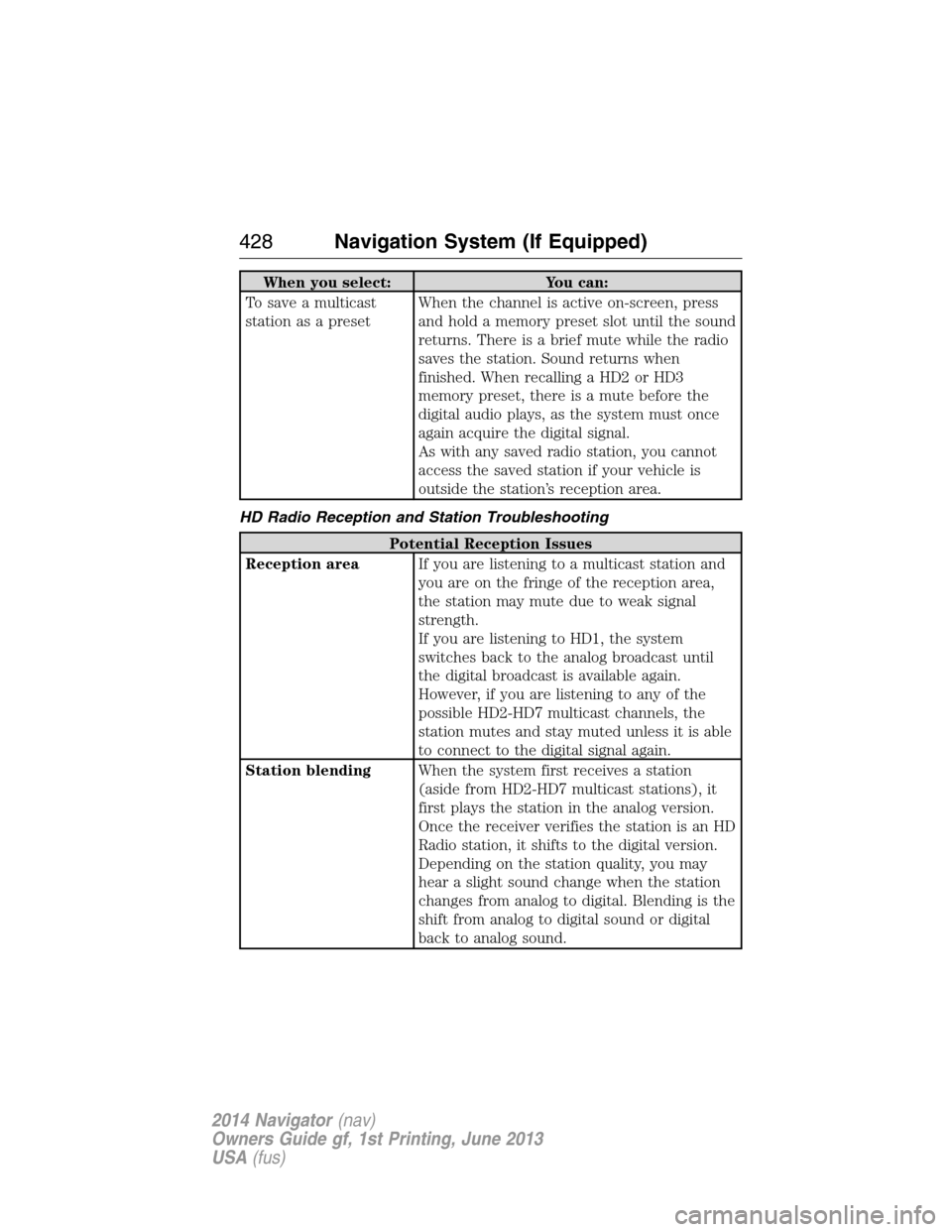
When you select: You can:
To save a multicast
station as a presetWhen the channel is active on-screen, press
and hold a memory preset slot until the sound
returns. There is a brief mute while the radio
saves the station. Sound returns when
finished. When recalling a HD2 or HD3
memory preset, there is a mute before the
digital audio plays, as the system must once
again acquire the digital signal.
As with any saved radio station, you cannot
access the saved station if your vehicle is
outside the station’s reception area.
HD Radio Reception and Station Troubleshooting
Potential Reception Issues
Reception areaIf you are listening to a multicast station and
you are on the fringe of the reception area,
the station may mute due to weak signal
strength.
If you are listening to HD1, the system
switches back to the analog broadcast until
the digital broadcast is available again.
However, if you are listening to any of the
possible HD2-HD7 multicast channels, the
station mutes and stay muted unless it is able
to connect to the digital signal again.
Station blendingWhen the system first receives a station
(aside from HD2-HD7 multicast stations), it
first plays the station in the analog version.
Once the receiver verifies the station is an HD
Radio station, it shifts to the digital version.
Depending on the station quality, you may
hear a slight sound change when the station
changes from analog to digital. Blending is the
shift from analog to digital sound or digital
back to analog sound.
428Navigation System (If Equipped)
2014 Navigator(nav)
Owners Guide gf, 1st Printing, June 2013
USA(fus)
Page 430 of 506

In order to provide the best possible experience, use the contact form to
report any station issues found while listening to a station broadcasting
with HD Radio technology. Independent entities own and operate each
station. These stations are responsible for ensuring all audio streams and
data fields are accurate.
Potential Station Issues
Issue Cause Action
Echo, stutter, skip or
repeat in audio.
Increase or decrease
in audio volume.This is poor time
alignment by the radio
broadcaster.No action required.
This is a broadcast
issue.
Sound fading or
blending in and out.The radio is shifting
between analog and
digital audio.No action required.
The reception issue
may clear up as you
continue to drive.
There is an audio
mute delay when
selecting HD2 or HD3,
multicast preset or
Direct Tune.The digital multicast is
not available until the
HD Radio broadcast is
decoded. Once
decoded, the audio is
available.No action required.
This is normal
behavior. Wait until
the audio is available.
Cannot access HD2 or
HD3 multicast channel
when recalling a
preset or from a direct
tune.The previously stored
multicast preset or
direct tune is not
available in your
current reception area.No action required.
The station is not
available in your
current location.
Text information does
not match currently
playing audio.Data service issue by
the radio broadcaster.Fill out the station
issue form at website
listed below.
*
There is no text
information shown for
currently selected
frequency.Data service issue by
the radio broadcasterFill out the station
issue form at website
listed below.
*
HD2-HD7 stations not
found when Scan is
pressed.Pressing Scan disables
HD2-HD7 channel
search.No action required.
This is normal
behavior.
Navigation System (If Equipped)429
2014 Navigator(nav)
Owners Guide gf, 1st Printing, June 2013
USA(fus)
Page 432 of 506

Sirius® Satellite Radio (If Activated)
Press the RADIO hard button, then select SAT on the
touchscreen.
When you select: You can:
SAT123Press this button to access three different
satellite radio modes (SAT1, SAT2 or SAT3).
ScanPress this button to hear a brief sampling of
all satellite radio channels within the current
genre.
Scan PresetsPress these buttons to hear a brief sampling
of all channels stored in the memory presets.
Channel GuideSee a list of channels sorted by genre and
also skip or lock out certain channels. Select
the desired genre and choose a channel by
pressing the channel name button. You can
then choose to Skip or Lock a certain
channel. A skipped channel is not accessible
using the tune knob, scan or seek functions.
(To access the skipped channel, select Direct
Tune and enter the channel number.) You can
only access a locked channel by entering the
Channel Guide and then entering the system’s
PIN.
Direct TuneEnter the desired satellite channel number
using the on-screen keypad.
Set GenrePress this button to choose from a list of
genres. Once you choose a genre, and you
press SEEK, it only looks for channels in that
genre.
Navigation System (If Equipped)431
2014 Navigator(nav)
Owners Guide gf, 1st Printing, June 2013
USA(fus)
Page 433 of 506

When you select: You can:
MemoPress this button to save a song title and
artist to the system. When the saved song is
playing on any satellite radio channel, the
system alerts you with a pop-up in the lower
status bar. You can either tune to the station
or ignore the pop-up. When you are in the
Memo screen, the following options are
available:
Refreshallows you to refresh the current
artist and title information.
Song Alertallows you to store the song
information displayed in the Title Field. The
next time the stored song plays, the system
displays an audio and visual notification.
Artist Alertallows you to store the artist
information currently displayed in the Artist
Field. The next time the artist plays, the
system alerts you with a pop-up.
Alert On/Offallows you to select Artists and
Titles that you would like the system to alert
you to when they are playing on other
channels.
Note:Sirius® does not support the Alert
feature on all channels. Ford Motor Company
shall not be responsible for Alert feature
variation.
Show PresetsDisplay presets at the bottom of the screen.
432Navigation System (If Equipped)
2014 Navigator(nav)
Owners Guide gf, 1st Printing, June 2013
USA(fus)
Page 434 of 506

Sirius® Satellite Radio Voice Commands
If you are listening to Sirius satellite radio, press the voice
button on the steering wheel control. When prompted, say any
of the commands in the following chart.
If you are not listening to Sirius satellite radio, press the voice button
and, after the tone, say “Sirius”, then any of the commands in the
following chart.
“Sirius”
“<0–233>” “Seek up”
“” “Sirius off”
“Preset <#>” “Sirius On”
“SAT 1” “Store”
*
“SAT 1 preset <#>” “Store preset <1–6>”
“SAT 2” “Store SAT1 preset <1–6>”
“SAT 2 preset <#>” “Store SAT2 preset <1–6>”
“SAT 3” “Store SAT3 preset <1–6>”
“SAT 3 preset <#>” “Tune”
**
“Seek down ” “Help”
*If you have said, “Store”, see the following “Store” chart.
**If you have said, “Tune”, see the following “Tune” chart.
“STORE”
“Preset <1–6>”
“SAT1 preset <1–6>”
“SAT2 preset <1–6>”
“SAT3 preset <1–6>”
“TUNE”
“<0–233>” “SAT 2”
“” “SAT 2 preset <#>”
“Preset <#>” “SAT 3”
“SAT 1” “SAT 3 preset <#>”
“SAT 1 preset <#>” “Help”
Navigation System (If Equipped)433
2014 Navigator(nav)
Owners Guide gf, 1st Printing, June 2013
USA(fus)
Page 436 of 506

Potential reception issues
Satellite radio signal
interferenceYour display may show ACQUIRING... to
indicate the interference and the audio
system may mute.
Troubleshooting tips
Radio Display Condition Possible Action
Acquiring... Radio requires more
than two seconds to
produce audio for the
selected channel.No action required.
This message should
disappear shortly.
Sat Fault/Sirius
System FailureThere is an internal
module or system
failure present.If this message does
not clear shortly, or
with an ignition key
cycle, your receiver
may have a fault.
See an authorized
dealer for service.
Invalid Channel. The channel is no
longer available.Tune to another
channel or choose
another preset.
Unsubscribed Channel. Your subscription does
not include this
channel.Contact Sirius at
1-888-539-7474 to
subscribe to the
channel, or tune to
another channel.
No Signal. The signal is lost from
the Sirius satellite or
Sirius tower to your
vehicle antenna.The signal is blocked.
When you move into
an open area, the
signal should return.
Updating. Update of channel
programming in
progress.No action required.
The process may take
up to three minutes.
Navigation System (If Equipped)435
2014 Navigator(nav)
Owners Guide gf, 1st Printing, June 2013
USA(fus)
Page 450 of 506

Route Guidance in Incompletely Mapped Areas
There are some rural areas in the map database without fully verified
roads. When the system is in route guidance mode, and the navigation
system encounters these incompletely mapped areas, the system alerts
you by:
•Announcing, “Entering an area with incomplete map data; please
follow with caution”
•Saying, “with caution” in the first route guidance instruction before
each turn
•Highlighting the route on the map in yellow
•Highlighting the incomplete mapped streets in yellow on the turn list
•Coloring the guidance arrows yellow.
Please drive using extra caution when driving in these areas as the
mapping information may be somewhat inaccurate.
Programming a Destination Using the Touchscreen
1. Press theDESThard button.
2. Select from the following:
Quick
Note:Items on this screen are selectable at any speed.
Cancel RouteTouch this button to cancel the current route.
EmergencyTouch this button to find hospitals and police
stations close to your vehicle’s location. The
system may display up to 25 locations.
Favorite DestinationsThis feature stores your home location and up to
five address book entries. To set an entry, touch
a preset button, and then follow the screen
prompts. The system displays the icon and name
associated with the location.
Navigation System (If Equipped)449
2014 Navigator(nav)
Owners Guide gf, 1st Printing, June 2013
USA(fus)