2014 LINCOLN MKZ climate control
[x] Cancel search: climate controlPage 347 of 468

Press to access your home screen.
Depending on your vehicle’s option
package and software, your screens
may vary in appearance from the
descriptions in this section. Your
features may also be limited
depending on your market. Check with
an authorized dealer for availability.
E142608
INFORMATION
Press to select any of the following:
• Services
• Travel Link
• Alerts
• Calendar
• Apps
ENTERTAINMENT
Press to select any of the following:
•AM
•FM
• SIRIUS
•CD
•USB
• BT Stereo
• SD Card
• A/V In
Using the Touch-Sensitive
Controls on Your System
To turn a feature on and off, just touch
the graphic with your finger. To get the
best performance from the
touch-sensitive controls:
• Do not press hard on the controls. They are sensitive to light touch.
• Use your bare finger to touch the center of a touch-control graphic.
Touching off-center of the graphic
may affect operation of a nearby
control.
• Make sure your hands are clean and dry.
• Since the touchscreen operates based on the touch of a finger, you
may have trouble using it if you are
wearing gloves.
• Keep metal and other conductive material away from the surface of
the touchscreen as this may cause
electronic interference (for
example, inadvertently turning on
a feature other than the one you
meant to turn on).
Depending on your vehicle and option
package, you may also have these
controls on your bezel:
• Power: Switch the media or climate features off and on.
• VOL: Control the volume of
playing media.
• Fan: Control the speed of the climate system fan.
• Seek and Tune buttons: Use as you normally would in media modes.
344
MyLincoln Touch™
Page 353 of 468
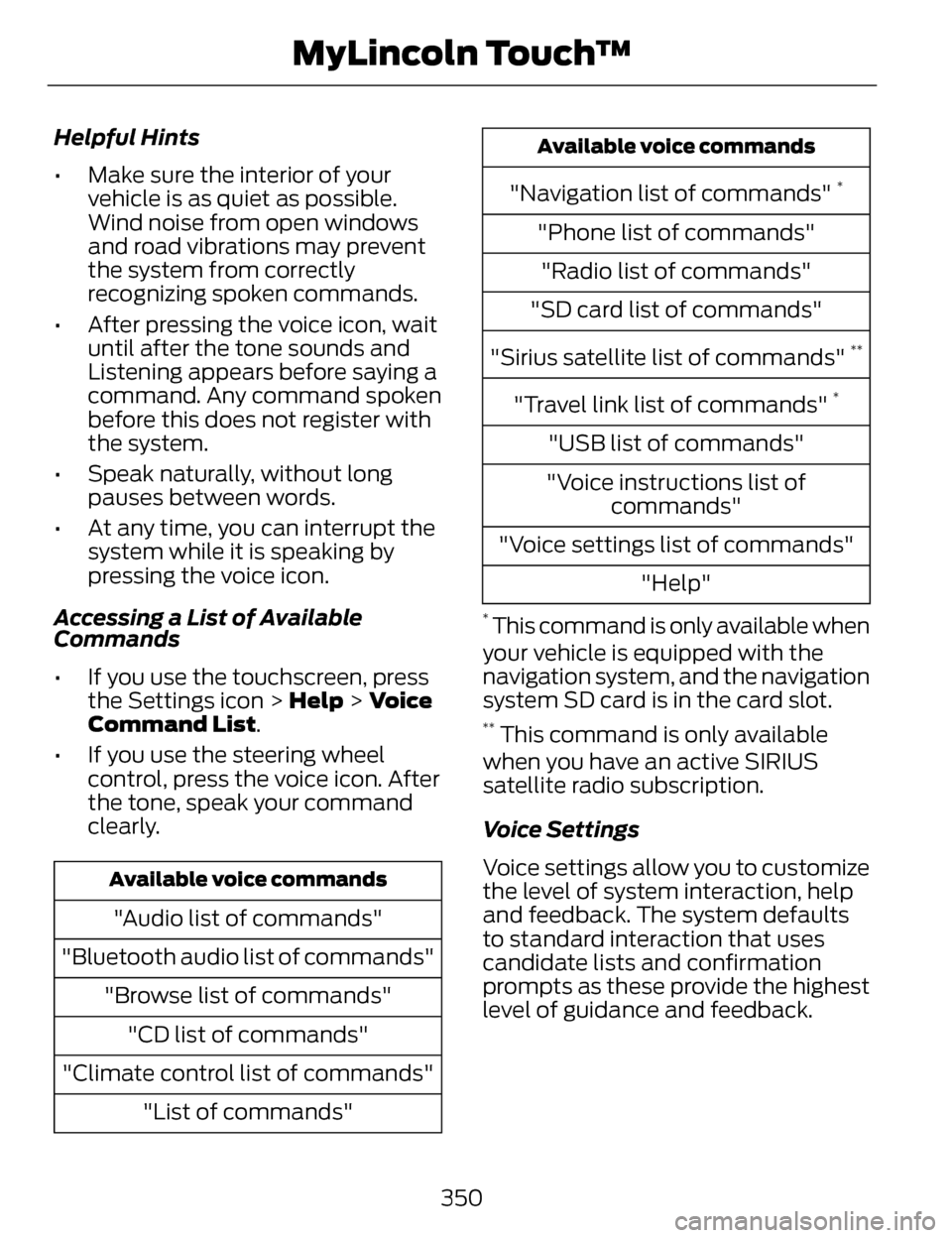
Helpful Hints
• Make sure the interior of yourvehicle is as quiet as possible.
Wind noise from open windows
and road vibrations may prevent
the system from correctly
recognizing spoken commands.
• After pressing the voice icon, wait until after the tone sounds and
Listening appears before saying a
command. Any command spoken
before this does not register with
the system.
• Speak naturally, without long pauses between words.
• At any time, you can interrupt the system while it is speaking by
pressing the voice icon.
Accessing a List of Available
Commands
• If you use the touchscreen, press the Settings icon > Help > Voice
Command List.
• If you use the steering wheel control, press the voice icon. After
the tone, speak your command
clearly.
Available voice commands
"Audio list of commands"
"Bluetooth audio list of commands" "Browse list of commands""CD list of commands"
"Climate control list of commands" "List of commands"
Available voice commands
"Navigation list of commands" *
"Phone list of commands""Radio list of commands"
"SD card list of commands"
"Sirius satellite list of commands"
**
"Travel link list of commands" *
"USB list of commands"
"Voice instructions list of commands"
"Voice settings list of commands" "Help"
* This command is only available when
your vehicle is equipped with the
navigation system, and the navigation
system SD card is in the card slot.
** This command is only available
when you have an active SIRIUS
satellite radio subscription.
Voice Settings
Voice settings allow you to customize
the level of system interaction, help
and feedback. The system defaults
to standard interaction that uses
candidate lists and confirmation
prompts as these provide the highest
level of guidance and feedback.
350
MyLincoln Touch™
Page 407 of 468

Vehicle Health Report Privacy
Notice
When you create a Vehicle Health
Report, Ford Motor Company may
collect your cellular phone number
(to process your report request) and
diagnostic information about your
vehicle. Certain versions or updates
to Vehicle Health Report may also
collect more vehicle information. Ford
may use your vehicle information it
collects for any purpose. If you do not
want to disclose your cellular phone
number or vehicle information, do not
run the feature or set up your VehicleHealth Report profile at
www.SYNCMyRide.com. See
www.SYNCMyRide.com (Vehicle
Health Report Terms and Conditions,
and Privacy Statement) for more
information.
CLIMATE
Press the lower right corner on the
touchscreen to access your climate
control features. Depending on your
vehicle line and option package, your
climate screen may look different
from the screen shown here.
E148839
Power: Touch to switch the system off and on. Outside air cannot
enter your vehicle when you switch off the system.
A
Passenger settings: Touch DUAL to switch on the passenger
temperature control. Touch the + and - to adjust the temperature.
Touch the heated seat icon to control the heated seat (if equipped).
Touch the cooled seat icon to control the cooled seat (if equipped).
See Seats (page 133).
B
404
MyLincoln Touch™
Page 409 of 468

Manual airflow distribution controls:Floor/Defrost: Distributes
air through the windshield defroster vents, demister vents, floor vents
and rear seat floor vents, and provides outside air to reduce window
fogging. Panel: Distributes air through the instrument panel vents.
Panel/Floor: Distributes air through the instrument panel vents,
demister vents, floor vents and rear seat floor vents. Floor: Distributes
air through the demister vents, floor vents and rear seat floor vents.
Defrost: Touch to clear the windshield of fog and thin ice. Touch again
to return to the previous airflow selection. When switched on, defrost
distributes outside air through the windshield defroster vents and
demister vents to reduce window fogging.
I
Driver settings: Depending on your vehicle and option package, you
may have the following features: Touch the + and - to adjust the
temperature. Touch the heated seat icon to control the heated seat
(if equipped). Touch the cooled seat icon to control the cooled seat
(if equipped). See Seats (page 133). Touch MyTemp to select your
previously pre-set temperature setpoint. Touch and hold MyTemp to
store a new pre-set for temperature setpoint. Touch the heated steering
wheel icon (if equipped) to warm the steering wheel.
J
Note: If your vehicle is equipped with
a wood-trimmed steering wheel, it
does not heat between the 10 o'clock
and 2 o'clock positions.
Climate Control Voice
Commands
E142599
Press the voice button on the
steering wheel controls.
When prompted, say any of
the following commands:
Climate control commands
"Climate automatic"
"Climate my temperature" "Climate off""Climate on"
Climate control commands
"Climate temperature <15.5-29.5> degrees"
"Climate temperature <60-85> degrees"
"Help"
There are additional climate control
commands but in order to access
them, you have to say "Climate" first.
When the system is ready to listen,
you may say any of the following
commands:
406
MyLincoln Touch™
Page 456 of 468

A
A/CSee: Climate Control...............................128
About This Manual..................................7Protecting the Environment......................7
ABSSee: Brakes..................................................179
ABS driving hintsSee: Hints on Driving With Anti-LockBrakes......................................................180
Accessories ...........................................337Exterior style...............................................337
Interior style................................................337
Lifestyle........................................................337
Peace of mind...........................................337
AccessoriesSee: Replacement Parts
Recommendation...................................12
ACCSee: Using Adaptive Cruise Control...199
Active Park Assist...............................189Automatic Steering into ParkingSpace.........................................................191
Deactivating the Park Assist Feature.....................................................192
Troubleshooting the System................192
Using Active Park Assist........................190
Adaptive Headlamps..........................86
Adjusting the Headlamps...............285
Horizontal Aim Adjustment.................286
Vertical Aim Adjustment......................285
Adjusting the Steering Wheel...........75Power Tilt and Telescope Steering Column.......................................................75
AFSSee: Adaptive Headlamps.....................86
Airbag Disposal.......................................51
Air Conditioning
See: Climate Control...............................128
AlarmSee: Anti-Theft Alarm...............................73
All-Wheel Drive....................................173
Anti-Theft Alarm...................................73
Arming the Alarm.......................................74
Disarming the Alarm.................................74
Appendices...........................................418
Audible Warnings andIndicators............................................100
Headlamps On Warning Chime.........100
Key in Ignition Warning Chime............100
Keyless Warning Alert............................100
Parking Brake On Warning
Chime....................................................... 100
Audio Control..........................................76Seek, Next or Previous..............................76
Audio System........................................124General Information................................124
Audio unit - Vehicles With: Premium
AM/FM/CD..........................................125
Autolamps...............................................82
Automatic Climate Control.............128
Automatic High Beam Control........84
Activating the System..............................85
Manually Overriding the System..........85
Automatic Transmission...................167Automatic Transmission Adaptive
Learning.....................................................171
Brake-Shift Interlock Override.............170
If Your Vehicle Gets Stuck In Mud or Snow..........................................................172
Push Button Shift Transmission.........167
SelectShift Automatic™ Transmission.........................................169
Automatic Transmission FluidCheck....................................................276
6F35/HF35 transmission......................276
6F50/6F55 Transmission.....................276
Autowipers..............................................79
Auxiliary Power Points......................148
110 Volt AC Power Point.........................148
12 Volt DC Power Point...........................148
Locations.....................................................148
453
Index
Page 457 of 468

AW DSee: All-Wheel Drive................................173
B
Blind Spot Monitor..............................213Blind Spot Information System(BLIS®) with Cross Traffic
Alert...........................................................213
Bonnet LockSee: Opening and Closing theHood........................................................268
Booster Seats..........................................18Types of Booster Seats.............................19
Brake Fluid Check..............................280
Brakes......................................................179
General Information................................179
Breaking-In...........................................240
Bulb Specification Chart..................287
C
Cabin Air Filter.......................................131
California Proposition 65.....................11
Capacities and Specifications......329
Technical Specifications.......................334
Car WashSee: Cleaning the Exterior....................288
Center Console....................................150
Changing a Bulb.................................286
Lamp Assembly Condensation.........286
Replacing Bulbs.......................................286
Changing a Fuse.................................255Fuses............................................................255
Changing a Road Wheel..................323Dissimilar Spare Wheel and TireAssembly Information.......................324
Stowing the flat tire.................................327
Tire Change Procedure..........................325
Changing the 12V Battery.................281 Changing the Engine Air Filter.......283
........................................................................\
284
2.0L EcoBoost Engine............................284
3.7L Engine.................................................284
Changing the Wiper Blades...........283
Checking MyKey System
Status.....................................................59
Checking the Wiper Blades............283
Child Restraint and Safety Belt Maintenance........................................39
Child Safety..............................................15
General Information...................................15
Child Safety Locks................................29Left-Hand Side...........................................29
Right-Hand Side........................................30
Child Seat Positioning..........................17
Cleaning Leather Seats....................292
Cleaning Products.............................288
Cleaning the Alloy Wheels..............293
Cleaning the Engine..........................290
Cleaning the Exterior........................288
Cleaning Plastic Exterior Parts...........289
Exterior Chrome.......................................289
Stripes or Graphics (if
equipped)..............................................289
Underbody.................................................289
Cleaning the Instrument Panel and Instrument Cluster Lens................292
Cleaning the Interior...........................291
Cleaning the Windows and Wiper Blades..................................................290
Clearing All MyKeys.............................58
Climate..................................................404
Climate Control Voice
Commands...........................................406
Climate Control....................................128
Collision Warning System................218
PRINCIPLE OF OPERATION.................218
Coolant CheckSee: Engine Coolant Check..................272
Crash Sensors and AirbagIndicator................................................50
454
Index
Page 458 of 468

Creating a MyKey..................................58Programming/Changing ConfigurableSettings.....................................................58
Cruise Control.........................................77Principle of Operation............................198
Type 1...............................................................77
Type 2..............................................................77
Cruise controlSee: Using Cruise Control.....................198
Customer Assistance.......................248
D
Data Recording........................................9Event Data Recording................................10
Service Data Recording..............................9
Daytime Running Lamps...................83
Direction Indicators..............................85
Drive Control.........................................222
LINCOLN DRIVE CONTROL.................222
Driver Alert............................................207Using Driver Alert.....................................207
Driver and Passenger Airbags..........43Children and Airbags................................44
Proper Driver and Front PassengerSeating Adjustment..............................44
Driving Aids...........................................207
Driving Hints.........................................240
Driving Through Water.......................241
DRL
See: Daytime Running Lamps...............83
E
Economical Driving...........................240 Electric Parking Brake.......................180
Applying the electric parking
brake.........................................................180
Applying the electric parking brake when the vehicle is moving...............181
Battery With No Charge.........................182
Releasing the electric parking brake..........................................................181
Emission Control System................164On-Board Diagnostics (OBD-II).........165
Readiness for Inspection/Maintenance(I/M) Testing..........................................165
End User License Agreement.........418SYNC® End User License Agreement(EULA).....................................................418
Engine Block Heater...........................155Using the Engine Block Heater............156
Engine Coolant Check.......................272Adding Engine Coolant..........................272
Checking the Engine Coolant..............272
Recycled Engine Coolant......................274
Severe Climates........................................274
What You Should Know AboutFail-Safe Cooling.................................274
Engine ImmobilizerSee: Passive Anti-Theft System...........72
Engine Oil Check..................................271Adding Engine Oil......................................271
Engine Oil Dipstick - 2.0LEcoBoost™..........................................271
Engine Oil Dipstick - 3.7L...................271
Engine Specifications.......................329
Drivebelt Routing.....................................329
455
Index
Page 460 of 468

General MaintenanceInformation........................................436
Multi-Point Inspection...........................439
Owner Checks and Services...............438
Protecting Your Investment.................437
Why Maintain Your Vehicle?...............436
Why Maintain Your Vehicle at Your
Dealership?...........................................436
Getting Assistance Outside the U.S.and Canada.......................................252
Getting the Services You Need.....................................................248
Away From Home...................................248
Global Opening and Closing............89Closing the Windows...............................89
Opening the Windows.............................89
H
Hazard Warning Flashers................244
Headlamp Exit Delay...........................83
Head Restraints...................................133
Adjusting the Head Restraint...............134
Tilting Head Restraints ..........................135
Heated Seats........................................140Rear Heated Seats....................................141
Heated Steering Wheel......................78
Heated Windows and Mirrors.........130
Heated Exterior Mirror............................130
Heated Rear Window..............................130
HeatingSee: Climate Control...............................128
Hill Start Assist....................................182Using Hill Start Assist.............................183
Hints on Controlling the InteriorClimate.................................................129
Cooling the Interior Quickly..................130
General Hints.............................................129
Heating the Interior Quickly..................130
Recommended Settings for Cooling
....................................................................1 3 0
Recommended Settings for Heating.....................................................130
Side Window Defogging in Cold Weather...................................................130
Hints on Driving With Anti-LockBrakes...................................................180
Hood Lock
See: Opening and Closing the
Hood........................................................268
I
In California (U.S. Only)...................249
Information Display Control..............77
Cluster Display Control Features..........77
Information Displays...........................101General Information.................................101
Information ...........................................392911 Assist....................................................400
Alerts...........................................................400
Calendar.....................................................400
Sirius Travel Link......................................396
SYNC Services (If Equipped, United
States Only)..........................................393
Vehicle Health Report...........................403
457
Index