2014 LINCOLN MKZ comfort
[x] Cancel search: comfortPage 134 of 468

Both heated mirrors remove ice, mist
and fog when you switch on the
heated rear window.
CABIN AIR FILTER
Your vehicle is equipped with a cabin
air filter. It is located behind the glove
box.
The particulate filtration system
reduces the concentration of airborne
particles such as dust, spores and
pollen in the air supplied to the interior
of your vehicle.
Note:To prevent foreign objects from
entering the system, make sure the
cabin air is in place at all times.
Running the system without a filter in
place could result in degradation or
damage to the system.
The particulate filtration system gives
you and your passengers the following
benefits:
• It improves your driving comfort by reducing particle concentration.
• It improves the interior compartment cleanliness.
• It protects the climate control components from particle
deposits.
Replace the filter at regular intervals.
See Scheduled Maintenance (page
436).
For additional cabin air filter
information, or to replace the filter,
see an authorized dealer.
REMOTE START
The climate control system adjusts
the cabin temperature during remote
start.
You cannot adjust the system during
remote start operation. Turn the
ignition on to return the system to its
previous settings. You can now make
adjustments. You need to turn certain
vehicle-dependent features back on,
such as:
• heated seats
• cooled seats
• heated steering wheel
• heated mirrors
• heated rear window.
You can adjust the settings using the
information display controls. See
Information Displays (page 101).
Automatic Settings
You can set the climate control to
operate in AUTO mode through the
information display setting: Remote
Start > Climate Control > Heater-A/C
> Auto. The climate control system
automatically sets the interior
temperature to 72°F (22°C).
In hot weather, the system is set to
72°F (22°C). Cooled seats are set to
high (if available, and selected to
AUTO in the information display).
In moderate weather, the system
either heats or cools (based on
previous settings). The rear defroster,
heated mirrors and heated/cooled
seats do not automatically turn on.
131
Climate Control
Page 136 of 468

SITTING IN THE CORRECT
POSITION
WARNINGS
Sitting improperly, out of
position or with the seat back
reclined too far can take weight off
the seat cushion and affect the
decision of the passenger sensing
system, resulting in serious injury or
death in the event of a crash. Always
sit upright against your seat back, with
your feet on the floor.
Do not recline the seat back as
this can cause the occupant to
slide under the safety belt, resulting
in serious injury in the event of a crash.
Do not place objects higher than
the seat back to reduce the risk
of serious injury in the event of a crash
or during heavy braking.
E68595
When you use them properly, the seat,
head restraint, safety belt and air bags
will provide optimum protection in the
event of a crash. We recommend that you follow these
guidelines:
• Sit in an upright position with the
base of your spine as far back as
possible.
• Do not recline the seat back more than 30 degrees.
• Adjust the head restraint so that the top of it is level with the top of
your head and as far forward as
possible. Make sure that you
remain comfortable.
• Keep sufficient distance between yourself and the steering wheel.
We recommend a minimum of 10
inches (25 centimeters) between
your breastbone and the air bag
cover.
• Hold the steering wheel with your arms slightly bent.
• Bend your legs slightly so that you can press the pedals fully.
• Position the shoulder strap of the safety belt over the center of your
shoulder and position the lap strap
tightly across your hips.
Make sure that your driving position is
comfortable and that you can
maintain full control of your vehicle.
HEAD RESTRAINTS
WARNINGS
Fully adjust the head restraint
before you sit in or operate your
vehicle. This will help minimize the risk
of neck injury in the event of a crash.
Do not adjust the head restraint when
your vehicle is moving.
133
Seats
Page 137 of 468

WARNINGS
The head restraint is a safety
device. Whenever possible it
should be installed and properly
adjusted when the seat is occupied.
Install the head restraint properly
to help minimize the risk of neck
injury in the event of a crash.
Note: Adjust the seatback to an
upright driving position before adjusting
the head restraint. Adjust the head
restraint so that the top of it is level
with the top of your head and as far
forward as possible. Make sure that you
remain comfortable. If you are
extremely tall, adjust the head restraint
to its highest position.
Front seat head restraint
E138642
Rear seat outboard head restraints
E153105
Rear center head restraint
E138645
The head restraints consist of:
an energy absorbing head
restraint
A
two steel stems
B
guide sleeve adjust and
unlock button
C
guide sleeve unlock and
remove button
D
Adjusting the Head Restraint
Raising the Head Restraint
Pull the head restraint up.
134
Seats
Page 138 of 468
Lowering the Head Restraint
1. Press and hold button C.
2. Push the head restraint down.
Removing the Head Restraint
1. Pull the head restraint up until itreaches its highest position.
2. Press and hold buttons C and D.
3. Pull the head restraint up.
Installing the Head Restraint
Align the steel stems into the guide
sleeves and push the head restraint
down until it locks.
Tilting Head Restraints
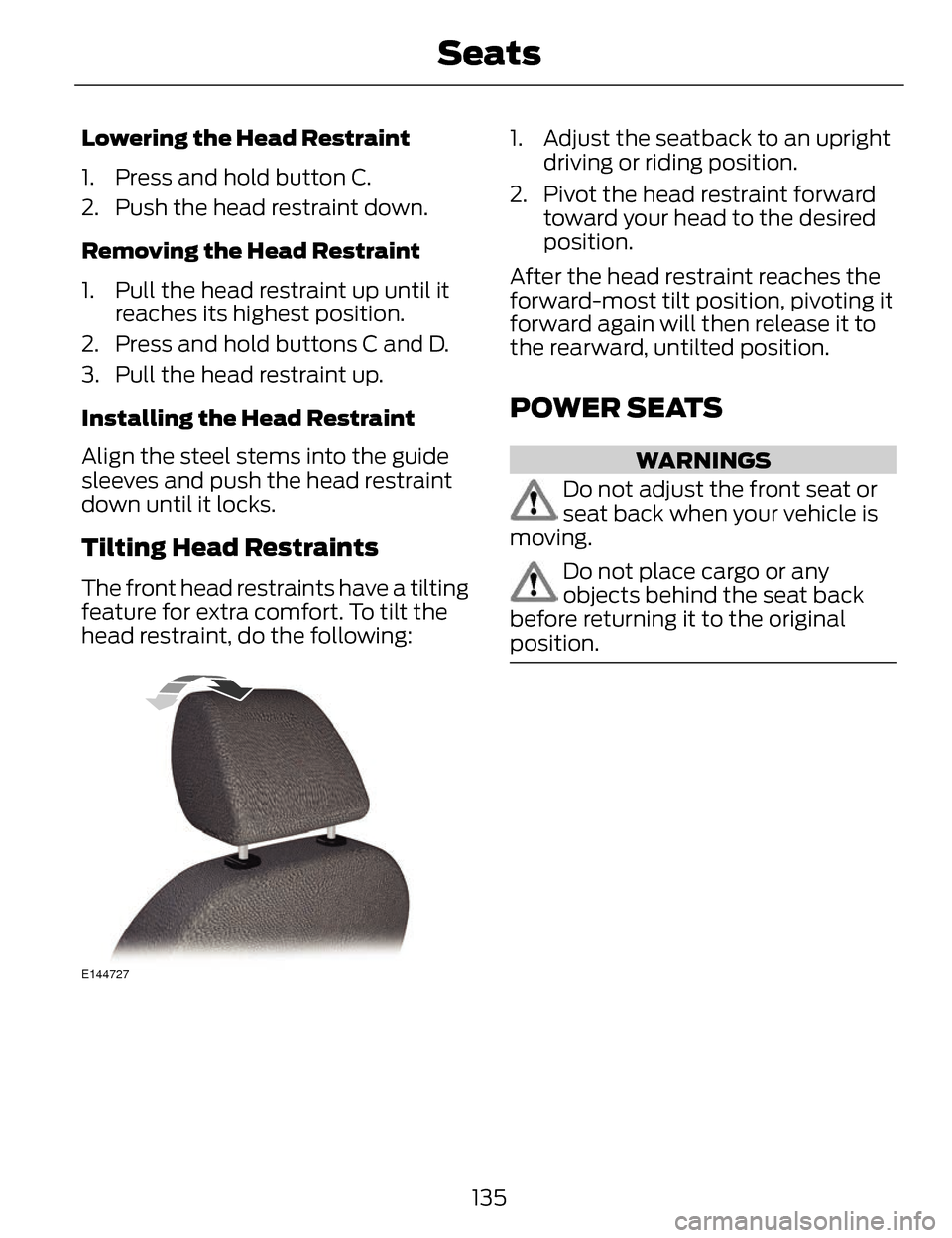
The front head restraints have a tilting
feature for extra comfort. To tilt the
head restraint, do the following:
E144727
1. Adjust the seatback to an upright driving or riding position.
2. Pivot the head restraint forward toward your head to the desired
position.
After the head restraint reaches the
forward-most tilt position, pivoting it
forward again will then release it to
the rearward, untilted position.
POWER SEATS
WARNINGS
Do not adjust the front seat or
seat back when your vehicle is
moving.
Do not place cargo or any
objects behind the seat back
before returning it to the original
position.
135
Seats
Page 205 of 468

Adaptive cruise control, distance between vehicle settings
Dynamic beha-vior
Distance gap
Time gap,
seconds
Graphic
display, bars indicatedbetweenvehicles
Set speed
yd (m)
mph ( km/h)
Sport
31 yd (28 m)
1
1
62 mph
(100 km/h)
Normal
43 yd (39 m)
1.4
2
62 mph
(100 km/h)
Normal
55 yd (50 m)
1.8
3
62 mph
(100 km/h)
Comfort
67 yd (61 m)
2.2
4
62 mph
(100 km/h)
Each time you start the vehicle, the
system will select the last chosen gap
for the current driver.
Disengaging the System
Press the brake pedal or press CNCL.
The last set speed will display in grey
but will not erase.
Overriding the System
WARNING
Whenever the driver is overriding
the system by pressing the
accelerator pedal, the system will not
automatically apply the brakes to
maintain separation from any vehicle
ahead.
You can override the set speed and
gap distance by pressing the
accelerator pedal.
E144529
When you override the
system, the green indicator
light illuminates and the
lead vehicle graphic does not show in
the information display.
The system will resume operation
when you release the accelerator
pedal. The vehicle speed will decrease
to the set speed, or a lower speed if
following a slower vehicle.
202
Cruise Control
Page 225 of 468

A high crown in the road or high
crosswinds may also make the
steering seem to wander or pull.
Adaptive Learning
The EPS system adaptive learning
helps correct for road irregularities
and improves overall handling and
steering feel. It communicates with
the vehicle's brake system to help
operate advanced stability control
and accident avoidance systems.
Additionally, whenever the battery is
disconnected or a new battery
installed, the vehicle must be driven
a short distance before the strategy
is relearned and all systems are
reactivated.
DRIVE CONTROL
LINCOLN DRIVE CONTROL
Lincoln Drive Control delivers the
Lincoln driving experience through a
suite of sophisticated electronic
vehicle systems. These systems
continuously monitor both your driving
inputs and the road conditions to
optimize ride comfort, steering,
handling, powertrain response and
sound. You can preset your
preferences for these systems within
the information display. Lincoln Drive
Control will respond to your
preferences based on what gear
position you select. This provides a
single location to control multiple
systems performance settings.
Lincoln Drive Control consists of the
following systems:• Continuously Controlled Damping
dynamically adjusts the shock
absorbers stiffness in real time to
match the road surface and driver
inputs. Vehicle motion (roll, pitch,
bounce), suspension position,
vehicle loading, vehicle speed, road
conditions, and steering are
continuously monitored to adjust
the suspension damping for
optimal vehicle control.
• Electronically Power-Assisted Steering adjusts steering effort and
feel based on vehicle speed and
your inputs
• Active Noise Control utilizes vehicle electronics to enhance the
acoustic experience
• Electronic Stability Control and Traction Control maintain vehicle
control in adverse conditions or
high performance driving
• Electronic Throttle Control which enhances the powertrain response
to your inputs
These systems have a range of modes
which you can choose from in order
to customize your ideal driving
experience:
222
Driving Aids
Page 226 of 468

• Comfort – Provides a more relaxeddriving experience, maximizing
comfort. Steering effort is
decreased and suspension
movement is more fluid. Comfort
mode is ideal when enhanced
traveling comfort is desired.
• Normal – Delivers a balanced combination of comfortable,
controlled ride and confident
handling. This mode provides an
engaging drive experience and a
direct connection to the road
without sacrificing any of the
composure demanded from a
luxury vehicle.
• Sport – Provides a sportier driving experience. Suspension stiffens,
with an emphasis on handling and
control. The engine responds more
directly to your inputs and takes
on a more powerful tone. Sport
mode is intended to be used during
more spirited driving.
Using Lincoln Drive Control
You can configure which of the Drive
Control modes are active when the
vehicle is in D (Drive) or in S (Sport).
The configuration is retained until
modified from the main menu on the
information display.
To change the vehicle’s Drive Control
settings from the main menu on the
information display:
1. Choose Settings.
2. Choose Driver Assist.
3. Choose Vehicle. 4. Select the shift position you would
like to configure, either D or S.
5. Choose from Comfort, Normal, or Sport modes as your preferred
setting in D.
6. Choose from Normal or Sport modes as your preferred setting in
S.
Note: Lincoln Drive Control has
diagnostic checks that continuously
monitor the system to ensure proper
operation. Certain types of system
errors will gray out the mode selections
within the information display,
preventing you from changing states
when the gear position is changed.
Other types of errors will produce a
temporary message that states Drive
Control Malfunction. If either condition
persists for multiple key cycles, take
your vehicle to an authorized dealer to
have it checked.
223
Driving Aids
Page 327 of 468

Dissimilar Spare Wheel and
Tire Assembly Information
WARNING
Failure to follow these guidelines
could result in an increased risk
of loss of vehicle control, injury or
death.
If you have a dissimilar spare wheel
and tire, then it is intended for
temporary use only. This means that
if you need to use it, you should
replace it as soon as possible with a
road wheel and tire assembly that is
the same size and type as the road
tires and wheels that were originally
provided by Ford. If the dissimilar
spare tire or wheel is damaged, it
should be replaced rather than
repaired.
A dissimilar spare wheel and tire
assembly is defined as a spare wheel
and tire assembly that is different in
brand, size or appearance from the
road tires and wheels and can be one
of three types:
1. T-type mini-spare: This spare tire
begins with the letter T for tire size
and may have Temporary Use Only
molded in the sidewall.
2. Full-size dissimilar spare with
label on wheel: This spare tire has a
label on the wheel that states: THIS
WHEEL AND TIRE ASSEMBLY FOR
TEMPORARY USE ONLY.
When driving with one of the
dissimilar spare tires listed above, do
not: • Exceed 50 mph (80 km/h)
• Load the vehicle beyond maximum
vehicle load rating listed on the
Safety Compliance Label.
• Tow a trailer.
• Use snow chains on the end of the vehicle with the dissimilar spare
tire.
• Use more than one dissimilar spare tire at a time.
• Use commercial car washing equipment.
• Try to repair the dissimilar spare tire.
Use of one of the dissimilar spare tires
listed above at any one wheel location
can lead to impairment of the
following:
• Handling, stability and braking performance.
• Comfort and noise.
• Ground clearance and parking at curbs.
• Winter weather driving capability.
• Wet weather driving capability.
• All-wheel driving capability (if applicable).
3. Full-size dissimilar spare
without label on wheel
When driving with the full-size
dissimilar spare wheel and tire
assembly, do not:
• Exceed 70 mph (113 km/h).
• Use more than one dissimilar spare wheel and tire assembly at a time.
324
Wheels and Tires