2014 LINCOLN MKZ Head
[x] Cancel search: HeadPage 51 of 468
WARNINGS
Do not lean your head on the
door. The side airbag could injure
you as it deploys from the side of the
seatback.
Do not attempt to service, repair,
or modify the airbag, its fuses or
the seat cover on a seat containing an
airbag as you could be seriously
injured or killed. Contact your
authorized dealer as soon as possible.
If the side airbag has deployed,
the airbag will not function again.
The side airbag system (including the
seat) must be inspected and serviced
by an authorized dealer. If the airbag
is not replaced, the unrepaired area
will increase the risk of injury in a
crash.
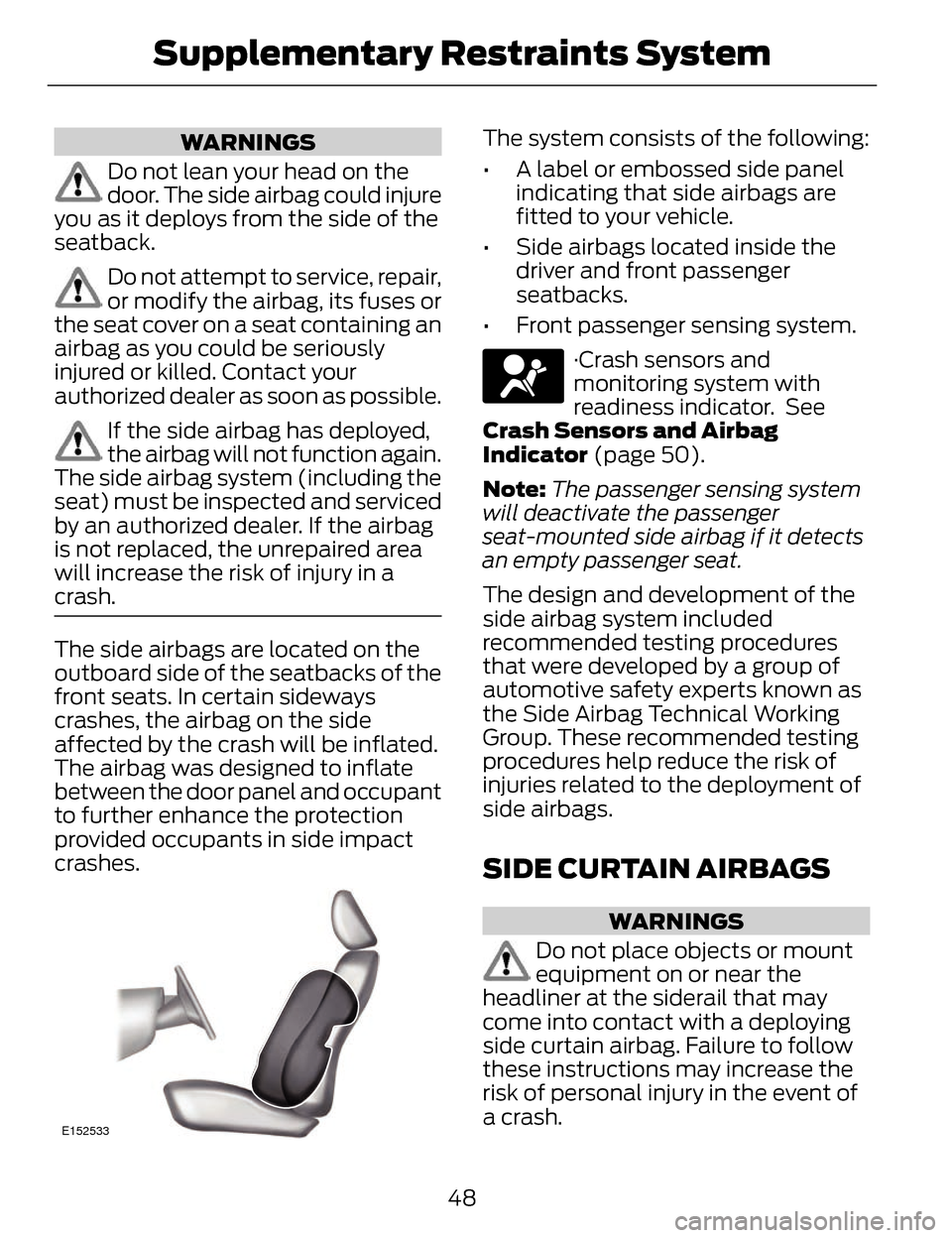
The side airbags are located on the
outboard side of the seatbacks of the
front seats. In certain sideways
crashes, the airbag on the side
affected by the crash will be inflated.
The airbag was designed to inflate
between the door panel and occupant
to further enhance the protection
provided occupants in side impact
crashes.
E152533
The system consists of the following:
• A label or embossed side panel indicating that side airbags are
fitted to your vehicle.
• Side airbags located inside the driver and front passenger
seatbacks.
• Front passenger sensing system.
·Crash sensors and
monitoring system with
readiness indicator. See
Crash Sensors and Airbag
Indicator (page 50).
Note: The passenger sensing system
will deactivate the passenger
seat-mounted side airbag if it detects
an empty passenger seat.
The design and development of the
side airbag system included
recommended testing procedures
that were developed by a group of
automotive safety experts known as
the Side Airbag Technical Working
Group. These recommended testing
procedures help reduce the risk of
injuries related to the deployment of
side airbags.
SIDE CURTAIN AIRBAGS
WARNINGS
Do not place objects or mount
equipment on or near the
headliner at the siderail that may
come into contact with a deploying
side curtain airbag. Failure to follow
these instructions may increase the
risk of personal injury in the event of
a crash.
48
Supplementary Restraints System
Page 52 of 468

WARNINGS
Do not lean your head on the
door. The side curtain airbag
could injure you as it deploys from the
headliner.
Do not attempt to service, repair,
or modify the side curtain
airbags, its fuses, the A, B, or C pillar
trim, or the headliner on a vehicle
containing side curtain airbags.
Contact your authorized dealer as
soon as possible.
All occupants of the vehicle
including the driver should
always wear their safety belts even
when an airbag supplemental
restraint system and side curtain
airbag is provided.
To reduce risk of injury, do not
obstruct or place objects in the
deployment path of the side curtain
airbag.
If the side curtain airbags have
deployed, the side curtain
airbags will not function again. The
side curtain airbags (including the A,
B and C pillar trim and headliner)
must be inspected and serviced by an
authorized dealer. If the side curtain
airbag is not replaced, the unrepaired
area will increase the risk of injury in a
crash.
The side curtain airbags will deploy
during significant side crashes. The
side curtain airbags are mounted to
the roof side-rail sheet metal, behind
the headliner, above each row of
seats. In certain sideways crashes, the
side curtain airbag on the impacted side of the vehicle will be activated.
The side curtain airbags are designed
to inflate between the side window
area and occupants to further
enhance protection provided in side
impact crashes.
The system consists of the following:
E75004
• Side curtain airbags located above
the trim panels over the front and
rear side windows identified by a
label or wording on the headliner
or roof-pillar trim.
• A flexible headliner which opens above the side doors to allow side
air curtain deployment.
Crash sensors and
monitoring system with
readiness indicator. See
Crash Sensors and Airbag
Indicator (page 50).
Children 12 years old and under should
always be properly restrained in the
back seats. The side curtain airbags
will not interfere with children
restrained using a properly installed
child or booster seat because it is
designed to inflate downward from
the headliner above the doors along
the side window opening.
49
Supplementary Restraints System
Page 55 of 468

GENERAL INFORMATION
ON RADIO FREQUENCIES
This device complies with Part 15 of
the FCC Rules and with Industry
Canada license-exempt RSS
standard(s). Operation is subject to
the following two conditions: (1) This
device may not cause harmful
interference, and (2) This device must
accept any interference received,
including interference that may cause
undesired operation.
Note:Changes or modifications not
expressively approved by the party
responsible for compliance could void
the user's authority to operate the
equipment. The term IC before the
radio certification number only signifies
that Industry Canada technical
specifications were met.
The typical operating range for your
transmitter is approximately 33 feet
(10 meters). Vehicles with the remote
start feature will have a greater range.
One of the following could cause a
decrease in operating range:
• weather conditions
• nearby radio towers
• structures around the vehicle
• other vehicles parked next to your vehicle The radio frequency used by your
remote control can also be used by
other short distance radio
transmissions, for example amateur
radios, medical equipment, wireless
headphones, remote controls and
alarm systems. If the frequencies are
jammed, you will not be able to use
your remote control. You can lock and
unlock the doors with the key.
Note:
Make sure to lock your vehicle
before leaving it unattended.
Note: If you are in range, the remote
control will operate if you press any
button unintentionally.
Intelligent Access
The system uses a radio frequency
signal to communicate with your
vehicle and authorize your vehicle to
unlock when one of the following
conditions are met:
• You touch the inside of the front exterior door handle.
• You press the luggage compartment button.
• You press a button on the transmitter.
If excessive radio frequency
interference is present in the area or
if the transmitter battery is low, you
may need to mechanically unlock your
door. You can use the mechanical key
blade in your intelligent access key to
open the driver door in this situation.
See Remote Control (page 53).
52
Keys and Remote Controls
Page 59 of 468

The horn will sound if the system fails
to start, unless quiet start is on. Quiet
start will run the blower fan at a
slower speed to reduce noise. It can
be switched on or off in the
information display. See General
Information (page 101).
Note: If the vehicle has been remote
started with an integrated keyhead
transmitter, you must switch the
ignition on before driving your vehicle.
With an intelligent access transmitter,
you must press the START/STOP
button on the instrument panel once
while applying the brake pedal before
driving your vehicle.
The power windows will not work
during the remote start and the radio
will not turn on automatically.
The parking lamps will remain on and
the vehicle will run for 5, 10, or 15
minutes, depending on the setting.
Extending the Vehicle Run Time
Repeat Steps 1 and 2 with the vehicle
still running to extend the run time for
another remote start duration. If you
programmed the duration to last 10
minutes, the second 10 minutes will
begin after what is left of the first
activation time. For example, if the
vehicle had been running from the first
remote start for five minutes, the
vehicle will continue to run now for a
total of 15 minutes. You can extend
the remote start up to a maximum of
35 minutes.
Wait at least five seconds before
remote starting after a vehicle
shutdown. Turning the Vehicle Off After
Remote Starting
E138625
Press the button once. The
parking lamps will turn off.
You may have to be closer to
the vehicle than when starting due to
ground reflection and the added noise
of the running vehicle.
You can disable or enable the remote
start system through the information
display. See General Information
(page 101).
REPLACING A LOST KEY OR
REMOTE CONTROL
Replacement keys or remote controls
can be purchased from an authorized
dealer. Authorized dealers can
program remote controls for your
vehicle. See Passive Anti-Theft
System (page 72).
To re-program the passive anti-theft
system see an authorized dealer.
56
Keys and Remote Controls
Page 68 of 468

The autolock feature repeats when:
• you open then close any door whilethe ignition is on and your vehicle
speed is 9 mph (15 km/h) or lower,
and
• your vehicle then attains a speed greater than 12 mph (20 km/h).
Autounlock Feature
The autounlock feature will unlock all
the doors when:
• the ignition is on, all the doors are closed, and your vehicle has been
in motion at a speed greater than
12 mph (20 km/h);
• your vehicle comes to a stop and you switch the ignition off or to
accessory; and
• you open the driver door within 10 minutes of switching the ignition
off or to accessory.
Note: The doors will not autounlock if
you electronically lock your vehicle
after you switch the ignition off and
before you open the driver door.
Enabling or Disabling
Note: You can enable or disable the
autolock and autounlock features
independently of each other.
You can enable or disable these
features in the information display or
your authorized dealer can do it for
you. See General Information (page
101).Illuminated Entry
The interior lamps and select exterior
lamps will illuminate when you unlock
the doors with the remote entry
system.
The illuminated entry system will turn
off the lights if:
• the ignition is on,
• you press the remote control lock button, or
• after 25 seconds of illumination.
The lights will not turn off if:
• you turn them on with the lamp control, or
• any door is open.
Illuminated Exit
The interior lamps and select exterior
lamps will illuminate when all doors
are closed and you switch the ignition
off.
The lamps will turn off if all the doors
remain closed and:
• 25 seconds elapse
• you press the START/STOP button.
Battery Saver
If you leave the courtesy lamps, dome
lamps or headlamps on, the battery
saver will shut them off 10 minutes
after you switch the ignition off.
65
Locks
Page 83 of 468

Note:If you switch autolamps on in
conjunction with autowipers, your low
beam headlamps will illuminate
automatically when the rain sensor
activates the windshield wipers
continuously.
Note: Wet or winter driving conditions
with ice, snow or salty road mist can
cause inconsistent and unexpected
wiping or smearing.
In these conditions, you can do the
following to help keep your windshield
clear:
• Lower the sensitivity of the autowipers to reduce the amount
of smearing.
• Switch to normal or high-speed wipe.
• Switch the autowipers off.
A
C
B
E169315
Highest sensitivity
A
OnB
Lowest sensitivity
C The autowipers feature uses a rain
sensor. You will find it in the area
around the interior mirror. The rain
sensor monitors the amount of
moisture on the windshield and
automatically turns on the wipers. It
will adjust the wiper speed by the
amount of moisture that the sensor
detects on the windshield. You can
turn this feature on and off in the
information display. See General
Information (page 101).
Use the rotary control to adjust the
sensitivity of the rain sensor. Set the
control to low sensitivity, and the
wipers will turn on when the rain
sensor detects a large amount of
moisture on the windshield. Set the
control to high sensitivity, and the
wipers will turn on when the rain
sensor detects a small amount of
moisture on the windshield.
Keep the outside of the windshield
clean. The rain sensor is very sensitive.
If the area around the mirror is dirty,
then the wipers may operate if dirt,
mist or insects hit the windshield.
WINDSHIELD WASHERS
Note:
Do not operate the washers
when the washer reservoir is empty.
This may cause the washer pump to
overheat.
80
Wipers and Washers
Page 85 of 468

LIGHTING CONTROL
E142449
OffA
Parking lamps, instrument
panel lamps, license plate
lamps and tail lamps
B
Headlamps
C
High Beams
E162679
Push the lever forward to switch the
high beams on.
Push the lever forward again or pull
the lever toward you to switch the
high beams off.
Headlamp Flasher
E162680
Pull the lever toward you slightly and
release it to flash the headlamps.
AUTOLAMPS (IF EQUIPPED)
Note: It may be necessary to switch
your headlamps on manually in severe
weather conditions.
E142451
The headlamps will switch on and off
automatically in low light situations
or during inclement weather.
82
Lighting
Page 86 of 468

The headlamps will remain on for a
period of time after you switch the
ignition off. You can adjust the time
delay using the information display
controls. See Information Displays
(page 101).
Note:If you switch autolamps on in
conjunction with autowipers, low beam
headlamps will illuminate
automatically when the rain sensor
activates the windshield wipers
continuously.
INSTRUMENT LIGHTING
DIMMER
Note: If you disconnect and connect
the battery, or fully discharge and
charge the battery, the illuminated
components will switch to the
maximum setting.
AB
E165337
Press repeatedly or press
and hold to dim.
A
Press repeatedly or press
and hold to brighten.
B
HEADLAMP EXIT DELAY
After you switch the ignition off, you
can switch the headlamps on by
pulling the direction indicator lever
toward you. You will hear a short tone.
The headlamps will switch off
automatically after three minutes with
any door open or 30 seconds after the
last door has been closed. You can
cancel this feature by pulling the
direction indicator toward you again
or switching the ignition on.
DAYTIME RUNNING LAMPS
(IF EQUIPPED)
WARNING
Always remember to switch your
headlamps on in low light
situations or during inclement
weather. The system does not
activate the tail lamps and may not
provide adequate lighting during these
conditions. Failure to activate your
headlamps under these conditions
may result in a collision.
The system switches the signature
lamps on in day light conditions.
To switch the system on, switch the
ignition on, and switch the lighting
control to the off, autolamp, or
parking lamp position.
83
Lighting