2014 LINCOLN MKZ light
[x] Cancel search: lightPage 369 of 468
![LINCOLN MKZ 2014 Owners Manual Sample commands
"Play [album] <name>"**
"Play [artist] <name>"**
"Play [genre] <name>"**
"Play [playlist] <name>"**
"Play [song] <name>"**
"Play <name>"
"Play <name (song or album)> by <artist name>"](/manual-img/15/6982/w960_6982-368.png "LINCOLN MKZ 2014 Owners Manual Sample commands
\"Play [album] <name>\"**
\"Play [artist] <name>\"**
\"Play [genre] <name>\"**
\"Play [playlist] <name>\"**
\"Play [song] <name>\"**
\"Play <name>\"
\"Play <name (song or album)> by <artist name>\"")
Sample commands
"Play [album]
"Play [artist]
"Play [genre]
"Play [playlist]
"Play [song]
"Play
"Play
"Sirius <0-223>"
*
"Sports games"*
*
This command is only usable if you
have an active subscription to Sirius
satellite radio.
** The commands that have [ ] around
the word means that the word is
optional. For example, if you say, "Play
Metallica", this is the same as the
voice command, "Play [artist]
AM/FM Radio
E142611
Touch the AM or FM tab to
listen to the radio.
To change between AM and FM
presets, just touch the AM or FM tab. Memory Presets
Save a station by pressing and holding
one of the memory preset areas.
There is a brief mute while the radio
saves the station. Sound returns when
finished.
HD Radio
Touch this button to turn HD Radio
on. The light on the button illuminates
when the feature is on. HD Radio
allows you to receive radio broadcasts
digitally, where available, providing
free, crystal-clear sound. See HD
Radio information later in this chapter.
Scan
Touch this button to go to the next
strong AM or FM radio station. The
light on the button illuminates when
the feature is on.
Options
Sound Settings
Touch this button to adjust settings
for:
•Bass
• Midrange
• Treble
• Balance and Fade
• THX Deep Note Demo
• DSP (Digital Signal processing)
• Occupancy Mode
• Speed Compensated Volume.
Note:
Your vehicle may not have all
these sound settings.
366
MyLincoln Touch™
Page 371 of 468

The multicast indicator appears in FM
mode (only) if the current station is
broadcasting multiple digital
broadcasts. The highlighted numbers
signify available digital channels
where new or different content is
available. HD1 signifies the main
programming status and is available
in analog and digital broadcasts.
Other multicast stations (HD2 through
HD7) are only available digitally.
TA G allows you to save a song to
download later when you are on an
acquired HD Radio station and the
feature is on. To turn the feature on
and use it:
1. Press AM or FM > Options > TA G
Button > On.
2. When you hear a song you like, touch TA G .
3. The system automatically saves the song's information and
transfers it to your portable music
player (if supported) when you
connect it to the system. The
system automatically transfers the
tag to your player (if already
connected) and a pop-up confirms
the transfer. 4. When you access iTunes with your
portable music player, the tags
appear to you as a reminder. The
system allows you to tag up to
approximately 100 songs. For a list
of devices that support tagging,
see www.SYNCMyRide.com,
www.SYNCMyRide.ca or
www.syncmaroute.ca.
When HD Radio broadcasts are active,
you can access the following
functions:
• Scan allows you to hear a brief
sampling of all available stations.
This feature still works when HD
Radio reception is on, although it
does not scan for HD2-HD7
channels. You may see the HD logo
appear if the station has a digital
broadcast.
• Memory presets allow you to
save an active channel as a
memory preset. Touch and hold a
memory preset slot until the sound
returns. There is a brief mute while
the radio saves the station. Sound
returns when finished. When
switching to an HD2 or HD3
memory preset, the sound mutes
before the digital audio plays,
because the system has to
reacquire the digital signal.
Note: As with any saved radio station,
you cannot access the saved station if
your vehicle is outside the station’s
reception area.
368
MyLincoln Touch™
Page 372 of 468
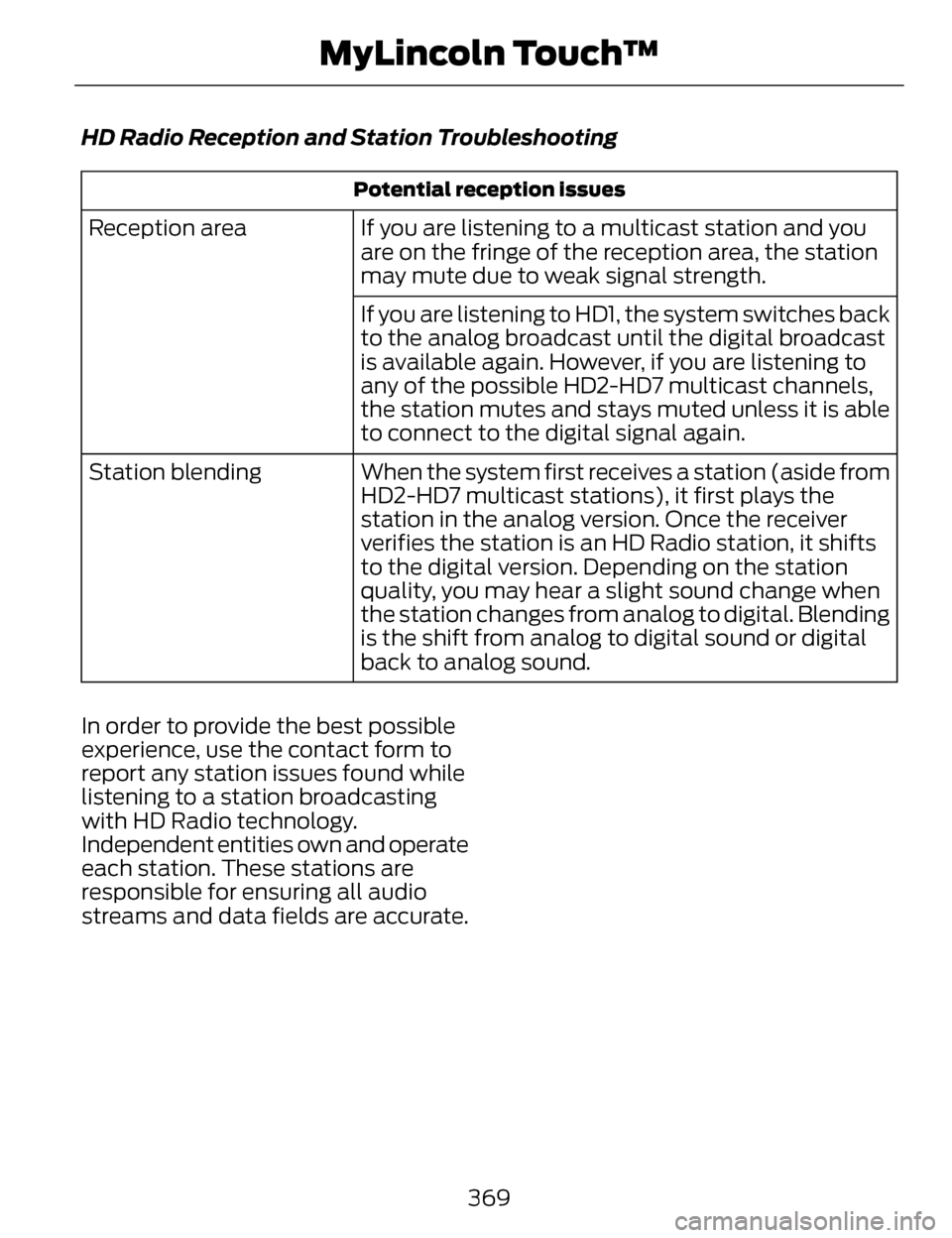
HD Radio Reception and Station Troubleshooting
Potential reception issues
If you are listening to a multicast station and you
are on the fringe of the reception area, the station
may mute due to weak signal strength.
Reception area
If you are listening to HD1, the system switches back
to the analog broadcast until the digital broadcast
is available again. However, if you are listening to
any of the possible HD2-HD7 multicast channels,
the station mutes and stays muted unless it is able
to connect to the digital signal again.
When the system first receives a station (aside from
HD2-HD7 multicast stations), it first plays the
station in the analog version. Once the receiver
verifies the station is an HD Radio station, it shifts
to the digital version. Depending on the station
quality, you may hear a slight sound change when
the station changes from analog to digital. Blending
is the shift from analog to digital sound or digital
back to analog sound.
Station blending
In order to provide the best possible
experience, use the contact form to
report any station issues found while
listening to a station broadcasting
with HD Radio technology.
Independent entities own and operate
each station. These stations are
responsible for ensuring all audio
streams and data fields are accurate.
369
MyLincoln Touch™
Page 408 of 468

Fan speed: Touch + or - to increase or decrease the volume of air
circulated in your vehicle.
C
Recirculated air: Touch the button to switch between outside air and
recirculated air. When you select recirculated air, the button illuminates
and the air currently in the passenger compartment recirculates. This
may reduce the time needed to cool the interior (when used with A/C)
and may reduce unwanted odors from entering your vehicle.
Recirculated air may turn off automatically in all airflow modes except
MAX A/C to reduce the possibility of fogging.
D
MAX A/C: Touch to switch on. The system distributes recirculated air
through the instrument panel air vents, air conditioning automatically
turns on and fan speed adjusts to the highest speed. This re-cooling
of the interior is more economical and efficient than normal A/C.
E
A/C: Touch to turn air conditioning on or off. To improve air
conditioning when starting your vehicle, drive with the windows slightly
open for two to three minutes. Use A/C with recirculated air to improve
cooling performance and efficiency.
F
AUTO: Touch to turn on fully automatic operation. Select the desired
temperature using the temperature control. The system automatically
adjusts fan speed, air distribution, A/C operation, and outside or
recirculated air, to heat or cool the vehicle to maintain the selected
temperature.
G
Rear defroster: Touch to turn the rear window defroster and heated
mirrors (if equipped).
H
405
MyLincoln Touch™
Page 411 of 468

To set a destination, press the green
corner of your touchscreen, then the
Dest button when it appears. See
Setting a destination later in this
chapter.
To view the navigation map and your
vehicle's current location, touch the
green bar in the upper right hand
corner of the touchscreen, or, press
Dest, then Map. See Map mode later
in this chapter.
Setting a Destination
Press the green corner of your
touchscreen, then the Dest button
when it appears. Choose any of the
following:
Destination
My Home
Favorites
Previous Destinations Point of InterestEmergency
Street Address IntersectionCity Center Map
Edit Route Cancel Route 1. Enter the necessary information
into the highlighted text fields (in
any order). For address destination
entry, the Go! button appears once
you enter all the necessary
information. Pressing the Go!
button makes the address location
appear on the map. If you choose
Previous Destination , the last 20
destinations you have selected
appear.
2. Select Set as Dest to make this your destination. You can also
choose to set this as a waypoint
(have the system route to this
point on the way to your current
destination) or save it as a favorite.
The system considers any Avoid
Areas selections in its route
calculation.
3. Choose from up to three different types of routes, and then select
Start Route.
• Fastest: Uses the fastest moving roads possible.
• Shortest: Uses the shortest distance possible.
• Eco Route: Uses the most fuel-efficient route.
You can cancel the route or have the
system demo the route for you. Select
Route Prefs to set route preferences
like avoiding freeways, tollroads,
ferries and car trains as well as to use
or not use high-occupancy vehicle
lanes. (High-occupancy vehicle lanes
are also known as carpool or diamond
lanes. People who ride in buses,
vanpools or carpools use these lanes.)
408
MyLincoln Touch™
Page 441 of 468

Oils, Fluids and Flushing
In many cases, fluid discoloration is a
normal operating characteristic and,
by itself, does not necessarily indicate
a concern or that the fluid needs to be
changed. However, a qualified expert,
such as the factory-trained
technicians at your dealership, should
inspect discolored fluids that also
show signs of overheating or foreign
material contamination immediately.Make sure to change your vehicle’s
oils and fluids at the specified
intervals or in conjunction with a
repair. Flushing is a viable way to
change fluid for many vehicle
sub-systems during scheduled
maintenance. It is critical that systems
are flushed only with new fluid that is
the same as that required to fill and
operate the system or using a
Ford-approved flushing chemical.
Owner Checks and Services
Make sure you perform the following
basic maintenance checks and
inspections every month or at
six-month intervals.
Check every month
Engine oil level.
Function of all interior and exterior lights.
Tires (including spare) for wear and proper pressure. Windshield washer fluid level.
Check every six months
Battery connections. Clean if necessary.
Body and door drain holes for obstructions. Clean if necessary. Cooling system fluid level and coolant strength.
Door weatherstrips for wear. Lubricate if necessary.
Hinges, latches and outside locks for proper operation. Lubricate if necessary. Parking brake for proper operation.
438
Scheduled Maintenance
Page 461 of 468

Information Messages......................106Active Park..................................................106
Adaptive Cruise Control........................106
AdvanceTrac™..........................................107
Airbag............................................................107
Alarm............................................................108
Automatic Engine Shutdown..............108
AWD..............................................................109
Battery and Charging System...............110
Blind Spot Information and CrossTraffic Alert System...............................111
Collision Warning System........................111
Doors and Locks.........................................112
Driver Alert....................................................112
Fuel..................................................................112
Hill Start Assist...........................................113
Keys and Intelligent Access...................113
Lane Keeping System..............................114
Maintenance................................................115
MyKey.............................................................116
Park Aid..........................................................117
Park Brake.....................................................117
Power Steering...........................................118
Remote Start..............................................118
Seats..............................................................119
Starting System ........................................119
Tire Pressure Monitoring System.......120
Traction Control........................................120
Transmission...............................................121
Installing Child Seats............................21Child Seats.....................................................21
Using Lap and Shoulder Belts................21
Using Lower Anchors and Tethers for CHildren (LATCH)..................................26
Using Tether Straps...................................28
Instrument Cluster...............................95
Instrument Lighting Dimmer............83
Interior Lamps........................................85
Front Interior Lamp...................................86
Rear Interior Lamp.....................................86
Interior Luggage Compartment Release...................................................70 Interior Mirror...........................................91
Auto-Dimming Mirror................................91
Introduction...............................................7
J
Jump-Starting the Vehicle..............245Connecting the Jumper Cables..........245
Jump Starting...........................................246
Preparing Your Vehicle...........................245
Removing the Jumper Cables.............246
K
Keyless Entry...........................................67SECURICODE™ KEYLESS ENTRY
KEYPAD.....................................................67
Keyless Starting....................................151Ignition Modes............................................151
Keys and Remote Controls................52
Knee Airbag............................................44
L
Lane Keeping System......................208Switching the System On andOff.............................................................209
Lighting Control.....................................82Headlamp Flasher.....................................82
High Beams..................................................82
Lighting.....................................................82
Lincoln Credit...........................................12
Load Carrying.......................................224
Load Limit.............................................224
Vehicle Loading - with and without aTrailer.......................................................224
458
Index
Page 466 of 468

Using MyKey With Remote StartSystems.................................................59
Using Snow Chains............................323
Using Stability Control......................186
AdvanceTrac® ..........................................186
Using Traction Control......................184System Indicator Lights and
Messages................................................184
Utilizing the Mediation/ArbitrationProgram (Canada Only)................251
V
Vehicle Care.........................................288General Information...............................288
Vehicle Certification Label..............332
Vehicle Identification Number........331
Vehicle Storage...................................294
Battery.........................................................295
Body.............................................................294
Brakes..........................................................295
Cooling system.........................................295
Engine..........................................................294
Fuel system...............................................294
General........................................................294
Miscellaneous...........................................295
Removing Vehicle From Storage.......295
Tires..............................................................295
Ventilated Seats...................................141Heated and ventilated seat air filter
replacement (if equipped)...............142
VentilationSee: Climate Control...............................128
VINSee: Vehicle Identification Number....331
Voice Control...........................................77
W
Warning Lamps and Indicators.......96Adaptive Cruise Control..........................96
Anti-Lock Braking System.......................97
Battery............................................................97
Blind Spot Monitor.....................................97
Brake System...............................................97
Cruise Control..............................................97
Direction Indicator......................................97
Door Ajar........................................................97
Electric Park Brake.....................................97
Engine Coolant Temperature................98
Engine Oil......................................................98
Fasten Safety Belt.....................................98
Front Airbag.................................................98
Heads Up Display......................................98
High Beam....................................................98
Hood Ajar......................................................98
Low Fuel Level............................................98
Low Tire Pressure Warning....................98
Low Washer Fluid......................................99
Parking Lamps............................................99
Powertrain Fault.........................................99
Service Engine Soon.................................99
Stability Control.........................................99
Stability Control Off................................100
Trunk Ajar....................................................100
Washer Fluid Check..........................280
Washers
See: Cleaning the Exterior....................288
See: Wipers and Washers.......................79
Waxing...................................................289
Wheel Nuts
See: Changing a Road Wheel..............323
Wheels and Tires................................297Technical Specifications.......................328
Windows and Mirrors..........................88
Windshield Washers...........................80
Windshield Wipers...............................79
Intermittent Wipe.......................................79
Speed Dependent Wipers.......................79
463
Index