Page 313 of 455
3. Lift the carpeted load floor panel
located in the rear of the vehicle.
4. Remove the spare tire cover and
foam spacer (if equipped).
5. Remove the wing nut securing
the spare tire by turning it
counterclockwise.
6. Remove the washer, temporary
spare and jack assembly from the
cargo area
7. Block the diagonally opposite
wheel.
8. Loosen each wheel lug nut
one-half turn counterclockwise but
do not remove them until the wheel
is raised off the ground.
9. The vehicle jacking points are shown here, and are depicted on the
yellow warning label on the jack.
Note:Jack at the specified locations to avoid damage to the vehicle.
312Wheels and Tires
2014 MKX(mkx)
Owners Guide gf, 2nd Printing, March 2014
USA(fus)
Page 314 of 455
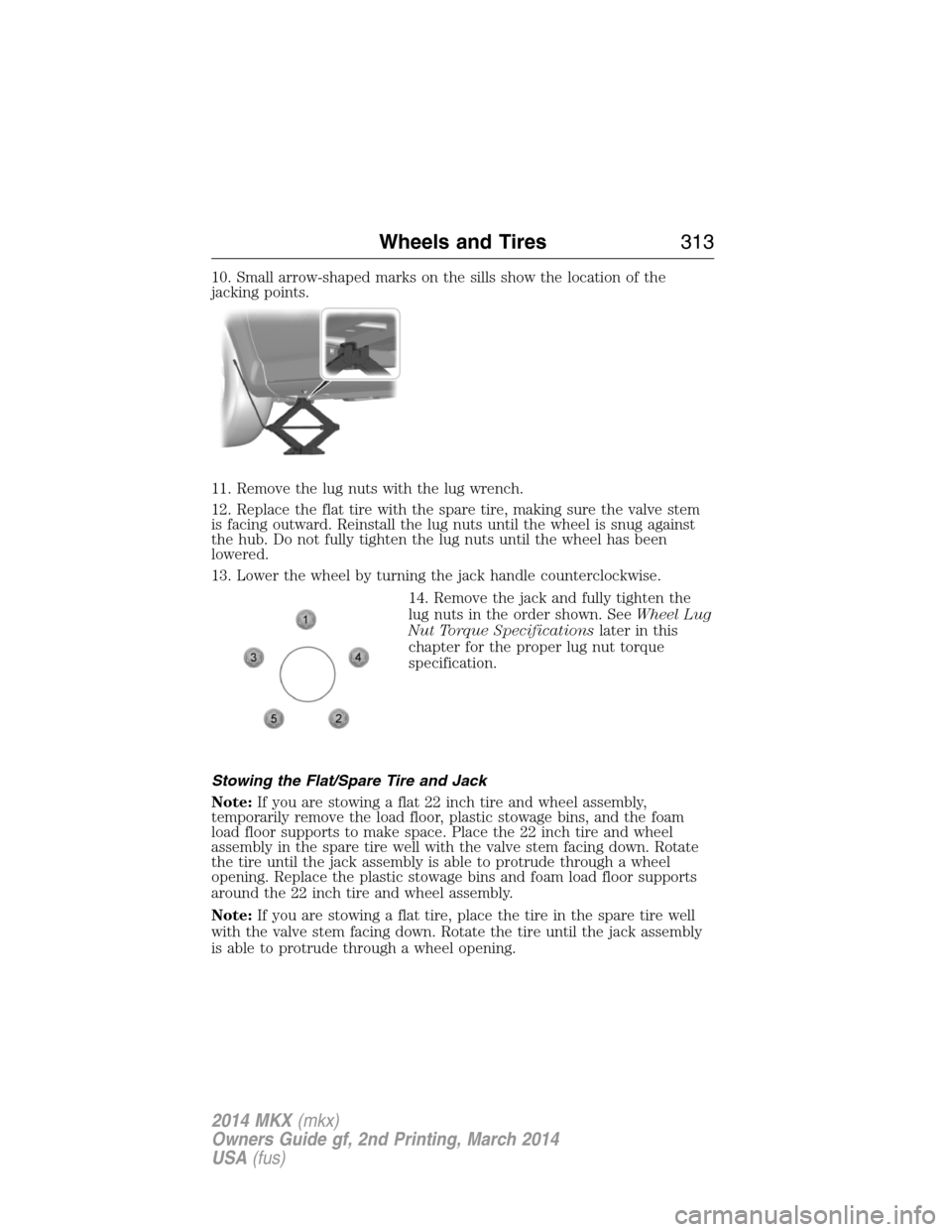
10. Small arrow-shaped marks on the sills show the location of the
jacking points.
11. Remove the lug nuts with the lug wrench.
12. Replace the flat tire with the spare tire, making sure the valve stem
is facing outward. Reinstall the lug nuts until the wheel is snug against
the hub. Do not fully tighten the lug nuts until the wheel has been
lowered.
13. Lower the wheel by turning the jack handle counterclockwise.
14. Remove the jack and fully tighten the
lug nuts in the order shown. SeeWheel Lug
Nut Torque Specificationslater in this
chapter for the proper lug nut torque
specification.
Stowing the Flat/Spare Tire and Jack
Note:If you are stowing a flat 22 inch tire and wheel assembly,
temporarily remove the load floor, plastic stowage bins, and the foam
load floor supports to make space. Place the 22 inch tire and wheel
assembly in the spare tire well with the valve stem facing down. Rotate
the tire until the jack assembly is able to protrude through a wheel
opening. Replace the plastic stowage bins and foam load floor supports
around the 22 inch tire and wheel assembly.
Note:If you are stowing a flat tire, place the tire in the spare tire well
with the valve stem facing down. Rotate the tire until the jack assembly
is able to protrude through a wheel opening.
Wheels and Tires313
2014 MKX(mkx)
Owners Guide gf, 2nd Printing, March 2014
USA(fus)
Page 315 of 455

Note:If you are stowing the spare tire, place the spare in the spare tire
well in its original position.
1. Put the flat tire, jack and lug wrench away. Make sure the jack kit is
secured in its original location and orientation in the jack kit recess
under the flat or spare tire. Unblock the wheels.
2. Secure the wheel by replacing the washer and the wing nut and
turning the wing nut clockwise.
TECHNICAL SPECIFICATIONS
Wheel Lug Nut Torque Specifications
WARNING:When a wheel is installed, always remove any
corrosion, dirt or foreign materials present on the mounting
surfaces of the wheel or the surface of the wheel hub, brake drum or
brake disc that contacts the wheel. Make sure that any fasteners that
attach the rotor to the hub are secured so they do not interfere with
the mounting surfaces of the wheel. Installing wheels without correct
metal-to-metal contact at the wheel mounting surfaces can cause the
wheel nuts to loosen and the wheel to come off while your vehicle is in
motion, resulting in loss of control.
Retighten the lug nuts to the specified torque within 100 miles
(160 kilometers) after any wheel disturbance (such as rotation, flat tire,
wheel removal).
Lug nut socket
size/Bolt sizeWheel lug nut torque*
ft-lb N•m
12x 20 100 135
* Torque specifications are for nut and bolt threads free of dirt and
rust. Use only Ford recommended replacement fasteners.
314Wheels and Tires
2014 MKX(mkx)
Owners Guide gf, 2nd Printing, March 2014
USA(fus)
Page 316 of 455
Note:Inspect the wheel pilot hole
and mounting surface prior to
installation. Remove any visible
corrosion or loose particles.
Wheels and Tires315
2014 MKX(mkx)
Owners Guide gf, 2nd Printing, March 2014
USA(fus)
Page 318 of 455

TECHNICAL SPECIFICATIONS
Item Capacity Ford part nameFord part number /
Ford specification
Brake fluid
1
Between MIN and
MAX on reservoirMotorcraft High
Performance DOT 4 LV
Motor Vehicle Brake
FluidPM-20 /
WSS-M6C65-A2
Door weatherstrips — Silicone Spray LubricantXL-6 /
ESR-M13P4-A
Hinges, latches,
striker plates and
rotors, seat tracks,
fuel filler door hinge
and spring—Multi-Purpose Grease
(Lithium grease)Motorcraft XL-5 (aerosol)
or CRCSL3151ESB /
ESB-M1C93-B
Lock cylinders —Motorcraft Penetrating
and Lock LubricantXL-1 /
None
Engine oil
2,3
3.7L engine
6.0 quarts (5.7L)Motorcraft SAE 5W-20
Motor OilWSS-M2C945-A
Engine coolant
4,5,6
3.7L engine
11.7 quarts
(11.1L)
4,5
Motorcraft Orange
Antifreeze/Coolant
PredilutedVC-3DIL-B (US)
CVC-3DIL-B (Canada) /
WSS-M97B44-D2
Power steering fluidBetween MIN and
MAX on reservoirMotorcraft MERCON LV
AT FXT-10-QLV /
MERCON LV
Automatic
transmission fluid
7,8
11.0 quarts (10.4L)
(6F50)Motorcraft
MERCON LV ATFXT-10-QLV /
MERCON LV
Rear differential
(All-Wheel Drive)
fluid2.4 pints (1.15L)Motorcraft SAE 80W-90
Premium Rear Axle
LubricantXY-80W90-QL /
WSP-M2C197-A
Capacities and Specifications317
2014 MKX(mkx)
Owners Guide gf, 2nd Printing, March 2014
USA(fus)
Page 319 of 455

Item Capacity Ford part nameFord part number /
Ford specification
Power Transfer Unit
(PTU) fluid
(All-Wheel Drive)
9
12 ounces (0.35L)Motorcraft SAE 75W-140
Synthetic Rear Axle
LubricantXY-75W140-QL /
WSL-M2C192-A
Windshield washer
fluidFill as requiredMotorcraft Premium
Windshield Washer
Concentrates (US)
Premium Quality
Windshield Washer Fluid
(Canada)ZC-32-A (US);
CXC-37-(A, B, D, and F)
(Canada)/
WSB-M8B16-A2/- -
Fuel tank
(front-wheel drive)18.3 gallons
(69.3L)——
Fuel tank (all-wheel
drive)19.2 gallons
(72.7L)——
Air conditioning
refrigerant
10
1.27 lb (0.58kg)Motorcraft R-134a
RefrigerantYN-19 (US) / CYN-16- R
(Canada)
/WSH-M17B19-A
Air conditioning
compressor oil
10
4.0 fl oz (118.3ml)Motorcraft PAG
Refrigerant Compressor
OilYN-12-D /
WSH-M1C231-B
1Ford recommends using Motorcraft (Ford) DOT 4 LV High Performance Brake Fluid or
equivalent meeting WSS-M6C65-A2 . Use of any fluid other than the recommended fluid may
cause degraded brake performance and not meet the Ford performance standards. Keep brake
fluid clean and dry. Contamination with dirt, water, petroleum products or other materials may
result in brake system damage and possible failure.
318Capacities and Specifications
2014 MKX(mkx)
Owners Guide gf, 2nd Printing, March 2014
USA(fus)
Page 325 of 455

•Cargo area protector
•Bumper protector
•Wheel locks
•Hitch-mounted parking sensors*
•Car cover*
*The accessory manufacturer designs, develops and therefore warrants
Lincoln Licensed Accessories, and does not design or test these
accessories to Lincoln Motor Company engineering requirements.
Contact an authorized Lincoln dealer for the manufacturer’s limited
warranty details, and request a copy of the Lincoln Licensed Accessories
product limited warranty from the accessory manufacturer.
For maximum vehicle performance, keep the following information in
mind when adding accessories or equipment to your vehicle:
•When adding accessories, equipment, passengers and luggage to your
vehicle, do not exceed the total weight capacity of the vehicle or of
the front or rear axle (GVWR or GAWR as indicated on the Safety
Compliance Certification label). Ask an authorized dealer for specific
weight information.
•The Federal Communications Commission (FCC) and Canadian Radio
Telecommunications Commission (CRTC) regulate the use of mobile
communications systems that are equipped with radio transmitters, for
example, two-way radios, telephones and theft alarms. Any such
equipment installed in your vehicle should comply with Federal
Communications Commission (FCC) and Canadian Radio
Telecommunications Commission (CRTC) regulations and should be
installed only by an authorized dealer.
•An authorized dealer needs to install mobile communications systems.
Improper installation may harm the operation of your vehicle,
particularly if their manufacturer did not design the mobile
communication device specifically for automotive use.
•If you or an authorized Lincoln dealer add any non-Lincoln electrical
or electronic accessories or components to the vehicle, you may
adversely affect battery performance and durability. In addition, you
may adversely affect the performance of other electrical systems in
the vehicle.
324Accessories
2014 MKX(mkx)
Owners Guide gf, 2nd Printing, March 2014
USA(fus)
Page 340 of 455
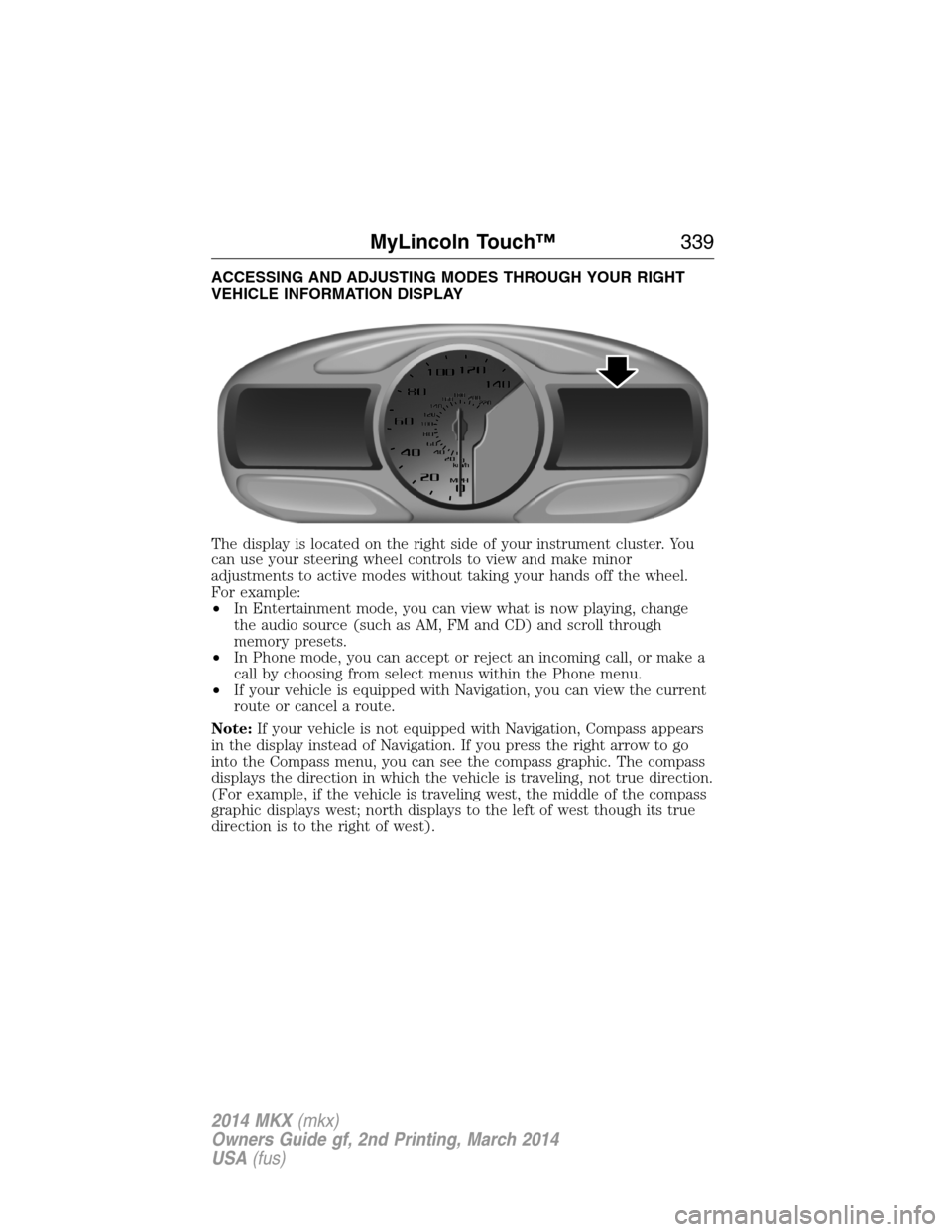
ACCESSING AND ADJUSTING MODES THROUGH YOUR RIGHT
VEHICLE INFORMATION DISPLAY
The display is located on the right side of your instrument cluster. You
can use your steering wheel controls to view and make minor
adjustments to active modes without taking your hands off the wheel.
For example:
•In Entertainment mode, you can view what is now playing, change
the audio source (such as AM, FM and CD) and scroll through
memory presets.
•In Phone mode, you can accept or reject an incoming call, or make a
call by choosing from select menus within the Phone menu.
•If your vehicle is equipped with Navigation, you can view the current
route or cancel a route.
Note:If your vehicle is not equipped with Navigation, Compass appears
in the display instead of Navigation. If you press the right arrow to go
into the Compass menu, you can see the compass graphic. The compass
displays the direction in which the vehicle is traveling, not true direction.
(For example, if the vehicle is traveling west, the middle of the compass
graphic displays west; north displays to the left of west though its true
direction is to the right of west).
MyLincoln Touch™339
2014 MKX(mkx)
Owners Guide gf, 2nd Printing, March 2014
USA(fus)

