Page 181 of 652
181
2-1. Driving procedures
2
When driving
RX350/270_EE
■Changing “ENGINE START STOP” switch modes
Modes can be changed by pressing the “ENGINE START STOP”
switch with the brake pedal released. (The mode changes each time
the switch is pressed.)
Off*
The emergency flashers can be
used.
ACCESSORY mode
Some electrical components
such as the audio system can be
used.
The “ENGINE START STOP”
switch indicator turns amber.
IGNITION ON mode
All electrical components can
be used.
The “ENGINE START STOP”
switch indicator turns amber.
*: If the shift lever is in a position
other than P when turning off
the engine, the “ENGINE
START STOP” switch will be
switched to ACCESSORY
mode, not to off.
RX350_270_EE_48D77E.book 181 ページ 2014年1月24日 金曜日 午前10時4分
Page 182 of 652

182
2-1. Driving procedures
RX350/270_EE
When stopping the engine with the shift lever in a position other than P
If the engine is stopped with the shift lever in a position other than P, the
“ENGINE START STOP” switch will not be turned off but instead be
turned to ACCESSORY mode. Perform the following procedure to turn
the switch off:
Check that the parking brake is set.
Shift the shift lever to P.
Check that the indicator on the “ENGINE START STOP” switch
is illuminated in amber and then press the “ENGINE START
STOP” switch once.
Check that the indicator on the “ENGINE START STOP” switch
is off.
■Auto power off function
When the shift lever is in P, if the vehicle is left in ACCESSORY or IGNITION ON
mode with the engine not running for more than 20 minutes (ACCESSORY mode)
or one hour (IGNITION ON mode), the “ENGINE START STOP” switch will auto-
matically turn off. However, this function cannot entirely prevent battery discharge.
Do not leave the vehicle with the “ENGINE START STOP” switch in ACCESSORY
or IGNITION ON mode for long periods of time when the engine is not running.
■Operation of the “ENGINE START STOP” switch
When operating the “ENGINE START STOP” switch, one short, firm press is
enough. If the switch is pressed improperly, the engine may not start or the
“ENGINE START STOP” switch mode may not change. It is not necessary to press
and hold the switch.
■Electronic key battery depletion
→P. 4 0
■Conditions affecting operation
→P. 3 7
■Note for the entry function
→P. 3 8
STEP1
STEP2
STEP3
STEP4
RX350_270_EE_48D77E.book 182 ページ 2014年1月24日 金曜日 午前10時4分
Page 188 of 652
188
2-1. Driving procedures
RX350/270_EE
■Selecting snow mode
Use snow mode for accelerating and driving on slippery road sur-
faces such as snow.
Press the menu switch.
The multi-information display
will change modes to electronic
features control mode.
Press the “∧” or “∨” switch
until “ECT SNOW” appears.
Press the “ENTER” switch to
change to “ON”.
The “ECT SNOW” indicator will
be displayed.
Each pressing of the switch
turns snow mode on and off.
Press the menu switch to
change to the normal display.
STEP1
STEP2
RX350_270_EE_48D77E.book 188 ページ 2014年1月24日 金曜日 午前10時4分
Page 192 of 652

192
2-1. Driving procedures
RX350/270_EE
■When driving with cruise control or radar cruise control activated
Even when performing the following actions with the intent of enabling engine
braking, engine braking will not activate while driving in S mode and downshifting
to 5 or 4 because cruise control or radar cruise control will not be canceled.
(→P. 230, 234)
■If the shift lever cannot be shifted from P
→P. 5 8 9
■If S does not come on or D comes on even after shifting the shift lever to S
This may indicate a malfunction in the automatic transmission system. Have the
vehicle inspected by any authorized Lexus dealer or repairer, or another duly quali-
fied and equipped professional immediately.
(In this situation, the transmission will operate in the same as manner as when the
shift lever is in D.)
■Downshift restriction warning buzzer
To help ensure safety and driving performance, downshifting operation may some-
times be restricted. In some circumstances, downshifting may not be possible even
when the shift lever or paddle shift switch is operated. (The warning buzzer will
sound twice.)
CAUTION
■When driving on slippery road surfaces
Do not accelerate or shift gears suddenly.
Sudden changes in engine braking may cause the vehicle to spin or skid, resulting in
an accident.
RX350_270_EE_48D77E.book 192 ページ 2014年1月24日 金曜日 午前10時4分
Page 193 of 652

193
2-1. Driving procedures
2
When driving
RX350/270_EE
Turn signal lever
■Turn signals can be operated when
The “ENGINE START STOP” switch is in IGNITION ON mode.
■If the indicators flash faster than usual
Check that a light bulb in the front or rear turn signal lights has not burned out.
■If the turn signals stop flashing before a lane change has been performed
Operate the lever again.
■To discontinue flashing of the turn signals during a lane change
Operate the lever in the opposite direction.
■Customization
The number of times the turn signals flash during a lane change can be changed.
(Customizable features →P. 6 2 2 )
The turn signal lever can be used to show the following intention of the
driver:
Right turn
Left turn
Lane change to the right
(move the lever partway and
release it)
The right hand signals will flash
3 times.
Lane change to the left (move
the lever partway and release
it)
The left hand signals will flash 3
times.
RX350_270_EE_48D77E.book 193 ページ 2014年1月24日 金曜日 午前10時4分
Page 203 of 652
203
2-2. Instrument cluster
2
When driving
RX350/270_EE
Multi-information display
The multi-information display presents the driver with a variety of driving-
related data including the current outside air temperature.
■Multi-information switches
“∧” “∨” switch
Changes items.
“ENTER” switch
Turns on/off electronic features
controls and changes customi-
zation settings.
Menu switch
Changes mode from normal
display to electronic features,
customization or back to normal
display.
RX350_270_EE_48D77E.book 203 ページ 2014年1月24日 金曜日 午前10時4分
Page 206 of 652
206
2-2. Instrument cluster
RX350/270_EE
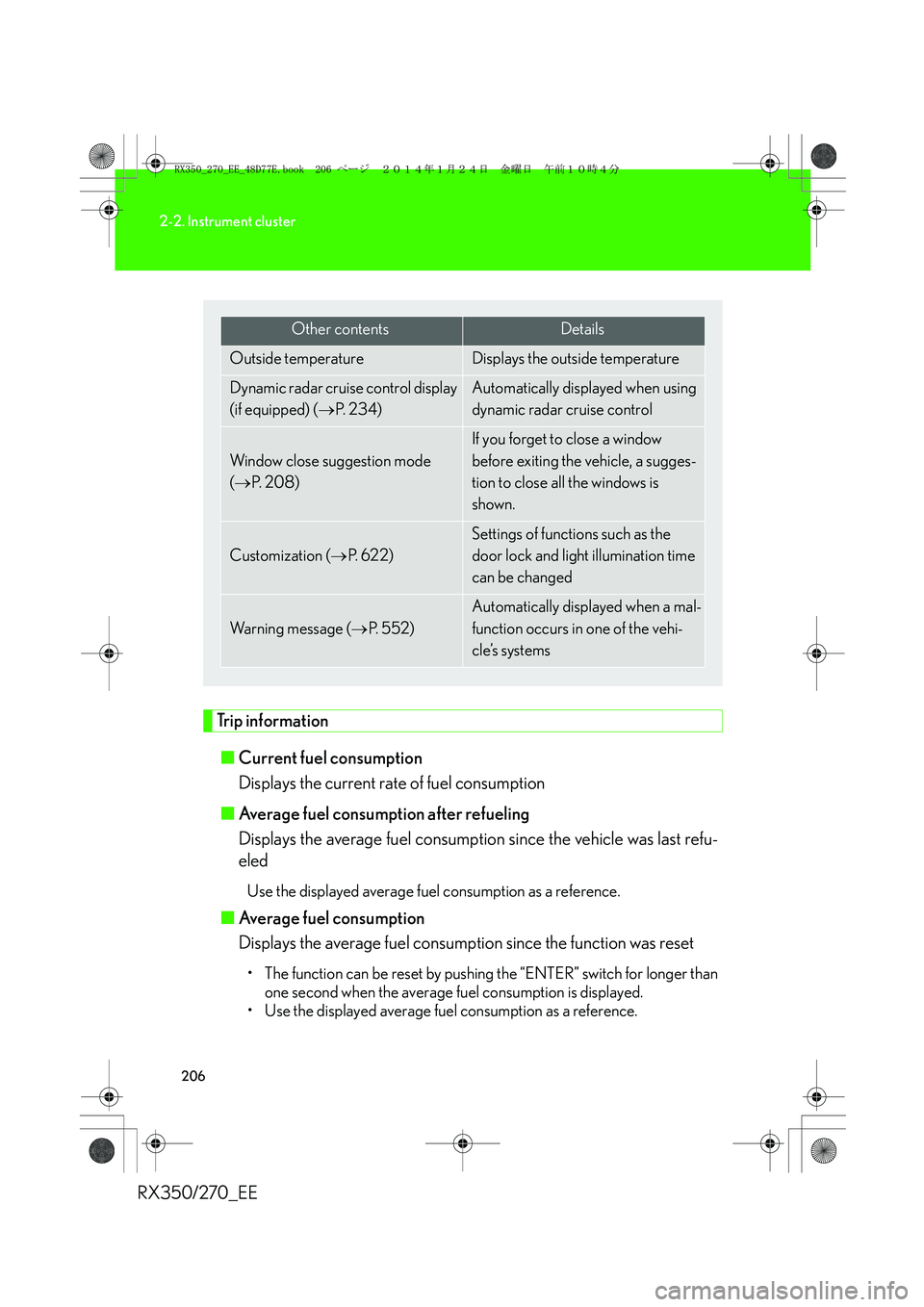
Trip information
■Current fuel consumption
Displays the current rate of fuel consumption
■Average fuel consumption after refueling
Displays the average fuel consumption since the vehicle was last refu-
eled
Use the displayed average fuel consumption as a reference.
■Average fuel consumption
Displays the average fuel consumption since the function was reset
• The function can be reset by pushing the “ENTER” switch for longer than
one second when the average fuel consumption is displayed.
• Use the displayed average fuel consumption as a reference.
Other contentsDetails
Outside temperature Displays the outside temperature
Dynamic radar cruise control display
(if equipped) (→P. 2 3 4 )Automatically displayed when using
dynamic radar cruise control
Window close suggestion mode
(→P. 2 0 8 )
If you forget to close a window
before exiting the vehicle, a sugges-
tion to close all the windows is
shown.
Customization (→P. 622)
Settings of functions such as the
door lock and light illumination time
can be changed
Wa r n i n g m e s s a g e (→P. 552)
Automatically displayed when a mal-
function occurs in one of the vehi-
cle’s systems
RX350_270_EE_48D77E.book 206 ページ 2014年1月24日 金曜日 午前10時4分
Page 210 of 652

210
2-2. Instrument cluster
RX350/270_EE
●In the following situations, the window close operation will stop partway:
• The “ENGINE START STOP” switch is turned to IGNITION ON mode.
• The “ENTER” switch was pressed.
• The window lock switch was turned on.
• The jam protection function was activated.
• The windows were opened or closed by the wireless remote control.
If the power window switch of any of the door is operated while in windows close
suggestion mode, the windows close operation of that door will stop partway.
■Eco Driving Indicator
■Outside temperature display
In the following situations, the correct outside temperature may not be displayed, or
the display may take longer than normal to change.
●When stopped, or driving at low speeds (less than 25km/h [16mph])
●When the outside temperature has changed suddenly (at the entrance/exit of a
garage, tunnel, etc.)Eco Driving Indicator Light
During Eco-friendly acceleration (Eco
driving), Eco Driving Indicator Light will
turn on.
Eco Driving Indicator Zone Display
Suggests Eco driving range with current
Eco driving ratio based on acceleration.
Zone of Eco driving
Eco driving ratio based on acceleration
If Zone of Eco driving is exceeded, the
right of Eco Driving Indicator Zone Dis-
play will blink and Eco Driving Indicator
Light will turn off.
RX350_270_EE_48D77E.book 210 ページ 2014年1月24日 金曜日 午前10時4分


