2014 LEXUS LX570 phone
[x] Cancel search: phonePage 462 of 956

4623-3. Using the audio system
LX570_OM_OM60L21U_(U) ■
Open source license
This product uses the following open source software. ●
T- K e r n e l
This Product uses the Source Code of T- Kernel under T-License granted by the T-
Engine Forum (www.t-engine.org ).●
C Library
This product includes software developed by the University of California, Berkeley
and its contributors. This product includes software developed by the University of
California, Lawrence Berkeley Laboratory.
Copyright © 1982, 1985, 1993 The Regents of the University of California. All
rights reserved.
Copyright © 1982, 1986, 1993 The Regents of the University of California. All
rights reserved.
Copyright © 1982, 1986, 1989, 1993 The Regents of the University of California.
All rights reserved.
© UNIX System Laboratories, Inc. All or some portions of this file are derived from
material licensed to the University of California by American Telephone and Tele-
graph Co. or Unix System Laboratories, In c. and are reproduced herein with the
permission of UNIX Sy stem Laboratories, Inc.
Copyright © 1982, 1986, 1991, 1993, 1994 The Regents of the University of Cali-
fornia. All rights reserved.
© UNIX System Laboratories, Inc. All or some portions of this file are derived from
material licensed to the University of California by American Telephone and Tele-
graph Co. or Unix System Laboratories, In c. and are reproduced herein with the
permission of UNIX Sy stem Laboratories, Inc.
Copyright © 1983, 1990, 1993 The Regents of the University of California. All
rights reserved.
© UNIX System Laboratories, Inc. All or some portions of this file are derived from
material licensed to the University of California by American Telephone and Tele-
graph Co. or Unix System Laboratories, In c. and are reproduced herein with the
permission of UNIX Sy stem Laboratories, Inc.
Copyright © 1983, 1993 The Regents of the University of California. All rights
reserved.
Page 463 of 956

4633-3. Using the audio system
3
Interior features
LX570_OM_OM60L21U_(U) Copyright © 1987, 1991, 1993 The Regents of the University of California. All
rights reserved.
Copyright © 1987, 1993 The Regents of the University of California. All rights
reserved.
Copyright © 1988 Regents of the Universi ty of California. All rights reserved.
Copyright © 1988 University of Utah.
Copyright © 1992, 1993 The Regents of the University of California. All rights
reserved. This code is derived from software contributed to Berkeley by the Sys-
tems Programming Group of the Universi ty of Utah Computer Science Depart-
ment and Ralph Campbell.
Copyright © 1988, 1993 The Regents of the University of California. All rights
reserved.
Copyright © 1988, 1993 The Regents of the University of California. All rights
reserved. This code is derived from software contributed to Berkeley by Arthur
David Olson of the National Cancer Institute.
Copyright © 1989 The Regents of the Univer sity of California. All rights reserved.
Copyright © 1989 The Regents of the Univer sity of California. All rights reserved.
© UNIX System Laboratories, Inc. All or some portions of this file are derived from
material licensed to the University of California by American Telephone and Tele-
graph Co. or Unix System Laboratories, In c. and are reproduced herein with the
permission of UNIX System Laboratories, Inc.
Copyright © 1989, 1993 The Regents of the University of California. All rights
reserved.
Copyright © 1989, 1993 The Regents of the University of California. All rights
reserved.
© UNIX System Laboratories, Inc. All or some portions of this file are derived from
material licensed to the University of California by American Telephone and Tele-
graph Co. or Unix System Laboratories, In c. and are reproduced herein with the
permission of UNIX System Laboratories, Inc.
Copyright © 1990, 1993 The Regents of the University of California. All rights
reserved.
This code is derived from software co ntributed to Berkel ey by Chris Torek.
Page 464 of 956

4643-3. Using the audio system
LX570_OM_OM60L21U_(U) Copyright © 1991, 1993 The Regents of the University of California. All rights
reserved.
Copyright © 1991, 1993 The Regents of the University of California. All rights
reserved.
This code is derived from software cont ributed to Berkeley by Berkeley Software
Design, Inc.
Copyright © 1992, 1993 The Regents of the University of California. All rights
reserved.
Copyright © 1992, 1993 The Regents of the University of California. All rights
reserved.
This code is derived from software cont ributed to Berkeley by Ralph Campbell.
Copyright © 1992, 1993 The Regents of the University of California. All rights
reserved.
© UNIX System Laboratories, Inc. All or some portions of this file are derived from
material licensed to the University of California by American Telephone and Tele-
graph Co. or Unix System Laboratories, In c. and are reproduced herein with the
permission of UNIX Sy stem Laboratories, Inc.
Copyright © 1992, 1993 The Regents of the University of California. All rights
reserved.
This software was developed by the Computer Systems Engineering group at
Lawrence Berkeley Laboratory under DARPA contract BG 91-66 and contributed
to Berkeley. All advertising materials ment ioning features or use of this software
must display the following acknowledgement: This product includes software
developed by the University of Califo rnia, Lawrence Berkeley Laboratory.
Copyright © 1992, 1993 The Regents of th e University of California. All rights
reserved.
This code is derived from software contributed to Berkeley by Ralph Campbell.
This file is derived from the MIPS RISC Architecture book by Gerry Kane.
Copyright © 1993 The Regents of the Univer sity of California. All rights reserved.
Copyright © 1994 The Regents of the University of California. All rights reserved.
Page 496 of 956
4963-3. Using the audio system
LX570_OM_OM60L21U_(U) Internet radio broadcast (vehicles with the navigation system)
One of Apps’ features is the ability to listen to internet radio. In order to
use this service, an Apps compat ible phone and the navigation system
need to be set. For details, ref er to the “Navigation System Owner’s
Manual”.
Press the “AUDIO” button.
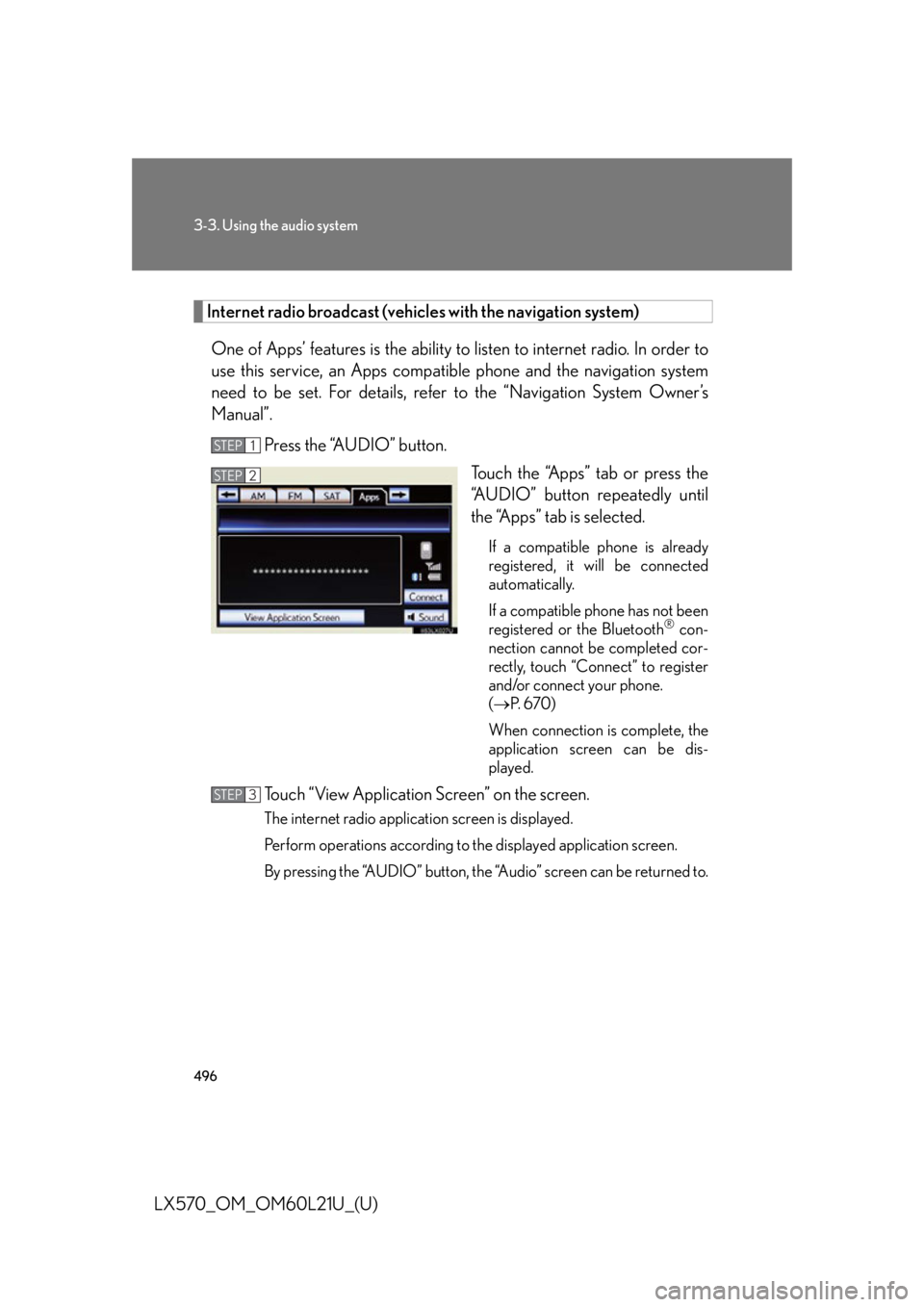
Touch the “Apps” tab or press the
“AUDIO” button repeatedly until
the “Apps” tab is selected. If a compatible phone is already
registered, it will be connected
automatically.
If a compatible phone has not been
registered or the Bluetooth ®
con-
nection cannot be completed cor-
rectly, touch “Connect” to register
and/or connect your phone.
( P. 6 7 0 )
When connection is complete, the
application screen can be dis-
played.
Touch “View Application Screen” on the screen. The internet radio application screen is displayed.
Perform operations according to the displayed application screen.
By pressing the “AUDIO” button, the “Audio” screen can be returned to.STEP 1
STEP 2
STEP 3
Page 501 of 956
5013-3. Using the audio system
3
Interior features
LX570_OM_OM60L21U_(U) Contact the XM ®
Listener Care Center at 1-877-515-3987 (U.S.A.) or 1-877-
438-9677 (Canada). ■
About internet radio (vehicles with the navigation system) ●
Other applications can be activated while listening to internet radio. ●
An iPhone cannot be connected via Bluetooth ®
and USB connection at the
same time. However, it is possible to recharge an iPhone while using Apps by
connecting via USB. The system uses the connection method that was used last.
Therefore, if connected via USB after Bluetooth ®
connection, it is necessary to
reconnect the iPhone via Bluetooth ®
.●
Services requiring a separate contract can also be used. For details, refer to
http://www.lexus.com/enform/ or call 1-800-255-3987.●
If internet radio has neve r been listened to by activating “Apps” from the
“Information” screen, the “Apps” tab will be dimmed. Ch Unavail The channel you selected is no longer available. Wait
for about 2 seconds until the radio returns to the previ-
ous channel or “CH 001”. If it does not change auto-
matically, select another channel.
Page 545 of 956
5453-3. Using the audio system
3
Interior features
LX570_OM_OM60L21U_(U) ■
If you touch
The display returns to the previous screen. ■
Connecting Bluetooth ®
audio player●
Touching “Connect Portable Player” on the “Bluetooth*” screen also connects a
Bluetooth ®
audio player. ( P. 6 7 7 )●
When none of the selectable portable players have been registered, a screen
confirming registration is displayed. The registration method is the same as
phone registration. ( P. 6 7 0 )●
When the currently connected portable pl ayer is selected, a screen confirming
the selected player’s disc onnection is displayed. ( P. 6 7 2 )●
If connection fails once, a changing connection method confirmation screen is
displayed. If connection fails 2 or more times, a message will be displayed.
When this message is displayed, try again.
*: Bluetooth is a registered trademark of Bluetooth SIG, Inc.■
When using the Bluetooth ®
audio system●
In the following conditions, the system may not function.
• The portable player is turned off
• The portable player is not connected
• The portable player battery is low ●
There may be a delay if phone connect ion is carried out during Bluetooth ®
audio play. ●
Depending on the type of portable player that is connected to the system, oper-
ation may differ slightly and cert ain functions may not be available.■
Bluetooth ®
antenna
The antenna is built into the audio unit. If the portable player is behind the seat or in
the glove box or console box, or is touching or covered by metal objects, connec-
tion status may deteriorate. ■
Battery charge/signal status
This display may not correspond exactly with the portable player, and this system
does not have a charging function.
Page 564 of 956
5643-3. Using the audio system
LX570_OM_OM60L21U_(U) ■
If you touch
The display returns to the previous screen. ■
About iPod
●
“Made for iPod” and “Made for iPhone” me an that an electronic accessory has
been designed to connect specifically to iPod, or iPhone, respectively, and has
been certified by the developer to meet Apple performance standards. ●
Apple is not responsible for the operation of this device or its compliance with
safety and regulatory standards. Please note that the use of this accessory with
iPod or iPhone may affect wireless performance. ●
iPhone, iPod, iPod classic, iPod nano and iPod touch are trademarks of Apple
Inc., registered in the U.S. and other countries.■
iPod cover art ●
Depending on the iPod and the songs in the iPod, iPod cover art may be dis-
played. This function can be changed to “On” or “Off”. ( P. 559)●
It may take time to disp lay iPod cover art, and the iPod may not be operated
while the cover art display is in process. ●
Only iPod cover art that is saved in JPEG format can be displayed.
Page 566 of 956

5663-3. Using the audio system
LX570_OM_OM60L21U_(U) ■
Compatible models
The following iPod ®
, iPod nano ®
, iPod classic ®
, iPod touch ®
and iPhone ®
devices
can be used with this system. ●
Made for
• iPod touch (4th generation)
• iPod touch (3rd generation)
• iPod touch (2nd generation)
• iPod touch (1st generation)
•iPod classic
•iPod with video
• iPod nano (6th generation)
• iPod nano (5th generation)
• iPod nano (4th generation)
• iPod nano (3rd generation)
• iPod nano (2nd generation)
• iPod nano (1st generation)
•iPhone 4
•iPhone 3GS
•iPhone 3G
•iPhone
Depending on differences between models or software versions etc., some models
might be incompatible with this system.