Page 533 of 890
532
GS450h_OM_OM30D52U_(U)
5-4. Using the hands-free phone system (for cellular phone)
Adjusting the volume
Press to increase the vol-
ume and to decrease the
volume.
Hold the switch in that position to con-
tinue increasing or decreasing the vol-
ume.
Back switch
Press .
To return to the previous screen.
Steering switch
1
2
GS450h_OM_OM30D52U_(U).book Page 532 Monday, July 29, 2013 12:07 PM
Page 540 of 890
539
GS450h_OM_OM30D52U_(U)5-4. Using the hands-free phone system (for cellular phone)
5
Interior features
Using a Bluetooth® phone
Device name
Bluetooth
® connection status
Character deletion
Make a call
To display the screen shown above, press the “MENU” button on the
Remote Touch, then select “Phone” or press on the steering wheel.
You can register up to 5 phones in the system. Display the “Phone” screen. ( →P. 5 3 9 )
Select “Yes”.
If 5 Bluetooth® devices have
already been registered, a regis-
tered device needs to be deleted.
( → P. 5 4 3 )
1
2
3
4
Registering a Bluetooth® phone
1
2
GS450h_OM_OM30D52U_(U).book Page 539 Monday, July 29, 2013 12:07 PM
Page 545 of 890
544
GS450h_OM_OM30D52U_(U)
5-4. Using the hands-free phone system (for cellular phone)
Once the Bluetooth® phone is registered, you can make a call using the
following procedure:
■Dialing
Display the “Phone” screen. ( →P. 5 3 9 )
Input the phone number.
To delete the inputted phone num-
ber, select .
Select or press on the steering wheel.
Depending on the type of Bluetooth® phone being connected, it may be nec-
essary to perform additional steps on the phone.
■Dialing from the phonebook
You can dial a number from the phonebook data imported from your
cellular phone. The system has one phonebook for each phone. Up to
1000 entries may be stored in each phonebook. ( →P. 562)
Display the “Phone” screen. ( →P. 5 3 9 )
Select “Contacts” on the “Phone” screen.
Choose the desired data to
call from the list.
Making a call
1
2
3
1
2
3
GS450h_OM_OM30D52U_(U).book Page 544 Monday, July 29, 2013 12:07 PM
Page 546 of 890
GS450h_OM_OM30D52U_(U)
5455-4. Using the hands-free phone system (for cellular phone)
5
Interior features
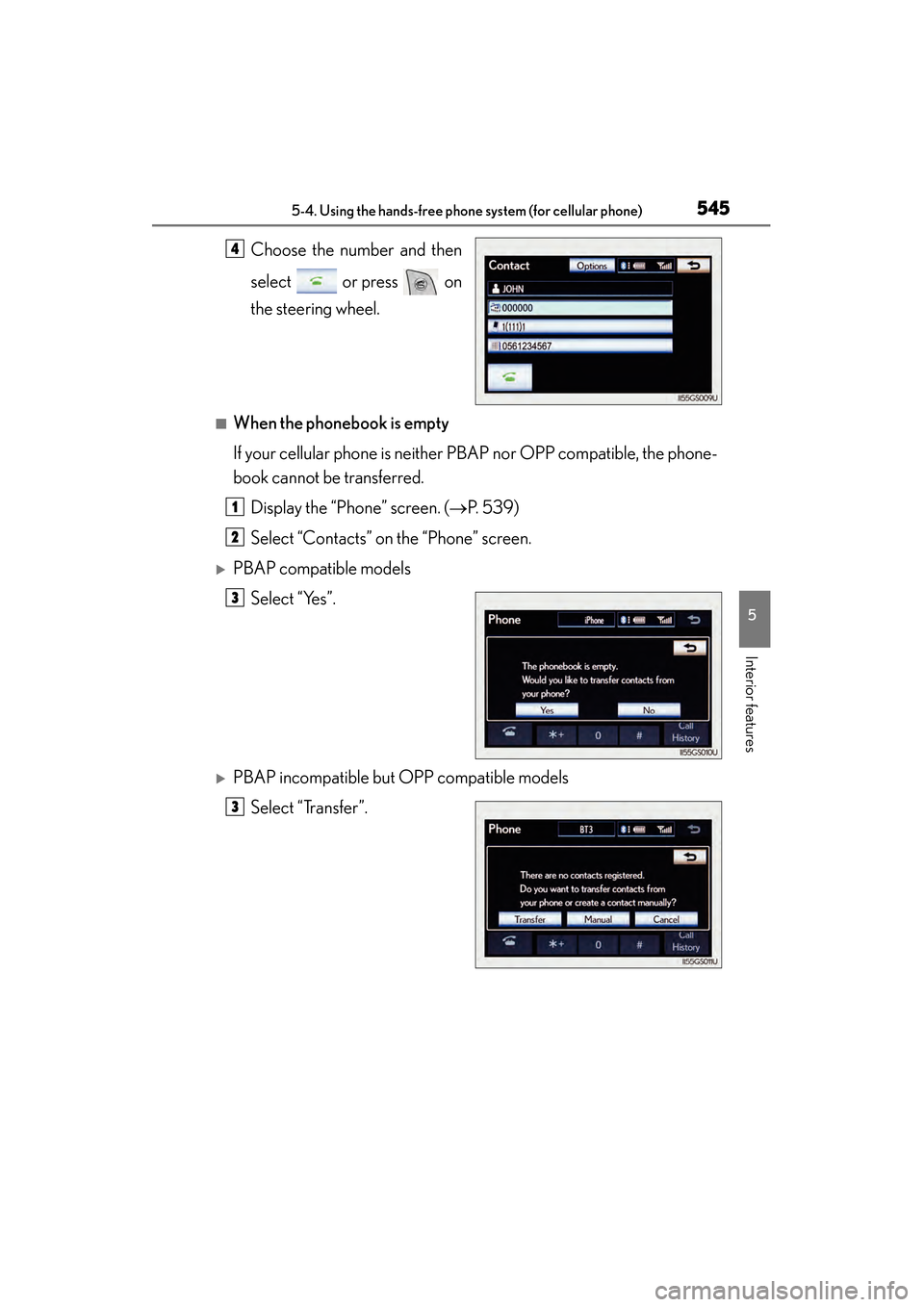
Choose the number and then
select or press on
the steering wheel.
■When the phonebook is empty
If your cellular phone is neither PBAP nor OPP compatible, the phone-
book cannot be transferred.Display the “Phone” screen. ( →P. 5 3 9 )
Select “Contacts” on the “Phone” screen.
XPBAP compatible models Select “Yes”.
XPBAP incompatible but OPP compatible modelsSelect “Transfer”.
4
1
2
3
3
GS450h_OM_OM30D52U_(U).book Page 545 Monday, July 29, 2013 12:07 PM
Page 549 of 890
548
GS450h_OM_OM30D52U_(U)
5-4. Using the hands-free phone system (for cellular phone)
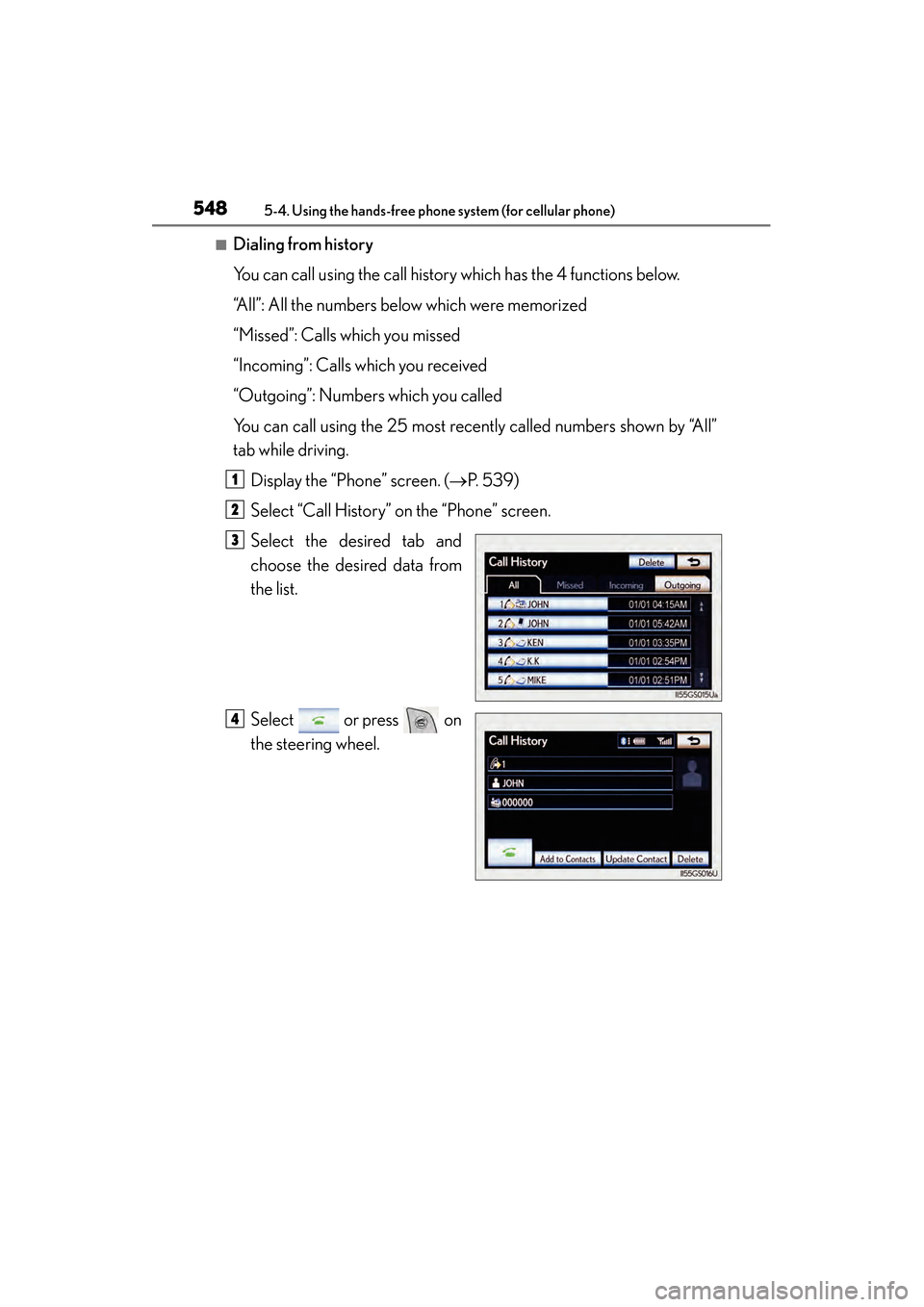
■Dialing from history
You can call using the call history which has the 4 functions below.
“All”: All the numbers below which were memorized
“Missed”: Calls which you missed
“Incoming”: Calls which you received
“Outgoing”: Numbers which you called
You can call using the 25 most recently called numbers shown by “All”
tab while driving.Display the “Phone” screen. ( →P. 5 3 9 )
Select “Call History” on the “Phone” screen.
Select the desired tab and
choose the desired data from
the list.
Select or press on
the steering wheel.
1
2
3
4
GS450h_OM_OM30D52U_(U).book Page 548 Monday, July 29, 2013 12:07 PM
Page 550 of 890
GS450h_OM_OM30D52U_(U)
5495-4. Using the hands-free phone system (for cellular phone)
5
Interior features
■Calling using voice recognition
You can call by giving a voice command. (
→P. 375)
Press .
The “Call ” and “Dial ” operating procedures are
explained here. Other operating procedures are also similar.
●Calling by name
You can call by giving a name registered in the phonebook.
(→ P. 562)
Press .
Following the system guid-
ance, wait for the beep and
then after saying “Call” say the
desired name, or the name and
type of phone.
Following the system guidance, wait for the beep and then say “Dial”.
(You can also call by pressing on the steering wheel.)
1
2
3
GS450h_OM_OM30D52U_(U).book Page 549 Monday, July 29, 2013 12:07 PM
Page 551 of 890

550
GS450h_OM_OM30D52U_(U)
5-4. Using the hands-free phone system (for cellular phone)
●Calling by dial number
You can call by giving a phone number
Press .
Following the system guid-
ance, wait for the beep and
then after saying “Dial” say the
phone number.
Following the system guidance, wait for the beep and then say “Dial”.
(You can also call by pressing on the steering wheel.)
■Calling using SMS/MMS message
You can call using the SMS (Short Message Service)/MMS (Multime-
dia Messaging Service) message sender’s phone number.Display the “Phone” screen. ( →P. 5 3 9 )
Select “Messages”.
When “Message Transfer” is set to
“Off”, a confirmation screen will be
displayed. Select “Yes”.
Select the “SMS/MMS” tab and then select the desired received
message from the list.
The tab display may vary depending on the type of cellular phone.
Select or press on the steering wheel.
■Calling using POI (vehicles with the navigation system)
You can make a call using a Point Of Interest.
1
2
3
1
2
3
4
GS450h_OM_OM30D52U_(U).book Page 550 Monday, July 29, 2013 12:07 PM
Page 553 of 890

552
GS450h_OM_OM30D52U_(U)
5-4. Using the hands-free phone system (for cellular phone)
■When calling by phone number
●Say the phone number one digit at a time. For example, if the phone number is
2345678, say “two three four five six seven eight”.
●The system can recognize the following types of phone numbers:
• 3 digit numbers (911, 411, 611)
• 7 digit numbers (Local phone numbers)
• 10 digit numbers (Area code + Local phone number)
• 11 digit phone numbers (1 + Area code + Local phone number)
●As the system cannot recognize additional numbers, say the complete number
without stopping.
●When the system recognizes multiple phone numbers, a phone number candidate
list will be displayed on the screen. If the desired phone number is not displayed on
the top of the screen, say the number of the desired phone number from the candi-
date list (number 1 and number 2) to select a phone number from the candidate list
■International calls
To dial a phone number that is not a 3, 7, 10 or 11 digit number, for example an inter-
national number, use “International Call”.Press on the steering wheel to display the “Shortcut Menu” screen and say-
ing “Main menu” or select “Main Menu”.
Say “Use a phone”.
Say “International call”.
Up to 24 digits can be recognized when using the international call function. The
number can also be divided into multiple groups and recognized.
You may not be able to make international calls, depending on the cellular phone in
use.
■Calling by using the latest call history item
Press on the steering wheel to display the “Phone” screen.
Press on the steering wheel to display the “Call History” screen.
Press on the steering wheel to select the most recent number in the history.
Select or press on the steering wheel.
1
2
3
1
2
3
4
GS450h_OM_OM30D52U_(U).book Page 552 Monday, July 29, 2013 12:07 PM