Page 515 of 846
514
GS350_OM_OM30D41U_(U)
5-4. Using the hands-free phone system (for cellular phone)
■Calling using voice recognition
You can call by giving a voice command. (
→P. 3 4 0 )
Press .
The “Call ” and “Dial ” operating procedures are
explained here. Other operating procedures are also similar.
●Calling by name
You can call by giving a name registered in the phonebook.
(→ P. 5 2 6 )
Press .
Following the system guid-
ance, wait for the beep and
then after saying “Call” say the
desired name, or the name and
type of phone.
Following the system guidance, wait for the beep and then say “Dial”.
(You can also call by pressing on the steering wheel.)
1
2
3
GS350_OM_OM30D41U_(U).book Page 514 Monday, July 29, 2013 2:22 PM
Page 516 of 846
GS350_OM_OM30D41U_(U)
5155-4. Using the hands-free phone system (for cellular phone)
5
Interior features
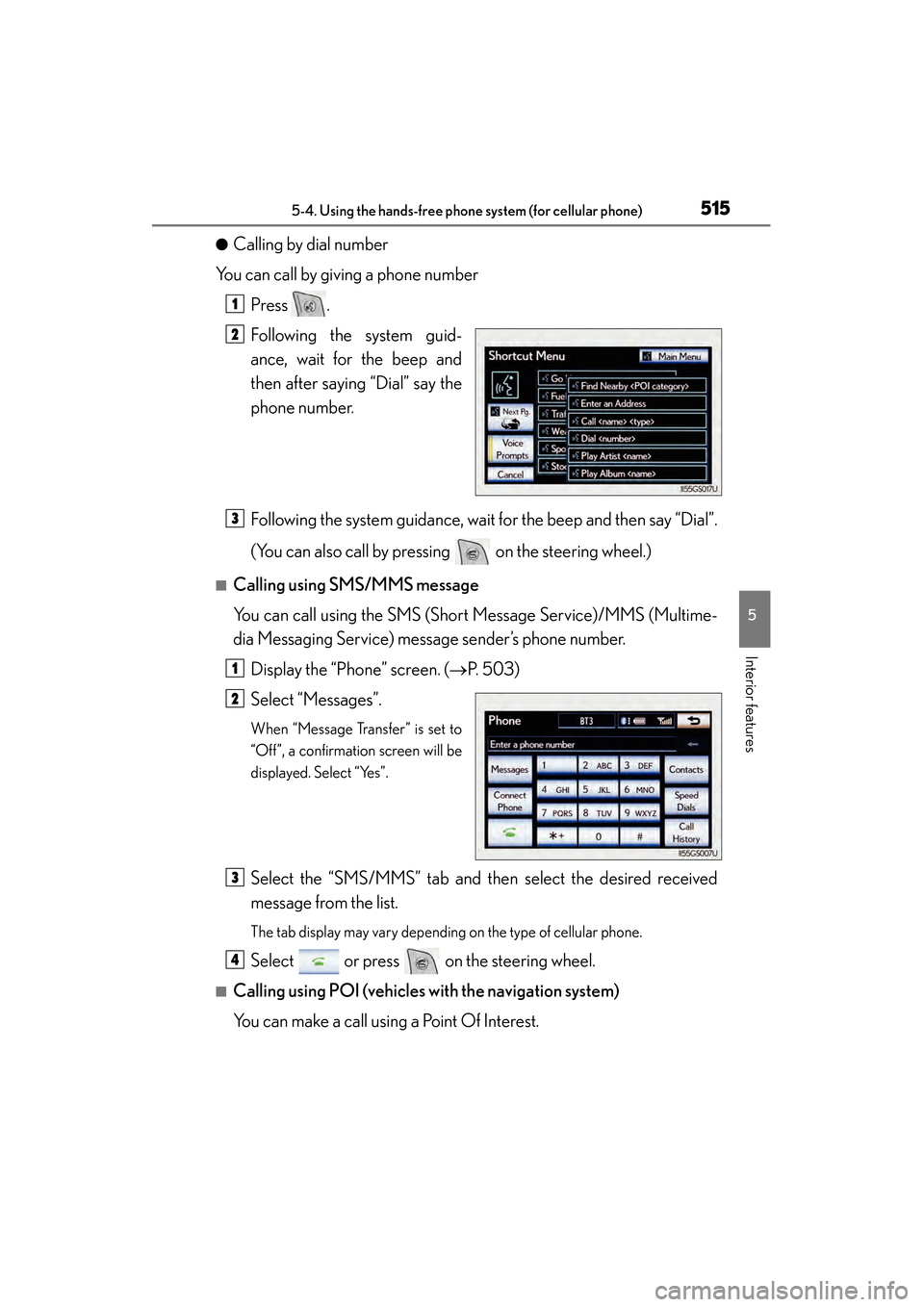
●Calling by dial number
You can call by giving a phone number
Press .
Following the system guid-
ance, wait for the beep and
then after saying “Dial” say the
phone number.
Following the system guidance, wait for the beep and then say “Dial”.
(You can also call by pressing on the steering wheel.)
■Calling using SMS/MMS message
You can call using the SMS (Short Message Service)/MMS (Multime-
dia Messaging Service) message sender’s phone number.Display the “Phone” screen. ( →P. 503)
Select “Messages”.
When “Message Transfer” is set to
“Off”, a confirmation screen will be
displayed. Select “Yes”.
Select the “SMS/MMS” tab and then select the desired received
message from the list.
The tab display may vary depending on the type of cellular phone.
Select or press on the steering wheel.
■Calling using POI (vehicles with the navigation system)
You can make a call using a Point Of Interest.
1
2
3
1
2
3
4
GS350_OM_OM30D41U_(U).book Page 515 Monday, July 29, 2013 2:22 PM
Page 518 of 846

GS350_OM_OM30D41U_(U)
5175-4. Using the hands-free phone system (for cellular phone)
5
Interior features
■When calling by phone number
●Say the phone number one digit at a time. For example, if the phone number is
2345678, say “two three four five six seven eight”.
●The system can recognize the following types of phone numbers:
• 3 digit numbers (911, 411, 611)
• 7 digit numbers (Local phone numbers)
• 10 digit numbers (Area code + Local phone number)
• 11 digit phone numbers (1 + Area code + Local phone number)
●As the system cannot recognize additional numbers, say the complete number
without stopping.
●When the system recognizes multiple phone numbers, a phone number candidate
list will be displayed on the screen. If the desired phone number is not displayed on
the top of the screen, say the number of the desired phone number from the candi-
date list (number 1 and number 2) to select a phone number from the candidate list
■International calls
To dial a phone number that is not a 3, 7, 10 or 11 digit number, for example an inter-
national number, use “International Call”.Press on the steering wheel to display the “Shortcut Menu” screen and say-
ing “Main menu” or select “Main Menu”.
Say “Use a phone”.
Say “International call”.
Up to 24 digits can be recognized when using the international call function. The
number can also be divided into multiple groups and recognized.
You may not be able to make international calls, depending on the cellular phone in
use.
■Calling by using the latest call history item
Press on the steering wheel to display the “Phone” screen.
Press on the steering wheel to display the “Call History” screen.
Press on the steering wheel to select the most recent number in the history.
Select or press on the steering wheel.
1
2
3
1
2
3
4
GS350_OM_OM30D41U_(U).book Page 517 Monday, July 29, 2013 2:22 PM
Page 519 of 846
518
GS350_OM_OM30D41U_(U)
5-4. Using the hands-free phone system (for cellular phone)
■To cancel voice recognition
●Press and hold .
●Press on the steering wheel.
●Select “Cancel”.
■When using voice recognition
Use correct commands and speak clearly, otherwise the system may not correctly
recognize the command. Wind or other noises may also cause the system not to rec-
ognize the desired command.
When a call is received, the following screen is displayed together with a
sound.
Select or press on the
steering wheel.
■To refuse a call
Select or press on the steering wheel.
■To adjust the incoming call volume
Select “-” or “+”, turn the “PWR/VOL” knob, or use the volume switch
on the steering wheel.
■International calls
Received international calls may not be displayed correctly depending on the cellu-
lar phone in use.
Receiving a call
GS350_OM_OM30D41U_(U).book Page 518 Monday, July 29, 2013 2:22 PM
Page 520 of 846
GS350_OM_OM30D41U_(U)
5195-4. Using the hands-free phone system (for cellular phone)
5
Interior features
The following screen is displayed when speaking on the phone.
■To adjust the incoming call volume
Select “-” or “+”, turn the “PWR/VOL” knob, or use the volume switch
on the steering wheel.
■To adjust your voice volume that the other party hears from their
speaker
Select “Transmit Volume” and select “-” or “+” to adjust the transmit vol-
ume.
Select “OK”.
■To prevent the other party from hearing your voice
Select “Mute”.
Speaking on the phone
GS350_OM_OM30D41U_(U).book Page 519 Monday, July 29, 2013 2:22 PM
Page 521 of 846
520
GS350_OM_OM30D41U_(U)
5-4. Using the hands-free phone system (for cellular phone)
■Inputting tones
When using phone services such as an answering service or a bank,
you can store phone numbers and code numbers in the phonebook.Select “0-9” on the “Call” screen.
Input the number.
If repeated tone symbols* are
stored in the phonebook, “Send”
and “Clear” are displayed on the
right side of the screen.
*: Repeated tone symbols are sym- bols or numbers displayed as p or
w, that come after the phone num-
ber.
(e.g. 056133w0123p#1✽ )
Confirm the number displayed on the screen, and select “Send”.
If you select “Clear”, this function will end.
■To transfer a call
Select “Handset Mode” to change from hands-free call to cellular
phone call. Select “Handsfree Mode” to change from cellular phone
call to hands-free call.
■To h a n g u p
Select or press on the steering wheel.
1
2
3
GS350_OM_OM30D41U_(U).book Page 520 Monday, July 29, 2013 2:22 PM
Page 522 of 846

GS350_OM_OM30D41U_(U)
5215-4. Using the hands-free phone system (for cellular phone)
5
Interior features
■Call waiting
When a connected call is interrupted by the third party, the incoming
call message will be displayed.
●To talk with the other party: Select or press on the steer-
ing wheel.
●To refuse the call: Select or press on the steering wheel.
Everytime you select or press on the steering wheel after a
call is interrupted, you will be switched to the other party.
If your cellular phone is not accepted in HFP Ver. 1.5, this function can-
not be used.
■Incoming call
●The ring tone that has been set in the “Phone Sound Settings” screen sounds when
there is an incoming call. ( →P. 5 2 5 )
●Depending on the type of Bluetooth® phone, both the system and Bluetooth®
phone may sound simultaneously when there is an incoming call.
■Transferring calls
●It is not possible to transfer from hands-free to a cellular phone while driving.
●If you transfer from a cellular phone to hands-free, the hands-free screen will be
displayed, and you can operate the system using the screen.
●Transfer method and operation may vary according to the cellular phone used.
●For operation of the cellular phone in use, see the phone’s manual.
■Repeated tone symbols
When the “p” pause tone is used, after waiting 2 seconds the tone data up until the
next pause tone will be automatically sent. When the “w” pause tone is used, the tone
data up until the next pause tone will be automatically sent after user operation.
■While driving
Key input is unavailable.
■Voice recognition during a call
“Send Tones” can be operated by voice recognition. ( →P. 3 4 0 )
■Interrupt call operation
Interrupt call operation may differ from depending on your phone company and the
cellular phone.
GS350_OM_OM30D41U_(U).book Page 521 Monday, July 29, 2013 2:22 PM
Page 523 of 846

522
GS350_OM_OM30D41U_(U)
5-4. Using the hands-free phone system (for cellular phone)
Received messages can be forwarded from the connected Bluetooth®
phone, enabling checking and replying (Quick reply).
■Checking a messageDisplay the “Phone” screen. ( →P. 503)
Select “Messages” on the “Phone” screen.
Depending on the type of Bluetooth® phone being connected, it may be nec-
essary to perform additional steps on the phone.
When “Message Transfer” is set to “Off”, a confirmation screen will be dis-
played. Select “Yes”.
Select the desired message to
check.
The text of the message is not dis-
played while driving.
Selecting “Previous” or “Next” dis-
plays the previous or next message.
Select “Play” to start reading out of the message. Select “Stop” to
stop the function.
■To adjust the message reading out volume
Select “-” or “+”, turn the “PWR/VOL” knob, or use the volume switch
on the steering wheel.
■Replying a message (Quick reply)
Select “Reply” on the desired
message screen.
Using a Bluetooth® phone message
1
2
3
4
1
GS350_OM_OM30D41U_(U).book Page 522 Monday, July 29, 2013 2:22 PM


