2014 Lexus GS250 ignition
[x] Cancel search: ignitionPage 109 of 688

1092. Instrument cluster
2
Instrument cluster
GS350_250_OM_OM30E16E_(EE)
■Tire inflation pressure (if equipped)
●It may take a few minutes to display the tire inflation pressure after the engine
switch is turned to IGNITION ON mode. It may also take a few minutes to display
the tire inflation pressure after inflation pressure has been adjusted.
●“---” may be displayed if the tire position information cannot be determined due to
unfavorable radio wave conditions.
●Tire inflation pressure changes with temperature. The displayed values may also be
different from the values measured using a tire pressure gauge.
■Liquid crystal display
Small spots or light spots may appear on the display. This phenomenon is character-
istic of liquid crystal displays, and there is no problem continuing to use the display.
■Customization
Setting of available languages can be changed. (Customizable features: →P. 6 5 2 )
CAUTION
■The information display at low temperatures
Allow the interior of the vehicle to warm up before using the liquid crystal informa-
tion display. At extremely low temperatures, the information display monitor may
respond slowly, and display changes may be delayed.
For example, there is a lag between the driver’s shifting and the new gear number
appearing on the display. This lag could cause the driver to downshift again, caus-
ing rapid and excessive engine braking and possibly an accident resulting in death
or injury.
■Cautions during setting up the display
As the engine needs to be running during setting up the display, ensure that the
vehicle is parked in a place with adequate ventilation. In a closed area such as a
garage, exhaust gases including harmful carbon monoxide (CO) may collect and
enter the vehicle. This may lead to death or a serious health hazard.
NOTICE
■During setting up the display
To prevent battery discharge, ensure that the engine is running while setting up the
display features.
GS350_250_OM_OM30E16E_(EE).book Page 109 Tuesday, July 8, 201 4 7:11 PM
Page 116 of 688

1162. Instrument cluster
GS350_250_OM_OM30E16E_(EE)
■Head-up display
●The head-up display may seem dark and hard to see when viewed through sun-
glasses, especially polarized sunglasses.
Adjust the brightness of the head-up display or remove your sunglasses.
●When the head-up display is turned off, it will remain off even if the engine switch is
turned to IGNITION ON mode after the engine switch has been turned off.
●The startup image will be displayed on the head-up display after the engine switch
has been turned to IGNITION ON mode while the head-up display switch is set to
on.
■When the battery is disconnected
The customize settings of the head-up display will be reset.
CAUTION
■Before using the head-up display
Check that the position and brightness of the head-up display image does not
interfere with safe driving. Incorrect adjustment of the image’s position or bright-
ness may obstruct the driver’s view and lead to an accident, resulting in death or
serious injury.
NOTICE
■To prevent damage to components
●Do not place any drinks near the head-up
display projector. If the projector gets wet,
electrical malfunctions may result.
●Do not place anything on or put stickers
onto the head-up display projector.
Doing so could interrupt head-up display
indications.
●Do not touch the inside of the head-up dis-
play projector or thrust sharp edges or the
like into the projector.
Doing so could cause mechanical malfunc-
tions.
GS350_250_OM_OM30E16E_(EE).book Page 116 Tuesday, July 8, 2014 7:11 PM
Page 118 of 688

1182. Instrument cluster
GS350_250_OM_OM30E16E_(EE)
Press the “MENU” button on the Remote Touch, then select on the
“Menu” screen.
■Trip information
If the “Past record” screen is displayed, select “Trip information”.Resetting the consumption
data
Fuel consumption in the past
15 minutes
Current fuel consumption
Average vehicle speed since
the engine was started.
Elapsed time since the engine was started.
Cruising range ( →P. 1 1 9 )
Average fuel consumption for the past 15 minutes is divided by color into past
averages and averages attained since the engine switch was last turned to
IGNITION ON mode. Use the displayed average fuel consumption as a ref-
erence.
The image is an example only, and may vary slightly from actual conditions.
Fuel consumption
1
2
3
4
5
6
GS350_250_OM_OM30E16E_(EE).book Page 118 Tuesday, July 8, 201 4 7:11 PM
Page 172 of 688

1723-2. Opening, closing and locking the doors and trunk
GS350_250_OM_OM30E16E_(EE)
Move the inside lock button to the lock position.
Close the door while pulling the door handle.
The door cannot be locked if the engine switch is in ACCESSORY or
IGNITION ON mode, or the electronic key is left inside the vehicle.
The key may not be detected correctly and the door may be locked.
The door cannot be opened from
inside the vehicle when the lock is
set. Unlock
Lock
These locks can be set to prevent chil-
dren from opening the rear doors.
Push down on each rear door switch
to lock both rear doors.
Locking the front doors from the outside without a key
Rear door child-protector lock
1
2
1
2
GS350_250_OM_OM30E16E_(EE).book Page 172 Tuesday, July 8, 201 4 7:11 PM
Page 180 of 688

1803-2. Opening, closing and locking the doors and trunk
GS350_250_OM_OM30E16E_(EE)
CAUTION
■Trunk easy closer (vehicles with power trunk lid)
■Power trunk lid (if equipped)
Observe the following precautions when operating the power trunk lid.
Failure to do so may cause serious injury.
●Check the safety of the surrounding area to make sure there are no obstacles or
anything that could cause any of your belongings to get caught.
●If anyone is in the vicinity, make sure they are safe and let them know that the
trunk is about to open or close.
●If the trunk closer switch is pressed while the trunk lid is opening during automatic
operation, the trunk lid stops opening. Take extra care when on an incline, as the
trunk lid may open or close suddenly.
●On an incline, the trunk lid may suddenly shut after it opens automatically. Make
sure the trunk lid is fully open and secure before using the trunk.
●In the following situations, the power trunk lid may detect an abnormality and
automatic operation may be stopped. In this case, the trunk lid has to be operated
manually. Take extra care in this situation, as the stopped trunk lid may suddenly
shut, causing an accident.
• When the trunk lid contacts an obstacle
• When the battery voltage suddenly drops, such as when the engine switch isturned to IGNITION ON mode or the engine is started during automatic
operation
●Do not attach any accessories other than genuine Lexus parts to the trunk lid. The
power trunk lid may not operate, causing itself to malfunction, or the trunk lid may
suddenly shut again after it is opened.
In the event that the trunk lid is left slightly
open, the trunk easy closer will automatically
close it to the fully closed position. It takes
several seconds before the trunk easy closer
begins to operate. Be careful not to catch fin-
gers or anything else in the trunk lid, as this
may cause bone fractures or other serious
injuries.
GS350_250_OM_OM30E16E_(EE).book Page 180 Tuesday, July 8, 201 4 7:11 PM
Page 186 of 688

1863-3. Adjusting the seats
GS350_250_OM_OM30E16E_(EE)
Driving position memory
The seat and steering wheel are automatically adjusted to allow the driver
or front passenger to enter and exit the vehicle easily.
■Driver’s seat
When all of the following have
been performed, the driver’s seat
and steering wheel are automati-
cally adjusted to a position that
allows driver to enter and exit the
vehicle easily.• The shift lever has been shifted
to P.
• The engine switch has been turned off.
• The driver’s seat belt has been unfastened.
When any of the following has been performed, the driver’s seat and
steering wheel automatically return to their original positions. • The engine switch has been turned to ACCESSORY mode or IGNITION ON mode.
• The driver’s seat belt has been fastened.
■Front passenger’s seat (if equipped)
If the front passenger’s door is opened while the vehicle is stopped, the
adjusted lumbar support, ottoman (if equipped), etc. will return to its
original position.
This feature automatically adjusts the front seats, steering wheel and
outside rear view mirrors to make entering and exiting the vehicle eas-
ier or to suit your preferences.
Power easy access system
GS350_250_OM_OM30E16E_(EE).book Page 186 Tuesday, July 8, 201 4 7:11 PM
Page 187 of 688
1873-3. Adjusting the seats
3
Operation of each component
GS350_250_OM_OM30E16E_(EE)
■Operation of the power easy access system
When exiting the vehicle, the power easy access system may not operate if the seat
is already close to the rearmost position, etc.
■Customization
The seat movement amount settings of the power easy access system can be cus-
tomized. (Customizable features: →P. 6 5 0 )
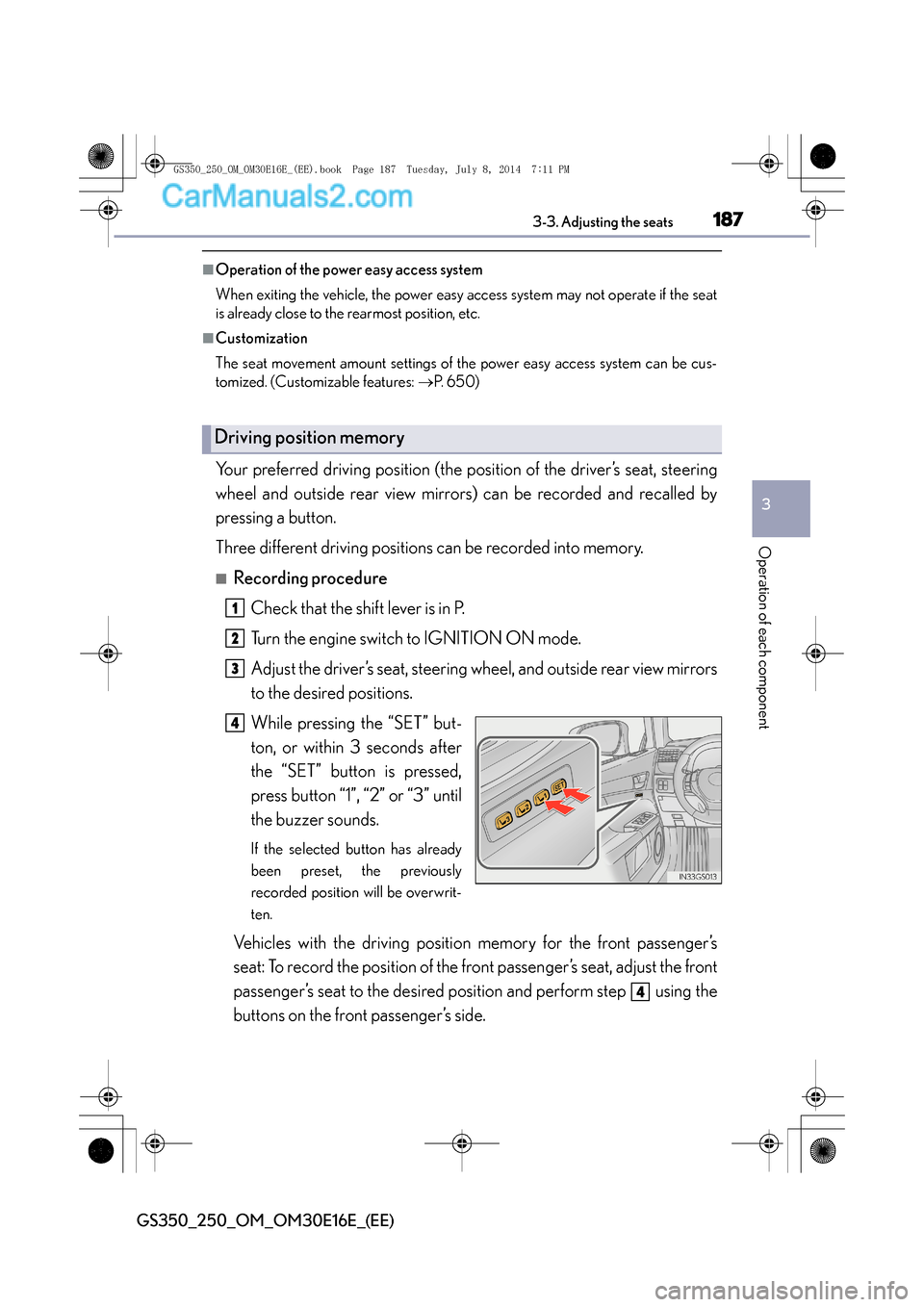
Your preferred driving position (the position of the driver’s seat, steering
wheel and outside rear view mirrors) can be recorded and recalled by
pressing a button.
Three different driving positions can be recorded into memory.
■Recording procedure
Check that the shift lever is in P.
Turn the engine switch to IGNITION ON mode.
Adjust the driver’s seat, steering wheel, and outside rear view mirrors
to the desired positions.
While pressing the “SET” but-
ton, or within 3 seconds after
the “SET” button is pressed,
press button “1”, “2” or “3” until
the buzzer sounds.
If the selected button has already
been preset, the previously
recorded position will be overwrit-
ten.
Vehicles with the driving position memory for the front passenger’s
seat: To record the position of the front passenger’s seat, adjust the front
passenger’s seat to the desired position and perform step using the
buttons on the front passenger’s side.
Driving position memory
1
2
3
4
4
GS350_250_OM_OM30E16E_(EE).book Page 187 Tuesday, July 8, 201 4 7:11 PM
Page 188 of 688

1883-3. Adjusting the seats
GS350_250_OM_OM30E16E_(EE)
■Recall procedureCheck that the shift lever is in P.
Turn the engine switch to IGNITION ON mode.
Press one of the buttons for the
driving position you want to
recall until the buzzer sounds.
Vehicles with front passenger’s seat
ottoman:
The recorded position will only be
recalled if the ottoman is in a posi-
tion higher than the recorded posi-
tion. It will not move in an upward
direction.
■To stop the position recall operation part-way through
Perform any of the following:
●Press the “SET” button.
●Press button “1”, “2” or “3”.
●Operate any of the seat adjustment switches (only cancels seat position recall).
●Operate the tilt and telescopic steering control switch (only cancels steering wheel
position recall).
■Seat positions that can be memorized ( →P. 1 8 2 )
XVehicles without seatback side support adjustment switch
The adjusted positions other than the position adjusted by lumbar support switch can
be recorded.
XVehicles with seatback side support adjustment switch
All adjusted positions can be recorded.
■Automatic ottoman adjustment (if equipped)
While the recorded position is being recalled, if it appears that the front edge of the
cushion will touch the area surrounding the instrument panel, the ottoman will be
automatically stowed.
1
2
3
GS350_250_OM_OM30E16E_(EE).book Page 188 Tuesday, July 8, 201 4 7:11 PM