2014 Lexus GS250 ECO mode
[x] Cancel search: ECO modePage 118 of 688

1182. Instrument cluster
GS350_250_OM_OM30E16E_(EE)
Press the “MENU” button on the Remote Touch, then select on the
“Menu” screen.
■Trip information
If the “Past record” screen is displayed, select “Trip information”.Resetting the consumption
data
Fuel consumption in the past
15 minutes
Current fuel consumption
Average vehicle speed since
the engine was started.
Elapsed time since the engine was started.
Cruising range ( →P. 1 1 9 )
Average fuel consumption for the past 15 minutes is divided by color into past
averages and averages attained since the engine switch was last turned to
IGNITION ON mode. Use the displayed average fuel consumption as a ref-
erence.
The image is an example only, and may vary slightly from actual conditions.
Fuel consumption
1
2
3
4
5
6
GS350_250_OM_OM30E16E_(EE).book Page 118 Tuesday, July 8, 201 4 7:11 PM
Page 131 of 688

1313-2. Opening, closing and locking the doors and trunk
3
Operation of each component
GS350_250_OM_OM30E16E_(EE)
■Alarms and warning indicators
An alarm sounds and warning message displays shown on the multi-information dis-
play are used to protect against unexpected accidents or theft of the vehicle result-
ing from erroneous operation. When a warning message is displayed, take
appropriate measures based on the displayed message. (→P. 5 7 0 )
When only an alarm sounds, circumstances and correction procedures are as fol-
lows.
AlarmSituationCorrection procedure
Exterior alarm sounds
once for 5 seconds
The trunk was closed
while the electronic key
was still inside the trunk
and all the doors were
locked.
Retrieve the electronic
key from the trunk and
close the trunk lid.
An attempt was made to
lock the vehicle while a
door was open.Close all of the doors and
lock the doors again.
Interior alarm sounds
continuously
The engine switch was
turned to ACCESSORY
mode while the driver’s
door was open (or the
driver’s door was opened
while the engine switch
was in ACCESSORY
mode).
Turn the engine switch off
and close the driver’s
door.
GS350_250_OM_OM30E16E_(EE).book Page 131 Tuesday, July 8, 201 4 7:11 PM
Page 136 of 688

1363-2. Opening, closing and locking the doors and trunk
GS350_250_OM_OM30E16E_(EE)
■Note for locking the doors (vehicles with entry function)
●Touching the door lock sensor while wearing gloves may delay or prevent lock
operation. Remove the gloves and touch the lock sensor again.
●If the door handle becomes wet while the electronic key is within the effective
range, the door may lock and unlock repeatedly. In that case, follow the following
correction procedures to wash the vehicle:
• Place the electronic key in a location 2 m (6 ft.) or more away from the vehicle.(Take care to ensure that the key is not stolen.)
• Set the electronic key to battery-saving mode to disable the smart entry & start system. ( →P. 1 3 3 )
●If the electronic key is inside the vehicle and a door handle becomes wet during a
car wash, a message may be shown on the multi-information display and a buzzer
will sound outside the vehicle. To turn off the alarm, lock all the doors.
●The lock sensor may not work properly if it comes into contact with ice, snow, mud,
etc. Clean the lock sensor and attempt to operate it again, or use the lock sensor
on the lower part of the door handle.
●Fingernails may scrape against the door during operation of the door handle. Be
careful not to injure fingernails or damage the surface of the door.
■Note for the unlocking function (vehicles with entry function)
●A sudden approach to the effective range or door handle may prevent the doors
from being unlocked. In this case, return the door handle to the original position
and check that the doors unlock before pulling the door handle again.
●Gripping the door handle when wearing a glove may not unlock the door.
●If the door handle becomes wet while the electronic key is within the effective
range, the door may lock and unlock repeatedly. In that case, follow the following
correction procedures to wash the vehicle:
• Place the electronic key in a location 2 m (6 ft.) or more away from the vehicle.
(Take care to ensure that the key is not stolen.)
• Set the electronic key to battery-saving mode to disable the smart entry & start system. ( →P. 1 3 3 )
●If there is another electronic key in the detection area, it may take slightly longer to
unlock the doors after the door handle is gripped.
●Fingernails may scrape against the door during operation of the door handle. Be
careful not to injure fingernails or damage the surface of the door.
GS350_250_OM_OM30E16E_(EE).book Page 136 Tuesday, July 8, 201 4 7:11 PM
Page 138 of 688

1383-2. Opening, closing and locking the doors and trunk
GS350_250_OM_OM30E16E_(EE)
■Electronic key battery depletion
●The standard battery life is 1 to 2 years. (The card key battery life is about a year and
a half.)
●If the battery becomes low, an alarm will sound in the cabin when the engine stops.
(→ P. 5 74 )
●As the electronic key always receives radio waves, the battery will become
depleted even if the electronic key is not used. The following symptoms indicate
that the electronic key battery may be depleted. Replace the battery when neces-
sary. ( →P. 4 8 9 )
• The smart entry & start system or the wireless remote control does not operate.
• The detection area becomes smaller.
• The LED indicator on the key surface does not turn on.
●To avoid serious deterioration, do not leave the electronic key within 1 m (3 ft.) of
the following electrical appliances that produce a magnetic field:
•TVs
• Personal computers
• Cellular phones, cordless phones and battery chargers
• Recharging cellular phones or cordless phones
• Table lamps
• Induction cookers
■When the electronic key battery is fully depleted
→ P. 4 8 9
■Customization
Settings (e. g. smart entry & start system) can be changed.
(Customizable features: →P. 650)
■If the smart entry & start system has been deactivated in a customized setting
●Locking and unlocking the doors and opening the trunk:
Use the wireless remote control or mechanical key. ( →P. 1 5 5 , 6 1 8 )
●Starting the engine and changing engine switch modes: →P. 6 1 9
●Stopping the engine: →P. 2 3 8
GS350_250_OM_OM30E16E_(EE).book Page 138 Tuesday, July 8, 201 4 7:11 PM
Page 180 of 688

1803-2. Opening, closing and locking the doors and trunk
GS350_250_OM_OM30E16E_(EE)
CAUTION
■Trunk easy closer (vehicles with power trunk lid)
■Power trunk lid (if equipped)
Observe the following precautions when operating the power trunk lid.
Failure to do so may cause serious injury.
●Check the safety of the surrounding area to make sure there are no obstacles or
anything that could cause any of your belongings to get caught.
●If anyone is in the vicinity, make sure they are safe and let them know that the
trunk is about to open or close.
●If the trunk closer switch is pressed while the trunk lid is opening during automatic
operation, the trunk lid stops opening. Take extra care when on an incline, as the
trunk lid may open or close suddenly.
●On an incline, the trunk lid may suddenly shut after it opens automatically. Make
sure the trunk lid is fully open and secure before using the trunk.
●In the following situations, the power trunk lid may detect an abnormality and
automatic operation may be stopped. In this case, the trunk lid has to be operated
manually. Take extra care in this situation, as the stopped trunk lid may suddenly
shut, causing an accident.
• When the trunk lid contacts an obstacle
• When the battery voltage suddenly drops, such as when the engine switch isturned to IGNITION ON mode or the engine is started during automatic
operation
●Do not attach any accessories other than genuine Lexus parts to the trunk lid. The
power trunk lid may not operate, causing itself to malfunction, or the trunk lid may
suddenly shut again after it is opened.
In the event that the trunk lid is left slightly
open, the trunk easy closer will automatically
close it to the fully closed position. It takes
several seconds before the trunk easy closer
begins to operate. Be careful not to catch fin-
gers or anything else in the trunk lid, as this
may cause bone fractures or other serious
injuries.
GS350_250_OM_OM30E16E_(EE).book Page 180 Tuesday, July 8, 201 4 7:11 PM
Page 183 of 688

1833-3. Adjusting the seats
3
Operation of each component
GS350_250_OM_OM30E16E_(EE)
Tilts the seatback forward
Tilts the seatback backward
Moves the seat forward
Moves the seat backward
■Power easy access system
The driver’s seat and steering wheel move in accordance with engine switch mode
and the driver’s seat belt condition. The passenger’s seat moves when the passen-
ger’s door is opened. (→P. 1 8 6 )
Seat operation switches on the side of the front passenger’s seat
(if equipped)
1
2
3
4
CAUTION
■When adjusting the seat position
●Take care when adjusting the seat position to ensure that other passengers are
not injured by the moving seat.
●Do not put your hands under the seat or near the moving parts to avoid injury.
Fingers or hands may become jammed in the seat mechanism.
■Seat adjustment
To reduce the risk of sliding under the lap belt during a collision, do not recline the
seat more than necessary.
If the seat is too reclined, the lap belt may slide past the hips and apply restraint
forces directly to the abdomen, or your neck may contact the shoulder belt,
increasing the risk of death or serious injury in the event of an accident.
Adjustments should not be made while driving as the seat may unexpectedly move
and cause the driver to lose control of the vehicle.
GS350_250_OM_OM30E16E_(EE).book Page 183 Tuesday, July 8, 201 4 7:11 PM
Page 187 of 688
1873-3. Adjusting the seats
3
Operation of each component
GS350_250_OM_OM30E16E_(EE)
■Operation of the power easy access system
When exiting the vehicle, the power easy access system may not operate if the seat
is already close to the rearmost position, etc.
■Customization
The seat movement amount settings of the power easy access system can be cus-
tomized. (Customizable features: →P. 6 5 0 )
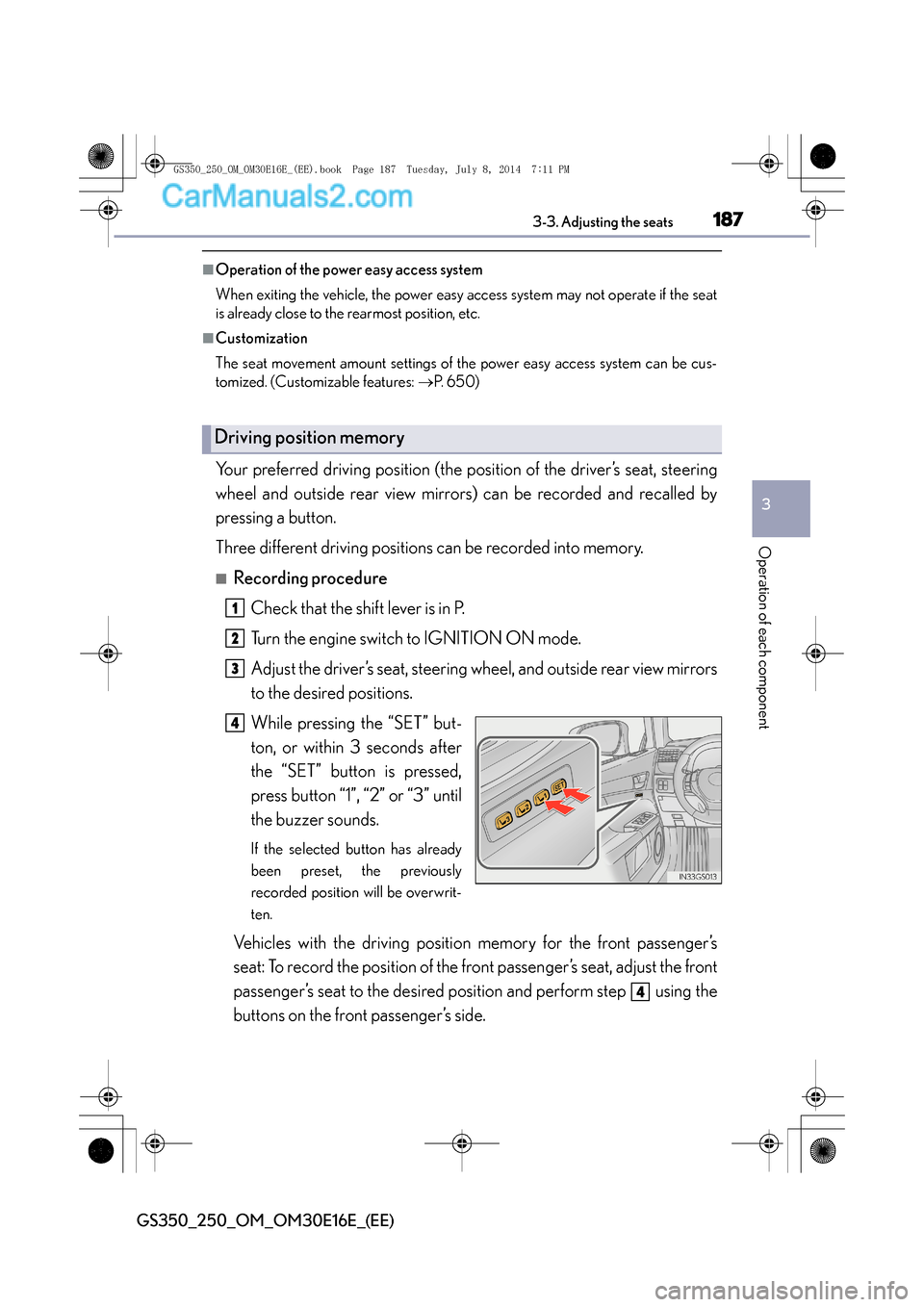
Your preferred driving position (the position of the driver’s seat, steering
wheel and outside rear view mirrors) can be recorded and recalled by
pressing a button.
Three different driving positions can be recorded into memory.
■Recording procedure
Check that the shift lever is in P.
Turn the engine switch to IGNITION ON mode.
Adjust the driver’s seat, steering wheel, and outside rear view mirrors
to the desired positions.
While pressing the “SET” but-
ton, or within 3 seconds after
the “SET” button is pressed,
press button “1”, “2” or “3” until
the buzzer sounds.
If the selected button has already
been preset, the previously
recorded position will be overwrit-
ten.
Vehicles with the driving position memory for the front passenger’s
seat: To record the position of the front passenger’s seat, adjust the front
passenger’s seat to the desired position and perform step using the
buttons on the front passenger’s side.
Driving position memory
1
2
3
4
4
GS350_250_OM_OM30E16E_(EE).book Page 187 Tuesday, July 8, 201 4 7:11 PM
Page 188 of 688

1883-3. Adjusting the seats
GS350_250_OM_OM30E16E_(EE)
■Recall procedureCheck that the shift lever is in P.
Turn the engine switch to IGNITION ON mode.
Press one of the buttons for the
driving position you want to
recall until the buzzer sounds.
Vehicles with front passenger’s seat
ottoman:
The recorded position will only be
recalled if the ottoman is in a posi-
tion higher than the recorded posi-
tion. It will not move in an upward
direction.
■To stop the position recall operation part-way through
Perform any of the following:
●Press the “SET” button.
●Press button “1”, “2” or “3”.
●Operate any of the seat adjustment switches (only cancels seat position recall).
●Operate the tilt and telescopic steering control switch (only cancels steering wheel
position recall).
■Seat positions that can be memorized ( →P. 1 8 2 )
XVehicles without seatback side support adjustment switch
The adjusted positions other than the position adjusted by lumbar support switch can
be recorded.
XVehicles with seatback side support adjustment switch
All adjusted positions can be recorded.
■Automatic ottoman adjustment (if equipped)
While the recorded position is being recalled, if it appears that the front edge of the
cushion will touch the area surrounding the instrument panel, the ottoman will be
automatically stowed.
1
2
3
GS350_250_OM_OM30E16E_(EE).book Page 188 Tuesday, July 8, 201 4 7:11 PM