2014 Lexus ES300h Hybrid system
[x] Cancel search: Hybrid systemPage 120 of 918

ES350_300h_OM_OM33A60U_(U)
1192. Instrument cluster
2
Instrument cluster
■Past record
If the “History” or “Past Record” screen is not displayed, select “History”
or “Past Record”.
Average fuel consumption
Previous fuel consumption record
Best recorded fuel consumption
Update the average fuel consumption data
Reset the past record data
“Trip Information” screen appears
Hybrid vehicles: “Energy Monitor” screen appears
The average fuel consumption history is divided by color into past aver-
ages and the average fuel consumption since the last updated. Use the
displayed average fuel consumption as a reference.
The image is an example only, and may vary slightly from actual condi-
tions.
XNavigation systemXLexus Display Audio system
1
2
3
4
5
6
7
Page 126 of 918
125
ES350_300h_OM_OM33A60U_(U)
3-2. Opening, closing and locking the doors and trunk
3
Operation of each component
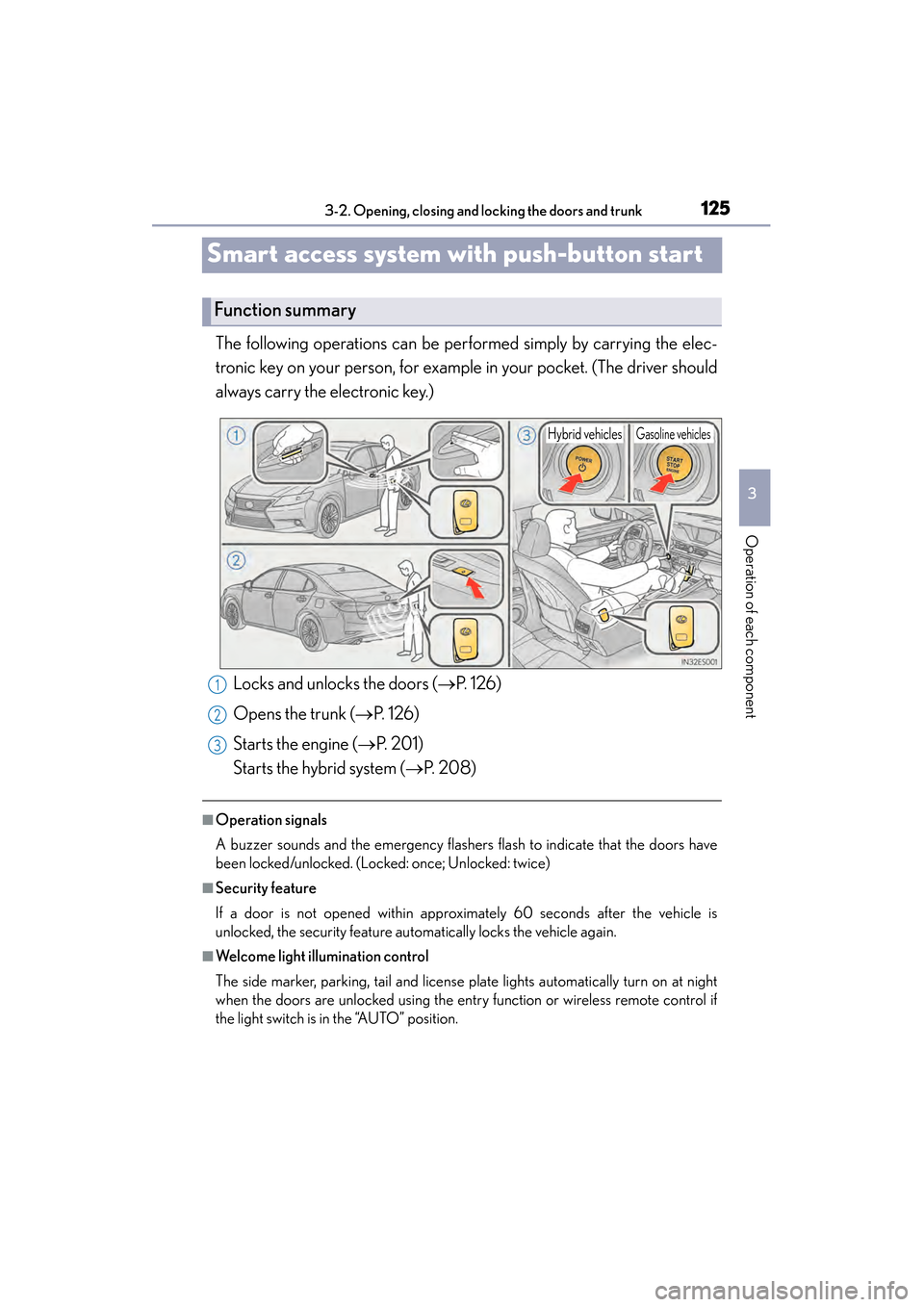
Smart access system with push-button start
The following operations can be performed simply by carrying the elec-
tronic key on your person, for example in your pocket. (The driver should
always carry the electronic key.)
■Operation signals
A buzzer sounds and the emergency flashers flash to indicate that the doors have
been locked/unlocked. (Locked: once; Unlocked: twice)
■Security feature
If a door is not opened within approximately 60 seconds after the vehicle is
unlocked, the security feature automatically locks the vehicle again.
■Welcome light illumination control
The side marker, parking, tail and license plate lights automatically turn on at night
when the doors are unlocked using the entry function or wireless remote control if
the light switch is in the “AUTO” position.
Function summary
Hybrid vehiclesGasoline vehicles
Locks and unlocks the doors (→P. 1 2 6 )
Opens the trunk ( →P. 1 2 6 )
Starts the engine ( →P. 201)
Starts the hybrid system ( →P. 2 0 8 )1
2
3
Page 129 of 918

128
ES350_300h_OM_OM33A60U_(U)
3-2. Opening, closing and locking the doors and trunk
■Effective range (areas within which the electronic key is detected)
When locking or unlocking the
doors
The system can be operated when
the electronic key is within about
2.3 ft. (0.7 m) of an outside door
handle. (Only the doors detecting
the key can be operated.)
When opening the trunk
The system can be operated when
the electronic key is within about
2.3 ft. (0.7 m) of the trunk release
button.
When starting the engine
“START STOP ENGINE”
<“POWER”> switch modes
The system can be operated when
the electronic key is inside the vehi-
cle.
■When the door cannot be locked by the lock sensor on the upper part of the door
handle
If the door will not lock even when the topside
sensor area is touched, try touching both the
topside and underside sensor areas at the
same time.
Page 134 of 918

ES350_300h_OM_OM33A60U_(U)
1333-2. Opening, closing and locking the doors and trunk
3
Operation of each component
■Note for the entry function
●Even when the electronic key is within the effective range (detection areas), the
system may not operate properly in the following cases:
• The electronic key is too close to the window or outside door handle, near the
ground, or in a high place when the doors are locked or unlocked.
• The electronic key is near the ground or in a high place, or too close to the rear bumper center when the trunk is opened.
• The electronic key is on the instrument panel, rear package tray or floor, or in the door pockets or glove box when the engine
“START STOP ENGINE” <“POWER”> switch modes are changed.
●Do not leave the electronic key on top of the instrument panel or near the door
pockets when exiting the vehicle. Depending on the radio wave reception condi-
tions, it may be detected by the antenna outside the cabin and the door will
become lockable from the outside, possibly trapping the electronic key inside the
vehicle.
●As long as the electronic key is within the effective range, the doors may be locked
or unlocked by anyone. However, only the doors detecting the electronic key can
be used to unlock the vehicle.
●Even if the electronic key is not inside the vehicle, it may be possible to start the
engine
●The doors may unlock or lock if a large am ount of water splashes on the door han-
dle, such as in the rain or in a car wash when the electronic key is within the effec-
tive range. (The doors will automatically be locked after approximately 60 seconds
if the doors are not opened and closed.)
●If the wireless remote control is used to lock the doors when the electronic key is
near the vehicle, there is a possibility that the door may not be unlocked by the
entry function. (Use the wireless remote control to unlock the doors.)
Page 136 of 918

ES350_300h_OM_OM33A60U_(U)
1353-2. Opening, closing and locking the doors and trunk
3
Operation of each component
■When the vehicle is not driven for extended periods
●To prevent theft of the vehicle, do not leave the electronic key within 6 ft. (2 m) of
the vehicle.
●The smart access system with push-button start can be deactivated in advance.
(→ P. 8 6 2 )
■Alarm
Using the smart access system with push-button start to lock the doors will set the
alarm system. ( →P. 8 6 )
■To operate the system properly
●Make sure to carry the electronic key when operating the system. Do not get the
electronic key too close to the vehicle when operating the system from the outside
of the vehicle.
Depending on the position and holding condition of the electronic key, the key
may not be detected correctly and the system may not operate properly. (The
alarm may go off accidentally, or the door lock prevention function may not oper-
ate.)
●Do not leave the electronic key inside the luggage compartment.
The key confinement prevention function may not operate, depending on the loca-
tion of the key (close to a spare tire, the inside edge of the luggage compartment),
conditions (inside a metal bag, close to metallic objects) and the radio waves in the
surrounding area. ( →P. 1 4 9 )
■If the smart access system with push-button start does not operate properly
●Locking and unlocking the doors and opening the trunk: Use the mechanical key.
(→ P. 8 1 0 )
●Starting the engine
Page 137 of 918

136
ES350_300h_OM_OM33A60U_(U)
3-2. Opening, closing and locking the doors and trunk
■Electronic key battery depletion
●The standard battery life is 1 to 2 years.
●If the battery becomes low, an alarm will sound in the cabin when the engine
●As the electronic key always receives radio waves, the battery will become
depleted even if the electronic key is not used. The following symptoms indicate
that the electronic key battery may be depleted. Replace the battery when neces-
sary. ( →P. 7 1 9 )
• The smart access system with push-button start or the wireless remote control does not operate.
• The detection area becomes smaller.
• The LED indicator on the key surface does not turn on.
●To avoid serious deterioration, do not leave the electronic key within 3 ft. (1 m) of
the following electrical appliances that produce a magnetic field:
•TVs
• Personal computers
• Cellular phones, cordless phones and battery chargers
• Recharging cellular phones or cordless phones
• Table lamps
• Induction cookers
■When the electronic key battery is fully depleted
→ P. 7 1 9
■Customization
Settings (e. g. smart access system with push-button start) can be changed.
(Customizable features: → P. 8 6 2 )
■If the smart access system with push-button start has been deactivated in a cus-
tomized setting
●Locking and unlocking the doors and opening the trunk:
Use the wireless remote control or mechanical key. ( →P. 1 3 9 , 8 1 0 )
●Starting the engine and changing “START STOP ENGINE” <“POWER”> switch
modes: →P. 8 1 1
●Stopping the engine
Page 153 of 918

152
ES350_300h_OM_OM33A60U_(U)
3-2. Opening, closing and locking the doors and trunk
CAUTION
■Trunk easy closer (vehicles with power trunk opener and closer)
■Power trunk opener and closer (if equipped)
Observe the following precautions when operating the power trunk opener and
closer.
Failure to do so may cause serious injury.
●Check the safety of the surrounding area to make sure there are no obstacles or
anything that could cause any of your belongings to get caught.
●If anyone is in the vicinity, make sure they are safe and let them know that the
trunk is about to open or close.
●If the trunk closer switch is pressed while the trunk lid is opening during automatic
operation, the trunk lid stops opening. Take extra care when on an incline, as the
trunk lid may open or close suddenly.
●On an incline, the trunk lid may fall after it opens automatically. Make sure the
trunk lid is fully open and secure before using the trunk.
●In the following situations, the power trunk opener and closer may detect an
abnormality and automatic operation may be stopped. In this case, the trunk lid
has to be operated manually. Take extra care in this situation, as the stopped trunk
lid may suddenly fall, causing an accident.
• When the trunk lid contacts an obstacle
• When the 12-volt battery voltage suddenly drops, such as when the “START STOP ENGINE” <“POWER”> switch is turned to IGNITION ON
mode or the engine
●Do not attach any accessories other than genuine Lexus parts to the trunk lid. The
power trunk opener and closer may not operate, causing itself to malfunction, or
the trunk lid may fall closed again after it is opened.
In the event that the trunk lid is left slightly
open, the trunk easy closer will automatically
close it to the fully closed position. It takes
several seconds before the trunk easy closer
begins to operate. Be careful not to catch fin-
gers or anything else in the trunk lid, as this
may cause bone fractures or other serious
injuries.
Page 176 of 918

ES350_300h_OM_OM33A60U_(U)
1753-5. Opening, closing the windows and moon roof
3
Operation of each component
■The power windows can be operated when
The “START STOP ENGINE” <“POWER”> switch is in IGNITION ON
mode.
■Operating the power windows after turning the engine
The power windows can be operated for approximately 45 seconds even after the
“START STOP ENGINE” <“POWER”> switch is turned to ACCESSORY mode or
turned off. They cannot, however, be operated once either front door is opened.
■Jam protection function
If an object becomes caught between the window and the window frame, window
travel is stopped and the window is opened slightly.
■When the power window does not close normally
If the jam protection function is operating abnormally and a window cannot be
closed, perform the following operations using the power window switch on the rele-
vant door.
●After stopping the vehicle, the window can be closed by holding the power window
switch in the one-touch closing position while the “START STOP ENGINE”
<“POWER”> switch is turned to IGNITION ON
●If the window still cannot be closed even by carrying out the operation as explained
above, initialize the function by performing the following procedure.Hold the power window switch in the one-touch closing position. Continue
holding the switch for a further 6 seconds after the window has closed.
Hold the power window switch in the one-touch opening position. Continue
holding the switch for a further 2 seconds after the window has opened com-
pletely.
Hold the power window switch in the one-touch closing position once again.
Continue holding the switch for a further 2 seconds after the window has
closed.
If you release the switch while the window is moving, start again from the beginning.
If the window continues to close but then re-open slightly even after performing the
above procedure correctly, have the vehicle inspected by your Lexus dealer.
1
2
3