Page 299 of 508
Features of your vehicle208
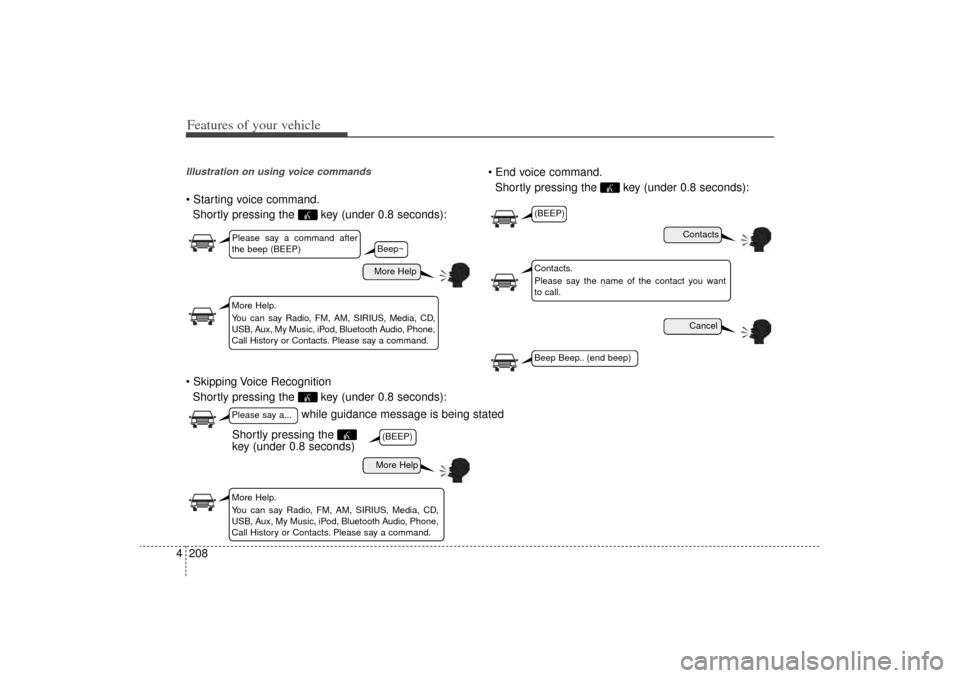
4Illustration on using voice commands Starting voice command.
Shortly pressing the key (under 0.8 seconds):
Skipping Voice Recognition Shortly pressing the key (under 0.8 seconds): End voice command.
Shortly pressing the key (under 0.8 seconds):
while guidance message is being stated
More Help
ContactsCancel
More Help
Please say a command after
the beep (BEEP)Please say a...More Help.
You can say Radio, FM, AM, SIRIUS, Media, CD,
USB, Aux, My Music, iPod, Bluetooth Audio, Phone,
Call History or Contacts. Please say a command.
Contacts.
Please say the name of the contact you want
to call.
More Help.
You can say Radio, FM, AM, SIRIUS, Media, CD,
USB, Aux, My Music, iPod, Bluetooth Audio, Phone,
Call History or Contacts. Please say a command.
(BEEP)
(BEEP)Beep Beep.. (end beep)
Shortly pressing the
key (under 0.8 seconds)
Beep~
XM(FL) CAN(ENG) 4b(AUDIO).qxp 1/23/2013 3:43 PM Page 208
Page 300 of 508
4 209
Features of your vehicle
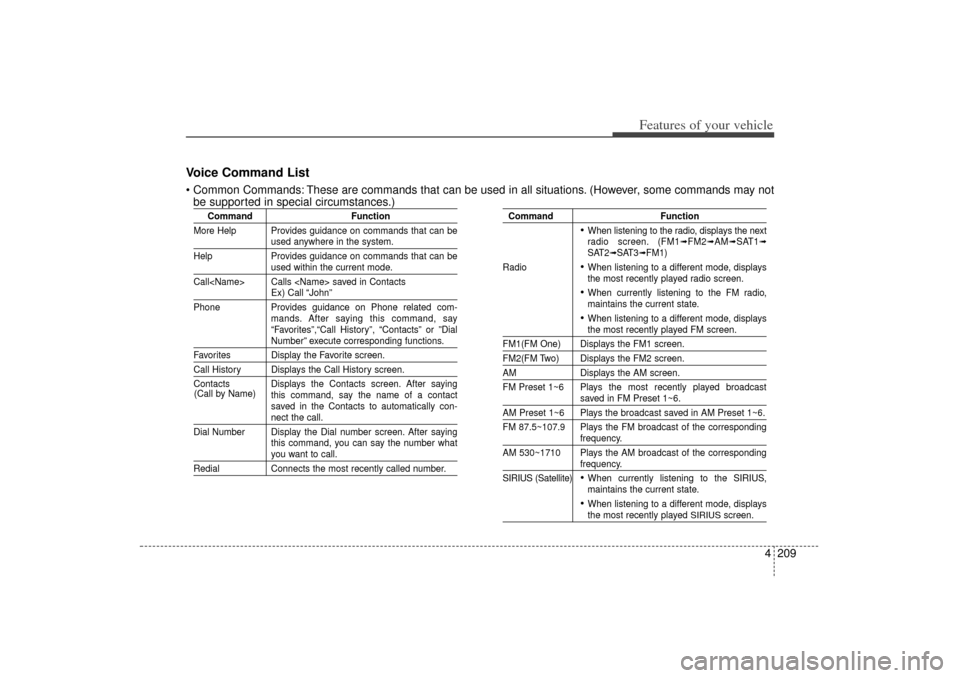
Voice Command List Common Commands: These are commands that can be used in all situations. (However, some commands may notbe supported in special circumstances.)
Command Function
More Help Provides guidance on commands that can be
used anywhere in the system.
Help Provides guidance on commands that can beused within the current mode.
Call Calls saved in ContactsEx) Call “John”
Phone Provides guidance on Phone related com- mands. After saying this command, say
“Favorites”,“Call History”, “Contacts” or ”DialNumber” execute corresponding functions.
Favorites Display the Favorite screen.Call History Displays the Call History screen.
Contacts Displays the Contacts screen. After sayingthis command, say the name of a contact
saved in the Contacts to automatically con-
nect the call.
Dial Number Display the Dial number screen. After saying this command, you can say the number whatyou want to call.
RedialConnects the most recently called number.
Command Function
When listening to the radio, displays the next
radio screen. (FM1
➟FM2
➟AM
➟SAT1
➟
SAT2
➟SAT3
➟FM1)
Radio
When listening to a different mode, displays
the most recently played radio screen. When currently listening to the FM radio,
maintains the current state. When listening to a different mode, displaysthe most recently played FM screen.
FM1(FM One) Displays the FM1 screen.FM2(FM Two) Displays the FM2 screen.AM Displays the AM screen.
FM Preset 1~6 Plays the most recently played broadcast
saved in FM Preset 1~6.
AM Preset 1~6 Plays the broadcast saved in AM Preset 1~6.
FM 87.5~107.9 Plays the FM broadcast of the corresponding
frequency.
AM 530~1710 Plays the AM broadcast of the correspondingfrequency.
SIRIUS (Satellite) When currently listening to the SIRIUS,
maintains the current state. When listening to a different mode, displaysthe most recently played
SIRIUS
screen.
(Call by Name)
XM(FL) CAN(ENG) 4b(AUDIO).qxp 1/23/2013 3:43 PM Page 209
Page 301 of 508
Features of your vehicle210
4
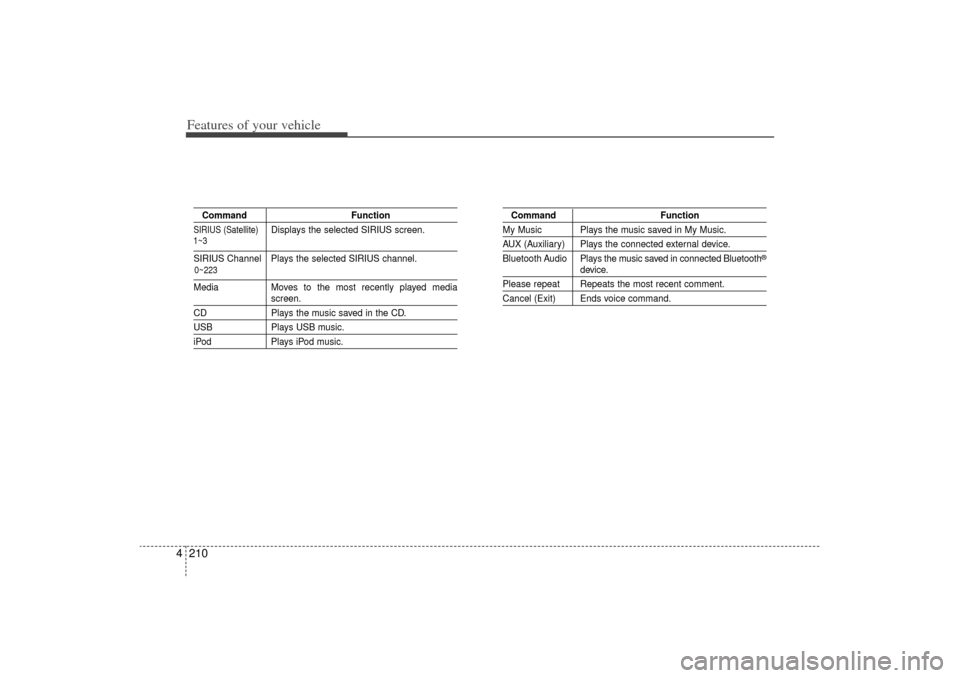
Command FunctionSIRIUS (Satellite)
Displays the selected SIRIUS screen.
SIRIUS Channel Plays the selected SIRIUS channel.MediaMoves to the most recently played media
screen.
CD Plays the music saved in the CD.USBPlays USB music.iPodPlays iPod music.
Command FunctionMy Music Plays the music saved in My Music.AUX (Auxiliary) Plays the connected external device.
Bluetooth Audio Plays the music saved in connected Bluetooth
®
device.
Please repeat Repeats the most recent comment.Cancel (Exit) Ends voice command.
0~223
1~3
XM(FL) CAN(ENG) 4b(AUDIO).qxp 1/23/2013 3:43 PM Page 210
Page 302 of 508
4 211
Features of your vehicle
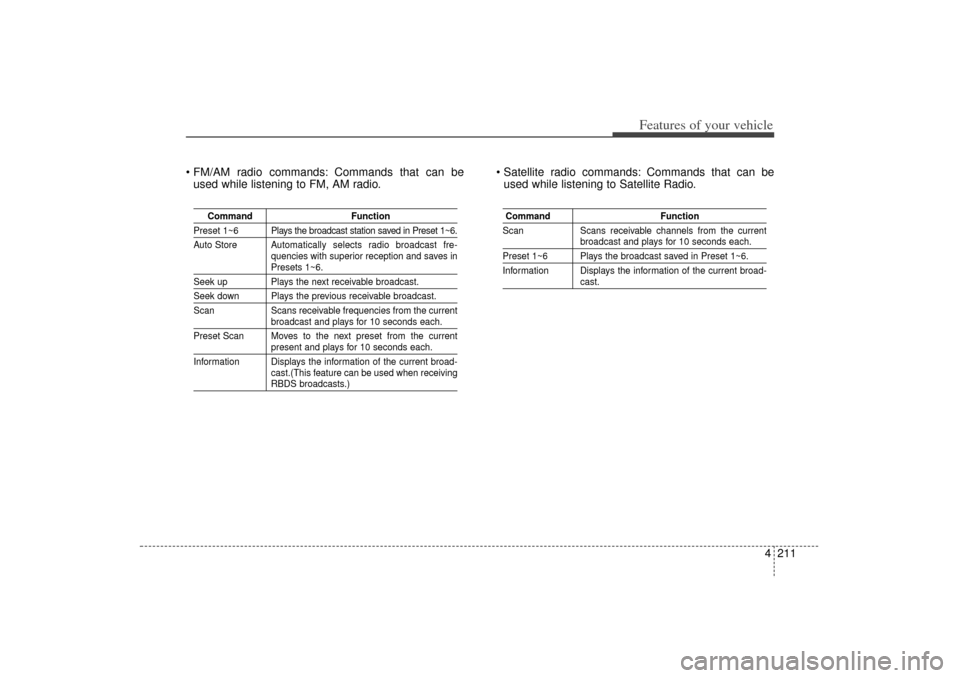
FM/AM radio commands: Commands that can beused while listening to FM, AM radio. Satellite radio commands: Commands that can be
used while listening to Satellite Radio.
Command Function
Preset 1~6 Plays the broadcast station saved in Preset 1~6.
Auto Store A utomatically selects radio broadcast fre-
quencies with superior reception and saves in
Presets 1~6.
Seek up Plays the next receivable broadcast.Seek down Plays the previous receivable broadcast.
Scan Scans receivable frequencies from the current
broadcast and plays for 10 seconds each.
Preset Scan Moves to the next preset from the currentpresent and plays for 10 seconds each.
Information Displays the information of the current broad- cast.(This feature can be used when receivingRBDS broadcasts.)
Command Function
Scan Scans receivable channels from the current
broadcast and plays for 10 seconds each.
Preset 1~6 Plays the broadcast saved in Preset 1~6.
Information Displays the information of the current broad-
cast.
XM(FL) CAN(ENG) 4b(AUDIO).qxp 1/23/2013 3:43 PM Page 211
Page 303 of 508
Features of your vehicle212
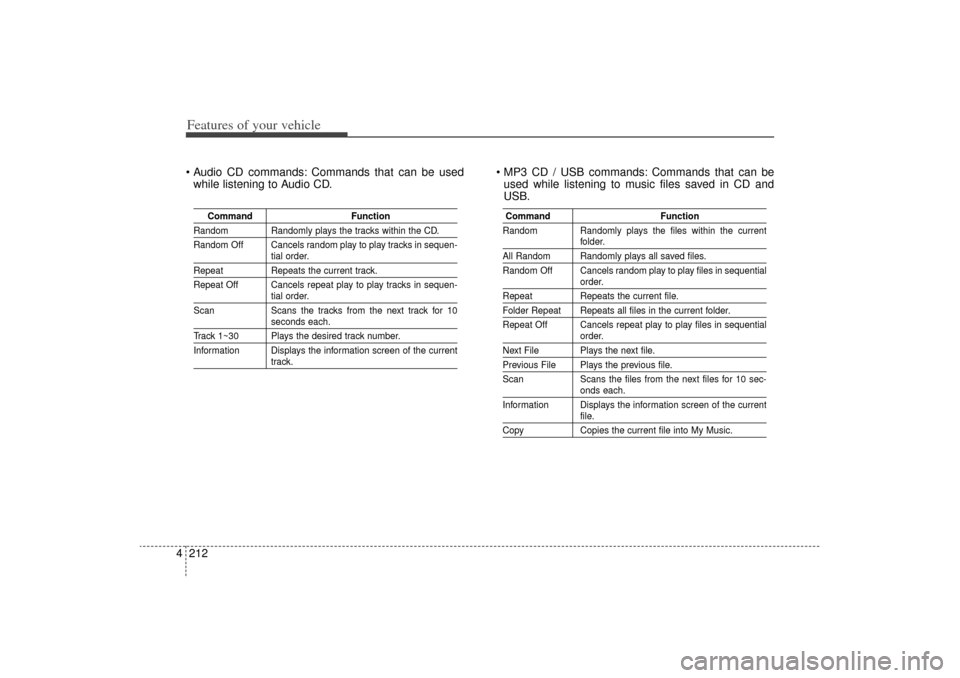
4 Audio CD commands: Commands that can be used
while listening to Audio CD. MP3 CD / USB commands: Commands that can be
used while listening to music files saved in CD and
USB.
Command Function
Random Randomly plays the tracks within the CD.
Random Off Cancels random play to play tracks in sequen-
tial order.
RepeatRepeats the current track.
Repeat Off Cancels repeat play to play tracks in sequen-
tial order.
Scan Scans the tracks from the next track for 10seconds each.
Track 1~30 Plays the desired track number.
Information Displays the information screen of the current
track.
Command Function
Random Randomly plays the files within the current
folder.
All Random Randomly plays all saved files.
Random Off Cancels random play to play files in sequential
order.
Repeat Repeats the current file.Folder Repeat Repeats all files in the current folder.
Repeat Off Cancels repeat play to play files in sequential
order.
Next File Plays the next file.Previous File Plays the previous file.
Scan Scans the files from the next files for 10 sec-
onds each.
Information Displays the information screen of the currentfile.
Copy Copies the current file into My Music.
XM(FL) CAN(ENG) 4b(AUDIO).qxp 1/23/2013 3:43 PM Page 212
Page 304 of 508
4 213
Features of your vehicle
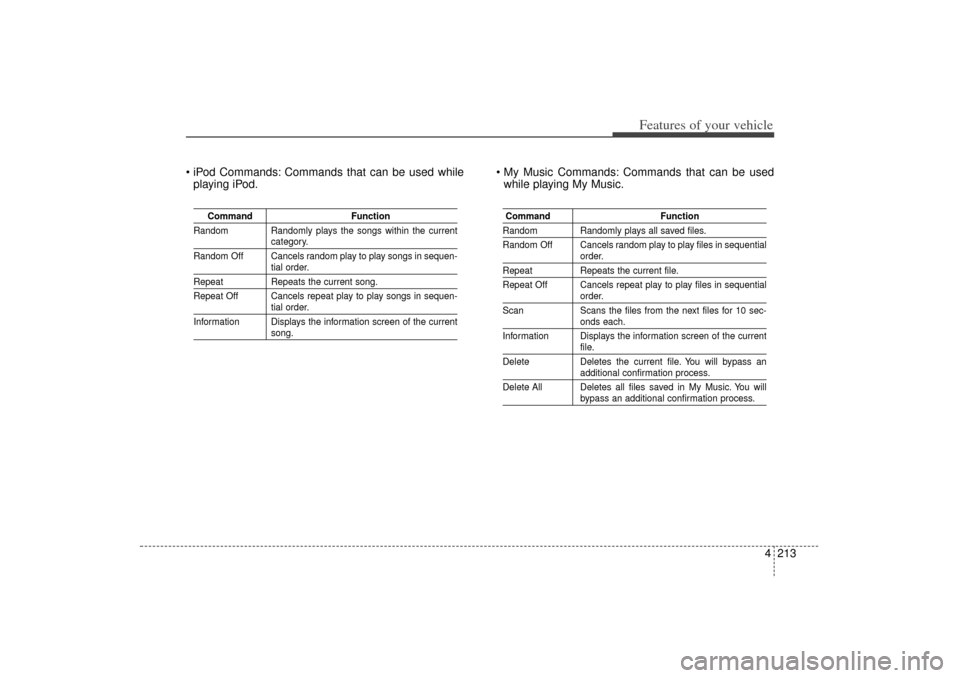
iPod Commands: Commands that can be used whileplaying iPod. My Music Commands: Commands that can be used
while playing My Music.
Command Function
Random Randomly plays the songs within the current
category.
Random Off Cancels random play to play songs in sequen-tial order.
Repeat Repeats the current song.
Repeat Off Cancels repeat play to play songs in sequen-
tial order.
Information Displays the information screen of the currentsong.
Command FunctionRandom Randomly plays all saved files.
Random Off Cancels random play to play files in sequential
order.
RepeatRepeats the current file.
Repeat Off Cancels repeat play to play files in sequential
order.
Scan Scans the files from the next files for 10 sec-onds each.
Information Displays the information screen of the currentfile.
Delete Deletes the current file. You will bypass anadditional confirmation process.
Delete All Deletes all files saved in My Music. You willbypass an additional confirmation process.
XM(FL) CAN(ENG) 4b(AUDIO).qxp 1/23/2013 3:43 PM Page 213
Page 305 of 508
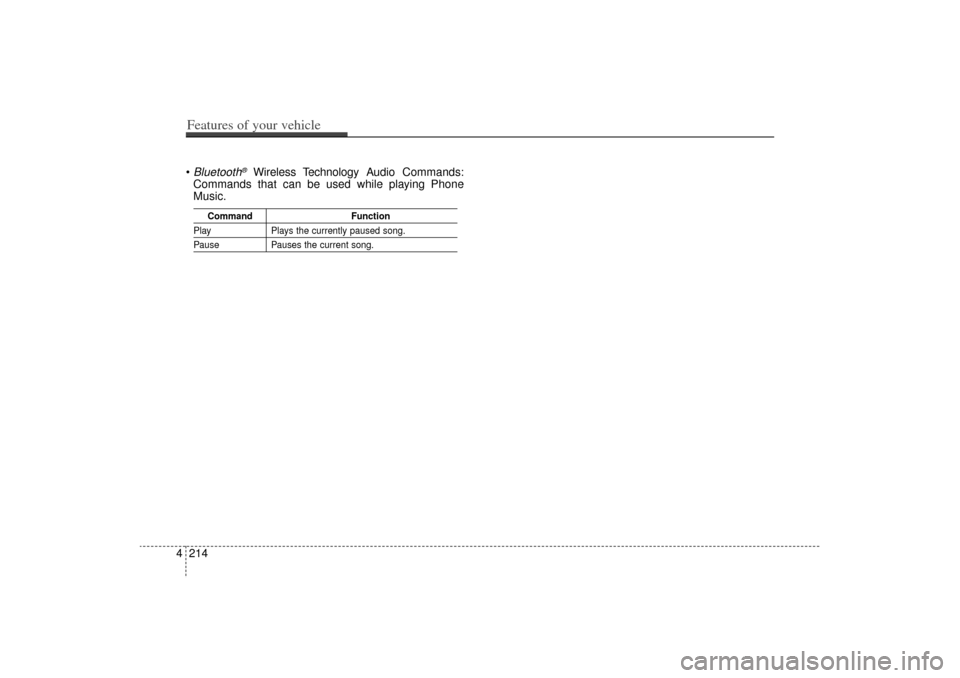
Bluetooth
®
Wireless Technology Audio Commands:
Commands that can be used while playing Phone
Music.
Command Function
PlayPlays the currently paused song.PausePauses the current song.
4 214Features of your vehicle
XM(FL) CAN(ENG) 4b(AUDIO).qxp 1/23/2013 3:43 PM Page 214
Page 309 of 508

Driving your vehicle45
WARNING
- Driving
under the influence of
alcohol or drugs
Drinking and driving is danger-
ous. Drunk driving is the num-
ber one contributor to the high-
way death toll each year. Even a
small amount of alcohol will
affect your reflexes, percep-
tions and judgment. Driving
while under the influence of
drugs is as dangerous or more
dangerous than driving drunk.
You are much more likely to
have a serious accident if you
drink or take drugs and drive.
If you are drinking or taking
drugs, don’t drive. Do not ride
with a driver who has been
drinking or taking drugs.
Choose a designated driver or
call a cab.
WARNING
All passengers must be proper-
ly belted whenever the vehicle
is moving. Refer to “Seat belts”
in chapter 3 for more informa-
tion on their proper use.
WARNING
Always check the surrounding
areas near your vehicle for peo-
ple, especially children, before
putting a vehicle into D (Drive)
or R (Reverse).
WARNING
When you intend to park or
stop the vehicle with the
engine on, be careful not to
depress the accelerator pedal
for a long period of time. It
may overheat the engine or
exhaust system and ignite a
fire.
When you make a sudden stop or turn the steering
wheel rapidly, loose objects
may drop on the floor and it
could interfere with the opera-
tion of the foot pedals, possi-
bly causing an accident. Keep
all things in the vehicle safely
stored.
If you do not focus on driving, it may cause an accident. Be
careful when operating what
may disturb driving such as
audio or heater. It is the
responsibility of the driver to
always drive safely.
XM(FL) CAN(ENG) 5.QXP 1/23/2013 3:29 PM Page 4