Page 267 of 508
Features of your vehicle176
4(7)
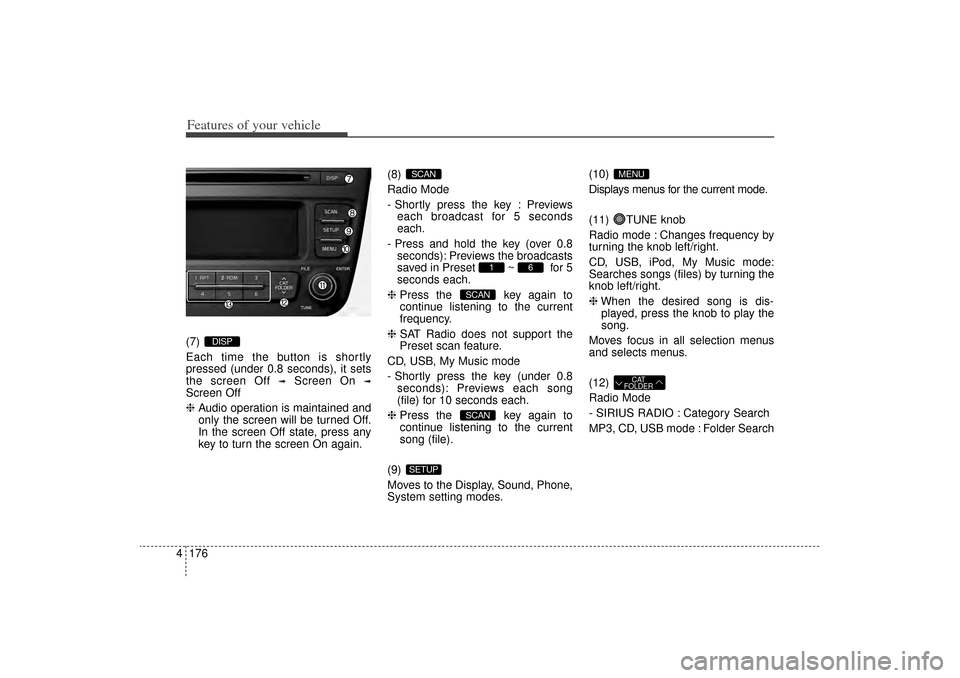
Each time the button is shortly
pressed (under 0.8 seconds), it sets
the screen Off
➟
Screen On
➟
Screen Off
❈ Audio operation is maintained and
only the screen will be turned Off.
In the screen Off state, press any
key to turn the screen On again. (8)
Radio Mode
- Shortly press the key : Previews
each broadcast for 5 seconds
each.
- Press and hold the key (over 0.8 seconds): Previews the broadcasts
saved in Preset ~ for 5
seconds each.
❈ Press the key again to
continue listening to the current
frequency.
❈ SAT Radio does not support the
Preset scan feature.
CD, USB, My Music mode
- Shortly press the key (under 0.8 seconds): Previews each song
(file) for 10 seconds each.
❈ Press the key again to
continue listening to the current
song (file).
(9)
Moves to the Display, Sound, Phone,
System setting modes. (10)
Displays menus for the current mode.
(11) TUNE knob
Radio mode : Changes frequency by
turning the knob left/right.
CD, USB, iPod, My Music mode:
Searches songs (files) by turning the
knob left/right.
❈
When the desired song is dis-
played, press the knob to play the
song.
Moves focus in all selection menus
and selects menus.
(12)
Radio Mode
- SIRIUS RADIO : Category Search
MP3, CD, USB mode : Folder Search
CAT
FOLDER
MENU
SETUP
SCANSCAN
6
1
SCAN
DISP
XM(FL) CAN(ENG) 4b(AUDIO).qxp 1/23/2013 3:42 PM Page 176
Page 268 of 508
4 177
Features of your vehicle
(13) ~ (Preset)
Radio Mode: Saves frequencies
(channels) or receives saved fre-
quencies (channels)
CD, USB, iPod, My Music mode
- : Repeat
- : Random
In the Radio, Media, Setup, and
Menu pop up screen, the number
menu is selected.
21
6
1
XM(FL) CAN(ENG) 4b(AUDIO).qxp 1/23/2013 3:42 PM Page 177
Page 269 of 508
Features of your vehicle178
4SETUP
Display SettingsPress the key Select [Display]
through TUNE knob or key
Select menu through TUNE knob
Mode Pop up[Mode Pop up] Changes /
selection mode
During On state, press the
or key to display the mode
change pop up screen.Text Scroll[Text Scroll] Set /
: Maintains scroll
: Scrolls only one (1) time.Media DisplayWhen playing an MP3 file, select the
desired display info from ‘Folder/File’
or ‘Album/Artist/Song’.
OffOn
Off
On
MEDIA
RADIO
Off
On
1
SETUP
XM(FL) CAN(ENG) 4b(AUDIO).qxp 1/23/2013 3:42 PM Page 178
Page 270 of 508
4 179
Features of your vehicle
SOUND SETTINGSPress the key Select [Sound]
through TUNE knob or key
Select menu through TUNE knob
Sound SettingsThis menu allows you to set the ‘Bass,
Middle, Treble’ and the Sound Fader and
Balance.Select [Sound Settings] Select
menu through
TUNE knob
Tu r n
TUNE knob
left/right to set
Bass, Middle, Treble : Selects the sound tone.
Fader, Balance : Moves the sound fader and balance.
Default : Restores default settings.
❈ Back : While adjusting values,
pressing the TUNE knob will
restore the parent menu. Speed Dependent Volume Control
This feature is used to automatically
control the volume level according to
the speed of the vehicle.
Select [Speed Dependent Vol.] Set
in 4 levels [Off/Low/Mid/High] of
TUNE
knob
Voice Recognition VolumeAdjusts voice recognition volume.
Select [Voice Recognition Vol.] Set
volume of
TUNE
knob
2
SETUP
XM(FL) CAN(ENG) 4b(AUDIO).qxp 1/23/2013 3:42 PM Page 179
Page 271 of 508
![KIA Sorento 2014 3.G Owners Manual Features of your vehicle180
4SYSTEM SETTINGSPress the key Select
[System] through tune knob or
key Select menu through TUNE
knob
Memory InformationDisplays currently used memory and
total system me](/manual-img/2/2957/w960_2957-270.png "KIA Sorento 2014 3.G Owners Manual Features of your vehicle180
4SYSTEM SETTINGSPress the key Select
[System] through tune knob or
key Select menu through TUNE
knob
Memory InformationDisplays currently used memory and
total system me")
Features of your vehicle180
4SYSTEM SETTINGSPress the key Select
[System] through tune knob or
key Select menu through TUNE
knob
Memory InformationDisplays currently used memory and
total system memory.
Select [Memory Information] OK
The currently used memory is dis-
played on the left side while the total
system memory is displayed on the
right side.Prompt FeedbackThis feature is used to change voice
command feedback between Normal
and Expert modes.
Select [Prompt Feedback] Set
through
TUNE
knob
On : This mode is for beginner
users and provides detailed instruc-
tions during voice command opera-
tion. Off : This mode is for expert users
and omits some information during
voice command operation. (When
using Expert mode, guidance
instructions can be heard through
the [Help] or [Menu] commands.
LanguageThis menu is used to set the display
and voice recognition language.
Select [Language]
Set through TUNE knob
❈ The system will reboot after the
language is changed.
❈ Language support by region
- English, Francais, Espanol
4
SETUP
XM(FL) CAN(ENG) 4b(AUDIO).qxp 1/23/2013 3:42 PM Page 180
Page 272 of 508
4 181
Features of your vehicle
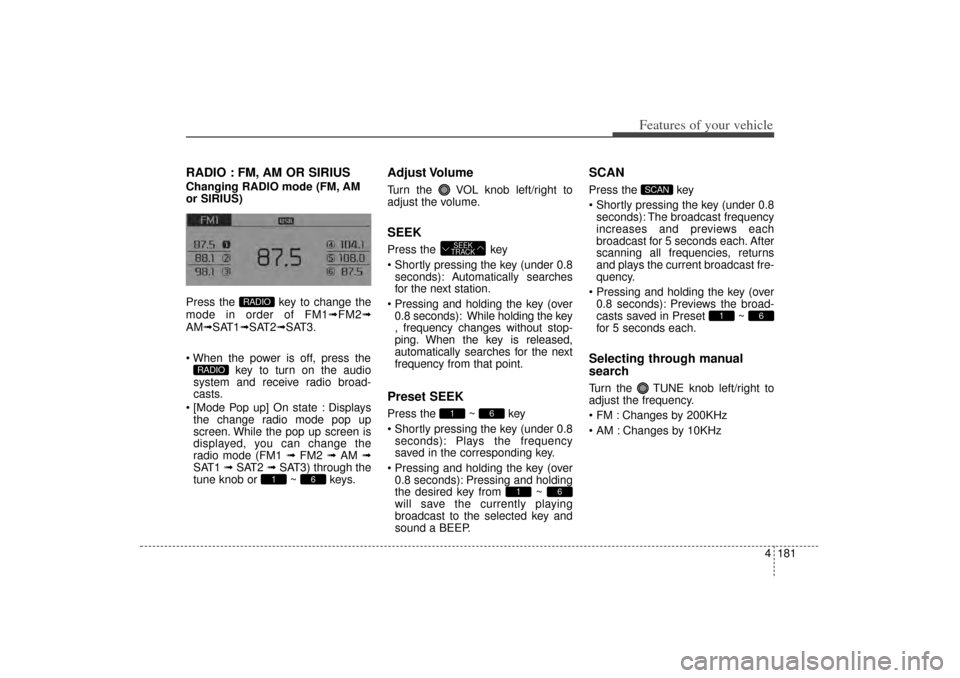
RADIO : FM, AM OR SIRIUSChanging RADIO mode (FM, AM
or SIRIUS)
Press the key to change the
mode in order of FM1➟FM2➟
AM➟SAT1➟SAT2➟SAT3.
When the power is off, press the key to turn on the audio
system and receive radio broad-
casts.
[Mode Pop up] On state : Displays the change radio mode pop up
screen. While the pop up screen is
displayed, you can change the
radio mode (FM1 ➟ FM2 ➟ AM ➟
SAT1 ➟ SAT2 ➟ SAT3) through the
tune knob or ~ keys.
Adjust VolumeTurn the VOL knob left/right to
adjust the volume.SEEKPress the key
Shortly pressing the key (under 0.8 seconds): A utomatically searches
for the next station.
Pressing and holding the key (over 0.8 seconds): While holding the key
, frequency changes without stop-
ping. When the key is released,
automatically searches for the next
frequency from that point.Preset SEEKPress the ~ key
Shortly pressing the key (under 0.8 seconds): Plays the frequency
saved in the corresponding key.
Pressing and holding the key (over 0.8 seconds): Pressing and holding
the desired key from ~
will save the currently playing
broadcast to the selected key and
sound a BEEP.
SCANPress the key
Shortly pressing the key (under 0.8seconds): The broadcast frequency
increases and previews each
broadcast for 5 seconds each. After
scanning all frequencies, returns
and plays the current broadcast fre-
quency.
Pressing and holding the key (over 0.8 seconds): Previews the broad-
casts saved in Preset ~
for 5 seconds each.Selecting through manual
searchTurn the TUNE knob left/right to
adjust the frequency.
FM : Changes by 200KHz
AM : Changes by 10KHz
6
1
SCAN
6
1
6
1 SEEK
TRACK
6
1
RADIO
RADIO
XM(FL) CAN(ENG) 4b(AUDIO).qxp 1/23/2013 3:42 PM Page 181
Page 273 of 508
Features of your vehicle182
4MENUWithin key are the A.Store
(Auto Store) and Info functions.
A.StorePress the key Set [A.Store]
through TUNE knob or key.Saves broadcasts with superior
reception to ~ keys. If no
frequencies are received, then the
most recently received frequency will
be broadcast.
6
1
1
MENU
MENU
XM(FL) CAN(ENG) 4b(AUDIO).qxp 1/23/2013 3:42 PM Page 182
Page 274 of 508
4 183
Features of your vehicle
Satellite Radio channels:
SIRIUS Satellite Radio has over 130
channels, including 69 channels of
100% commercial-free music, plus
sports, news, talk and entertainment
available nationwide in your vehicle.
For more information and a complete
list of SIRIUS Satellite Radio chan-
nels, visit sirius.com in the United
States, sirius-canada.ca in Canada,
or call SIRIUS at 1-888-539-7474.
Satellite Radio reception factors:
To receive the satellite signal, your
vehicle has been equipped with a
satellite radio antenna located on the
roof of your vehicle. The vehicle roof
provides the best location for an
unobstructed, open view of the sky, a
requirement of a satellite radio sys-
tem. Like AM/FM, there are several
factors that can affect satellite radio
reception performance:
Antenna obstructions: For optimalreception performance, keep the
antenna clear of snow and ice
build-up and keep luggage and
other material as far away from the
antenna as possible.
Terrain: Hills, mountains, tall build- ings, bridges, tunnels, freeway over- passes, parking garages, dense
tree foliage and thunderstorms can
interfere with your reception.
SIRIUS Satellite Radio service:
SIRIUS Satellite Radio is a subscrip-
tion-based satellite radio service that
broadcasts music, sports, news and
entertainment programming to radio
receivers, which are available for instal-
lation in motor vehicles or factory
installed, as well as for the home,
portable and wireless devices, and
through an Internet connection on per-
sonal computer.
Vehicles that are equipped with a
factory installed SIRIUS Satellite
Radio system include:
Hardware and an introductory trial subscription term, which begins on
the date of sale or lease of the
vehicle.
For a small upgrade fee, access to SIRIUS music channels, and other
select channels over the Internet
using any computer connected to
the Internet (U.S. customers only).
For information on extended sub-
scription terms, contact SIRIUS at
1-888-539-7474. NOTE:
Satellite Radio requires SIRIUS®
compatible receiver and a sub-
scription service fee after trial
period.
Vehicles without a factory-installed
radio receiver require hardware
purchase and installation. Please
see your dealer for further details.
All fees and programming subject
to change.
Subscriptions governed by the
SIRIUS Terms & Conditions avail-
able at www.sirius.com / service
terms.
Available only in the 48 contiguous
United States and the District of
Columbia. Service available in
Canada; see www.siriuscanada.ca
KIA shall not be responsible for
any such programming changes.
Satellite Radio Electronic Serial
Number (ESN):
This 12-digit
Satellite Serial Number is needed to
re-activate, modify or track your
satellite radio account. You will need
this number when communicating
with SIRIUS.SIRIUS Satellite Radio information
XM(FL) CAN(ENG) 4b(AUDIO).qxp 1/23/2013 3:42 PM Page 183
![KIA Sorento 2014 3.G Owners Manual Features of your vehicle178
4SETUP
Display SettingsPress the key Select [Display]
through TUNE knob or key
Select menu through TUNE knob
Mode Pop up[Mode Pop up] Changes /
selection mode
During](/manual-img/2/2957/w960_2957-268.png "KIA Sorento 2014 3.G Owners Manual Features of your vehicle178
4SETUP
Display SettingsPress the key Select [Display]
through TUNE knob or key
Select menu through TUNE knob
Mode Pop up[Mode Pop up] Changes /
selection mode
During")
![KIA Sorento 2014 3.G Owners Manual 4 179
Features of your vehicle
SOUND SETTINGSPress the key Select [Sound]
through TUNE knob or key
Select menu through TUNE knob
Sound SettingsThis menu allows you to set the ‘Bass,
Middle, Treb](/manual-img/2/2957/w960_2957-269.png "KIA Sorento 2014 3.G Owners Manual 4 179
Features of your vehicle
SOUND SETTINGSPress the key Select [Sound]
through TUNE knob or key
Select menu through TUNE knob
Sound SettingsThis menu allows you to set the ‘Bass,
Middle, Treb")
![KIA Sorento 2014 3.G Owners Manual Features of your vehicle182
4MENUWithin key are the A.Store
(Auto Store) and Info functions.
A.StorePress the key Set [A.Store]
through TUNE knob or key.Saves broadcasts with superior
reception to](/manual-img/2/2957/w960_2957-272.png "KIA Sorento 2014 3.G Owners Manual Features of your vehicle182
4MENUWithin key are the A.Store
(Auto Store) and Info functions.
A.StorePress the key Set [A.Store]
through TUNE knob or key.Saves broadcasts with superior
reception to")