Page 292 of 508
4 201
Features of your vehicle
When the incoming call pop-up isdisplayed, most Audio and SETUP
mode features will not operate.
Only the call volume can be oper-
ated.
The telephone number may not be properly displayed in some mobile
phones.
When a call is answered with the mobile phone, the call mode will
automatically convert to Private
mode.
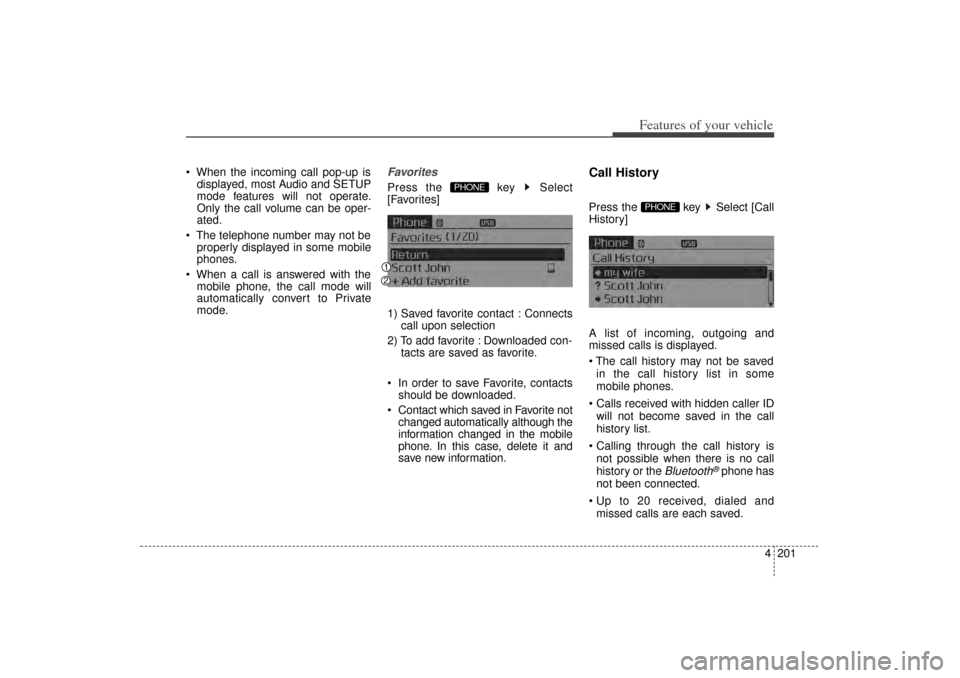
FavoritesPress the key Select
[Favorites]
1) Saved favorite contact : Connects call upon selection
2) To add favorite : Downloaded con- tacts are saved as favorite.
In order to save Favorite, contacts should be downloaded.
Contact which saved in Favorite not changed automatically although the
information changed in the mobile
phone. In this case, delete it and
save new information.
Call HistoryPress the key Select [Call
History]
A list of incoming, outgoing and
missed calls is displayed.
The call history may not be saved
in the call history list in some
mobile phones.
Calls received with hidden caller ID will not become saved in the call
history list.
Calling through the call history is not possible when there is no call
history or the
Bluetooth
®phone has
not been connected.
Up to 20 received, dialed and missed calls are each saved.
PHONE
PHONE
XM(FL) CAN(ENG) 4b(AUDIO).qxp 1/23/2013 3:43 PM Page 201
Page 295 of 508
Features of your vehicle204
4 Only contacts within connected
phones can be downloaded. Also
check to see that your mobile
phone supports the download fea-
ture.
To learn more about whether your mobile phone supports contacts
downloads, refer to your mobile
phone user’s manual.
The contacts for only the connected phone can be downloaded. Before
downloading, check to see whether
your phone supports the download
feature.
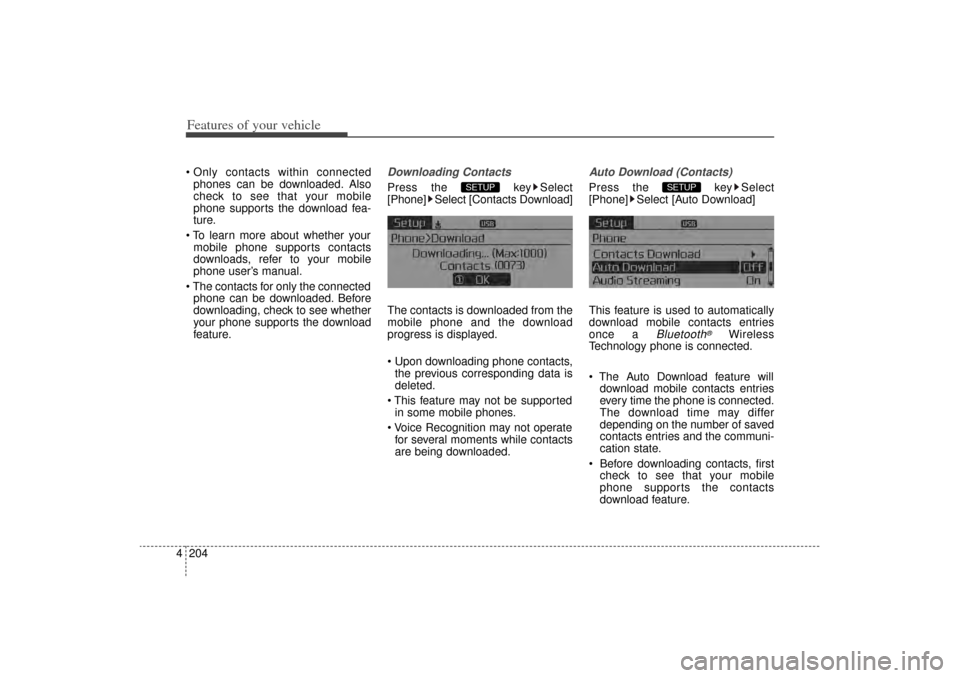
Downloading ContactsPress the key Select
[Phone] Select [Contacts Download]
The contacts is downloaded from the
mobile phone and the download
progress is displayed.
Upon downloading phone contacts,the previous corresponding data is
deleted.
This feature may not be supported in some mobile phones.
Voice Recognition may not operate for several moments while contacts
are being downloaded.
Auto Download (Contacts)Press the key Select
[Phone] Select [Auto Download]
This feature is used to automatically
download mobile contacts entries
once a
Bluetooth
®
Wireless
Technology phone is connected.
The Auto Download feature will download mobile contacts entries
every time the phone is connected.
The download time may differ
depending on the number of saved
contacts entries and the communi-
cation state.
Before downloading contacts, first check to see that your mobile
phone supports the contacts
download feature.
SETUP
SETUP
XM(FL) CAN(ENG) 4b(AUDIO).qxp 1/23/2013 3:43 PM Page 204
Page 297 of 508
![KIA Sorento 2014 3.G Owners Manual Features of your vehicle206
4VOICE RECOGNITIONUsing Voice RecognitionStarting Voice RecognitionShortly press the key on the
steering remote controller. Say a
command If prompt feedback is in [ON],](/manual-img/2/2957/w960_2957-296.png "KIA Sorento 2014 3.G Owners Manual Features of your vehicle206
4VOICE RECOGNITIONUsing Voice RecognitionStarting Voice RecognitionShortly press the key on the
steering remote controller. Say a
command If prompt feedback is in [ON],")
Features of your vehicle206
4VOICE RECOGNITIONUsing Voice RecognitionStarting Voice RecognitionShortly press the key on the
steering remote controller. Say a
command If prompt feedback is in [ON], then
the system will say “Please say a
command after the beep (BEEP)”
If prompt feedback is in [OFF], then
the system will only say “(BEEP)”
To change Prompt Feedback [On]/[Off], go to [System] [Prompt Feedback]
For proper recognition, say the command after the voice instruc-
tion and beep tone.
Skipping Prompt MessagesWhile prompt message is being stat-
ed Shortly press the key on the
steering remote controller (under 0.8
seconds)
The prompt message is immediately
ended and the beep tone will sound.
After the “beep”, say the voice com-
mand.Re-starting Voice RecognitionWhile system waits for a command
Shortly press the key on the
steering remote controller (under 0.8
seconds)
The command wait state is immedi-
ately ended and the beep ton will
sound. After the “beep”, say the voice
command.
SETUP
XM(FL) CAN(ENG) 4b(AUDIO).qxp 1/23/2013 3:43 PM Page 206
Page 298 of 508
4 207
Features of your vehicle
ENDING VOICE
RECOGNITIONWhile Voice Recognition is operatingPress and hold the key on the
steering remote controller (over 0.8
seconds)
While using voice command, press- ing any steering wheel control or a
different key will end voice com-
mand.
In a state where the system is wait- ing for a voice command, say “can-
cel” or “end” to end voice com-
mand.
In a state where the system is wait- ing for a voice command, press and
hold the key on the steering
remote controller to end voice com-
mand.
XM(FL) CAN(ENG) 4b(AUDIO).qxp 1/23/2013 3:43 PM Page 207
Page 299 of 508
Features of your vehicle208
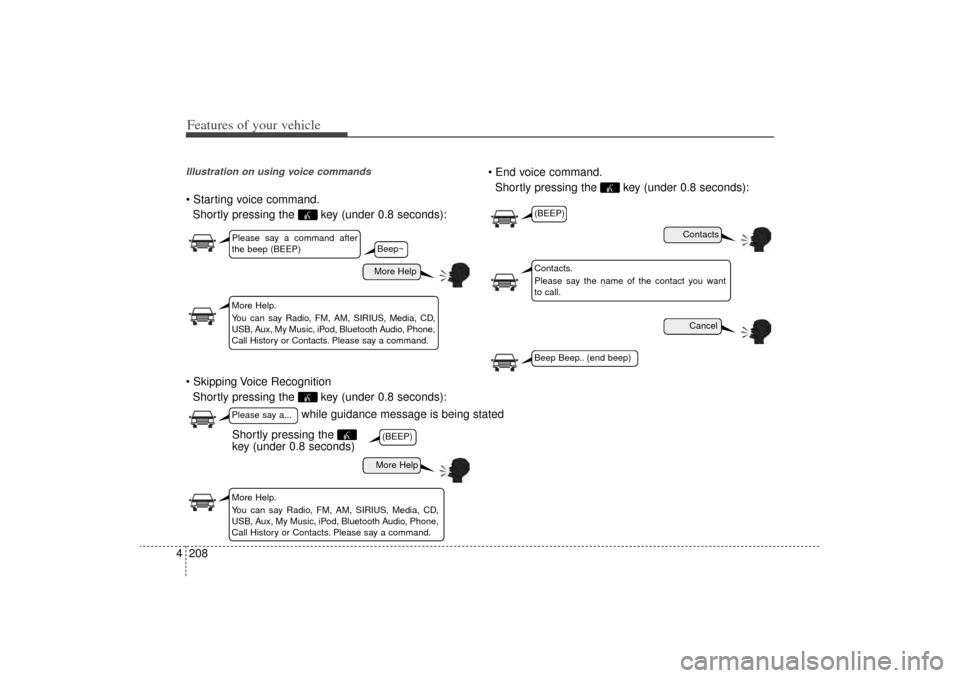
4Illustration on using voice commands Starting voice command.
Shortly pressing the key (under 0.8 seconds):
Skipping Voice Recognition Shortly pressing the key (under 0.8 seconds): End voice command.
Shortly pressing the key (under 0.8 seconds):
while guidance message is being stated
More Help
ContactsCancel
More Help
Please say a command after
the beep (BEEP)Please say a...More Help.
You can say Radio, FM, AM, SIRIUS, Media, CD,
USB, Aux, My Music, iPod, Bluetooth Audio, Phone,
Call History or Contacts. Please say a command.
Contacts.
Please say the name of the contact you want
to call.
More Help.
You can say Radio, FM, AM, SIRIUS, Media, CD,
USB, Aux, My Music, iPod, Bluetooth Audio, Phone,
Call History or Contacts. Please say a command.
(BEEP)
(BEEP)Beep Beep.. (end beep)
Shortly pressing the
key (under 0.8 seconds)
Beep~
XM(FL) CAN(ENG) 4b(AUDIO).qxp 1/23/2013 3:43 PM Page 208
Page 302 of 508
4 211
Features of your vehicle
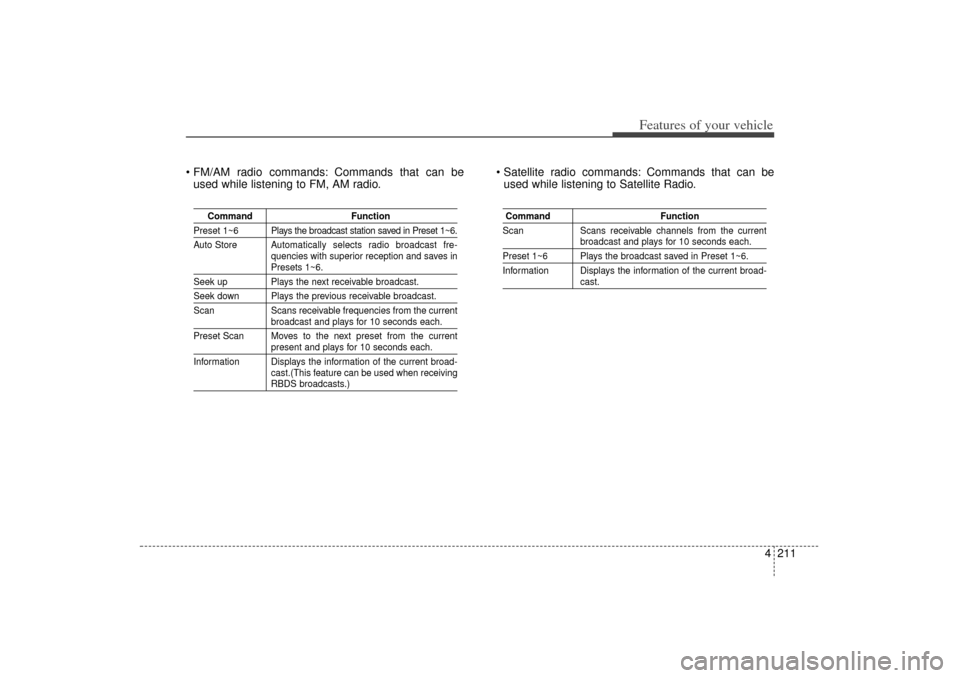
FM/AM radio commands: Commands that can beused while listening to FM, AM radio. Satellite radio commands: Commands that can be
used while listening to Satellite Radio.
Command Function
Preset 1~6 Plays the broadcast station saved in Preset 1~6.
Auto Store A utomatically selects radio broadcast fre-
quencies with superior reception and saves in
Presets 1~6.
Seek up Plays the next receivable broadcast.Seek down Plays the previous receivable broadcast.
Scan Scans receivable frequencies from the current
broadcast and plays for 10 seconds each.
Preset Scan Moves to the next preset from the currentpresent and plays for 10 seconds each.
Information Displays the information of the current broad- cast.(This feature can be used when receivingRBDS broadcasts.)
Command Function
Scan Scans receivable channels from the current
broadcast and plays for 10 seconds each.
Preset 1~6 Plays the broadcast saved in Preset 1~6.
Information Displays the information of the current broad-
cast.
XM(FL) CAN(ENG) 4b(AUDIO).qxp 1/23/2013 3:43 PM Page 211
Page 303 of 508
Features of your vehicle212
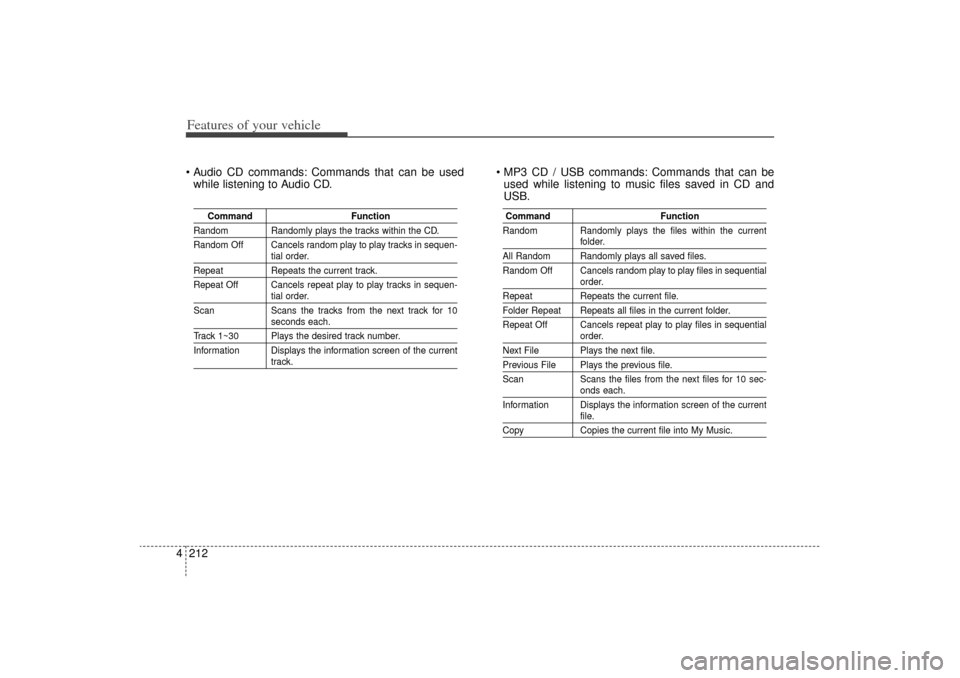
4 Audio CD commands: Commands that can be used
while listening to Audio CD. MP3 CD / USB commands: Commands that can be
used while listening to music files saved in CD and
USB.
Command Function
Random Randomly plays the tracks within the CD.
Random Off Cancels random play to play tracks in sequen-
tial order.
RepeatRepeats the current track.
Repeat Off Cancels repeat play to play tracks in sequen-
tial order.
Scan Scans the tracks from the next track for 10seconds each.
Track 1~30 Plays the desired track number.
Information Displays the information screen of the current
track.
Command Function
Random Randomly plays the files within the current
folder.
All Random Randomly plays all saved files.
Random Off Cancels random play to play files in sequential
order.
Repeat Repeats the current file.Folder Repeat Repeats all files in the current folder.
Repeat Off Cancels repeat play to play files in sequential
order.
Next File Plays the next file.Previous File Plays the previous file.
Scan Scans the files from the next files for 10 sec-
onds each.
Information Displays the information screen of the currentfile.
Copy Copies the current file into My Music.
XM(FL) CAN(ENG) 4b(AUDIO).qxp 1/23/2013 3:43 PM Page 212
Page 306 of 508

Driving your vehicle Before driving . . . . . . . . . . . . . . . . . . . . . . . . . . . . . . 5-3
Key . . . . . . . . . . . . . . . . . . . . . . . . . . . . . . . . . . . . \
. . . 5-5
Engine start/stop button . . . . . . . . . . . . . . . . . . . . . 5-8
Manual transaxle . . . . . . . . . . . . . . . . . . . . . . . . . . 5-13• Manual transaxle operation . . . . . . . . . . . . . . . . . . . . 5-13Automatic transaxle . . . . . . . . . . . . . . . . . . . . . . . . 5-16• Automatic transaxle operation . . . . . . . . . . . . . . . . . . 5-16All wheel drive (AWD) . . . . . . . . . . . . . . . . . . . . . . 5-23
Brake system . . . . . . . . . . . . . . . . . . . . . . . . . . . . . . 5-30• Power brakes . . . . . . . . . . . . . . . . . . . . . . . . . . . . . . . 5-30
• Parking brake . . . . . . . . . . . . . . . . . . . . . . . . . . . . . . . 5-32
• Anti-lock brake system (ABS) . . . . . . . . . . . . . . . . . . 5-34
• Electronic stability control (ESC) . . . . . . . . . . . . . . . 5-36
• Vehicle stability management (VSM) . . . . . . . . . . . . 5-40
• Hill-start assist control (HAC) . . . . . . . . . . . . . . . . . . 5-41Cruise control system. . . . . . . . . . . . . . . . . . . . . . . 5-44
Blind spot detection system (BSD) . . . . . . . . . . . . 5-49
Active ECO system. . . . . . . . . . . . . . . . . . . . . . . . . 5-54
Economical operation . . . . . . . . . . . . . . . . . . . . . . 5-55Special driving conditions . . . . . . . . . . . . . . . . . . . 5-57
• Hazardous driving conditions . . . . . . . . . . . . . . . . . . 5-57
• Rocking the vehicle . . . . . . . . . . . . . . . . . . . . . . . . . . . 5-58
• Smooth cornering . . . . . . . . . . . . . . . . . . . . . . . . . . . . 5-59
• Driving at night . . . . . . . . . . . . . . . . . . . . . . . . . . . . . . 5-60
• Driving in the rain . . . . . . . . . . . . . . . . . . . . . . . . . . . . 5-60
• Driving in flooded areas . . . . . . . . . . . . . . . . . . . . . . . 5-61
• Driving off-road . . . . . . . . . . . . . . . . . . . . . . . . . . . . . . 5-61
• Highway driving . . . . . . . . . . . . . . . . . . . . . . . . . . . . . 5-61Winter driving . . . . . . . . . . . . . . . . . . . . . . . . . . . . 5-63
Trailer towing . . . . . . . . . . . . . . . . . . . . . . . . . . . . . 5-66
Vehicle load limit . . . . . . . . . . . . . . . . . . . . . . . . . . 5-75
Vehicle weight . . . . . . . . . . . . . . . . . . . . . . . . . . . . . 5-81• Base curb weight . . . . . . . . . . . . . . . . . . . . . . . . . . . . . 5-81
• Vehicle curb weight . . . . . . . . . . . . . . . . . . . . . . . . . . . 5-81
• Cargo weight . . . . . . . . . . . . . . . . . . . . . . . . . . . . . . . . 5-81
• GAW (Gross axle weight) . . . . . . . . . . . . . . . . . . . . . . 5-81
• GAWR (Gross axle weight rating) . . . . . . . . . . . . . . . 5-81
• GVW (Gross vehicle weight) . . . . . . . . . . . . . . . . . . . 5-81
• GVWR (Gross vehicle weight rating) . . . . . . . . . . . . 5-81
5
XM(FL) CAN(ENG) 5.QXP 1/23/2013 3:29 PM Page 1