2014 KIA MOHAVE heating
[x] Cancel search: heatingPage 184 of 417
4107
Features of your vehicle
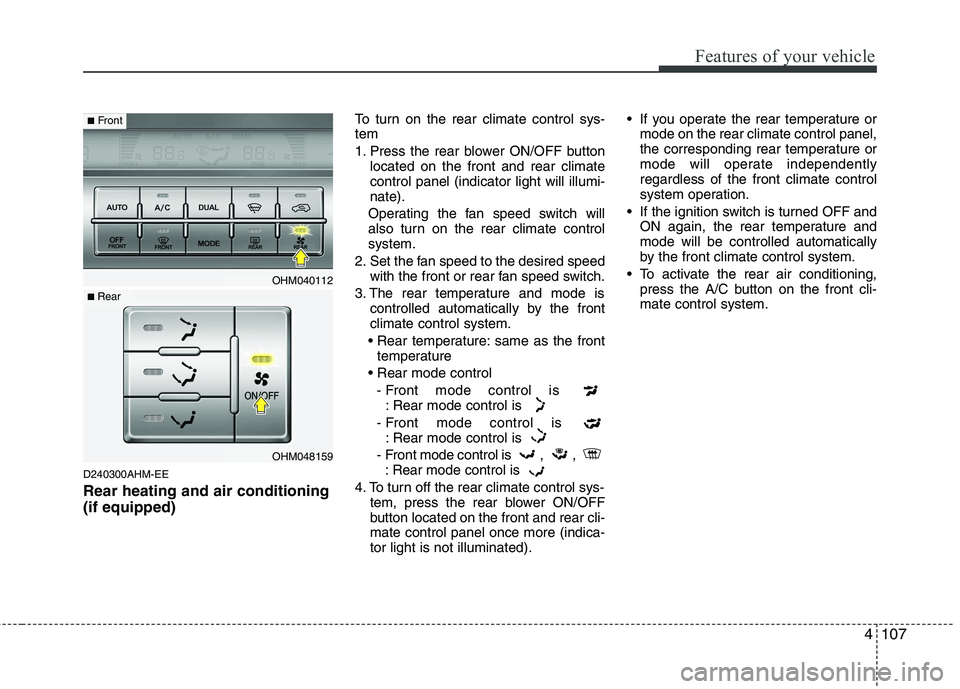
D240300AHM-EE Rear heating and air conditioning (if equipped)To turn on the rear climate control sys- tem
1. Press the rear blower ON/OFF button
located on the front and rear climate control panel (indicator light will illumi-nate).
Operating the fan speed switch will
also turn on the rear climate controlsystem.
2. Set the fan speed to the desired speed with the front or rear fan speed switch.
3. The rear temperature and mode is controlled automatically by the frontclimate control system.
same as the front temperature
- Front mode control is : Rear mode control is
- Front mode control is : Rear mode control is
- Front mode control is , , : Rear mode control is
4. To turn off the rear climate control sys- tem, press the rear blower ON/OFF
button located on the front and rear cli-mate control panel once more (indica-tor light is not illuminated). If you operate the rear temperature or
mode on the rear climate control panel,
the corresponding rear temperature or
mode will operate independentlyregardless of the front climate control
system operation.
If the ignition switch is turned OFF and ON again, the rear temperature andmode will be controlled automatically
by the front climate control system.
To activate the rear air conditioning, press the A/C button on the front cli-mate control system.
OHM040112
OHM048159
■Front
■ Rear
Page 187 of 417
Features of your vehicle
110
4
D250000AHM
For maximum defrosting, set the tem-
perature control to the extreme
right/hot position and the fan speedcontrol to the highest speed.
If warm air to the floor is desired while defrosting or defogging, set the modeto the floor-defrost position.
Before driving, clear all snow and ice from the windshield, rear window, out-
side rear view mirrors, and all side win-
dows.
Clear all snow and ice from the hood and air inlet in the cowl grill to improveheater and defroster efficiency and to
reduce the probability of fogging up theinside of the windshield. Manual climate control system D250101AHM
To defog inside windshield
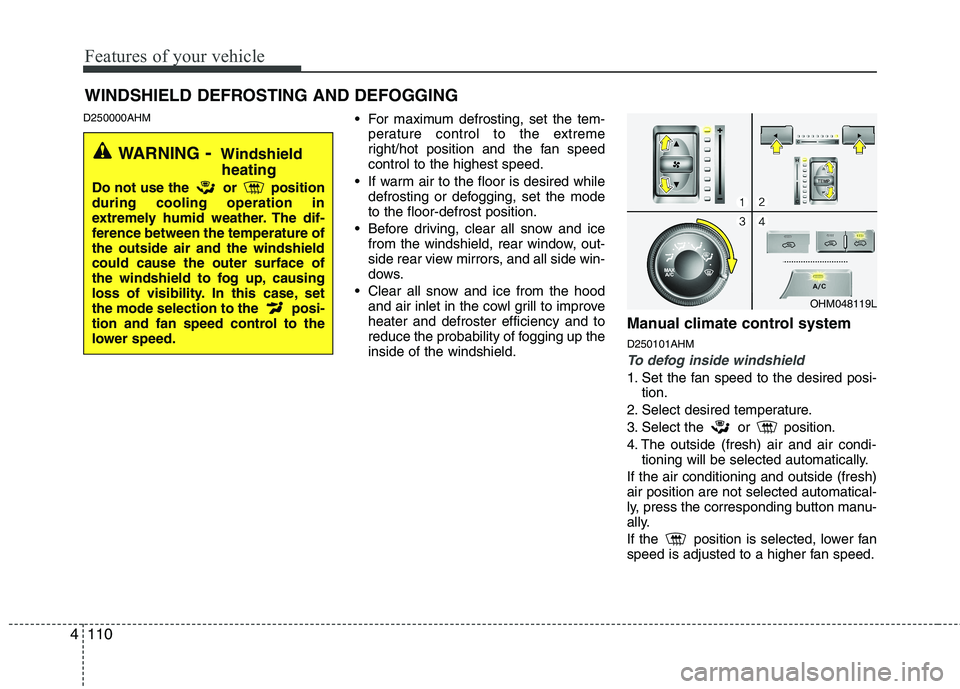
1. Set the fan speed to the desired posi-
tion.
2. Select desired temperature.
3. Select the or position.
4. The outside (fresh) air and air condi- tioning will be selected automatically.
If the air conditioning and outside (fresh) air position are not selected automatical-
ly, press the corresponding button manu-
ally.
If the position is selected, lower fan
speed is adjusted to a higher fan speed.
WINDSHIELD DEFROSTING AND DEFOGGING
OHM048119L
WARNING - Windshield
heating
Do not use the or position during cooling operation in
extremely humid weather. The dif-
ference between the temperature ofthe outside air and the windshieldcould cause the outer surface of
the windshield to fog up, causing
loss of visibility. In this case, set
the mode selection to the posi-
tion and fan speed control to the
lower speed.
Page 193 of 417
Features of your vehicle
116
4
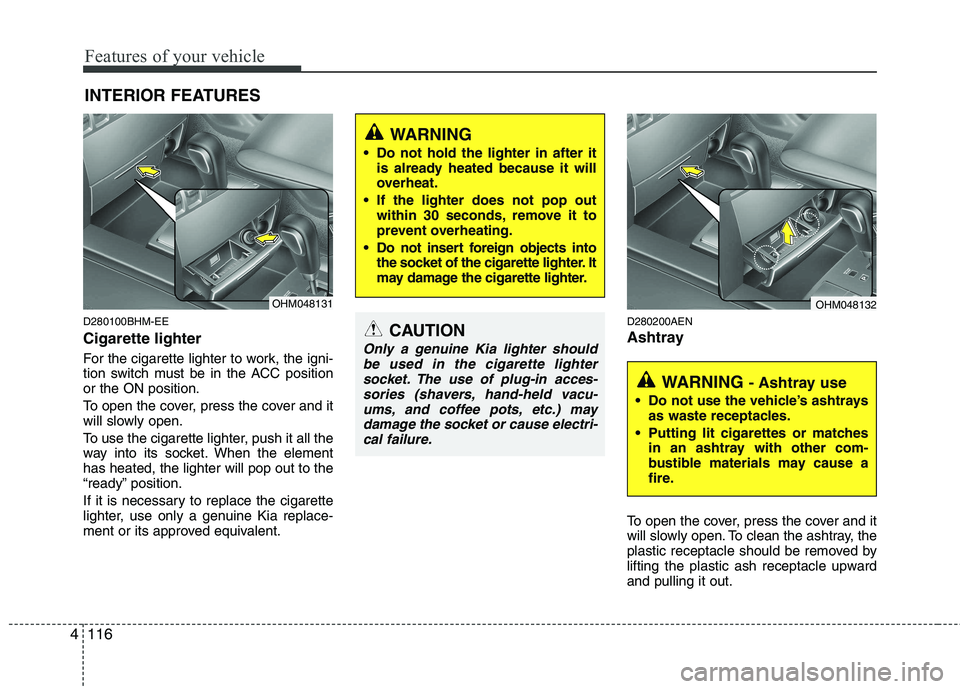
D280100BHM-EE Cigarette lighter
For the cigarette lighter to work, the igni-
tion switch must be in the ACC positionor the ON position.
To open the cover, press the cover and it
will slowly open.
To use the cigarette lighter, push it all the
way into its socket. When the elementhas heated, the lighter will pop out to the
“ready” position.
If it is necessary to replace the cigarette
lighter, use only a genuine Kia replace-
ment or its approved equivalent. D280200AEN
Ashtray
To open the cover, press the cover and it
will slowly open. To clean the ashtray, the
plastic receptacle should be removed by
lifting the plastic ash receptacle upwardand pulling it out.
INTERIOR FEATURES CAUTION
Only a genuine Kia lighter should
be used in the cigarette lightersocket. The use of plug-in acces-sories (shavers, hand-held vacu- ums, and coffee pots, etc.) may
damage the socket or cause electri- cal failure.
WARNING
Do not hold the lighter in after it is already heated because it will
overheat.
If the lighter does not pop out within 30 seconds, remove it to
prevent overheating.
Do not insert foreign objects into the socket of the cigarette lighter. It
may damage the cigarette lighter.
OHM048131
WARNING - Ashtray use
Do not use the vehicle’s ashtrays as waste receptacles.
Putting lit cigarettes or matches in an ashtray with other com-
bustible materials may cause a
fire.
OHM048132
Page 250 of 417

59
Driving your vehicle
3. Turn the ignition switch to the ON posi-tion to pre-heat the engine. Then the
glow indicator light will illuminate.
4. If the glow indicator light goes out, turn the ignition switch to the START posi-tion and hold it there until the engine
starts (a maximum of 10 seconds),
then release the key.
✽✽
NOTICE
If the engine does not start within 10
seconds after the preheating is complet-
ed, turn the ignition switch once more to
the LOCK position for 10 seconds, and
then to the ON position, in order to pre-
heat again.
Starting and stopping the engine for tur-
bocharger intercooler
1. Do not race or accelerate the engine immediately after starting.
If the engine is cold, idle for several
seconds before sufficient lubrication isensured in the turbocharger unit.
2. After high speed or extended driving, requiring a heavy engine load, idle the
engine about 1 minute before turning it
off.
This idle time will allow the tur- bocharger to cool prior to shutting the
engine off. E040300CHM
Starting the engine with a smart
key (if equipped)
Gasoline engine
1. Carry the smart key or leave it inside
the vehicle.
2. Make sure the parking brake is firmly applied
3. Place the transmission shift lever in P (Park).
4. Press the ENGINE START/STOP but- ton while depressing the brake pedal.
5. In extremely cold weather (below - 18°C (0°F)) or after the vehicle has not
been operated for several days, let the
engine warm up without depressing
the accelerator.
Whether the engine is cold or warm, it
should be started without depressing the
accelerator.
W-60
Glow indicator light
CAUTION
Do not turn the engine off immedi- ately after it has been subjected toa heavy load. Doing so may causesevere damage to the engine or tur-
bocharger unit.
OHM058033
Page 251 of 417

Driving your vehicle
10
5
Diesel engine
To start the diesel engine when the engine is cold, it has to be pre-heated
before starting the engine and then have
to be warmed up before starting to drive.
1. Make sure the parking brake is
applied.
2. Place the transmission shift lever in P (Park).
3. Press the ENGINE START/STOP but- ton while depressing the brake pedal.
4. Continue depressing the brake pedal until the illuminated glow indicator
goes off. (approximately 5 seconds)
5. The engine starts running when the glow indicator goes off.✽✽
NOTICE
If the ENGINE START/STOP button is
pressed once more while the engine is
pre-heating, the engine may start.
Starting and stopping the engine for tur-
bocharger intercooler
1. Do not race or accelerate the engine immediately after starting.
If the engine is cold, idle for several
seconds before sufficient lubrication isensured in the turbocharger unit.
2. After high speed or extended driving, requiring a heavy engine load, idle the
engine about 1 minute before turning it
off.
This idle time will allow the tur- bocharger to cool prior to shutting the
engine off. Even if the smart key is in the vehicle,
if it is far away from you, the engine
may not start.
When the ENGINE START/STOP but- ton is in the ACC position or above, if
any door is opened, the system checks
for the smart key. If the smart key is not
in the vehicle, the "KEY OUT" indicator
will blink or the warning "Key is not in
vehicle" will illuminate on the LCD dis-
play. And if all doors are closed, the
chime will sound for 5 seconds. The
indicator or warning will turn off while
the vehicle is moving. Always have the
smart key with you.
WARNING
The engine will start, only when the
smart key is in the vehicle.
Never allow children or any person
who is unfamiliar with the vehicle
touch the ENGINE START/STOP
button or related parts.
W-60
Glow indicator light
CAUTION
Do not turn the engine off immedi- ately after it has been subjected to
a heavy load. Doing so may cause severe damage to the engine or tur-bocharger unit.
Page 252 of 417

511
Driving your vehicle
✽✽
NOTICE
If the ENGINE START/STOP button is
pressed once more while the engine is
pre-heating, the engine may start.
✽
✽
NOTICE
If the battery is weak or the smart key does not work correctly, you can start
the engine by inserting the smart key
in the smart key holder. When you
pull out the smart key from the smart
key holder, press the smart key and
pull it out. (Continued)(Continued)
When the stop lamp fuse is blown, you
can't start the engine normally.
Replace the fuse with a new one. If it
is not possible, you can start the
engine by pressing the ENGINE
START/STOP button for 10 seconds
while it is in the ACC position. The
engine can start without depressing
the brake pedal. But for your safety
always depress the brake pedal before
starting the engine.CAUTION
Do not press the ENGINE START/
STOP button for more than 10
seconds except when the stoplamp fuse is blown.
Do not turn the ignition switch to the START position with theengine running. It may damage
the starter.
OHM058002
CAUTION
If the engine stalls while the vehicle is in motion, do not attempt to move
the shift lever to the P (Park) posi-tion. If the traffic and road condi-tions permit, you may put the shiftlever in the N (Neutral) position
while the vehicle is still moving andpress the ENGINE START/STOPbutton in an attempt to restart theengine.
Page 291 of 417

Driving your vehicle
50
5
E110100AHM
Hazardous driving conditions
When hazardous driving conditions are
encountered such as water, snow, ice,
mud, sand, or similar hazards, followthese suggestions:
Drive cautiously and allow extra dis-
tance for braking.
Avoid sudden braking or steering. When braking with non-ABS brakes
pump the brake pedal with a light up-
and-down motion until the vehicle isstopped.
If stalled in snow, mud, or sand, use second gear. Accelerate slowly to
avoid spinning the drive wheels.
Use sand, rock salt, tire chains, or other non-slip material under the drive
wheels to provide traction when stalled
in ice, snow, or mud. E110200BHM
Rocking the vehicle
If it is necessary to rock the vehicle to free
it from snow, sand, or mud, first turn the
steering wheel right and left to clear the
area around your driving wheels. Then,
shift back and forth between R (Reverse)
and any forward gear in vehicles
equipped with an automatic transmission.
Do not race the engine, and spin the
wheels as little as possible. If you are still
stuck after a few tries, have the vehicle
pulled out by a tow vehicle to avoid
engine overheating and possible damage
to the transmission.
SPECIAL DRIVING CONDITIONS
1VQA3002
WARNING -
ABS
Do not pump the brake pedal on a
vehicle equipped with ABS.
WARNING - Downshifting
Downshifting with an automatic
transmission, while driving on slip-
pery surfaces can cause an acci-
dent. The sudden change in tirespeed could cause the tires to skid.
Be careful when downshifting on
slippery surfaces.
CAUTION
Prolonged rocking may cause engine overheating, transmission
damage or failure, and tire damage.
Page 294 of 417

553
Driving your vehicle
E110700AHM
Highway driving
Tires
Adjust the tire inflation pressures to
specification. Low tire inflation pressures
will result in overheating and possible
failure of the tires.
Avoid using worn or damaged tires which
may result in reduced traction or tire fail-
ure.
✽✽NOTICE
Never exceed the maximum tire inflation
pressure shown on the tires.
Fuel, engine coolant and engine oil
High speed travel consumes more fuel
than urban motoring. Do not forget to
check both the engine coolant andengine oil.
Drive belt
A loose or damaged drive belt may over-
heat the engine.
WARNING
Underinflated or overinflated tires can cause poor handling,
loss of vehicle control, and sud-den tire failure leading to acci-
dents, injuries, and even death.
Always check tires for proper
inflation before driving. For prop-
er tire pressures, refer to “Tires
and wheels” in section 8.
Driving on tires with no or insuffi- cient tread is dangerous. Worn-out tires can result in loss of
vehicle control, collisions, injury,
and even death. Worn-out tiresshould be replaced as soon as
possible and should never be
used for driving. Always check
the tire tread before driving your
vehicle. For further information
and tread limits, refer to “Tires
and wheels” in section 7.
1VQA1004