2014 KIA Cerato Time
[x] Cancel search: TimePage 195 of 446

Features of your vehicle
126
4
✽
✽
NOTICE
• When using the air conditioning
system, monitor the temperature
gauge closely while driving up
hills or in heavy traffic when out-
side temperatures are high. Air
conditioning system operation
may cause engine overheating.
Continue to use the blower fan but
turn the air conditioning system
off if the temperature gauge indi-
cates engine overheating.
• When opening the windows in humid weather air conditioning
may create water droplets inside
the vehicle. Since excessive water
droplets may cause damage to
electrical equipment, air condi-
tioning should only be used with
the windows closed.
Air conditioning system operation tips
If the vehicle has been parked in
direct sunlight during hot weather,
open the windows for a short time
to let the hot air inside the vehicle
escape.
To help reduce moisture inside of the windows on rainy or humid
days, decrease the humidity inside
the vehicle by operating the air
conditioning system.
During air conditioning system operation, you may occasionally
notice a slight change in engine
speed as the air conditioning com-
pressor cycles. This is a normal
system operation characteristic.
Use the air conditioning system every month only for a few minutes
to ensure maximum system per-
formance.
When using the air conditioning system, you may notice clear water
dripping (or even puddling) on the
ground under the passenger side
of the vehicle. This is a normal sys-
tem operation characteristic. Operating the air conditioning sys-
tem in the recirculated air position
provides maximum cooling, how-
ever, continual operation in this
mode may cause the air inside the
vehicle to become stale.
During cooling operation, you may occasionally notice a misty air flow
because of rapid cooling and
humid air intake. This is a normal
system operation characteristic.
If you operate air conditioner excessively, the difference between
the temperature of the outside air
and that of the windshield could
cause the outer surface of the
windshield to fog up, causing loss
of visibility. In this case, set the
mode selection knob or button to
the position and fan speed
control to the lower speed.
Page 198 of 446

4129
Features of your vehicle
Defogging Logic
To reduce the probability of fogging
up inside of the windshield, the air
intake or air conditioning are con-
trolled automatically according to
certain conditions such as or
position. Logic can be disabled and
enabled by doing following :
Manual climate control system
1. Turn the ignition switch to the ONposition.
2. Turn the mode selection knob to the defrost position ( ).
3. Push the air intake control button at least 5 times within 3 seconds.
The indicator light in the air intake
control button will blink 3 times with
0.5 second of interval. It indicates that
the defogging logic is canceled or
returned to the programmed status.
If the battery has been discharged or
disconnected, it resets to the defog
logic status.
Automatic climate control system
1. Turn the ignition switch to the ON position.
2. Select the defroster position before pressing the defroster button ( ).
3. While pressing the air conditioning button (A/C), press the air intake
control button ( ) at least 5
times within 3 seconds.
The indicator on the air intake button
blinks 3 times with 0.5 seconds of
interval. It indicates that the defog-
ging logic is canceled or returned to
the programmed status.
OYDDCL2027OYDDCL2028
Page 200 of 446

4131
Features of your vehicle
If your vehicle is equipped with the
auto defogging system, it is automat-
ically activated when the conditions
are met. However, if you would like to
cancel the auto defogging system,
press the front defroster button 4
times within 2 seconds while press-
ing the AUTO button. The indicator
will blink 3 times to notify you that the
system is cancelled. To use the auto
defogging system again, follow the
procedures mentioned above.
If the battery has been disconnected
or discharged, it resets to the auto
defogging status.✽ ✽NOTICE
• When the air conditioning is
turned on by Auto defogging sys-
tem, if you try to turn off the air
conditioning, the indicator will
blink 3 times and the air condi-
tioning will not be turned off.
• For efficiency, do not select recir- culated air position while Auto
defogging system is operating.
CAUTION
Do not remove the sensor cover
located on the upper end of thedriver side windshield glass.Damage to the system partscould occur and may not be cov-ered by your vehicle warranty.
Page 207 of 446
Features of your vehicle
138
4
The seat warmer is provided to warm
the front seats during cold weather.
With the ignition switch in the ON
position, push either of the switches
to warm the driver's seat or the front
passenger's seat.
During mild weather or under condi-
tions where the operation of the seat
warmer is not needed, keep the
switches in the OFF position.
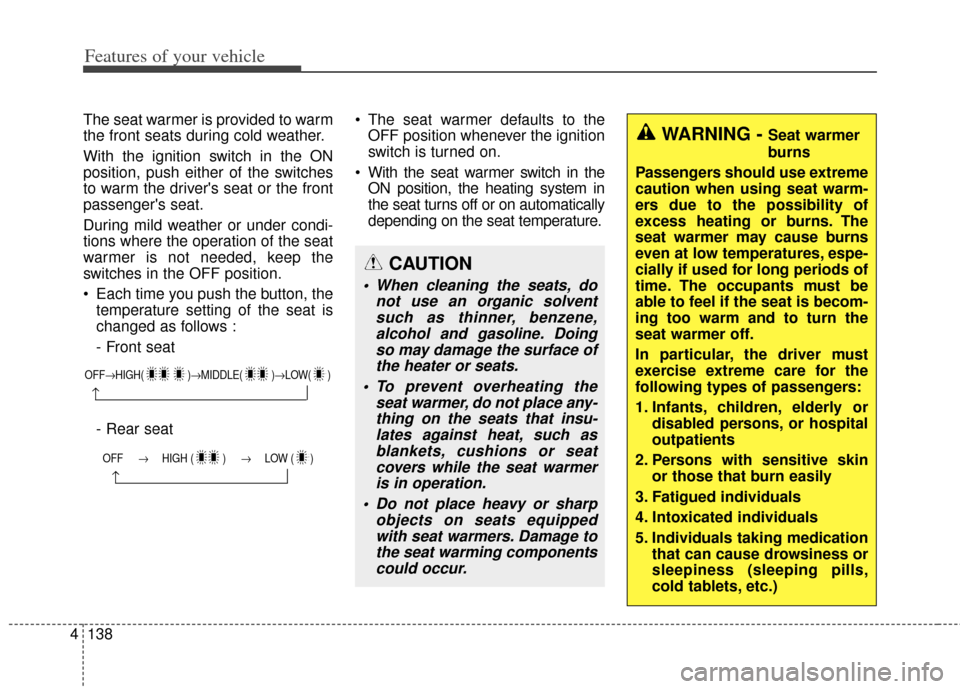
Each time you push the button, the
temperature setting of the seat is
changed as follows :
- Front seat
- Rear seat The seat warmer defaults to the
OFF position whenever the ignition
switch is turned on.
With the seat warmer switch in the ON position, the heating system in
the seat turns off or on automatically
depending on the seat temperature.
OFF→ HIGH( )→ MIDDLE( )→LOW( )
→
OFF → HIGH ( ) → LOW ( )
→
CAUTION
When cleaning the seats, do
not use an organic solventsuch as thinner, benzene,alcohol and gasoline. Doingso may damage the surface ofthe heater or seats.
To prevent overheating the seat warmer, do not place any-thing on the seats that insu-lates against heat, such asblankets, cushions or seatcovers while the seat warmeris in operation.
Do not place heavy or sharp objects on seats equippedwith seat warmers. Damage tothe seat warming componentscould occur.
WARNING - Seat warmer
burns
Passengers should use extreme
caution when using seat warm-
ers due to the possibility of
excess heating or burns. The
seat warmer may cause burns
even at low temperatures, espe-
cially if used for long periods of
time. The occupants must be
able to feel if the seat is becom-
ing too warm and to turn the
seat warmer off.
In particular, the driver must
exercise extreme care for the
following types of passengers:
1. Infants, children, elderly or disabled persons, or hospital
outpatients
2. Persons with sensitive skin or those that burn easily
3. Fatigued individuals
4. Intoxicated individuals
5. Individuals taking medication that can cause drowsiness or
sleepiness (sleeping pills,
cold tablets, etc.)
Page 208 of 446

4139
Features of your vehicle
Climate control seat
(if equipped)
The climate control seat is provided
to cool or warm the seat during hot or
cold weather by blowing air through
small vent holes on the surface of the
seat and seatback. While the engine
is running, push the rear portion of
the switch (blue color) to cool the
seat, and push the front portion of the
switch (red color) to warm the seat.
When the operation of the climate
control seat is not needed, keep the
switch in the OFF position.The climate control seat defaults to
the OFF position whenever the igni-
tion switch is turned on.
Each time you push the button, the
airflow is changed as follows:
OYDDCO2060
OFF→ HIGH( )→ MIDDLE( )→LOW( )
→
CAUTION
The climate control seat is a
supplementary cooling/heat-ing system. Use the climatecontrol seat when the climatecontrol system is on. Using theclimate control seat for pro-longed periods of time with theclimate control system offcould cause the climate con-trol seat performance to impair.
(Continued)
(Continued) When cleaning the seats, do not use an organic solventsuch as paint thinner, ben-zene, alcohol and gasoline.Doing so may damage the sur-face of the seats.
Do not spill liquid such as water or beverages on the sur-face of the front seats andseatbacks, or the air ventholes may be blocked and pre-vented from working properly.
Do not place materials such as plastic bags or newspapersunder the seats. The air ventmay not work properly as theair intake can be blocked.
When the air vent does not operate, restart the vehicle. Ifthere is no change, have yourvehicle inspected by anauthorized Kia dealer.
Page 209 of 446

Features of your vehicle
140
4
Power outlet (if equipped)
The power outlet is designed to pro-
vide power for mobile telephones or
other devices designed to operate
with vehicle electrical systems. The
devices should draw less than 12V,
10A with the engine running. Use the power outlet only when the
engine is running and remove the
accessory plug after use. Using the
accessory plug for prolonged periods
of time with the engine off could
cause the battery to discharge.
Only use 12V electric accessories
which are less than 10A in electric
capacity.
Adjust the air-conditioner or heater to
the lowest operating level when
using the power outlet.
Close the cover when not in use.
Some electronic devices can cause
electronic interference when plugged
into a vehicle’s power outlet. These
devices may cause excessive audio
static and malfunctions in other elec-
tronic systems or devices used in
your vehicle.
OYDECO2061CN
OYDECO2061CN-1
■Type A
■Type B
WARNING - Electric shock
Do not put a finger or a foreign
element (pin, etc.) into a power
outlet and do not touch with a
wet hand. You may get an electric
shock.
Page 210 of 446
4141
Features of your vehicle
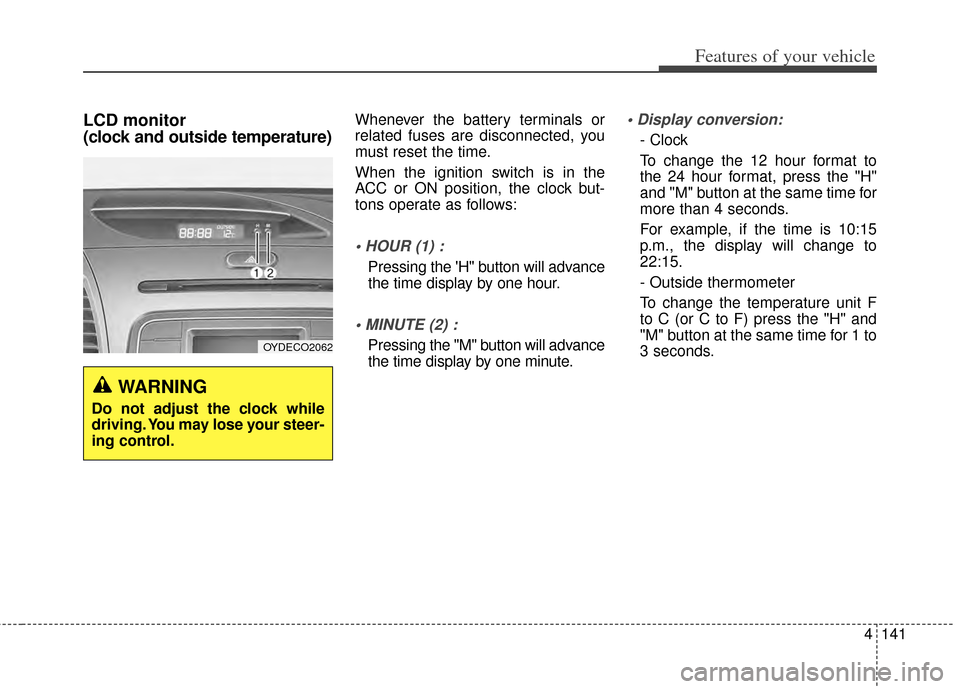
LCD monitor
(clock and outside temperature)Whenever the battery terminals or
related fuses are disconnected, you
must reset the time.
When the ignition switch is in the
ACC or ON position, the clock but-
tons operate as follows:
Pressing the 'H" button will advance
the time display by one hour.
Pressing the "M" button will advance
the time display by one minute.
- Clock
To change the 12 hour format to
the 24 hour format, press the "H"
and "M" button at the same time for
more than 4 seconds.
For example, if the time is 10:15
p.m., the display will change to
22:15.
- Outside thermometer
To change the temperature unit F
to C (or C to F) press the "H" and
"M" button at the same time for 1 to
3 seconds.
WARNING
Do not adjust the clock while
driving. You may lose your steer-
ing control.
OYDECO2062
Page 218 of 446

4149
Features of your vehicle
Using a cellular phone or a two-way radio
When a cellular phone is used inside
the vehicle, noise may be produced
from the audio system. This does not
mean that something is wrong with
the audio equipment. In such a case,
try to operate mobile devices as far
from the audio equipment as possible.
Caring for disc
If the temperature inside the car is too high, open the car windows to
ventilate before using the system.
It is illegal to copy and use MP3/WMA files without permis-
sion. Use CDs that are created
only by lawful means.
Do not apply volatile agents, such as benzene and thinner, normal
cleaners and magnetic sprays
made for analogue disc onto CDs.
To prevent the disc surface from getting damaged, hold CDs by the
edges or the center hole only.
Clean the disc surface with a piece of soft cloth before playback (wipe
it from the center to the outside
edge).
Do not damage the disc surface or attach pieces of sticky tape or
paper.
Make certain only CDs are insert- ed into the CD player (Do not insert
more than one CD at a time).
Keep CDs in their cases after use to protect them from scratches or
dirt.
CAUTION
When using a communicationsystem such as a cellular phoneor a radio set inside the vehicle,a separate external antennamust be fitted. When a cellularphone or a radio set is usedwith an internal antenna alone,it may interfere with the vehi-cle's electrical system andadversely affect safe operationof the vehicle.
WARNING
Do not use a cellular phone
while driving. Stop at a safe
location to use a cellular phone.