Page 85 of 274
5. Hands-Free Phone
5-6
HANDS-FREE TEXT MESSAGING AS-
SISTANT
WARNING!
Use the text messaging feature after parking
your vehicle in a safe location. If you have to
use the feature while driving, exercise
extreme caution at all times so full attention
may be given to vehicle operation.
CAUTION!
This feature is disabled if the connected
device does not support the Message Access
Profile (MAP). See the phone’s Owner’s
Manual for details and instructions.
Laws in some jurisdictions may restrict the
use of “Text-to-Speech.” Check local reg-
ulations before using this feature.
The system allows for the sending and
receiving of text messages through the
vehicle interface.
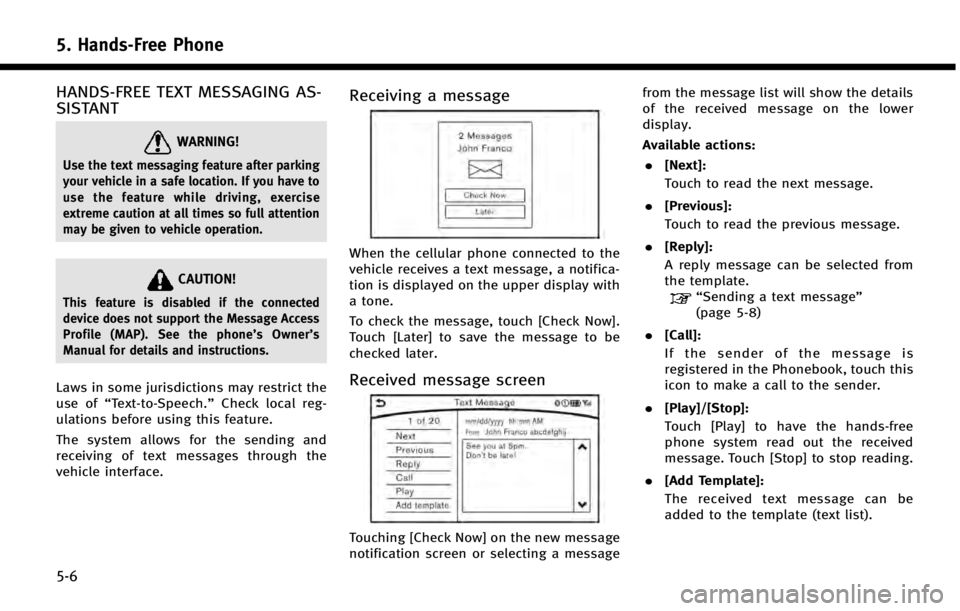
Receiving a message
When the cellular phone connected to the
vehicle receives a text message, a notifica-
tion is displayed on the upper display with
a tone.
To check the message, touch [Check Now].
Touch [Later] to save the message to be
checked later.
Received message screen
Touching [Check Now] on the new message
notification screen or selecting a message from the message list will show the details
of the received message on the lower
display.
Available actions:
. [Next]:
Touch to read the next message.
. [Previous]:
Touch to read the previous message.
. [Reply]:
A reply message can be selected from
the template.
“Sending a text message”
(page 5-8)
. [Call]:
If the sender of the message is
registered in the Phonebook, touch this
icon to make a call to the sender.
. [Play]/[Stop]:
Touch [Play] to have the hands-free
phone system read out the received
message. Touch [Stop] to stop reading.
. [Add Template]:
The received text message can be
added to the template (text list).
Page 97 of 274
![INFINITI Q50 2014 Infiniti Intouch 6. Infiniti InTouch Apps
6-4
Available settings. [Vehicle Apps Manager]
Install, uninstall and update Vehicle
Apps.
. [App Garage Settings]
View apps information, manage apps,
customize shortcuts on t](/manual-img/42/34966/w960_34966-96.png "INFINITI Q50 2014 Infiniti Intouch 6. Infiniti InTouch Apps
6-4
Available settings. [Vehicle Apps Manager]
Install, uninstall and update Vehicle
Apps.
. [App Garage Settings]
View apps information, manage apps,
customize shortcuts on t")
6. Infiniti InTouch Apps
6-4
Available settings. [Vehicle Apps Manager]
Install, uninstall and update Vehicle
Apps.
. [App Garage Settings]
View apps information, manage apps,
customize shortcuts on the Menu
screen and Set notifications.
. Available application list
Display the downloaded Vehicle Apps
and selected Mobile Apps.
When a listed application is selected,
the application will start.
App Garage Settings screen
You can use various application settings.
1. Push
Page 105 of 274
7. Monitor system
7-2
REARVIEW MONITOR (if so equipped)
When the shift lever is shifted into the R
(Reverse) position, the upper touch screen
display (upper display) shows the view to
the rear of the vehicle.
The system is designed as an aid to the
driver in situations such as slot parking or
parallel parking.
REARVIEW MONITOR OPERATION
PRECAUTIONS
The distance between the vehicle and the
objects viewed on the monitor may be
different from the actual distances.
“Difference between predictive and
actual distances” (page 7-19)
WARNING!
Failure to follow the warnings and instruc-
tions for proper use of the RearView Monitor
could result in serious injury or death.
. The RearView Monitor is a convenience
but it is not a substitute for proper
backing. Always turn and look out the
windows, and check mirrors to be sure
that it is safe to move before operating
the vehicle. Always back up slowly. .
The system is designed as an aid to the
driver in detecting large stationary ob-
jects directly behind the vehicle, to help
avoid damaging the vehicle.
. The system cannot completely eliminate
blind spots and may not detect every
object. It does not warn of moving
objects.
. Underneath the bumper and the corner
areas of the bumper cannot be viewed on
the RearView Monitor because of its
monitoring range limitation. The system
will not detect small objects below the
bumper, and may not detect objects
close to the bumper or on the ground.
. Objects viewed in the RearView Monitor
differ from actual distance because a
wide-angle lens is used.
. Objects in the RearView Monitor will
appear visually opposite, similar to than
when viewed in the rear view and outside
mirrors
. Make sure that the trunk is securely
closed when backing up.
. Do not put anything on the RearView
camera. The RearView camera is installed
above the license plate. .
When washing the vehicle with high-
pressure water, be sure not to spray it
around the camera. Otherwise, water
may enter the camera unit causing water
condensation on the lens, a malfunction,
fire or an electric shock.
. Do not strike the camera. It is a precision
instrument. Otherwise, it may malfunc-
tion or cause damage resulting in a fire
or an electric shock.
CAUTION!
Do not scratch the camera lens when
cleaning dirt or snow from the front of the
camera.
Page 108 of 274
![INFINITI Q50 2014 Infiniti Intouch Setting ItemsAction
[Camera Menu] [Predictive Course Lines] When this item is turned on, the predictive
course line is displayed on the rear view
screen.
[Display Settings]
(Available only when camera](/manual-img/42/34966/w960_34966-107.png "INFINITI Q50 2014 Infiniti Intouch Setting ItemsAction
[Camera Menu] [Predictive Course Lines] When this item is turned on, the predictive
course line is displayed on the rear view
screen.
[Display Settings]
(Available only when camera")
Setting ItemsAction
[Camera Menu] [Predictive Course Lines] When this item is turned on, the predictive
course line is displayed on the rear view
screen.
[Display Settings]
(Available only when camera
screen is displayed on the
upper display.) [Brightness]
Adjust display settings by touching [+]/[-].
[Contrast]
[Tint]
[Color]
[Black Level]
[Default Settings] Return all settings to default.
OPERATING TIPS
. When the shift lever is shifted to the R
(Reverse) position, the upper screen
automatically changes to the RearView
Monitor mode.
. The following conditions may occur, but
it does not indicate a malfunction.
—
When the view is switched, the images
on the screen may be displayed with
some delay.
—When the temperature is extremely highor low, the screen may not clearly
display objects.
—When strong light directly comes on tothe camera, objects may not be dis- played clearly.
—Vertical lines may be seen in objects on
the screen due to strong reflected light
from the bumper.
—The screen may flicker under fluorescent
light.
—The colors of objects on the RearViewMonitor may differ somewhat from the
actual color of objects.
—Objects on the monitor may not be clearin a dark environment.
. If dirt, rain or snow accumulates on the
camera, the RearView Monitor may not
display object clearly. Clean the camera
if this happens. .
Do not use alcohol, benzine or thinner
to clean the camera. This will cause
discoloration. To clean the camera,
wipe with a cloth dampened with
diluted mild cleaning agent and then
wipe with a dry cloth.
. Do not damage the camera as the
monitor screen may be adversely af-
fected.
. Do not use wax on the camera window.
Wipe off any wax with a clean cloth
dampened with mild detergent diluted
with water.
7. Monitor system
7-5
Page 109 of 274

7. Monitor system
7-6
AROUND VIEW®MONITOR (AVM) (if so
equipped)
When you push the on the
INFINITI Controller or shift the shift lever
into the R (Reverse) position while the
ignition switch is in the ON position, the
Around View Monitor operates with the
sonar system. The upper touch screen
display (upper display) shows the view to
the Around View Monitor. The Around View
Monitor shows various views of the posi-
tion of the vehicle.
Available views:
. Bird-Eye View
The surrounding view of the vehicle.
. Front-Side View
The view around and ahead of the front
passenger’s side wheel.
. Front View
An approximately 150-degree view of
the front of the vehicle.
. Front-Wide View
An approximately 180-degree view of
the front of the vehicle. .
Rear View
An approximately 150-degree view of
the rear of the vehicle.
. Rear-Wide View
An approximately 180-degree view of
the rear of the vehicle.
AROUND VIEW MONITOR OPERA-
TION PRECAUTIONS
The system is designed as an aid to the
driver in situations such as slot parking or
parallel parking.
There are some areas where the system
will not show objects. When in the front or
the rear view display, an object below the
bumper or on the ground may not be
viewed
*1. When in the bird-eye view, a
tall object near the seam of the camera
viewing areas will not appear in the
monitor
*2.
WARNING!
. The Around View Monitor is a convenient
feature but it is not a substitute for
proper vehicle operation because it has
areas where objects cannot be viewed.
Always look out the windows and check
mirrors to be sure that it is safe to move.
The driver is always responsible for
safety during parking and other maneu-
vers.
. Do not use the Around View Monitor with
the outside mirror in the stored position,
and make sure that the trunk lid is
securely closed when operating the
vehicle using the Around View Monitor.
. The distance between objects viewed on
the Around View Monitor differs from the
actual distance.
Page 120 of 274
Available setting itemAction
[Sonar Settings] [Sonar] Turns on/off the sonar system.
[FR Sensor Only] Turns on the front sonar and turns off the rear sonar.
[Interrupt Display] Turns on/off the automatic sonar display.
[Sonar Sensitivity] Adjust the sonar sensitivity by touching [+]/[-].
[Sonar Volume] Adjust the warning tone volume by touching [+]/[-]
[Display Settings]
(Available only when the
camera screen is displayed on
the upper display.) [Brightness]
Adjust the display settings by touching [+]/[-].
[Contrast]
[Tint]
[Color]
[Black Level]
[Default Settings] Return all the settings to default.
7. Monitor system
7-17
Page 128 of 274
![INFINITI Q50 2014 Infiniti Intouch Automotive Weather information
Step 1Step 2Menu item Action
Push <MENU> [SXM Info] [Automotive
Weather][Current Condition]
Models with navigation system
Display current weather condition information.](/manual-img/42/34966/w960_34966-127.png "INFINITI Q50 2014 Infiniti Intouch Automotive Weather information
Step 1Step 2Menu item Action
Push <MENU> [SXM Info] [Automotive
Weather][Current Condition]
Models with navigation system
Display current weather condition information.")
Automotive Weather information
Step 1Step 2Menu item Action
Push
Page 129 of 274
![INFINITI Q50 2014 Infiniti Intouch 8. Information and settings
8-6
Step 1Step 2Menu item Action
Push <MENU> [SXM Info] [Automotive
Weather][Alert Map]*
Show Alert Map information on the upper display. Touch [Legend] to display
the deta](/manual-img/42/34966/w960_34966-128.png "INFINITI Q50 2014 Infiniti Intouch 8. Information and settings
8-6
Step 1Step 2Menu item Action
Push <MENU> [SXM Info] [Automotive
Weather][Alert Map]*
Show Alert Map information on the upper display. Touch [Legend] to display
the deta")
8. Information and settings
8-6
Step 1Step 2Menu item Action
Push
![INFINITI Q50 2014 Infiniti Intouch Available setting itemAction
[Sonar Settings] [Sonar] Turns on/off the sonar system.
[FR Sensor Only] Turns on the front sonar and turns off the rear sonar.
[Interrupt Display] Turns on/off the automa](/manual-img/42/34966/w960_34966-119.png "INFINITI Q50 2014 Infiniti Intouch Available setting itemAction
[Sonar Settings] [Sonar] Turns on/off the sonar system.
[FR Sensor Only] Turns on the front sonar and turns off the rear sonar.
[Interrupt Display] Turns on/off the automa")