4-27
Multimedia System
4
BBAA SSIICC MM EETT HH OO DD OO FF UU SSEE ::
A
A uuddiioo CC DD // MM PP33 CC DD // UU SSBB //
i
i PP oodd ®®
// MM yy MM uussiicc
Press the key to change the mod mode in order of CD ➟ USB(iPod®)
➟ AUX ➟ My Music ➟ BT Audio.
The folder/file name is displayed on the screen.
Page 240 of 542
4-29
Multimedia System
4
MENU : Audio CD
Press the CD MP3 mode key to set the Repeat, Random,
Information features.
Repeat
Press the key Set [ RPT] through the TUNEknob or
key to repeat the current song. ❈ Press RPT again to turn off.
Random
Press the key Set [ RDM] through the
TUNEknob or
key to randomly play songs within
the current folder. ❈ Press RDM again to turn off.
Information
Press the key Set [ Info] through the
TUNEknob or
key to display information of the cur-rent song. ❈ Press the key to turn off
info display
.
MENU : MP3 CD / USB
Press the CD MP3 mode key
to set the Repeat, Folder Random,
Folder Repeat, All Random,
Information, and Copy features.
Repeat
Press the key Set [ RPT] through the
TUNEknob or
key to repeat the current song. ❈ Press RPT again to turn off.1
RPTMENU
MENU
MENU
3
MENU
2 RDM
MENU
1 RPT
MENU
MENU
Page 241 of 542
4-30
Multimedia System
Folder Random
Press the key Set [ F.RDM] through the
TUNEknob or
key to randomly play songs within the
current folder. ❈ Press F.RDM again to turn off.
Folder Repeat
Press the key Set [ F.RPT] through the
TUNEknob or
key to repeat songs within the cur-
rent folder. ❈ Press F.RPT again to turn off.
All Random
Press the key Set [ A.RDM] through the
TUNEknob or key
to randomly play all songs within the
CD. ❈ Press A.RDM again to turn off.
Information
Press the key Set [ Info] through the
TUNEknob or
key to display information of the cur-rent song. ❈ Press the key to turn off
info display.
Copy
Press the key Set [ Copy] through the
TUNEknob or
key.
song into My Music. You can play the copied Music in My Music
mode.
❈ If another key is pressed while
copying is in progress, a pop up
asking you whether to cancel
copying is displayed.
❈ If another media is connected or
inserted (USB, CD, iPod
®, AUX)
while copying is in progress, copy- ing is canceled.
❈ Music will not be played while
copying is in progress.
MENU : iPod®
In iPod®mode, press the key
to set the Repeat, Album Random, All
Random, Information and Search fea-
tures.
Repeat
Press the key Set [ RPT] through the
TUNEknob or
key to repeat the current song. ❈ Press RPT again to turn repeat off.
Album Random
Press the key Set [ Alb.RDM] through the TUNEknob or key.
Plays albums within the currently
playing category in random order. ❈ Press Alb.RDM again to turn off.
2
RDMMENU
1
RPTMENU
MENU
6
MENU
MENU
5
MENU
4
MENU
3
MENU
2
RDMMENU
Page 242 of 542
4-31
Multimedia System
4
All Random
Press the key Set [ A.RDM] through the TUNEknob
or key.
Plays all songs within the currently
playing category in random order. ❈ Press A.RDM again to turn off.
Information
Press the key Set [ Info] through the
TUNEknob or
key.
Displays information of the current song. ❈ Press the key to turn off
info display.
Search
Press the key Set [ Search] through the
TUNEknob or
key.
Displays iPod
®category list.
❈ Searching iPod
®category is
key pressed, move to par-
ent category.MENU
5
MENU
MENU
4
MENU
3
MENU
Page 243 of 542
4-32
Multimedia System
MENU : My Music Mode
In My Music mode, press the
key to set the Repeat, Random,
Information, Delete, Delete All, and
Delete Selection features.
Repeat
Press the key Set [ RPT] through the TUNEknob or
key.
Repeats the currently playing song.❈ Press RPT again to turn repeat
off.
Random
Press the key Set [ RDM] through the TUNEknob or
key.
Plays all songs in random order.❈ Press RDM again to turn random off.
Information
Press the key Set [ Info] through the
TUNEknob or key.
Displays information of the currentsong. ❈ Press the key to turn off
info display.
Delete
Press the key Set [ Delete] through the TUNEknob or
key.
In the play screen, pressing delete
will delete the currently playing song. ➀ Select the file you wish to delete
by using the TUNE knob.
➁ Press the key and select
the delete menu to delete the
selected file.
Delete All
Press the key Set [ Del.All] through the TUNEknob or key.
Deletes all songs of My Music.
5
MENU
MENU
4
MENU
MENU
3
MENU
2 RDM
MENU
1 RPT
MENU
MENU
Page 247 of 542
4-36
Multimedia System
PPHH OO NNEE
Before using the Bluetooth®Wireless
Technology phone features
Bluetooth®Wireless
Technology phone, you must first pair and connect the
Bluetooth®
Wireless Technology mobile phone.
connected, it is not possible to enter
Phone mode. Once a phone ispaired or connected, the guidance
screen will be displayed.
(IGN/ACC ON), the
Bluetooth®
Wireless Technology phone will be
automatically connected. Even if you
are outside, the
Bluetooth® Wireless
Technology phone will be automati-
cally connected once you are in the
vicinity of the vehicle. If you do not
want automatic
Bluetooth®Wireless
Technology phone connection, setthe
Bluetooth®Wireless Technology
power to OFF.
PP HH OO NNEE
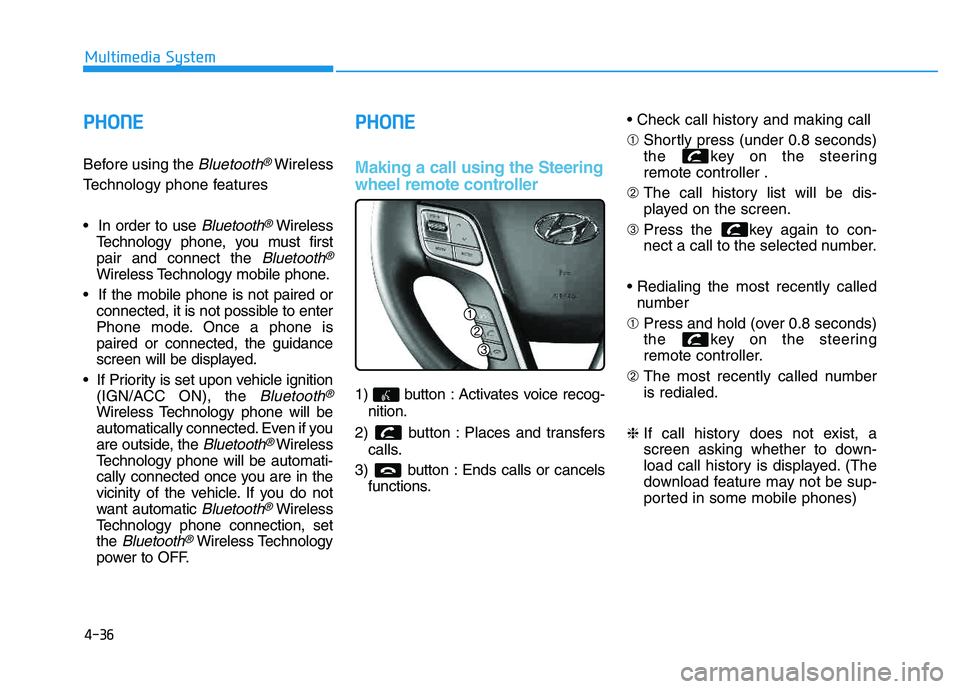
Making a call using the Steering
wheel remote controller
1) button : Activates voice recog-
nition.
2) button : Places and transfers calls.
3) button : Ends calls or cancels functions. ➀
Shortly press (under 0.8 seconds)
the key on the steeringremote controller .
➁ The call history list will be dis-
played on the screen.
➂ Press the key again to con-
nect a call to the selected number.
number
➀ Press and hold (over 0.8 seconds)
the key on the steering
remote controller.
➁ The most recently called numberis redialed.
❈ If call history does not exist, a
screen asking whether to down-
load call history is displayed. (The
download feature may not be sup-
ported in some mobile phones)
Page 249 of 542
4-38
Multimedia System
Pairing Key / Key
on the Steering Remote
Controller
When No Devices have been
Paired
1. Press the key or the key on the steering remote con-
troller. The following screen is dis-
played. 2. Select [OK] button to enter the
Pair Phone screen.
1) Car Name : Name of device as shown when searching from your
Bluetooth®Wireless Technology
device
2) Passkey : Passkey used to pair the device
3. From your
Bluetooth®Wireless
Technology device (i.e. Mobile
Phone), search and select yourcar audio system. [Non SSP supported device]
(SSP: Secure Simple Pairing)
4. After a few moments, a screen is
displayed where the passkey is entered.
Hear, enter the passkey “0000” to
pair your
Bluetooth®Wireless
Technology device with the caraudio system.
[SSP supported device]
4. After a few moments, a screen is displayed 6 digits passkey.
Hear, check the passkey on your
Bluetooth®Wireless Technology
device and confirm.
5. Once pairing is complete, the fol- lowing screen is displayed.
PHONE
PHONE
Page 250 of 542
4-39
Multimedia System
4
✽✽NOTICE
If Bluetooth ®
Wireless Technology
devices are paired but none are cur-
rently connected, pressing the key or the key on the
steering wheel displays the following
screen. Select [Pair] button to pair a
new device or select [Connect] to
connect a previously paired device.Pairing through [PHONE] Setup
Press the key Select
[Phone] Select [Pair Phone]
Select TUNE knob
1. The following steps are the same as those described in the section
"When No Devices have been
Paired" on the previous page.
✽✽ NOTICE
Bluetooth ®
Wireless Technology
features supported within the vehi-
cle are as follows. Some features
may not be supported depending
on your Bluetooth®
Wireless
Technology device.
- Outgoing/Incoming Handsfree calls
- Operations during a call (Switch to Private, Switch to call waiting,
MIC on/off)
- Downloading Call History
- Downloading Mobile Contacts- Bluetooth ®
Wireless Technology
device auto connection
- Bluetooth Audio Streaming
Up to five Bluetooth®
Wireless
Technology devices can be paired
to the Car Handsfree system.
Only one Bluetooth®
Wireless
Technology device can be connect-
ed at a time.
Other devices cannot be paired while a Bluetooth®
Wireless
Technology device is connected.
Only Bluetooth®
Wireless
Technology Handsfree and
Bluetooth audio related features
are supported.
SETUP
CLOCK
PHONE

![HYUNDAI TUCSON 2014 Owners Manual 4-29
Multimedia System
4
MENU : Audio CD
Press the CD MP3 mode key to set the Repeat, Random,
Information features.
Repeat
Press the key Set [ RPT] through the TUNEknob or
key to repeat the current](/manual-img/35/56203/w960_56203-239.png "HYUNDAI TUCSON 2014 Owners Manual 4-29
Multimedia System
4
MENU : Audio CD
Press the CD MP3 mode key to set the Repeat, Random,
Information features.
Repeat
Press the key Set [ RPT] through the TUNEknob or
key to repeat the current")
![HYUNDAI TUCSON 2014 Owners Manual 4-30
Multimedia System
Folder Random
Press the key Set [ F.RDM] through the
TUNEknob or
key to randomly play songs within the
current folder. ❈ Press F.RDM again to turn off.
Folder Repeat
Press](/manual-img/35/56203/w960_56203-240.png "HYUNDAI TUCSON 2014 Owners Manual 4-30
Multimedia System
Folder Random
Press the key Set [ F.RDM] through the
TUNEknob or
key to randomly play songs within the
current folder. ❈ Press F.RDM again to turn off.
Folder Repeat
Press")
![HYUNDAI TUCSON 2014 Owners Manual 4-31
Multimedia System
4
All Random
Press the key Set [ A.RDM] through the TUNEknob
or key.
Plays all songs within the currently
playing category in random order. ❈ Press A.RDM again to turn off](/manual-img/35/56203/w960_56203-241.png "HYUNDAI TUCSON 2014 Owners Manual 4-31
Multimedia System
4
All Random
Press the key Set [ A.RDM] through the TUNEknob
or key.
Plays all songs within the currently
playing category in random order. ❈ Press A.RDM again to turn off")