2014 Hyundai Sonata eco mode
[x] Cancel search: eco modePage 446 of 665
4-188
Multimedia System
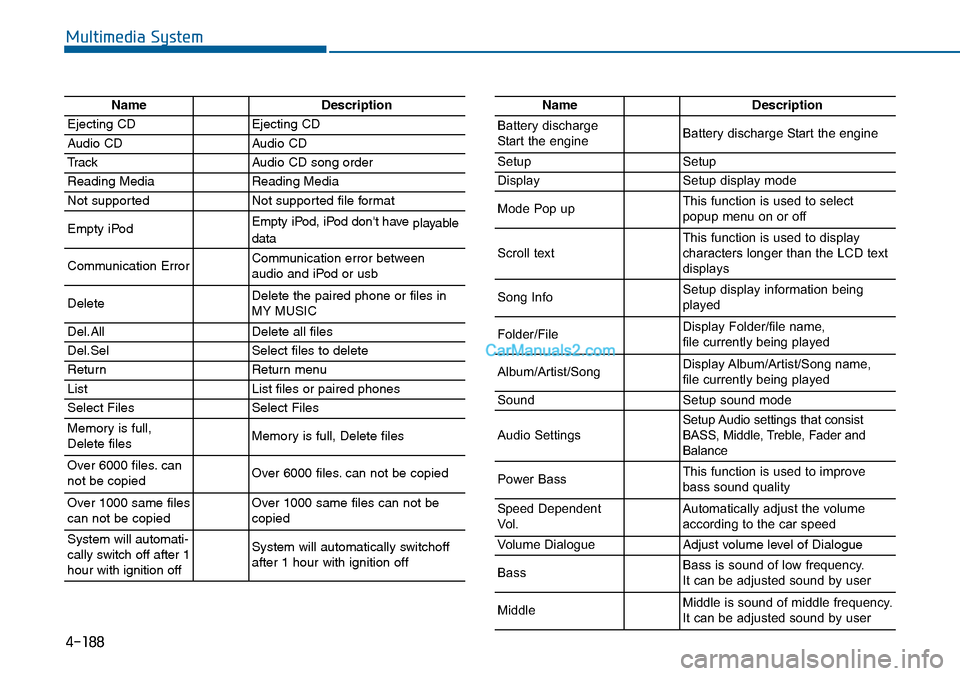
NameDescription
Ejecting CDEjecting CD
Audio CDAudio CD
TrackAudio CD song order
Reading MediaReading Media
Not supportedNot supported file format
Empty iPodEmpty iPod, iPod don't have playabledata
Communication ErrorCommunication error between audio and iPod or usb
DeleteDelete the paired phone or files in MY MUSIC
Del.AllDelete all files
Del.SelSelect files to delete
ReturnReturn menu
ListList files or paired phones
Select FilesSelect Files
Memory is full,Delete files Memory is full, Delete files
Over 6000 files. cannot be copied Over 6000 files. can not be copied
Over 1000 same filescan not be copied Over 1000 same files can not becopied
System will automati-cally switch off after 1hour with ignition off
System will automatically switchoffafter 1 hour with ignition off
NameDescription
Battery dischargeStart the engineBattery discharge Start the engine
SetupSetup
DisplaySetup display mode
Mode Pop upThis function is used to selectpopup menu on or off
Scroll textThis function is used to display characters longer than the LCD textdisplays
Song InfoSetup display information beingplayed
Folder/FileDisplay Folder/file name, file currently being played
Album/Artist/SongDisplay Album/Artist/Song name, file currently being played
SoundSetup sound mode
Audio SettingsSetup Audio settings that consistBASS, Middle, Treble, Fader andBalance
Power BassThis function is used to improvebass sound quality
Speed DependentVo l .Automatically adjust the volume according to the car speed
Vo l u m e D i a l o g u eAdjust volume level of Dialogue
BassBass is sound of low frequency. It can be adjusted sound by user
MiddleMiddle is sound of middle frequency. It can be adjusted sound by user
Page 447 of 665
4-189
Multimedia System
4
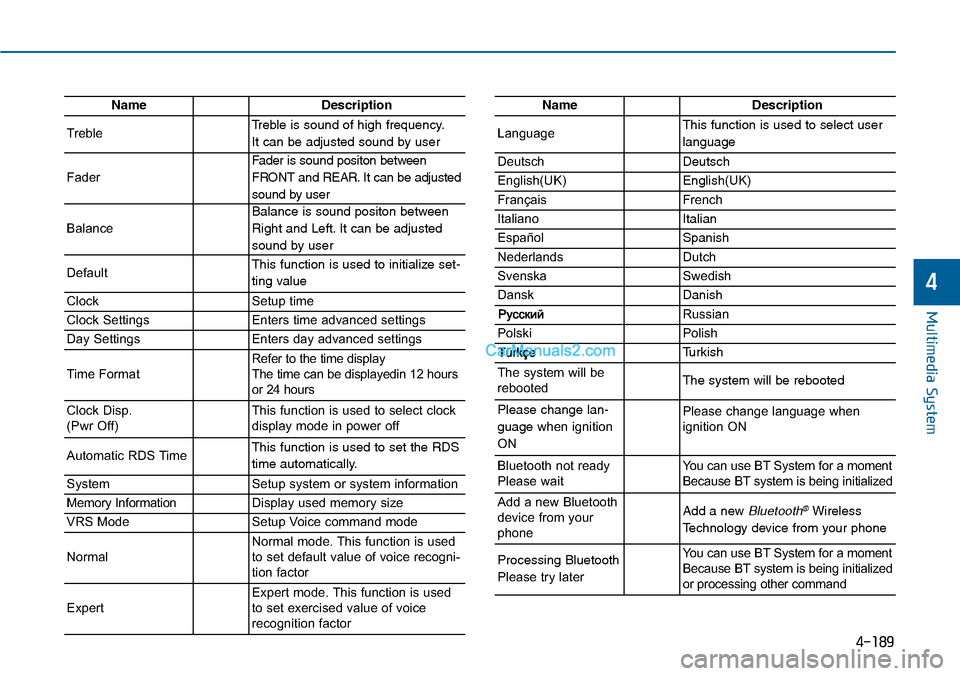
NameDescription
TrebleTreble is sound of high frequency.
It can be adjusted sound by user
Fader
Fader is sound positon between
FRONT and REAR. It can be adjusted
sound by user
Balance
Balance is sound positon between
Right and Left. It can be adjusted
sound by user
DefaultThis function is used to initialize set-
ting value
ClockSetup time
Clock SettingsEnters time advanced settings
Day SettingsEnters day advanced settings
Time FormatRefer to the time display The time can be displayedin 12 hoursor 24 hours
Clock Disp.(Pwr Off)This function is used to select clockdisplay mode in power off
Automatic RDS TimeThis function is used to set the RDS
time automatically.
SystemSetup system or system information
Memory InformationDisplay used memory size
VRS ModeSetup Voice command mode
NormalNormal mode. This function is usedto set default value of voice recogni-tion factor
ExpertExpert mode. This function is usedto set exercised value of voicerecognition factor
NameDescription
LanguageThis function is used to select user
language
DeutschDeutsch
English(UK)English(UK)
FrançaisFrench
Italiano Italian
EspañolSpanish
NederlandsDutch
SvenskaSwedish
DanskDanish
Russian
PolskiPolish
Turkish
The system will berebootedThe system will be rebooted
Please change lan-
guage when ignition
ON
Please change language when ignition ON
Bluetooth not readyPlease waitYo u c a n u s e B T S y s t e m f o r a m o m e n tBecause BT system is being initialized
Add a new Bluetoothdevice from yourphone
Add a new Bluetooth®Wireless
Technology device from your phone
Processing Bluetooth
Please try later
Yo u c a n u s e B T S y s t e m f o r a m o m e n tBecause BT system is being initializedor processing other command
Page 457 of 665
5-8
Driving your vehicle
Information
• Do not wait for the engine to warm
up while the vehicle remains station-
ary.
Start driving at moderate engine
speeds. (Steep accelerating and
decelerating should be avoided.)
• Always start the vehicle with your
foot on the brake pedal. Do not
depress the accelerator while start-
ing the vehicle. Do not race the
engine while warming it up.
To prevent damage to the vehicle:
•Do not hold the ignition key in
the START position for more
than 10 seconds. Wait 5 to 10
seconds before trying again.
•Do not turn the ignition switch to
the START position with the
engine running. It may damage
the starter.
•If traffic and road conditions
permit, you may put the shift
lever in the N (Neutral) position
while the vehicle is still moving
and turn the ignition switch to
the START position in an
attempt to restart the engine.
•Do not push or tow your vehicle
to start the engine.
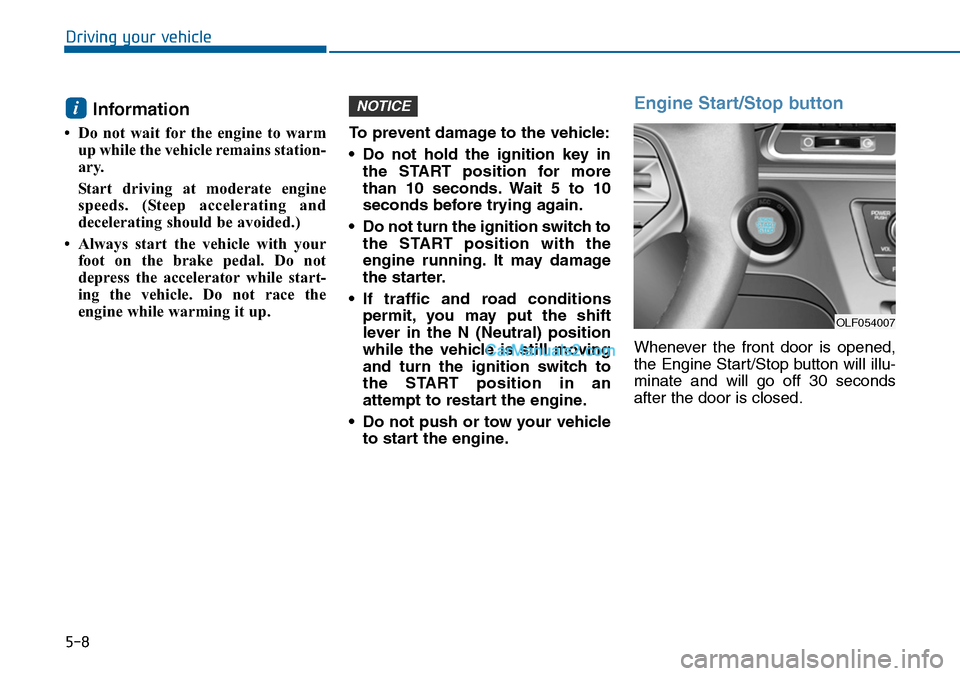
Engine Start/Stop button
Whenever the front door is opened,
the Engine Start/Stop button will illu-
minate and will go off 30 seconds
after the door is closed.
NOTICEi
OLF054007
Page 464 of 665
5-15
Driving your vehicle
5
Information
• Do not wait for the engine to warm
up while the vehicle remains station-
ary.
Start driving at moderate engine
speeds. (Steep accelerating and
decelerating should be avoided.)
• Always start the vehicle with your
foot on the brake pedal. Do not
depress the accelerator while start-
ing the vehicle. Do not race the
engine while warming it up.
To prevent damage to the vehicle:
•If the engine stalls while you are
in motion, do not attempt to
move the shift lever to the P
(Park) position.
If traffic and road conditions
permit, you may put the shift
lever in the N (Neutral) position
while the vehicle is still moving
and press the Engine Start/Stop
button in an attempt to restart
the engine.
•Do not push or tow your vehicle
to start the engine.
To prevent damage to the vehicle:
Do not press the Engine
Start/Stop button for more than 10
seconds except when the stop
lamp fuse is blown.
When the stop lamp fuse is blown,
you can't start the engine normal-
ly. Replace the fuse with a new
one. If you are not able to replace
the fuse, you can start the engine
by pressing and holding the
Engine Start/Stop button for 10
seconds with the Engine
Start/Stop button in the ACC posi-
tion.
For your safety always depress
the brake and/or clutch pedal
before starting the engine.
NOTICENOTICEi
Page 472 of 665
5-23
Driving your vehicle
5
R (Reverse)
Use this position to drive the vehicle
backward.
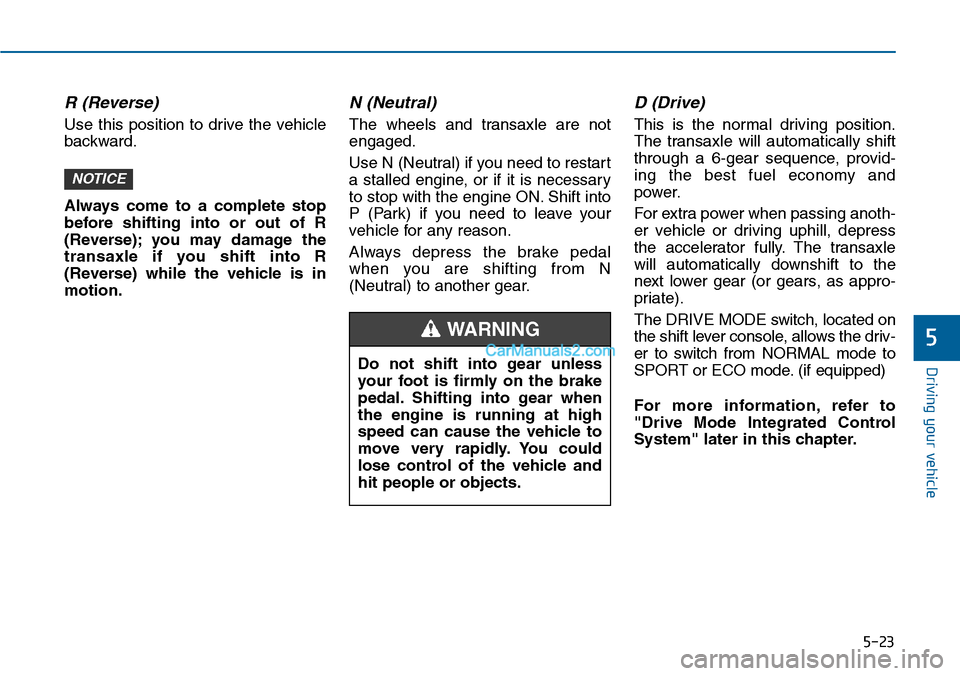
Always come to a complete stop
before shifting into or out of R
(Reverse); you may damage the
transaxle if you shift into R
(Reverse) while the vehicle is in
motion.
N (Neutral)
The wheels and transaxle are not
engaged.
Use N (Neutral) if you need to restart
a stalled engine, or if it is necessary
to stop with the engine ON. Shift into
P (Park) if you need to leave your
vehicle for any reason.
Always depress the brake pedal
when you are shifting from N
(Neutral) to another gear.
D (Drive)
This is the normal driving position.
The transaxle will automatically shift
through a 6-gear sequence, provid-
ing the best fuel economy and
power.
For extra power when passing anoth-
er vehicle or driving uphill, depress
the accelerator fully. The transaxle
will automatically downshift to the
next lower gear (or gears, as appro-
priate).
The DRIVE MODE switch, located on
the shift lever console, allows the driv-
er to switch from NORMAL mode to
SPORT or ECO mode. (if equipped)
For more information, refer to
"Drive Mode Integrated Control
System" later in this chapter.
NOTICE
Do not shift into gear unless
your foot is firmly on the brake
pedal. Shifting into gear when
the engine is running at high
speed can cause the vehicle to
move very rapidly. You could
lose control of the vehicle and
hit people or objects.
WARNING
Page 487 of 665
5-38
Driving your vehicle
If you continuously notice a noise
or burning smell when the EPB is
used for emergency braking, we
recommend that the system be
checked by an authorized
HYUNDAI dealer.
When the EPB (Electric Parking
Brake) does not release
If the EPB does not release normal-
ly, we recommend that you contact
an authorized HYUNDAI dealer by
loading the vehicle on a flatbed tow
truck and have the system checked.
AUTO HOLD (if equipped)
This feature keeps the brake applied
when the shift lever is in D (Drive), R
(Reverse), N (Neutral) or Sports
Mode with the feature enabled and
when the brake pedal has been
depressed to stop the vehicle.
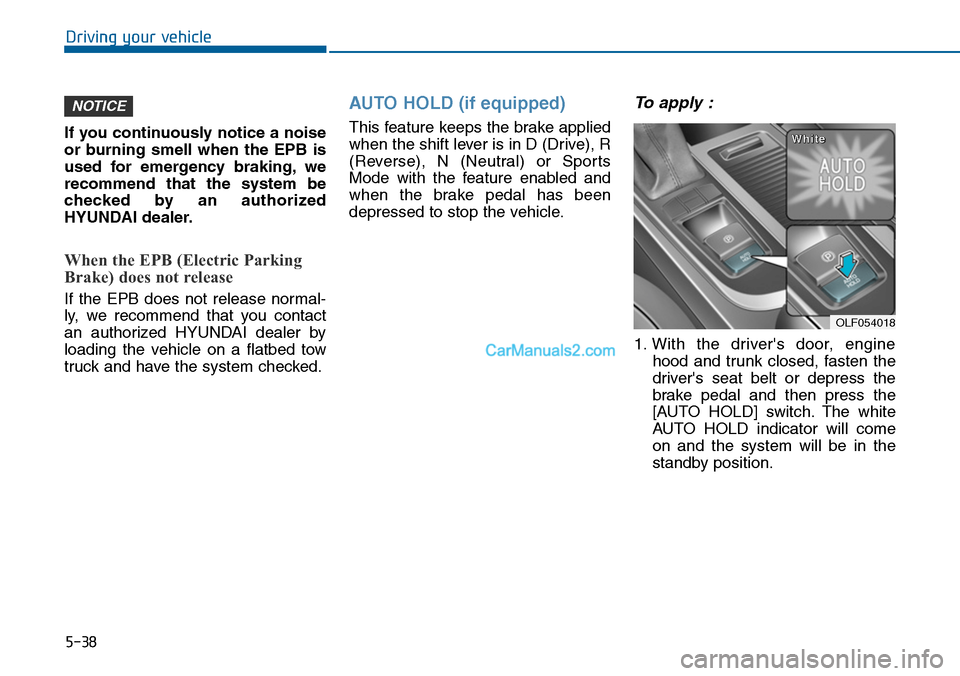
To apply :
1. With the driver's door, engine
hood and trunk closed, fasten the
driver's seat belt or depress the
brake pedal and then press the
[AUTO HOLD] switch. The white
AUTO HOLD indicator will come
on and the system will be in the
standby position.
NOTICE
OLF054018
WWhhiittee
Page 492 of 665
5-43
Driving your vehicle
5
ABS is an electronic braking system
that helps prevent a braking skid.
ABS allows the driver to steer and
brake at the same time.
Using ABS
To obtain the maximum benefit from
your ABS in an emergency situation,
do not attempt to modulate your
brake pressure and do not try to
pump your brakes. Depress your
brake pedal as hard as possible.
When you apply your brakes under
conditions which may lock the
wheels, you may hear sounds from
the brakes, or feel a corresponding
sensation in the brake pedal. This is
normal and it means your ABS is
active.
ABS does not reduce the time or dis-
tance it takes to stop the vehicle.
Always maintain a safe distance from
the vehicle in front of you.
ABS will not prevent a skid that
results from sudden changes in
direction, such as trying to take a
corner too fast or making a sudden
lane change. Always drive at a safe
speed for the road and weather con-
ditions.
ABS cannot prevent a loss of stabili-
ty. Always steer moderately when
braking hard. Severe or sharp steer-
ing wheel movement can still cause
your vehicle to veer into oncoming
traffic or off the road.
On loose or uneven road surfaces,
operation of the anti-lock brake sys-
tem may result in a longer stopping
distance than for vehicles equipped
with a conventional brake system.
The ABS warning light ( ) will stay
on for several seconds after the
Engine Start/Stop button is in the ON
position. During that time, the ABS
will go through self-diagnosis and the
light will go off if everything is nor-
mal. If the light stays on, you may
have a problem with your ABS. We
recommend that you contact an
authorized HYUNDAI dealer as soon
as possible.
(Continued)
•On roads where the road sur-
face is pitted or has different
surface height.
•Tire chains are installed on
your vehicle.
The safety features of an ABS
or ESC equipped vehicle should
not be tested by high speed
driving or cornering. This could
endanger the safety of yourself
or others.
Page 496 of 665

5-47
Driving your vehicle
5
Indicator lights
When the ignition switch is pressed
to the ON position, the ESC indicator
light illuminates, then goes off if the
ESC system is operating normally.
The ESC indicator light blinks when-
ever the ESC is operating.
If ESC indicator light stays on, your
vehicle may have a malfunction with
the ESC system. When this warning
light illuminates we recommend that
the vehicle be checked by an author-
ized HYUNDAI dealer as soon as
possible.
The ESC OFF indicator light comes
on when the ESC is turned off with
the button.
Driving with varying tire or wheel
sizes may cause the ESC system
to malfunction. When replacing
tires, make sure they are the same
size as your original tires for this
vehicle.
ESC OFF usage
When Driving
The ESC OFF mode should only be
used briefly to help free the vehicle if
stuck in snow or mud by temporarily
stopping operation of the ESC to
maintain wheel torque.
To turn ESC off while driving, press
the ESC OFF button while driving on
a flat road surface.
NOTICE
■ESC indicator light (blinks)
■ ESC OFF indicator light (comes on)When the ESC is blinking, this
indicates the ESC is active:
Drive slowly and NEVER
attempt to accelerate. NEVER
turn the ESC off while the ESC
indicator light is blinking or you
may lose control of the vehicle
resulting in an accident.
WARNING