2014 Hyundai Sonata warning
[x] Cancel search: warningPage 94 of 665
2-65
Safety system of your vehicle
2
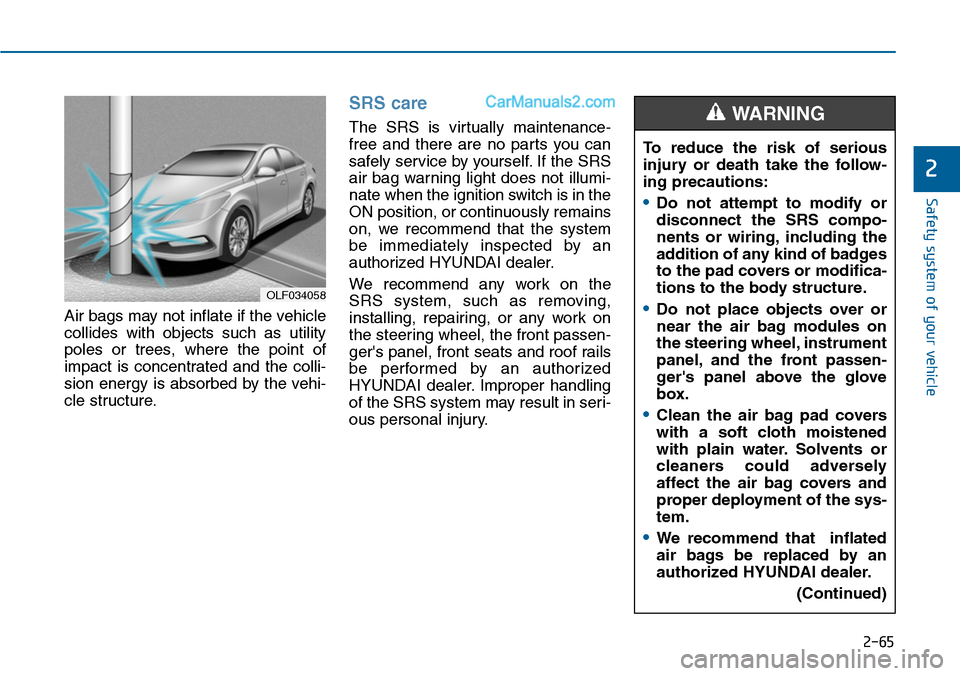
Air bags may not inflate if the vehicle
collides with objects such as utility
poles or trees, where the point of
impact is concentrated and the colli-
sion energy is absorbed by the vehi-
cle structure.
SRS care
The SRS is virtually maintenance-
free and there are no parts you can
safely service by yourself. If the SRS
air bag warning light does not illumi-
nate when the ignition switch is in the
ON position, or continuously remains
on, we recommend that the system
be immediately inspected by an
authorized HYUNDAI dealer.
We recommend any work on the
SRS system, such as removing,
installing, repairing, or any work on
the steering wheel, the front passen-
ger's panel, front seats and roof rails
be performed by an authorized
HYUNDAI dealer. Improper handling
of the SRS system may result in seri-
ous personal injury.
OLF034058
To reduce the risk of serious
injury or death take the follow-
ing precautions:
•Do not attempt to modify or
disconnect the SRS compo-
nents or wiring, including the
addition of any kind of badges
to the pad covers or modifica-
tions to the body structure.
•Do not place objects over or
near the air bag modules on
the steering wheel, instrument
panel, and the front passen-
ger's panel above the glove
box.
•Clean the air bag pad covers
with a soft cloth moistened
with plain water. Solvents or
cleaners could adversely
affect the air bag covers and
proper deployment of the sys-
tem.
•We recommend that inflated
air bags be replaced by an
authorized HYUNDAI dealer.
(Continued)
WARNING
Page 96 of 665
2-67
Safety system of your vehicle
2
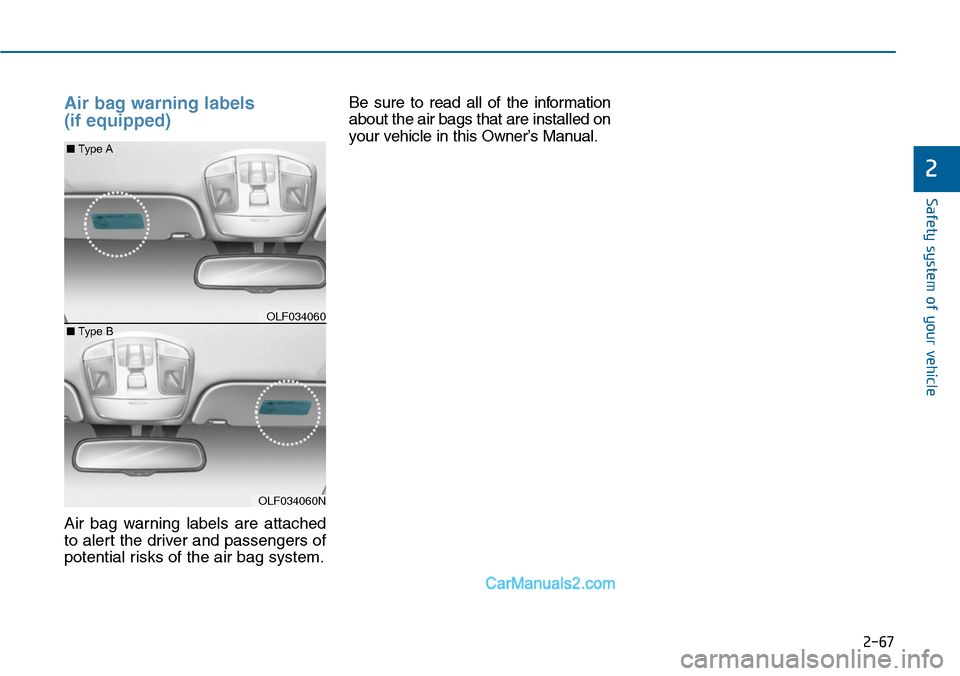
Air bag warning labels
(if equipped)
Air bag warning labels are attached
to alert the driver and passengers of
potential risks of the air bag system.
Be sure to read all of the information
about the air bags that are installed on
your vehicle in this Owner’s Manual.
OLF034060
■Type A
OLF034060N
■Type B
Page 98 of 665

A/V mode ..........................................................................3-68
Information mode ............................................................3-68
User settings mode.........................................................3-70
Warning messages ..........................................................3-75
Tr i p c o m p u t e r . . . . . . . . . . . . . . . . . . . . . . . . . . . . . . . . . . . . . . . . . . . . . . . . . . . . . . . 3 - 8 3
Overview............................................................................3-83
Tr i p m o d e s . . . . . . . . . . . . . . . . . . . . . . . . . . . . . . . . . . . . . . . . . . . . . . . . . . . . . . . . . . . . . . . . . . . . . . . . 3 - 8 3
Tr i p A / B . . . . . . . . . . . . . . . . . . . . . . . . . . . . . . . . . . . . . . . . . . . . . . . . . . . . . . . . . . . . . . . . . . . . . . . . . . . . . 3 - 8 3
Fuel economy ...................................................................3-84
Warning and indicator lights ..............................3-87
Warning lights ..................................................................3-87
Indicator lights .................................................................3-94
Light .......................................................................3-98
Exterior lights ..................................................................3-98
Welcome system ...........................................................3-105
Interior lights..................................................................3-106
Wipers and washers ..........................................3-111
Windshield wipers ........................................................3-111
Windshield washers ....................................................3-113
Driver assist system ..........................................3-115
Rear view camera .........................................................3-115
Rear parking assist system ........................................3-116
Parking assist system ..................................................3-119
Defroster .............................................................3-122
Rear window defroster ...............................................3-122
Manual climate control system........................3-124
Heating and air conditioning......................................3-125
System operation ..........................................................3-130
System maintenance ....................................................3-132
Checking the amount of air conditioner refrigerant and
compressor lubricant ...................................................3-133
Automatic climate control system ...................3-134
Automatic heating and air conditioning ..................3-135
Manual heating and air conditioning .......................3-136
System operation ..........................................................3-142
System maintenance ....................................................3-145
Checking the amount of air conditioner refrigerant and
compressor lubricant ...................................................3-145
Windshield defrosting and defogging ............3-146
Manual climate control system .................................3-146
Automatic climate control system ............................3-147
Defogging logic..............................................................3-148
Climate control additional features.................3-150
Cluster ionizer ................................................................3-150
Sunroof inside air recirculation.................................3-150
Storage compartment ........................................3-151
Center console storage ...............................................3-151
Glove box ........................................................................3-152
Sunglass holder .............................................................3-152
Multi box .........................................................................3-153
3
Page 100 of 665
3-4
Convenient features of your vehicle
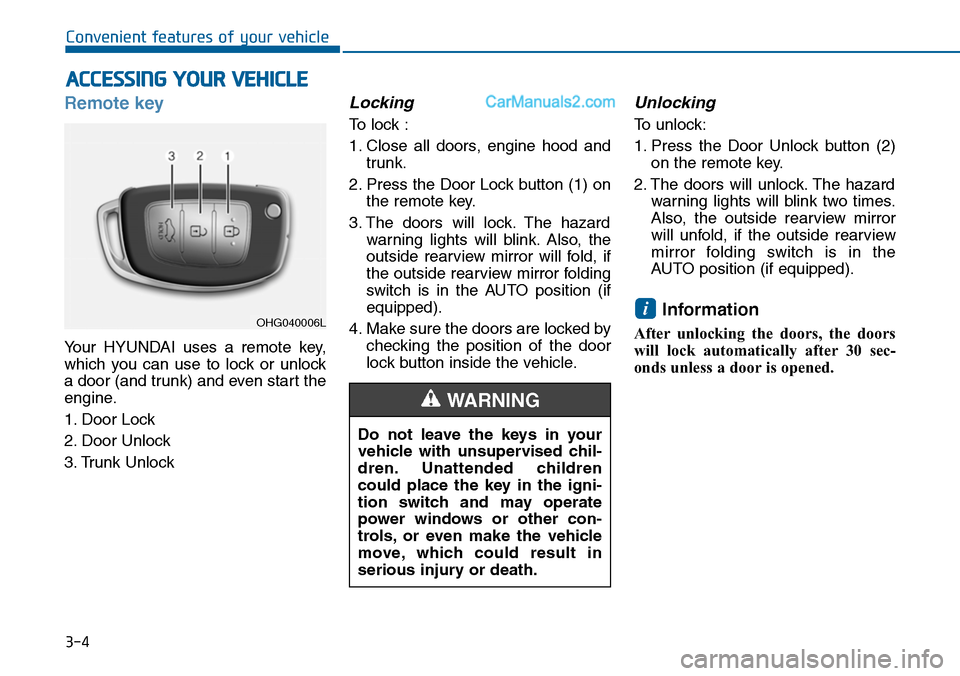
Remote key
Yo u r H Y U N D A I u s e s a r e m o t e k e y,
which you can use to lock or unlock
a door (and trunk) and even start the
engine.
1. Door Lock
2. Door Unlock
3. Trunk Unlock
Locking
To lock :
1. Close all doors, engine hood and
trunk.
2. Press the Door Lock button (1) on
the remote key.
3. The doors will lock. The hazard
warning lights will blink. Also, the
outside rearview mirror will fold, if
the outside rearview mirror folding
switch is in the AUTO position (if
equipped).
4. Make sure the doors are locked by
checking the position of the door
lock button inside the vehicle.
Unlocking
To unlock:
1. Press the Door Unlock button (2)
on the remote key.
2. The doors will unlock. The hazard
warning lights will blink two times.
Also, the outside rearview mirror
will unfold, if the outside rearview
mirror folding switch is in the
AUTO position (if equipped).
Information
After unlocking the doors, the doors
will lock automatically after 30 sec-
onds unless a door is opened.
i
ACCESSING YOUR VEHICLE
Do not leave the keys in your
vehicle with unsupervised chil-
dren. Unattended children
could place the key in the igni-
tion switch and may operate
power windows or other con-
trols, or even make the vehicle
move, which could result in
serious injury or death.
WARNING
OHG040006L
Page 101 of 665
3-5
Convenient features of your vehicle
Trunk unlocking
To unlock:
1. Press the Trunk Unlock button (3)
on the remote key for more than
one second.
2. The hazard warning lights will
blink two times. Once the trunk is
opened and then closed, the trunk
will lock automatically.
Information
• After unlocking the trunk, the trunk
will lock automatically.
• The word "HOLD" is written on the
button to inform you that you must
press and hold the button for more
than one second.
Start-up
For detailed infor mation refer to “Key
Ignition Switch” in chapter 5.
To prevent damaging the remote
key:
•Keep the remote key away from
water or any liquid. If the remote
key is inoperative due to expo-
sure to water or other liquids, it
will not be covered by your man-
ufacturer’s vehicle warranty.
•Avoid dropping or throwing the
remote key.
•Protect the remote key from
extreme temperatures.
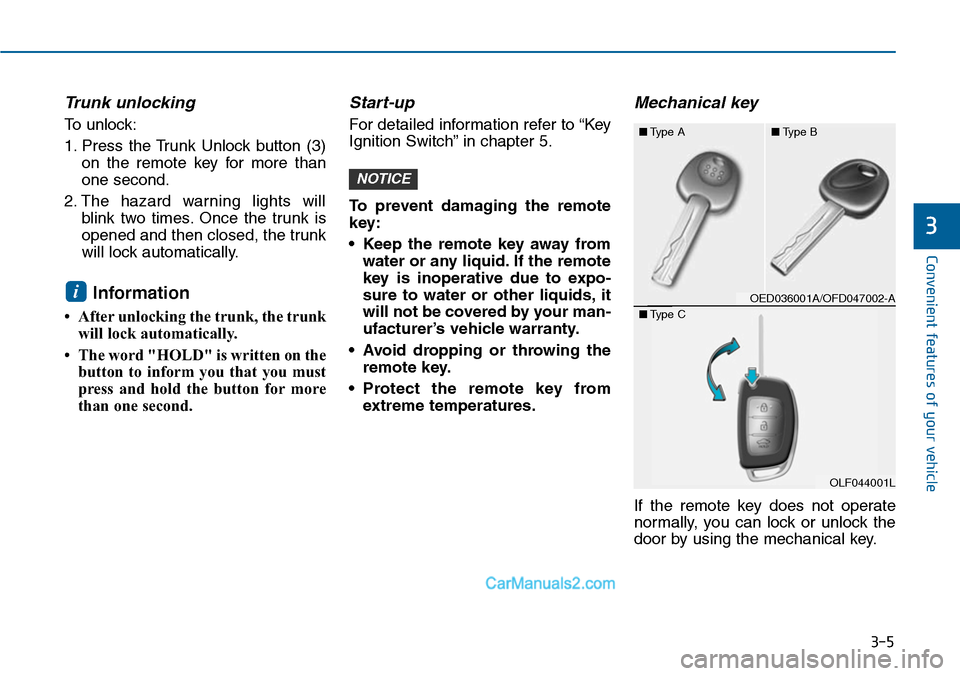
Mechanical key
If the remote key does not operate
normally, you can lock or unlock the
door by using the mechanical key.
NOTICE
i
3
OED036001A/OFD047002-A
■Type A■Type B
OLF044001L
■Type C
Page 104 of 665
3-8
Smart key
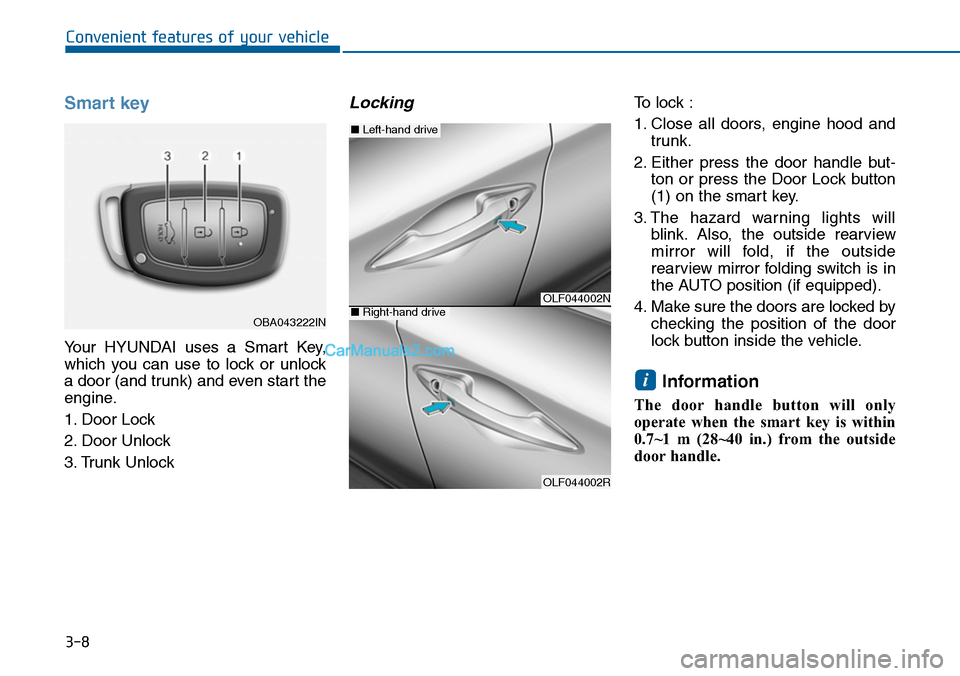
Yo u r H Y U N D A I u s e s a S m a r t K e y,
which you can use to lock or unlock
a door (and trunk) and even start the
engine.
1. Door Lock
2. Door Unlock
3. Trunk Unlock
Locking To lock :
1. Close all doors, engine hood and
trunk.
2. Either press the door handle but-
ton or press the Door Lock button
(1) on the smart key.
3. The hazard warning lights will
blink. Also, the outside rearview
mirror will fold, if the outside
rearview mirror folding switch is in
the AUTO position (if equipped).
4. Make sure the doors are locked by
checking the position of the door
lock button inside the vehicle.
Information
The door handle button will only
operate when the smart key is within
0.7~1 m (28~40 in.) from the outside
door handle.
i
Convenient features of your vehicle
OBA043222IN
OLF044002N
OLF044002R
■Left-hand drive
■Right-hand drive
Page 105 of 665
3-9
Convenient features of your vehicle
Even though you press the outside
door handle button, the doors will not
lock and the chime will sound for
three seconds if any of the following
occur:
•The Smart Key is in the vehicle.
•The Engine Start/Stop button is in
ACC or ON position.
•Any door except the trunk is open.
Unlocking
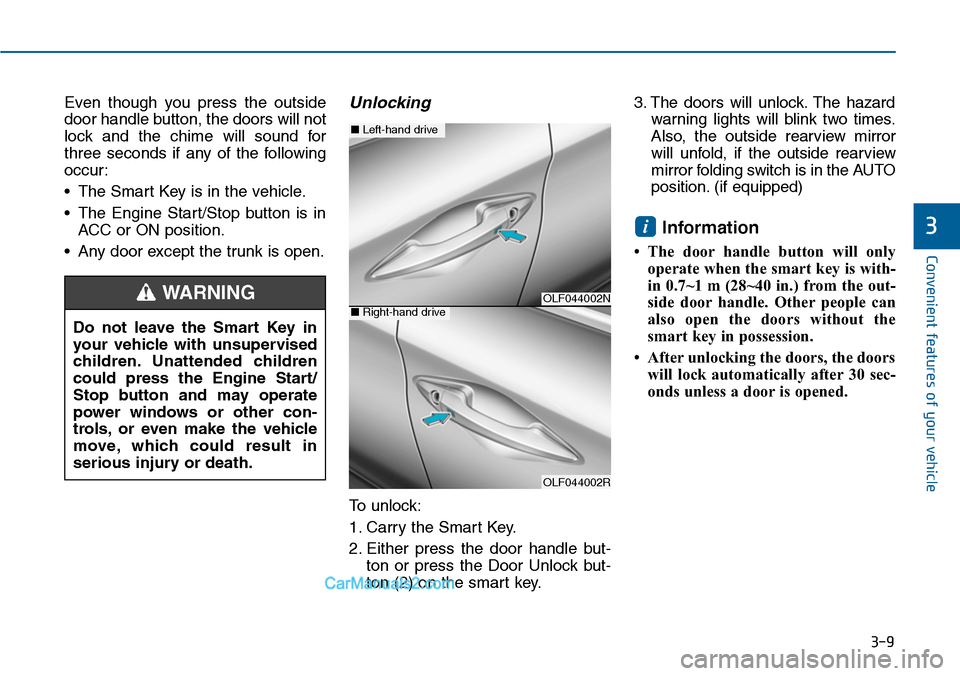
To unlock:
1. Carry the Smart Key.
2. Either press the door handle but-
ton or press the Door Unlock but-
ton (2) on the smart key.
3. The doors will unlock. The hazard
warning lights will blink two times.
Also, the outside rearview mirror
will unfold, if the outside rearview
mirror folding switch is in the AUTO
position. (if equipped)
Information
• The door handle button will only
operate when the smart key is with-
in 0.7~1 m (28~40 in.) from the out-
side door handle. Other people can
also open the doors without the
smart key in possession.
•Afterunlocking the doors, the doors
will lock automatically after 30 sec-
onds unless a door is opened.
i3
Do not leave the Smart Key in
your vehicle with unsupervised
children. Unattended children
could press the Engine Start/
Stop button and may operate
power windows or other con-
trols, or even make the vehicle
move, which could result in
serious injury or death.
WARNINGOLF044002N
OLF044002R
■Left-hand drive
■Right-hand drive
Page 106 of 665
3-10
Convenient features of your vehicle
Trunk unlocking
To unlock:
1. Carry the smart key.
2. Either press the trunk handle but-
ton or press the Trunk Unlock but-
ton (3) on the smart key for more
than one second.
3. The hazard warning lights will
blink two times.
Once the trunk is opened and then
closed, the trunk will lock automati-
cally.
Information
After unlocking the trunk, the trunk
will lock automatically after 30 sec-
onds unless the trunk is opened.
Start-up
Yo u c a n s t a r t t h e e n g i n e w i t h o u t
inserting the key.For detailed infor-
mation refer to the Engine
Start/Stop button in chapter 5.
To prevent damaging the smart
key:
•Keep the smart key away from
water or any liquid. If the smart
key is inoperative due to expo-
sure to water or other liquids, it
will not be covered by your man-
ufacturer’s vehicle warranty.
•Avoid dropping or throwing the
smart key.
•Protect the smart key from
extreme temperatures.
Mechanical key
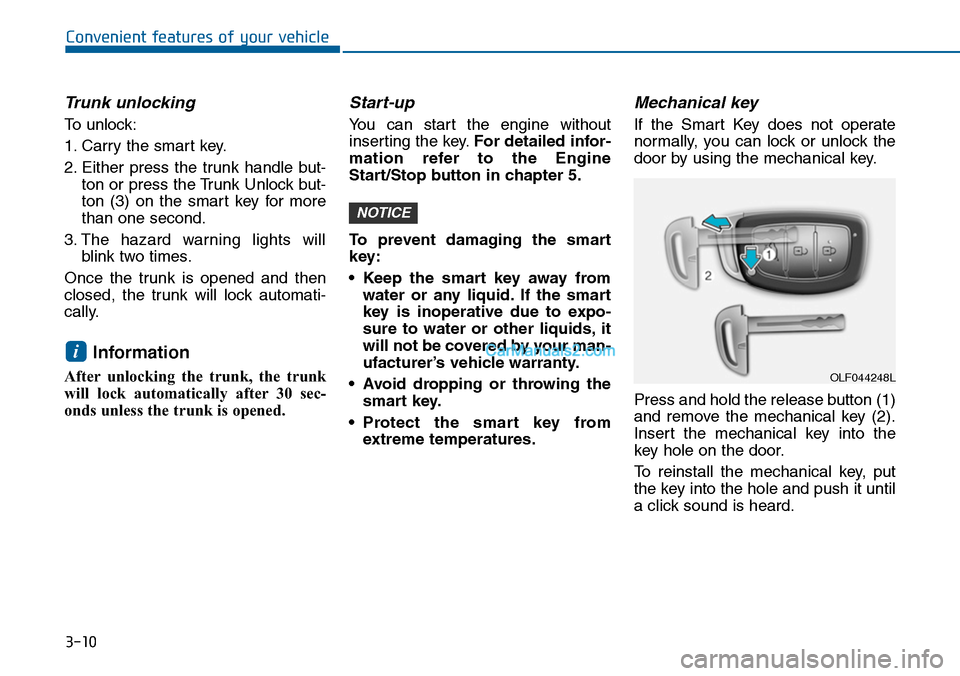
If the Smart Key does not operate
normally, you can lock or unlock the
door by using the mechanical key.
Press and hold the release button (1)
and remove the mechanical key (2).
Insert the mechanical key into the
key hole on the door.
To reinstall the mechanical key, put
the key into the hole and push it until
a click sound is heard.
NOTICE
i
OLF044248L