2014 Hyundai Sonata display
[x] Cancel search: displayPage 452 of 665
5-3
Driving your vehicle
5
Before entering the vehicle
•Be sure all windows, outside mir-
ror(s), and outside lights are clean
and unobstructed.
•Remove frost, snow, or ice.
•Visually check the tires for uneven
wear and damage.
•Check under the vehicle for any
sign of leaks.
•Be sure there are no obstacles
behind you if you intend to back up.
Before starting
•Make sure the hood, the trunk, and
the doors are securely closed and
locked.
•Adjust the position of the seat and
steering wheel.
•Adjust the inside and outside
rearview mirrors.
•Verify all the lights work.
•Fasten your seatbelt.Check that all
passengers have fastened their
seatbelts.
•Check the gauges and indicators in
the instrument panel and the mes-
sages on the instrument display
when the ignition switch is in the
ON position.
•Check that any items you are car-
rying are stored properly or fas-
tened down securely.
BEFORE DRIVING
To reduce the risk of SERIOUS
INJURY or DEATH, take the fol-
lowing precautions:
•ALWAYS wear your seat belt.
All passengers must be prop-
erly belted whenever the vehi-
cle is moving. For more infor-
mation, refer to “Seat Belts” in
chapter 2.
•Always drive defensively.
Assume other drivers or
pedestrians may be careless
and make mistakes.
•Stay focused on the task of
driving. Driver distraction can
cause accidents.
•Leave plenty of space
between you and the vehicle
in front of you.
WARNING
Page 471 of 665
5-22
Driving your vehicle
Automatic transaxle operation
The automatic transaxle has six for-
ward speeds and one reverse speed.
The individual speeds are selected
automatically in the D (Drive) posi-
tion.
The indicator in the instrument clus-
ter displays the shift lever position
when the ignition switch is in the ON
position.
P (Park)
Always come to a complete stop
before shifting into P (Park).
To shift from P (Park), you must
depress firmly on the brake pedal
and make sure your foot is off the
accelerator pedal.
If you have done all of the above
and still cannot shift the lever out
of P (Park), see “Shift-Lock
Release” in this chapter.
The shift lever must be in P (Park)
before turning the engine off.
To reduce the risk of serious
injury or death:
•ALWAYS check the surround-
ing areas near your vehicle for
people, especially children,
before shifting a vehicle into
D (Drive) or R (Reverse).
•Before leaving the driver’s
seat, always make sure the
shift lever is in the P (Park)
position, then set the parking
brake, and place the ignition
switch in the LOCK/OFF posi-
tion. Unexpected and sudden
vehicle movement can occur
if these precautions are not
followed.
(Continued)
(Continued)
•Do not use the engine brake
(shifting from a high gear to
lower gear) rapidly on slip-
pery roads. The vehicle may
slip causing an accident.
WARNING
•Shifting into P (Park) while the
vehicle is in motion may
cause you to lose control of
the vehicle.
•After the vehicle has stopped,
always make sure the shift
lever is in P (Park), apply the
parking brake, and turn the
engine off.
•Do not use the P (Park) posi-
tion in place of the parking
brake.
WARNING
Page 491 of 665
![Hyundai Sonata 2014 Owners Manual 5-42
Driving your vehicle
Press brake pedal to deactivate
AUTO HOLD
If you did not apply the brake pedal
when you release the Auto Hold by
pressing the [AUTO HOLD] switch, a
warning will](/manual-img/35/16805/w960_16805-490.png "Hyundai Sonata 2014 Owners Manual 5-42
Driving your vehicle
Press brake pedal to deactivate
AUTO HOLD
If you did not apply the brake pedal
when you release the Auto Hold by
pressing the [AUTO HOLD] switch, a
warning will")
5-42
Driving your vehicle
Press brake pedal to deactivate
AUTO HOLD
If you did not apply the brake pedal
when you release the Auto Hold by
pressing the [AUTO HOLD] switch, a
warning will sound and a message
will appear.
AUTO HOLD conditions not met.
Close door, hood, trunk, and fasten
seatbelt
When you press the [AUTO HOLD]
switch, if the driver’s door, engine
hood and trunk are not closed or the
driver’s seat belt is not fastened, a
warning will sound and a message
will appear on the LCD display. In
that time, press the [AUTO HOLD]
button after closing the driver’s door,
engine hood and trunk and fastening
the seat belt.
Anti-lock Brake System (ABS)
An Anti-Lock Braking System
(ABS) or an Electronic Stability
Control (ESC) system will not
prevent accidents due to
improper or dangerous driving
maneuvers. Even though vehi-
cle control is improved during
emergency braking, always
maintain a safe distance
between you and objects ahead
of you. Vehicle speeds should
always be reduced during
extreme road conditions. The
braking distance for cars
equipped with ABS or ESC may
be longer than for those without
these systems in the following
road conditions.
•Drive your vehicle at reduced
speeds during the following
conditions:
•Rough, gravel or snow-cov-
ered roads.
(Continued)
WARNING
OLF054129N
■Type A■Type B
OLF054127N/OLF044407N
Page 497 of 665
5-48
Driving your vehicle
To p r e v e n t d a m a g e t o t h e
transaxle:
•Do not allow wheel(s) of one
axle to spin excessively while
the ESC, ABS, and brake warn-
ing lights are displayed. The
repairs would not be covered by
the vehicle warranty. Reduce
engine power and do not spin
the wheel(s) excessively while
these lights are displayed.
•When operating the vehicle on a
dynamometer, ensure the ESC is
turned off (ESC OFF light illumi-
nated).
Information
Turning the ESC off does not affect
ABS or standard brake system opera-
tion.
Vehicle Stability Manag ement
(if equipped)
Ve h i c l e S t a b i l i t y M a n a g e m e n t ( V S M )
helps ensure the vehicle stays stable
when accelerating or braking sud-
denly on wet, slippery and rough
roads where traction over the four
tires can suddenly become uneven.
VSM operation
VSM ON condition
The VSM operates when:
•The Electronic Stability Control
(ESC) is on.
•Vehicle speed is approximately
above 15 km/h (9mph) on curve
roads.
•Vehicle speed is approximately
above 20 km/h (12mph) when the
vehicle is braking on rough roads.
When operating
When you apply your brakes under
conditions which may activate the
ESC, you may hear sounds from the
brakes, or feel a corresponding sen-
sation in the brake pedal. This is nor-
mal and it means your VSM is active.
i
NOTICE
Take the following precautions
when using the Vehicle Stability
Management (VSM):
•ALWAYS check the speed and
the distance to the vehicle
ahead. The VSM is not a sub-
stitute for safe driving prac-
tices.
•Never drive too fast for the
road conditions. The VSM sys-
tem will not prevent acci-
dents. Excessive speed in bad
weather, slippery and uneven
roads can result in severe
accidents.
WARNING
Page 501 of 665

5-52
Driving your vehicle
DRIVE MODE INTEGRATED CONTROL SYSTEM (IF EQUIPPED)
The drive mode may be selected
according to the driver’s preference
or road condition.
The system initializes to the NOR-
MAL mode (except for ECO mode)
after the engine has been turned off
and on.
Information
If there is a problem with the instru-
ment cluster, the drive mode will be in
NORMAL mode and may not change
to ECO mode or SPORT mode.
•The mode changes whenever the
DRIVE MODE button is pressed.
When NORMAL mode is selected,
it is not displayed on the instrument
cluster.
ECO mode (Active ECO)
Active ECO helps improve
fuel efficiency by control-
ling certain engine and
transaxle system operating
parameters.
Fuel efficiency depends on the driver's
driving habit and road condition.
•When the DRIVE MODE button is
pressed and the ECO mode is
selected, the ECO indicator
(green) will illuminate to show that
the Active ECO is operating.
•When the Active ECO is activated,
and the engine is turned off and on
it will maintain ECO mode.
i
NORMAL
ECO SPORT
ECO
OLF054021L
OLF054140L
OLF054141L
■Type B
■Type A
■Type C
Page 509 of 665

5-60
Driving your vehicle
As the Blind Spot Detection
(BSD) system is a supplemental
device for your safe driving, it
may be dangerous to rely on
only the BSD information of the
head up display image when
changing the lane. Always pay
attention to drive safely.
WARNING
The Blind Spot Detection System
(BSD) uses a radar sensor to alert
the driver.
It senses the rear side territory of the
vehicle and provides an indication to
the driver if it detects an object
approaching from these areas.
(1) BSD (Blind Spot Detection)
The warning range depends on
your vehicle speed. However, if
your vehicle is much faster than
the other vehicle, the system will
not warn you.
(2) LCA (Lane Change Assist)
If the system detects a vehicle
approaching you at high speed,
the system will warn you.
(3) RCTA (Rear Cross Traffic Alert)
If the sensor detects an
approaching vehicle from the left
and right side as your vehicle
moves rearward, the system will
warn you.
BLIND SPOT DETECTION SYSTEM (BSD) (IF EQUIPPED)
OLF054067L
Blind spot area
Closing at high speed
•Always check the road condi-
tion while driving for unex-
pected situations even
though the Blind Spot
Detection System (BSD) is
operating.
(Continued)
(Continued)
•The Blind Spot Detection
System (BSD) is a supplemen-
tal system to assist you. Do
not solely rely on the system
and always pay attention and
drive safely.
•The Blind Spot Detection
System (BSD) is not a substi-
tute for proper and safe driv-
ing. Always drive safely and
use caution when changing
lanes or backing the vehicle
up. The Blind Spot Detection
System (BSD) may not detect
every object alongside the
vehicle.
WARNING
Page 513 of 665

5-64
Driving your vehicle
RCTA (Rear Cross Traffic Alert)
Operating conditions
To operate:
Go to the User Settings Mode
(Driving Assist) and select RCTA
(Rear Cross Traffic Alert) on the LCD
display (For more details, refer to
"LCD Display" in chapter 3.).The
system will turn on and standby to
activate. The system will activate
when vehicle speed is below 10km/h
(6.2mph) with the shift lever in R
(Reverse).
Information
The RCTA (Rear Cross Traffic Alert)
detecting range is about 0.5m ~ 20m.
A vehicle will be detected if the vehicle
speed is 4km/h ~ 36km/h within the
detecting range. However, the detect-
ing range may change under different
conditions. Always pay attention to
the surroundings.
Warning type
If the vehicle detected by the sensors
approaches your vehicle, the warn-
ing chime will sound, the warning
light on the outside rearview mirror
will blink and a message will appear
on the LCD display.
Information
• If the detected vehicle is out of the
sensing range of your vehicle, move
the vehicle away from the detected
object slowly; the warning will be
cancelled.
• The system may not operate proper-
ly due to other factors or circum-
stances. Always pay attention to
your surrounding.
• If your vehicle's left or right side
bumper is blinded by barrier or
vehicles, the system sensing ability
may be reduced.
i
i
• Type A■ Left
■ Right
• Type B
• Type A• Type B
OLF054221N/OLF054219N
OLF054222N/OLF054218N
Page 611 of 665
7-54
Maintenance
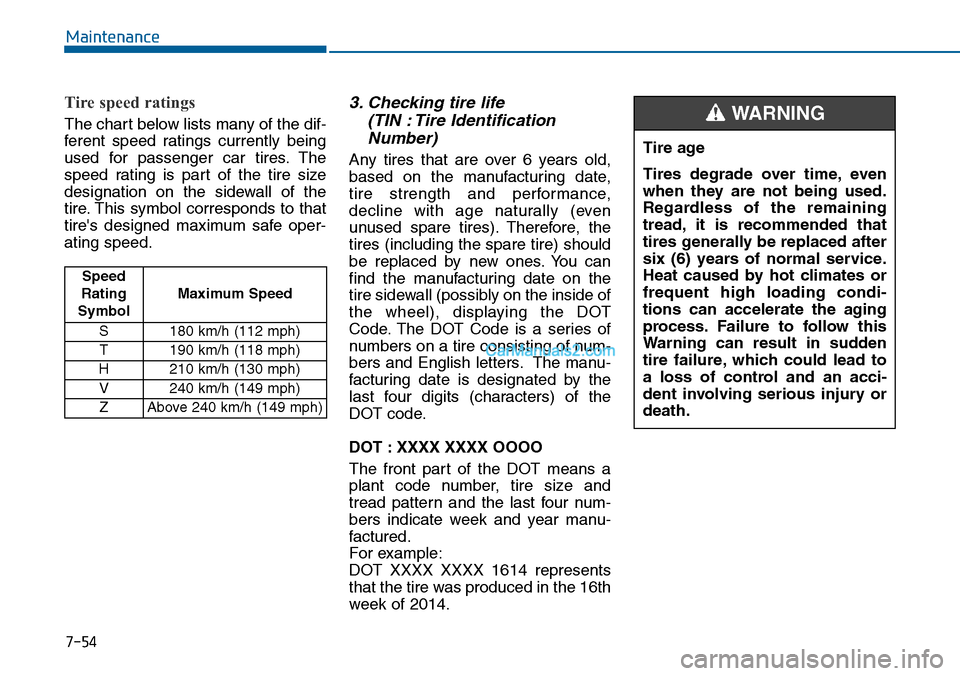
Tire speed ratings
The chart below lists many of the dif-
ferent speed ratings currently being
used for passenger car tires. The
speed rating is part of the tire size
designation on the sidewall of the
tire. This symbol corresponds to that
tire's designed maximum safe oper-
ating speed.
3. Checking tire life
(TIN : Tire Identification
Number)
Any tires that are over 6 years old,
based on the manufacturing date,
tire strength and performance,
decline with age naturally (even
unused spare tires). Therefore, the
tires (including the spare tire) should
be replaced by new ones. You can
find the manufacturing date on the
tire sidewall (possibly on the inside of
the wheel), displaying the DOT
Code. The DOT Code is a series of
numbers on a tire consisting of num-
bers and English letters. The manu-
facturing date is designated by the
last four digits (characters) of the
DOT code.
DOT : XXXX XXXX OOOO
The front part of the DOT means a
plant code number, tire size and
tread pattern and the last four num-
bers indicate week and year manu-
factured.
For example:
DOT XXXX XXXX 1614 represents
that the tire was produced in the 16th
week of 2014.
Tire age
Tires degrade over time, even
when they are not being used.
Regardless of the remaining
tread, it is recommended that
tires generally be replaced after
six (6) years of normal service.
Heat caused by hot climates or
frequent high loading condi-
tions can accelerate the aging
process. Failure to follow this
Warning can result in sudden
tire failure, which could lead to
a loss of control and an acci-
dent involving serious injury or
death.
WARNING
Speed
Rating
Symbol
Maximum Speed
S 180 km/h (112 mph)
T190 km/h (118 mph)
H210 km/h (130 mph)
V 240 km/h (149 mph)
ZAbove 240 km/h (149 mph)