2014 Hyundai Santa Fe start engine
[x] Cancel search: start enginePage 259 of 711
Features of your vehicle
158 4
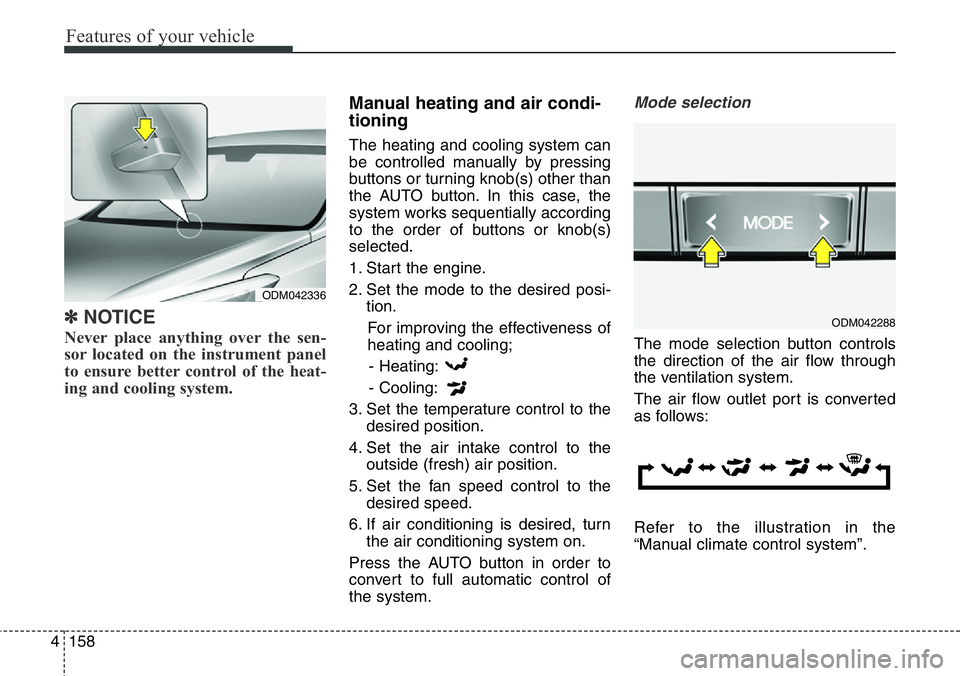
✽NOTICE
Never place anything over the sen-
sor located on the instrument panel
to ensure better control of the heat-
ing and cooling system.
Manual heating and air condi-
tioning
The heating and cooling system can
be controlled manually by pressing
buttons or turning knob(s) other than
the AUTO button. In this case, the
system works sequentially according
to the order of buttons or knob(s)
selected.
1. Start the engine.
2. Set the mode to the desired posi-
tion.
For improving the effectiveness of
heating and cooling;
- Heating:
- Cooling:
3. Set the temperature control to the
desired position.
4. Set the air intake control to the
outside (fresh) air position.
5. Set the fan speed control to the
desired speed.
6. If air conditioning is desired, turn
the air conditioning system on.
Press the AUTO button in order to
convert to full automatic control of
the system.
Mode selection
The mode selection button controls
the direction of the air flow through
the ventilation system.
The air flow outlet port is converted
as follows:
Refer to the illustration in the
“Manual climate control system”.
ODM042336
ODM042288
Page 267 of 711
Features of your vehicle
166 4
Air conditioning (if equipped)
HYUNDAI Air Conditioning Systems
are filled with environmentally friend-
ly refrigerant*.
1. Start the engine. Push the air con-
ditioning button.
2. Set the mode to the position.
3. Set the air intake control to the
outside air or recirculated air posi-
tion.
4. Adjust the fan speed control and
temperature control to maintain
maximum comfort.
*: Your vehicle is filled with R-134a or
R-1234yf according to the regula-
tion in your country at the time of
producing. You can find out which
air conditioning refrigerant is
applied your vehicle at the label
inside of hood. Refer to section 8
for more detail location of air con-
ditioning refrigerant label.
✽NOTICE
• When using the air conditioning
system, monitor the temperature
gauge closely while driving up
hills or in heavy traffic when out-
side temperatures are high. Air
conditioning system operation
may cause engine overheating.
Continue to use the blower fan but
turn the air conditioning system
off if the temperature gauge indi-
cates engine overheating.
• When opening the windows in
humid weather air conditioning
may create water droplets inside
the vehicle. Since excessive water
droplets may cause damage to
electrical equipment, air condi-
tioning should only be used with
the windows closed.CAUTION
• The refrigerant system should
only be serviced by trained
and certified technicians to
insure proper and safe opera-
tion.
• The refrigerant system should
be serviced in a well-ventilat-
ed place.
• The air conditioning evapora-
tor (cooling coil) shall never
be repaired or replaced with
one removed from a used or
salvaged vehicle and new
replacement MAC evaporators
shall be certified (and labeled)
as meeting SAE Standard
J2842.
Page 299 of 711
Features of your vehicle
198 4
✽NOTICE - USING THE USB
DEVICE
• To use an external USB device,
make sure the device is not con-
nected when starting up the vehi-
cle. Connect the device after start-
ing up.
• If you start the engine when the
USB device is connected, it may
damage the USB device. (USB
flashdrives are very sensitive to
electric shock.)
• If the engine is started up or
turned off while the external USB
device is connected, the external
USB device may not work.
• The System may not play inau-
thentic MP3 or WMA files.
1) It can only play MP3 files with
the compression rate between
8Kbps ~ 320Kbps.
2) It can only play WMA music
files with the compression rate
between 8Kbps ~ 320Kbps.
• Take precautions for static elec-
tricity when connecting or discon-
necting the external USB device.
• An encrypted MP3 PLAYER is
not recognizable.
(Continued)(Continued)
• Depending on the condition of the
external USB device, the connect-
ed external USB device can be
unrecognizable.
• When the formatted byte/sector
setting of External USB device is
not either 512BYTE or
2048BYTE, then the device will
not be recognized.
• Use only a USB device formatted
to FAT 12/16/32.
• USB devices without USB I/F
authentication may not be recog-
nizable.
• Make sure the USB connection
terminal does not come in contact
with the human body or other
objects.
• If you repeatedly connect or dis-
connect the USB device in a short
period of time, it may break the
device.
• You may hear a strange noise
when connecting or disconnecting
a USB device.
(Continued)(Continued)
• If you disconnect the external USB
device during playback in USB
mode, the external USB device can
be damaged or may malfunction.
Therefore, disconnect the external
USB device when the audio is
turned off or in another mode.
(e.g, Radio, CD)
• Depending on the type and capac-
ity of the external USB device or
the type of the files stored in the
device, there is a difference in the
time taken for recognition of the
device.
• Do not use the USB device for pur-
poses other than playing music
files.
• Playing videos through the USB is
not supported.
• Use of USB accessories such as
rechargers or heaters using USB
I/F may lower performance or
cause trouble.
(Continued)
Page 450 of 711
Driving your vehicle
Before driving . . . . . . . . . . . . . . . . . . . . . . . . . . . . . . 5-4
Key . . . . . . . . . . . . . . . . . . . . . . . . . . . . . . . . . . . . . . . 5-6
Engine start/stop button . . . . . . . . . . . . . . . . . . . . 5-10
Manual transmission . . . . . . . . . . . . . . . . . . . . . . . 5-17
Automatic transmission . . . . . . . . . . . . . . . . . . . . . 5-21
• Automatic transmission operation . . . . . . . . . . . . . . . 5-22
Four wheel drive (4WD) . . . . . . . . . . . . . . . . . . . . 5-29
Brake system . . . . . . . . . . . . . . . . . . . . . . . . . . . . . . 5-37
• Power brakes . . . . . . . . . . . . . . . . . . . . . . . . . . . . . . . 5-37
• Parking brake . . . . . . . . . . . . . . . . . . . . . . . . . . . . . . . 5-39
• Electric parking brake (EPB) . . . . . . . . . . . . . . . . . . 5-42
• Auto hold . . . . . . . . . . . . . . . . . . . . . . . . . . . . . . . . . . . 5-48
• Anti-lock brake system (ABS) . . . . . . . . . . . . . . . . . . 5-51
• Electronic stability control (ESC) . . . . . . . . . . . . . . . 5-53
• Vehicle stability management (VSM) . . . . . . . . . . . . 5-57
• Trailer stability assist (TSA). . . . . . . . . . . . . . . . . . . . 5-58
• Hill-start assist control (HAC) . . . . . . . . . . . . . . . . . . 5-59
• Emergency stop signal (ESS) . . . . . . . . . . . . . . . . . . . 5-59
• Downhill brake control (DBC) . . . . . . . . . . . . . . . . . . 5-60
Cruise control system. . . . . . . . . . . . . . . . . . . . . . . 5-64
Speed limit control system. . . . . . . . . . . . . . . . . . . 5-69
Lane departure warning system (LDWS) . . . . . . 5-73
Active ECO system. . . . . . . . . . . . . . . . . . . . . . . . . 5-77
Economical operation . . . . . . . . . . . . . . . . . . . . . . 5-78
Special driving conditions . . . . . . . . . . . . . . . . . . . 5-80
• Hazardous driving conditions . . . . . . . . . . . . . . . . . . 5-80
• Rocking the vehicle . . . . . . . . . . . . . . . . . . . . . . . . . . . 5-81
• Smooth cornering . . . . . . . . . . . . . . . . . . . . . . . . . . . . 5-82
• Driving at night . . . . . . . . . . . . . . . . . . . . . . . . . . . . . . 5-83
• Driving in the rain . . . . . . . . . . . . . . . . . . . . . . . . . . . . 5-83
• Driving in flooded areas . . . . . . . . . . . . . . . . . . . . . . . 5-84
• Driving off-road . . . . . . . . . . . . . . . . . . . . . . . . . . . . . . 5-84
• Highway driving . . . . . . . . . . . . . . . . . . . . . . . . . . . . . 5-84
Winter driving . . . . . . . . . . . . . . . . . . . . . . . . . . . . 5-86
Trailer towing . . . . . . . . . . . . . . . . . . . . . . . . . . . . . 5-91
5
Page 452 of 711
53
Driving your vehicle
WARNING- ENGINE EXHAUST CAN BE DANGEROUS!
Engine exhaust fumes can be extremely dangerous. If, at any time, you smell exhaust fumes inside the vehicle,
open the windows immediately.
• Do not inhale exhaust fumes.
Exhaust fumes contain carbon monoxide, a colorless, odorless gas that can cause unconsciousness and death
by asphyxiation.
• Be sure the exhaust system does not leak.
The exhaust system should be checked whenever the vehicle is raised to change the oil or for any other purpose.
If you hear a change in the sound of the exhaust or if you drive over something that strikes the underneath side
of the vehicle, we recommend that the system be checked by an authorized HYUNDAI dealer.
• Do not run the engine in an enclosed area.
Letting the engine idle in your garage, even with the garage door open, is a hazardous practice. Never run the
engine in your garage any longer than it takes to start the engine and back the vehicle out.
• Avoid idling the engine for prolonged periods with people inside the vehicle.
If it is necessary to idle the engine for a prolonged period with people inside the vehicle, be sure to do so only in
an open area with the air intake set at "Fresh" and fan operating at one of the higher speeds so fresh air is drawn
into the interior.
If you must drive with the tailgate open because you are carrying objects that make this necessary:
1. Close all windows.
2. Open side vents.
3. Set the air intake control at "Fresh", the air flow control at "Floor" or "Face" and the fan at one of the higher
speeds.
To assure proper operation of the ventilation system, be sure the ventilation air intakes located just in front of the
windshield are kept clear of snow, ice, leaves or other obstructions.
Page 453 of 711
Driving your vehicle
4 5
Before entering vehicle
• Be sure that all windows, outside
mirror(s), and outside lights are
clean.
• Check the condition of the tires.
• Check under the vehicle for any
sign of leaks.
• Be sure there are no obstacles
behind you if you intend to back up.
Necessary inspections
Fluid levels, such as engine oil,
engine coolant, brake fluid, and
washer fluid should be checked on a
regular basis, with the exact interval
depending on the fluid. Further
details are provided in section 7,
“Maintenance”.
Before starting
• Close and lock all doors.
• Position the seat so that all con-
trols are easily reached.
• Adjust the inside and outside
rearview mirrors.
• Be sure that all lights work.
• Check all gauges.
• Check the operation of warning
lights when the ignition switch is
turned to the ON position.
• Release the parking brake and
make sure the brake warning light
goes out.
For safe operation, be sure you are
familiar with your vehicle and its
equipment.
BEFORE DRIVING
WARNING
All passengers must be proper-
ly belted whenever the vehicle
is moving. Refer to “Seat belts”
in section 3 for more informa-
tion on their proper use.
WARNING
Driving while distracted can
result in a loss of vehicle con-
trol, that may lead to an acci-
dent, severe personal injury,
and death. The driver’s primary
responsibility is in the safe and
legal operation of a vehicle, and
use of any handheld devices,
other equipment, or vehicle sys-
tems which take the driver’s
eyes, attention and focus away
from the safe operation of a
vehicle or which are not permis-
sible by law should never be
used during operation of the
vehicle.
Page 455 of 711
Driving your vehicle
6 5
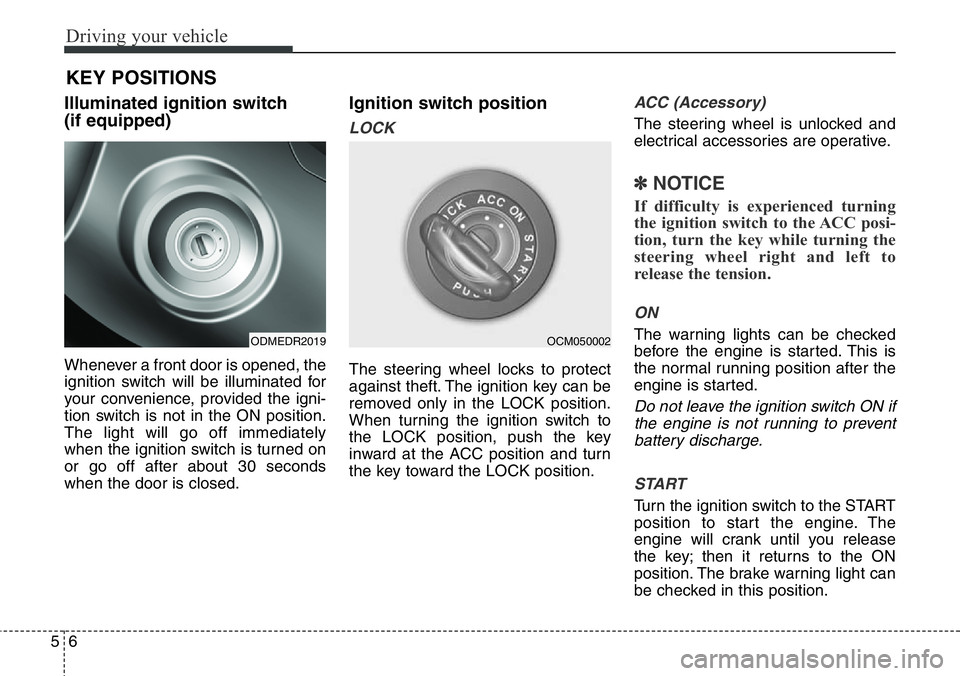
Illuminated ignition switch
(if equipped)
Whenever a front door is opened, the
ignition switch will be illuminated for
your convenience, provided the igni-
tion switch is not in the ON position.
The light will go off immediately
when the ignition switch is turned on
or go off after about 30 seconds
when the door is closed.
Ignition switch position
LOCK
The steering wheel locks to protect
against theft. The ignition key can be
removed only in the LOCK position.
When turning the ignition switch to
the LOCK position, push the key
inward at the ACC position and turn
the key toward the LOCK position.
ACC (Accessory)
The steering wheel is unlocked and
electrical accessories are operative.
✽NOTICE
If difficulty is experienced turning
the ignition switch to the ACC posi-
tion, turn the key while turning the
steering wheel right and left to
release the tension.
ON
The warning lights can be checked
before the engine is started. This is
the normal running position after the
engine is started.
Do not leave the ignition switch ON if
the engine is not running to prevent
battery discharge.
START
Turn the ignition switch to the START
position to start the engine. The
engine will crank until you release
the key; then it returns to the ON
position. The brake warning light can
be checked in this position.
KEY POSITIONS
ODMEDR2019OCM050002
Page 456 of 711
57
Driving your vehicle
Starting the engineWARNING - Ignition key
• Never turn the ignition switch
to LOCK or ACC while the
vehicle is moving. This would
result in loss of directional
control and braking function,
which could cause an acci-
dent.
• The anti-theft steering column
lock is not a substitute for the
parking brake. Before leaving
the driver’s seat, always make
sure the shift lever is engaged
in 1st gear for the manual
transaxle or P (Park) for the
automatic transaxle, set the
parking brake fully and shut
the engine off. Unexpected
and sudden vehicle movement
may occur if these precau-
tions are not taken.
(Continued)
(Continued)
• Never reach for the ignition
switch, or any other controls
through the steering wheel
while the vehicle is in motion.
The presence of your hand or
arm in this area could cause a
loss of vehicle control, an
accident and serious bodily
injury or death.
• Do not place any movable
objects around the driver’s
seat as they may move while
driving, interfere with the driv-
er and lead to an accident.
WARNING
• Always wear appropriate
shoes when operating your
vehicle. Unsuitable shoes
(high heels, ski boots,etc.)
may interfere with your ability
to use the brake, accelerator
and clutch pedal (if equipped).
• Do not start the vehicle with
the accelerator pedal
depressed. The vehicle can
move and lead to an accident.
• Wait until the engine rpm is
normal. The vehicle may sud-
denly move if the brake padel
is released when the rpm is
high.