Page 433 of 711
Features of your vehicle
332 4
Sound Settings
Sound Settings
Press the key Select
[Sound] Select [Audio Setting]Use the , , , buttons to
adjust the Fader/Balance settings.
Use the , buttons to adjust the
Bass/Middle/Treble settings.
Press the button to reset.
Virtual Sound
Press the key Select
[Sound] Select [Virtual Sound]
This feature is used to set the Power
Bass, Power Treble and Surround
sound options.SETUP
DefaultSETUP
Page 434 of 711
4333
Features of your vehicle
SDVC (Speed Dependent Volume
Control)
Press the key Select
[Sound] Select [Speed Dependent
Vol.]
The volume level is controlled auto-
matically according to the vehicle
speed. SDVC can be set by selecting
from Off/Low/Mid/High.
Voice Recognition Setting
Press the key Select
[Sound] Select [Volume Dialogue]
Use the , buttons to adjust
the Volume Dialog.
Touch Screen Beep
Press the key Select
[Sound] Select [Touch Screen
Beep]
This feature is used to turn the touch
screen beep on/off.
Clock/Day Setting
Clock Setting
Press the key Select
[Clock/Day] Select [Clock Settings]
Use the , buttons to set the
Hour, Minutes and AM/PM setting.
✽NOTICE
Press and hold the key (over
0.8 seconds) to display the Clock/
Day screen.CLOCK
SETUP
SETUP
SETUP
SETUP
Page 435 of 711
Features of your vehicle
334 4
Calendar Setting
Press the key Select
[Clock/Day] Select [Day Settings]
Use the , buttons to set the
Day, Month and Year setting.
Time Format
Press the key Select
[Clock/Day] Select [Time Format]
This feature is used to change the
clock format between 12hr or 24hr.
Clock Display
Press the key Select
[Clock/Day] Select [Clock Display
(Power off)]
This feature is used to display a clock
on the screen when the audio sys-
tem is turned off.
Automatic RDS Time
Press the key Select
[Clock/Day] Select [Automatic RDS
Time]
This feature is used to set time auto-
matically by synchronizing with RDS.SETUP SETUP
SETUP
SETUP
Page 440 of 711
4339
Features of your vehicle
SETUP
(for
Bluetooth®Wireless
Technologyequipped model)
-AM900DMMG, AM910DMMG,
AM911DMMG, AM901DMGG,
AM910DMEE, AM911DMEE,
AM912DMEE, AM913DMEE,
AM910DMGL, AM911DMGL,
AM900DMMN, AM910DMMN
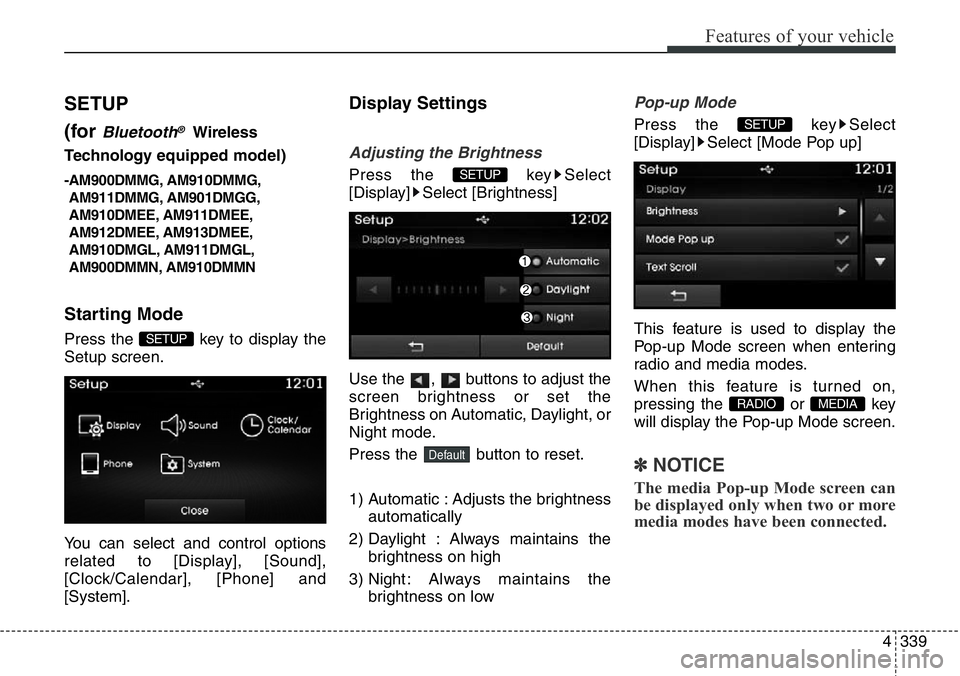
Starting Mode
Press the key to display the
Setup screen.
You can select and control options
related to [Display], [Sound],
[Clock/Calendar], [Phone] and
[System].
Display Settings
Adjusting the Brightness
Press the key Select
[Display] Select [Brightness]
Use the , buttons to adjust the
screen brightness or set the
Brightness on Automatic, Daylight, or
Night mode.
Press the button to reset.
1) Automatic : Adjusts the brightness
automatically
2) Daylight : Always maintains the
brightness on high
3) Night : Always maintains the
brightness on low
Pop-up Mode
Press the key Select
[Display] Select [Mode Pop up]
This feature is used to display the
Pop-up Mode screen when entering
radio and media modes.
When this feature is turned on,
pressing the or key
will display the Pop-up Mode screen.
✽NOTICE
The media Pop-up Mode screen can
be displayed only when two or more
media modes have been connected.
MEDIA RADIO
SETUP
Default
SETUP
SETUP
Page 441 of 711
Features of your vehicle
340 4
Text Scroll
Press the key Select
[Display] Select [Text Scroll]
This feature is used to scroll text dis-
played on the screen when it is too
long to be displayed at once.
When turned on, the text is repeat-
edly scrolled. When turned off, the
text is scrolled just once.
MP3 Information Display
Press the key Select
[Display] Select [Media Display]
This feature is used to change the
information displayed within USB
and MP3 CD modes.
1) Folder File : Displays file name
and folder name
2) Album Artist Song : Displays
album name/artist name/song
Sound Settings
Sound Settings
Press the key Select
[Sound] Select [Sound Setting]
Use the , , , buttons to
adjust the Fader/Balance settings.
Use the , buttons to adjust the
Bass/Middle/Treble settings.
Press the button to reset.
Default
SETUP
SETUP SETUP
Page 443 of 711
Features of your vehicle
342 4
Clock/Calendar Setting
Clock Setting
Press the key Select
[Clock/Calendar] Select [Clock
Settings]
Use the , buttons to set the
Hour, Minutes and AM/PM setting.
✽NOTICE
Press and hold the key (over
0.8 seconds) to set the Clock/
Calendar screen.
Calendar Setting
Press the key Select
[Clock/Calendar] Select [Calendar
Settings]
Use the , buttons to set the
Day, Month and Year setting.
Clock Display
Press the key Select
[Clock/Calendar] Select [Clock
Display (Power off)]
This feature is used to display a clock
on the screen when the audio sys-
tem is turned off.SETUP SETUP
CLOCK
SETUP
![Hyundai Santa Fe 2014 Owners Manual Features of your vehicle
332 4
Sound Settings
Sound Settings
Press the key Select
[Sound] Select [Audio Setting]Use the , , , buttons to
adjust the Fader/Balance settings.
Use the , buttons to adj](/manual-img/35/16363/w960_16363-432.png "Hyundai Santa Fe 2014 Owners Manual Features of your vehicle
332 4
Sound Settings
Sound Settings
Press the key Select
[Sound] Select [Audio Setting]Use the , , , buttons to
adjust the Fader/Balance settings.
Use the , buttons to adj")
![Hyundai Santa Fe 2014 Owners Manual 4333
Features of your vehicle
SDVC (Speed Dependent Volume
Control)
Press the key Select
[Sound] Select [Speed Dependent
Vol.]
The volume level is controlled auto-
matically according to the vehicle](/manual-img/35/16363/w960_16363-433.png "Hyundai Santa Fe 2014 Owners Manual 4333
Features of your vehicle
SDVC (Speed Dependent Volume
Control)
Press the key Select
[Sound] Select [Speed Dependent
Vol.]
The volume level is controlled auto-
matically according to the vehicle")
![Hyundai Santa Fe 2014 Owners Manual Features of your vehicle
334 4
Calendar Setting
Press the key Select
[Clock/Day] Select [Day Settings]
Use the , buttons to set the
Day, Month and Year setting.
Time Format
Press the key Select
[C](/manual-img/35/16363/w960_16363-434.png "Hyundai Santa Fe 2014 Owners Manual Features of your vehicle
334 4
Calendar Setting
Press the key Select
[Clock/Day] Select [Day Settings]
Use the , buttons to set the
Day, Month and Year setting.
Time Format
Press the key Select
[C")
![Hyundai Santa Fe 2014 Owners Manual Features of your vehicle
340 4
Text Scroll
Press the key Select
[Display] Select [Text Scroll]
This feature is used to scroll text dis-
played on the screen when it is too
long to be displayed at onc](/manual-img/35/16363/w960_16363-440.png "Hyundai Santa Fe 2014 Owners Manual Features of your vehicle
340 4
Text Scroll
Press the key Select
[Display] Select [Text Scroll]
This feature is used to scroll text dis-
played on the screen when it is too
long to be displayed at onc")
![Hyundai Santa Fe 2014 Owners Manual Features of your vehicle
342 4
Clock/Calendar Setting
Clock Setting
Press the key Select
[Clock/Calendar] Select [Clock
Settings]
Use the , buttons to set the
Hour, Minutes and AM/PM setting.
✽NO](/manual-img/35/16363/w960_16363-442.png "Hyundai Santa Fe 2014 Owners Manual Features of your vehicle
342 4
Clock/Calendar Setting
Clock Setting
Press the key Select
[Clock/Calendar] Select [Clock
Settings]
Use the , buttons to set the
Hour, Minutes and AM/PM setting.
✽NO")