Page 304 of 711
4203
Features of your vehicle
SYSTEM CONTROLLERS
AND FUNCTIONS
❈Display and settings may differ
depending on the selected audio.
Audio Head Unit
(for RDS model)
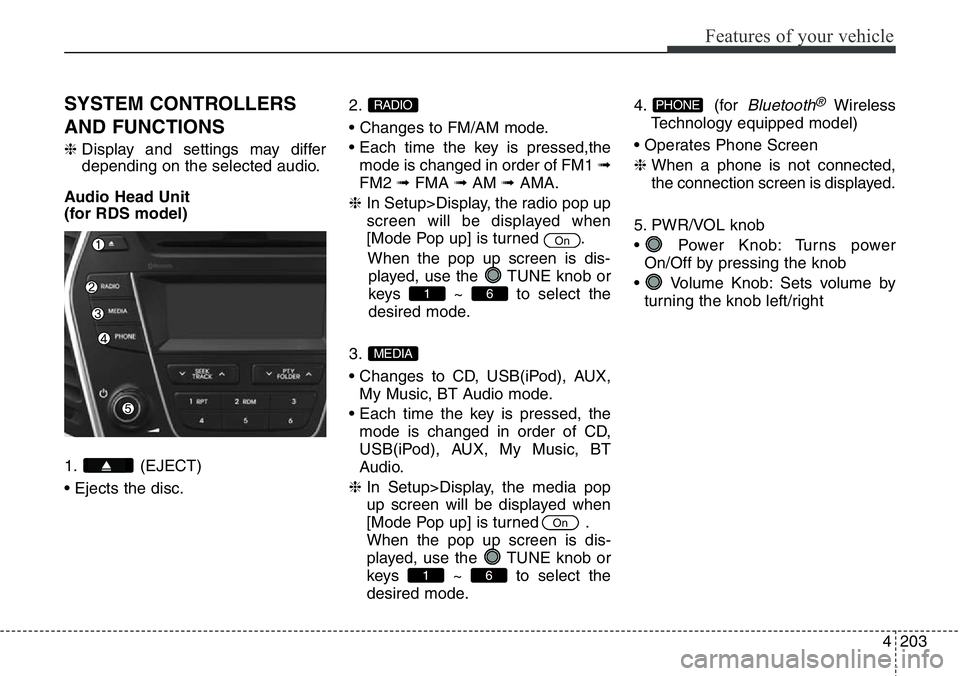
1. (EJECT)
• Ejects the disc.2.
• Changes to FM/AM mode.
• Each time the key is pressed,the
mode is changed in order of FM1 ➟
FM2 ➟FMA ➟AM ➟AMA.
❈ In Setup>Display, the radio pop up
screen will be displayed when
[Mode Pop up] is turned .
When the pop up screen is dis-
played, use the TUNE knob or
keys ~ to select the
desired mode.
3.
• Changes to CD, USB(iPod), AUX,
My Music, BT Audio mode.
• Each time the key is pressed, the
mode is changed in order of CD,
USB(iPod), AUX, My Music, BT
Audio.
❈ In Setup>Display, the media pop
up screen will be displayed when
[Mode Pop up] is turned .
When the pop up screen is dis-
played, use the TUNE knob or
keys ~ to select the
desired mode.4. (for
Bluetooth®Wireless
Technology equipped model)
• Operates Phone Screen
❈ When a phone is not connected,
the connection screen is displayed.
5. PWR/VOL knob
• Power Knob: Turns power
On/Off by pressing the knob
• Volume Knob: Sets volume by
turning the knob left/rightPHONE
61
On
MEDIA
61
On
RADIO
Page 310 of 711
4209
Features of your vehicle
SETUP (for RDS model)
-
AM104DMEE, AM114DMEE
Display Settings
Press the key Select
[Display] through TUNE knob or
key Select menu through
TUNE knobMode Pop up
[Mode Pop up] Changes .
selection mode
• During On state, press the
or key to display the mode
change pop up screen.
Scroll text
[Scroll text] Set /
• : Maintains scroll
• : Scrolls only one time.
Song Info
When playing an MP3 file, select the
desired display info from ‘Folder/File’
or ‘Album/Artist/Song’.
Sound Settings
Press the key Select
[Sound] through TUNE knob or
key Select menu through
TUNE knob
2 RDM
SETUP
Off
On
OffOn
MEDIA
RADIO
On
1 RPT
SETUP
Page 311 of 711
![Hyundai Santa Fe 2014 Owners Manual Features of your vehicle
210 4
Audio Settings
This menu allows you to set the
‘Bass, Middle, Treble’ and the Sound
Fader and Balance.
Select [Audio Settings] Select
menu through TUNE knob Turn
TU](/manual-img/35/16363/w960_16363-310.png "Hyundai Santa Fe 2014 Owners Manual Features of your vehicle
210 4
Audio Settings
This menu allows you to set the
‘Bass, Middle, Treble’ and the Sound
Fader and Balance.
Select [Audio Settings] Select
menu through TUNE knob Turn
TU")
Features of your vehicle
210 4
Audio Settings
This menu allows you to set the
‘Bass, Middle, Treble’ and the Sound
Fader and Balance.
Select [Audio Settings] Select
menu through TUNE knob Turn
TUNE knob left/right to set
• Bass, Middle, Treble : Selects the
sound tone.
• Fader, Balance : Moves the sound
fader and balance.
• Default : Restores default settings.
❈ Return : While adjusting values,
re-pressing the TUNE knob will
restore the parent menu.
Virtual Sound
The PoewrBass, PowerTreble, and
Surround can be set.
Select [Virtual Sound] Set menu
through TUNE knob Set /
through TUNE knob
• PowerBass : This is a sound sys-
tem feature that provides live bass.
• PowerTreble : This is a sound sys-
tem feature that provides live trem-
ble.
• Surround : This is a sound system
feature that provides surround
sound.
❈ May differ depending on the
selected audio.
Speed Dependent Volume
Control
This feature is used to automatically
control the volume level according to
the speed of the vehicle.
Select [Speed Dependent Vol.] Set
in 4 levels [Off/Low/Mid/High] of
TUNE knob
Volume Dialogue
Adjusts voice recognition volume.
Select [Volume Dialogue] Set vol-
ume of TUNE knob
Off
On
Page 312 of 711
4211
Features of your vehicle
Clock Settings
Press the key Select
[Clock] through TUNE knob or
key Select menu through
TUNE knob
Clock Settings
This menu is used to set the time.
Select [Clock Settings] Set through
TUNE knob Press TUNE knob
❈ Adjust the number currently in
focus to set the [hour] and press
the tune knob to set the [minute].
Day Settings
This menu is used to set the date
(DD/MM/YYYY).
Select [Day Settings] Set through
TUNE knob Press TUNE knob
❈ Adjust the number currently in
focus to make the settings and
press the tune knob to move to the
next setting. (Set in order of
Year/Month/Day)
3
SETUPCLOCK
Page 319 of 711
Features of your vehicle
218 4
System Settings
Press the key Select [System]
through tune knob or key Select
menu through TUNE knob
Memory Information
(if equipped)
Displays currently used memory and
total system memory.
Select [Memory Information] OK
The currently used memory is dis-
played on the left side while the total
system memory is displayed on the
right side.
VRS Mode
This feature is used to change voice
command feedback between Normal
and Expert modes.
Select [VRS Mode] Set through
TUNE knob
• Normal : This mode is for beginner
users and provides detailed
instructions during voice command
operation.
• Expert : This mode is for expert
users and omits some information
during voice command operation.
(When using Expert mode, guid-
ance instructions can be heard
through the [Help] or [Menu] com-
mands.
❈ May differ depending on the
selected audio.
5
SETUP
Page 320 of 711
4219
Features of your vehicle
Language
This menu is used to set the display
and voice recognition language.
Select [Language] Set through
TUNE knob
❈ The system will reboot after the
language is changed.
❈ Language support by region
-
SETUP
- AM100DMMG, AM110DMMG,
AM111DMMG, AM101DMGG,
AM110DMEE, AM111DMEE,
AM112DMEE, AM113DMEE,
AM110DMGL, AM111DMGL,
AM100DMMN, AM110DMMN
Display Settings
Press the key Select
[Display] through TUNE knob or
key Select menu through
TUNE knob
Mode Pop up
[Mode Pop up] Changes .
selection mode
• During On state, press the
or key to display the mode
change pop up screen.
Text Scroll
[Text Scroll ] Set /
• : Maintains scroll
• : Scrolls only one (1) time.
Media Display
When playing an MP3 file, select the
desired display info from ‘Folder/File’
or ‘Album/Artist/Song’.
Off
On
OffOn
MEDIA
RADIO
On
1 RPT
SETUP
Page 321 of 711
Features of your vehicle
220 4
SOUND SETTINGS
Press the key Select
[Sound] through TUNE knob or
key Select menu through
TUNE knob
Sound Settings
This menu allows you to set the
‘Bass, Middle, Treble’ and the Sound
Fader and Balance.
Select [Sound Settings] Select
menu through TUNE knob Turn
TUNE knob left/right to set
• Bass, Middle, Treble : Selects the
sound tone.
• Fader, Balance : Moves the sound
fader and balance.
• Default : Restores default settings.
❈ Return : While adjusting values,
re-pressing the TUNE knob will
restore the parent menu.
Virtual Sound
The PoewrBass, PowerTreble, and
Surround can be set.
Select [Virtual Sound] Set menu
through TUNE knob Set
/ through TUNE knob
• PowerBass : This is a sound system
feature that provides live bass.
• PowerTreble : This is a sound system
feature that provides live tremble.
• Surround : This is a sound system
feature that provides surround
sound.
❈ May differ depending on the select-
ed audio.
Off
On2 RDM
SETUP
Page 322 of 711
4221
Features of your vehicle
Speed Dependent Volume
Control
This feature is used to automatically
control the volume level according to
the speed of the vehicle.
Select [Speed Dependent Vol.] Set
in 4 levels [Off/Low/Mid/High] of
TUNE knob
Clock Settings
Press the key Select
[Clock] through TUNE knob or
key Select menu through
TUNE knob
Clock Settings
This menu is used to set the time.
Select [Clock Settings] Set through
TUNE knob Press TUNE knob
❈ Adjust the number currently in
focus to set the [hour] and press
the tune knob to set the [minute].
3
SETUPCLOCK
![Hyundai Santa Fe 2014 Owners Manual 4209
Features of your vehicle
SETUP (for RDS model)
-
AM104DMEE, AM114DMEE
Display Settings
Press the key Select
[Display] through TUNE knob or
key Select menu through
TUNE knobMode Pop up
[Mode Po](/manual-img/35/16363/w960_16363-309.png "Hyundai Santa Fe 2014 Owners Manual 4209
Features of your vehicle
SETUP (for RDS model)
-
AM104DMEE, AM114DMEE
Display Settings
Press the key Select
[Display] through TUNE knob or
key Select menu through
TUNE knobMode Pop up
[Mode Po")
![Hyundai Santa Fe 2014 Owners Manual 4211
Features of your vehicle
Clock Settings
Press the key Select
[Clock] through TUNE knob or
key Select menu through
TUNE knob
Clock Settings
This menu is used to set the time.
Select [Clock Sett](/manual-img/35/16363/w960_16363-311.png "Hyundai Santa Fe 2014 Owners Manual 4211
Features of your vehicle
Clock Settings
Press the key Select
[Clock] through TUNE knob or
key Select menu through
TUNE knob
Clock Settings
This menu is used to set the time.
Select [Clock Sett")
![Hyundai Santa Fe 2014 Owners Manual Features of your vehicle
218 4
System Settings
Press the key Select [System]
through tune knob or key Select
menu through TUNE knob
Memory Information
(if equipped)
Displays currently used memory](/manual-img/35/16363/w960_16363-318.png "Hyundai Santa Fe 2014 Owners Manual Features of your vehicle
218 4
System Settings
Press the key Select [System]
through tune knob or key Select
menu through TUNE knob
Memory Information
(if equipped)
Displays currently used memory")
![Hyundai Santa Fe 2014 Owners Manual 4219
Features of your vehicle
Language
This menu is used to set the display
and voice recognition language.
Select [Language] Set through
TUNE knob
❈ The system will reboot after the
language is ch](/manual-img/35/16363/w960_16363-319.png "Hyundai Santa Fe 2014 Owners Manual 4219
Features of your vehicle
Language
This menu is used to set the display
and voice recognition language.
Select [Language] Set through
TUNE knob
❈ The system will reboot after the
language is ch")
![Hyundai Santa Fe 2014 Owners Manual Features of your vehicle
220 4
SOUND SETTINGS
Press the key Select
[Sound] through TUNE knob or
key Select menu through
TUNE knob
Sound Settings
This menu allows you to set the
‘Bass, Middle, Tre](/manual-img/35/16363/w960_16363-320.png "Hyundai Santa Fe 2014 Owners Manual Features of your vehicle
220 4
SOUND SETTINGS
Press the key Select
[Sound] through TUNE knob or
key Select menu through
TUNE knob
Sound Settings
This menu allows you to set the
‘Bass, Middle, Tre")
![Hyundai Santa Fe 2014 Owners Manual 4221
Features of your vehicle
Speed Dependent Volume
Control
This feature is used to automatically
control the volume level according to
the speed of the vehicle.
Select [Speed Dependent Vol.] Set
in](/manual-img/35/16363/w960_16363-321.png "Hyundai Santa Fe 2014 Owners Manual 4221
Features of your vehicle
Speed Dependent Volume
Control
This feature is used to automatically
control the volume level according to
the speed of the vehicle.
Select [Speed Dependent Vol.] Set
in")