Page 174 of 711
473
Features of your vehicle
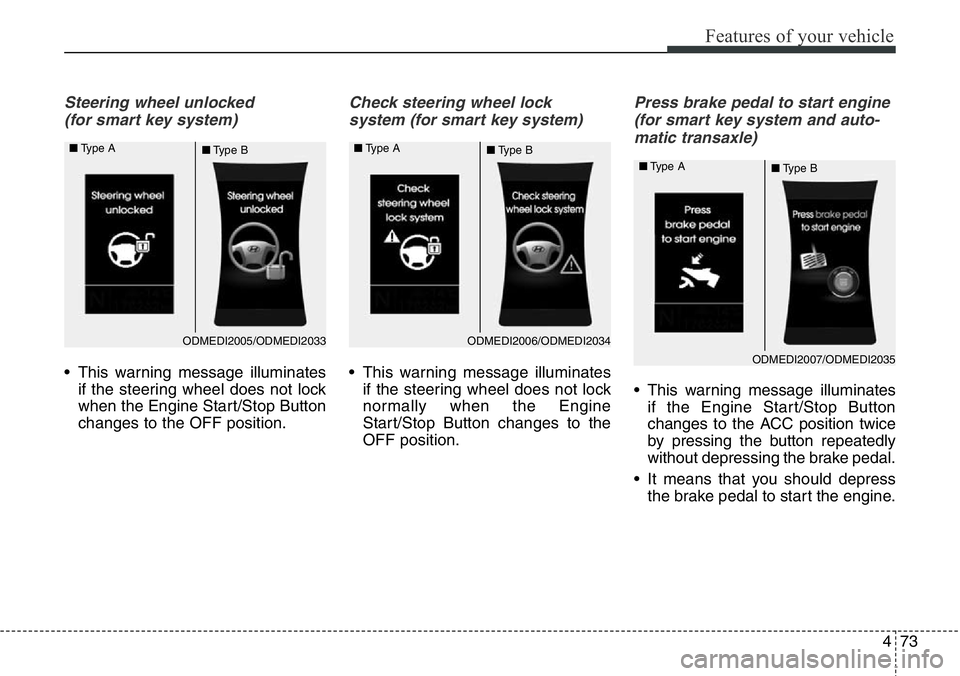
Steering wheel unlocked
(for smart key system)
• This warning message illuminates
if the steering wheel does not lock
when the Engine Start/Stop Button
changes to the OFF position.
Check steering wheel lock
system (for smart key system)
• This warning message illuminates
if the steering wheel does not lock
normally when the Engine
Start/Stop Button changes to the
OFF position.
Press brake pedal to start engine
(for smart key system and auto-
matic transaxle)
• This warning message illuminates
if the Engine Start/Stop Button
changes to the ACC position twice
by pressing the button repeatedly
without depressing the brake pedal.
• It means that you should depress
the brake pedal to start the engine.
ODMEDI2006/ODMEDI2034 ■Type A
■Type BODMEDI2005/ODMEDI2033 ■Type A
■Type B
ODMEDI2007/ODMEDI2035 ■Type A
■Type B
Page 208 of 711
4107
Features of your vehicle
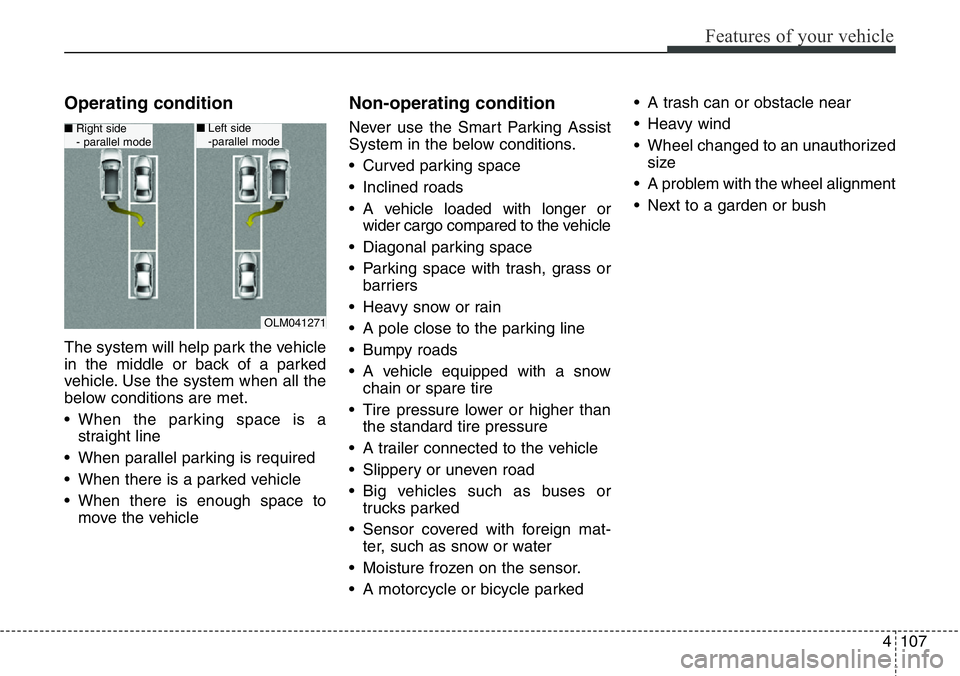
Operating condition
The system will help park the vehicle
in the middle or back of a parked
vehicle. Use the system when all the
below conditions are met.
• When the parking space is a
straight line
• When parallel parking is required
• When there is a parked vehicle
• When there is enough space to
move the vehicle
Non-operating condition
Never use the Smart Parking Assist
System in the below conditions.
• Curved parking space
• Inclined roads
• A vehicle loaded with longer or
wider cargo compared to the vehicle
• Diagonal parking space
• Parking space with trash, grass or
barriers
• Heavy snow or rain
• A pole close to the parking line
• Bumpy roads
• A vehicle equipped with a snow
chain or spare tire
• Tire pressure lower or higher than
the standard tire pressure
• A trailer connected to the vehicle
• Slippery or uneven road
• Big vehicles such as buses or
trucks parked
• Sensor covered with foreign mat-
ter, such as snow or water
• Moisture frozen on the sensor.
• A motorcycle or bicycle parked• A trash can or obstacle near
• Heavy wind
• Wheel changed to an unauthorized
size
• A problem with the wheel alignment
• Next to a garden or bush
OLM041271
■Right side
- parallel mode■Left side
-parallel mode
Page 218 of 711
4117
Features of your vehicle
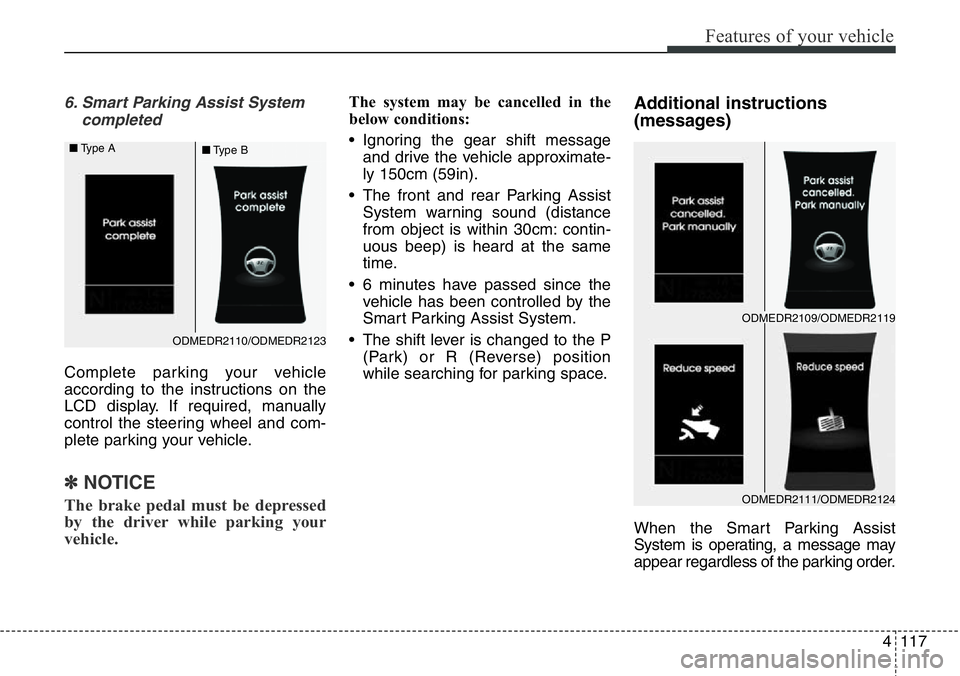
6. Smart Parking Assist System
completed
Complete parking your vehicle
according to the instructions on the
LCD display. If required, manually
control the steering wheel and com-
plete parking your vehicle.
✽NOTICE
The brake pedal must be depressed
by the driver while parking your
vehicle.
The system may be cancelled in the
below conditions:
• Ignoring the gear shift message
and drive the vehicle approximate-
ly 150cm (59in).
• The front and rear Parking Assist
System warning sound (distance
from object is within 30cm: contin-
uous beep) is heard at the same
time.
• 6 minutes have passed since the
vehicle has been controlled by the
Smart Parking Assist System.
• The shift lever is changed to the P
(Park) or R (Reverse) position
while searching for parking space.Additional instructions
(messages)
When the Smart Parking Assist
System is operating, a message may
appear regardless of the parking order.
ODMEDR2110/ODMEDR2123 ■Type A
■Type B
ODMEDR2111/ODMEDR2124
ODMEDR2109/ODMEDR2119
Page 225 of 711
Features of your vehicle
124 4
Traffic change (for Europe)
Use this function when you visit a
country with opposite traffic direction.
If the traffic change is activated when
you visit a country with opposite traf-
fic direction, it will decrease the daz-
zle on oncoming vehicle drivers.
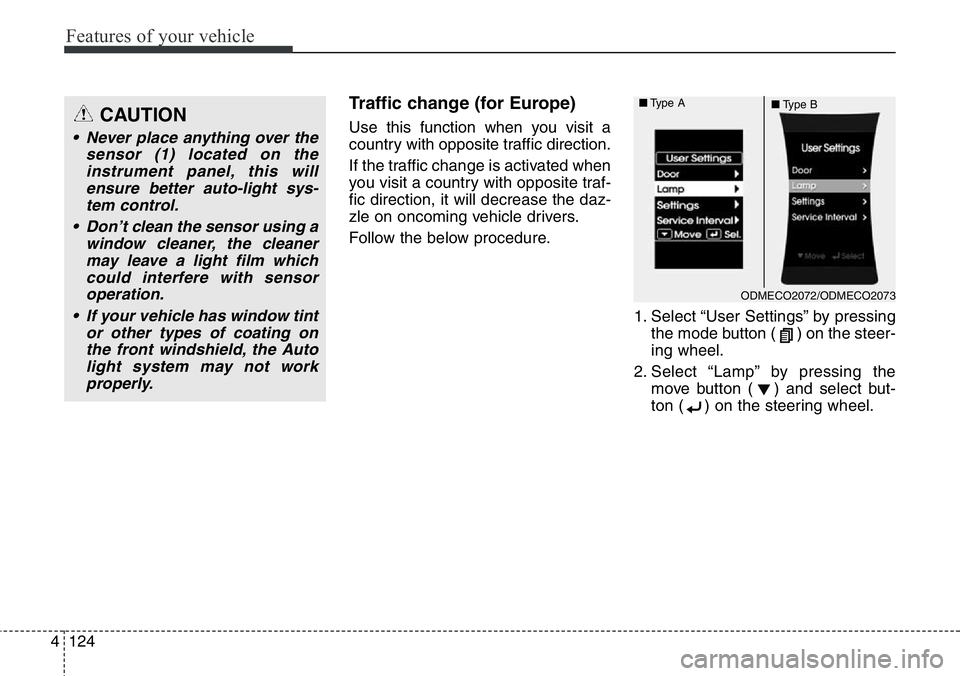
Follow the below procedure.
1. Select “User Settings” by pressing
the mode button ( ) on the steer-
ing wheel.
2. Select “Lamp” by pressing the
move button ( ) and select but-
ton ( ) on the steering wheel.CAUTION
• Never place anything over the
sensor (1) located on the
instrument panel, this will
ensure better auto-light sys-
tem control.
• Don’t clean the sensor using a
window cleaner, the cleaner
may leave a light film which
could interfere with sensor
operation.
• If your vehicle has window tint
or other types of coating on
the front windshield, the Auto
light system may not work
properly.
ODMECO2072/ODMECO2073 ■Type A
■Type B
Page 226 of 711
4125
Features of your vehicle
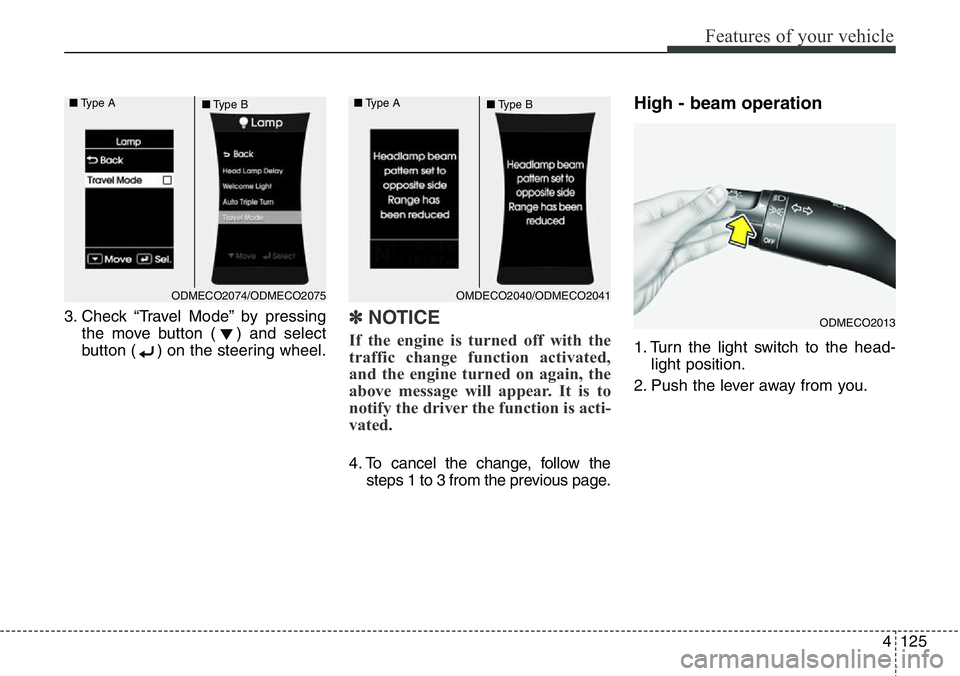
3. Check “Travel Mode” by pressing
the move button ( ) and select
button ( ) on the steering wheel.✽NOTICE
If the engine is turned off with the
traffic change function activated,
and the engine turned on again, the
above message will appear. It is to
notify the driver the function is acti-
vated.
4. To cancel the change, follow the
steps 1 to 3 from the previous page.
High - beam operation
1. Turn the light switch to the head-
light position.
2. Push the lever away from you.
ODMECO2013
ODMECO2074/ODMECO2075 ■Type A
■Type BOMDECO2040/ODMECO2041 ■Type A
■Type B
Page 247 of 711
Features of your vehicle
146 4
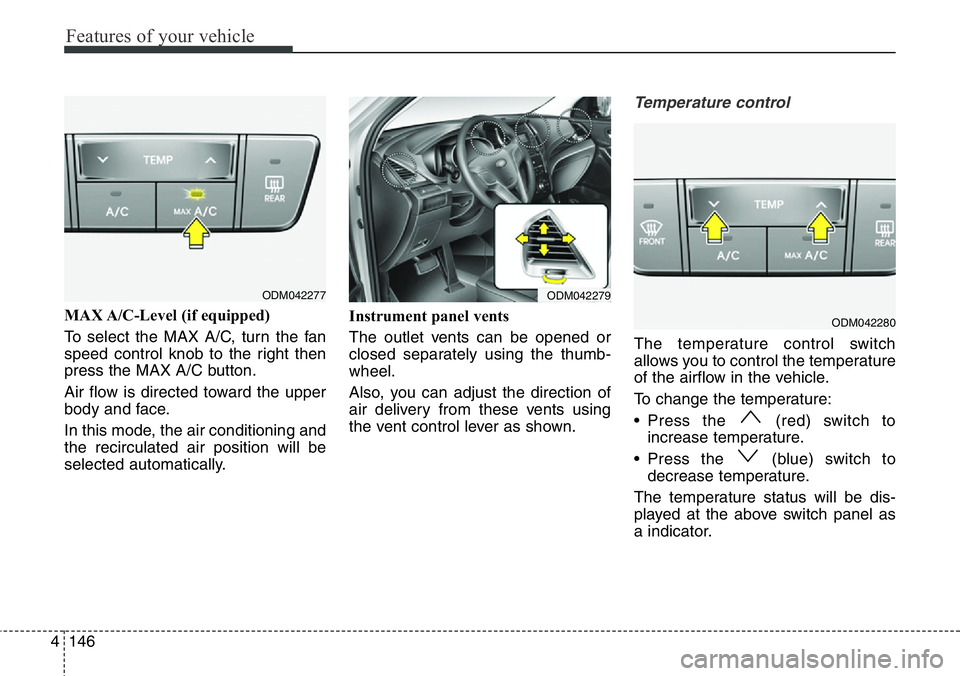
MAX A/C-Level (if equipped)
To select the MAX A/C, turn the fan
speed control knob to the right then
press the MAX A/C button.
Air flow is directed toward the upper
body and face.
In this mode, the air conditioning and
the recirculated air position will be
selected automatically.Instrument panel vents
The outlet vents can be opened or
closed separately using the thumb-
wheel.
Also, you can adjust the direction of
air delivery from these vents using
the vent control lever as shown.
Temperature control
The temperature control switch
allows you to control the temperature
of the airflow in the vehicle.
To change the temperature:
• Press the (red) switch to
increase temperature.
• Press the (blue) switch to
decrease temperature.
The temperature status will be dis-
played at the above switch panel as
a indicator.
ODM042277ODM042279
ODM042280
Page 261 of 711

Features of your vehicle
160 4
Instrument panel vents
The outlet vents can be opened or
closed separately using the thumb-
wheel.
Also, you can adjust the direction of
air delivery from these vents using
the vent control lever as shown.
Temperature control
The temperature will increase to the
maximum (HIGH) by holding the
button.
The temperature will decrease to the
minimum (LOW) by holding the
button.
The temperature will increase or
decrease by 0.5°C/1°F. When set to
the lowest temperature, the air condi-
tioning will operate continuously.Adjusting the driver and passenger
side temperature individually
1. Press the DUAL button to operate
the driver and passenger side
temperature individually. Also, if
the passenger side temperature
control button is operated, it will
automatically change to the DUAL
mode as well.
2. Operate the driver side tempera-
ture control to adjust the driver
side temperature. Operate the
passenger side temperature con-
trol to adjust the passenger side
temperature.
ODM042279
ODMECL2003 ■The driver’s side
■The passenger’s side
ODM042291 ■Type A, B
■Type C, D
Page 459 of 711

Driving your vehicle
10 5
ENGINE START/STOP BUTTON (IF EQUIPPED)
Illuminated engine start/stop
button
Whenever the front door is opened,
the engine start/stop button will illu-
minate for your convenience. The
light will go off after about 30 sec-
onds when the door is closed. It will
also go off immediately when the
theft-alarm system is armed.
Engine start/stop button posi-
tion
OFF
With manual transaxle
To turn off the engine (START/RUN
position) or vehicle power (ON posi-
tion), stop the vehicle then press the
engine start/stop button.
With automatic transaxle
To turn off the engine (START/RUN
position) or vehicle power (ON posi-
tion), press the engine start/stop but-
ton with the shift lever in the P (Park)
position. When you press the engine
start/stop button without the shift
lever in the P (Park) position, the
engine start/stop button will not
change to the OFF position but to the
ACC position.Vehicles equipped with anti-theft
steering column lock
The steering wheel locks when the
engine start/stop button is in the OFF
position to protect you against theft.
It locks when the door is opened.
If the steering wheel is not locked
properly when you open the driver's
door, the warning chime will sound.
Try locking the steering wheel again.
If the problem is not solved, we rec-
ommend that the system be checked
by an authorized HYUNDAI dealer.
In addition, if the engine start/stop
button is in the OFF position after the
driver's door is opened, the steering
wheel will not lock and the warning
chime will sound. In such a situation,
close the door. Then the steering
wheel will lock and the warning
chime will stop.
White
ODM052006
ODMEDR2201R