Page 1256 of 1534
4 185
Features of your vehicle
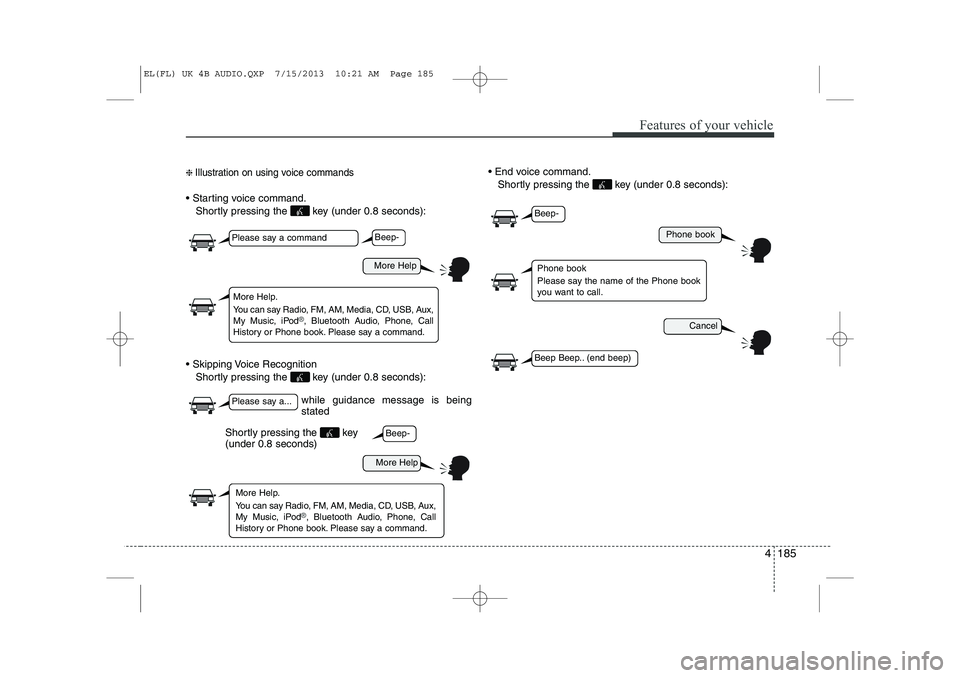
❈ Illustration on using voice commands
Starting voice command.
Shortly pressing the key (under 0.8 seconds):
Skipping Voice Recognition Shortly pressing the key (under 0.8 seconds): End voice command.
Shortly pressing the key (under 0.8 seconds):
while guidance message is being stated
More Help
Phone book
Cancel
More Help
Please say a command
Please say a...
More Help.
You can say Radio, FM, AM, Media, CD, USB, Aux,
My Music, iPod
®, Bluetooth A udio, Phone, Call
History or Phone book. Please say a command.
Phone book
Please say the name of the Phone book
you want to call.
More Help.
You can say Radio, FM, AM, Media, CD, USB, Aux,
My Music, iPod
®, Bluetooth A udio, Phone, Call
History or Phone book. Please say a command.
Beep-
Beep-
Beep-
Beep Beep.. (end beep)
Shortly pressing the key (under 0.8 seconds)
EL(FL) UK 4B AUDIO.QXP 7/15/2013 10:21 AM Page 185
Page 1257 of 1534
Features of your vehicle
186
4
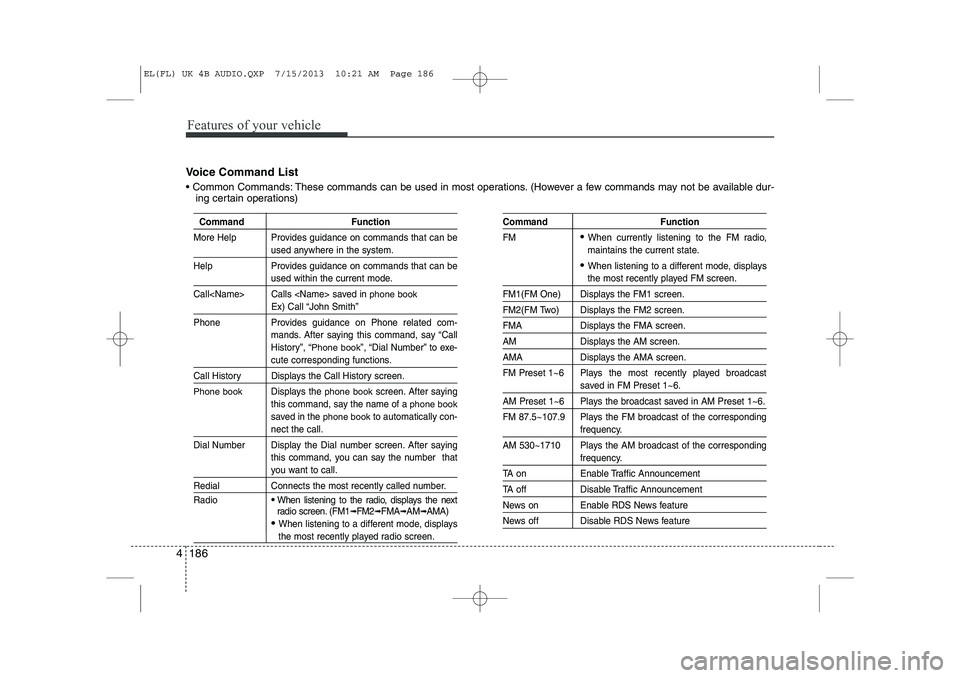
Voice Command List
Common Commands: These commands can be used in most operations. (However a few commands may not be available dur-
ing certain operations)
Command Function
More Help Provides guidance on commands that can be
used anywhere in the system.
Help Provides guidance on commands that can be
used within the current mode.
Call Calls saved in
phone book
Ex) Call “John Smith”
Phone Provides guidance on Phone related com- mands. After saying this command, say “Call
History”, “
Phone book”, “Dial Number” to exe-
cute corresponding functions.
Call History Displays the Call History screen.
Phone bookDisplays the phone bookscreen. After saying
this command, say the name of a
phone book
saved in the phone bookto automatically con-
nect the call.
Dial Number Display the Dial number screen. After saying this command, you can say the number that
you want to call.
Redial Connects the most recently called number. Radio
When listening to the radio, displays the next
radio screen. (FM1➟FM2 ➟FMA ➟AM ➟AMA)
When listening to a different mode, displays
the most recently played radio screen.
Command Function FM
When currently listening to the FM radio,
maintains the current state.
When listening to a different mode, displays
the most recently played FM screen.
FM1(FM One) Displays the FM1 screen.
FM2(FM Two) Displays the FM2 screen.
FMA Displays the FMA screen.
AM Displays the AM screen.
AMA Displays the AMA screen.
FM Preset 1~6 Plays the most recently played broadcast
saved in FM Preset 1~6.
AM Preset 1~6 Plays the broadcast saved in AM Preset 1~6.
FM 87.5~107.9 Plays the FM broadcast of the corresponding
frequency.
AM 530~1710 Plays the AM broadcast of the corresponding
frequency.
TA on Enable Traffic Announcement
TA off Disable Traffic Announcement
News on Enable RDS News feature
News off Disable RDS News feature
EL(FL) UK 4B AUDIO.QXP 7/15/2013 10:21 AM Page 186
Page 1261 of 1534
Features of your vehicle
190
4
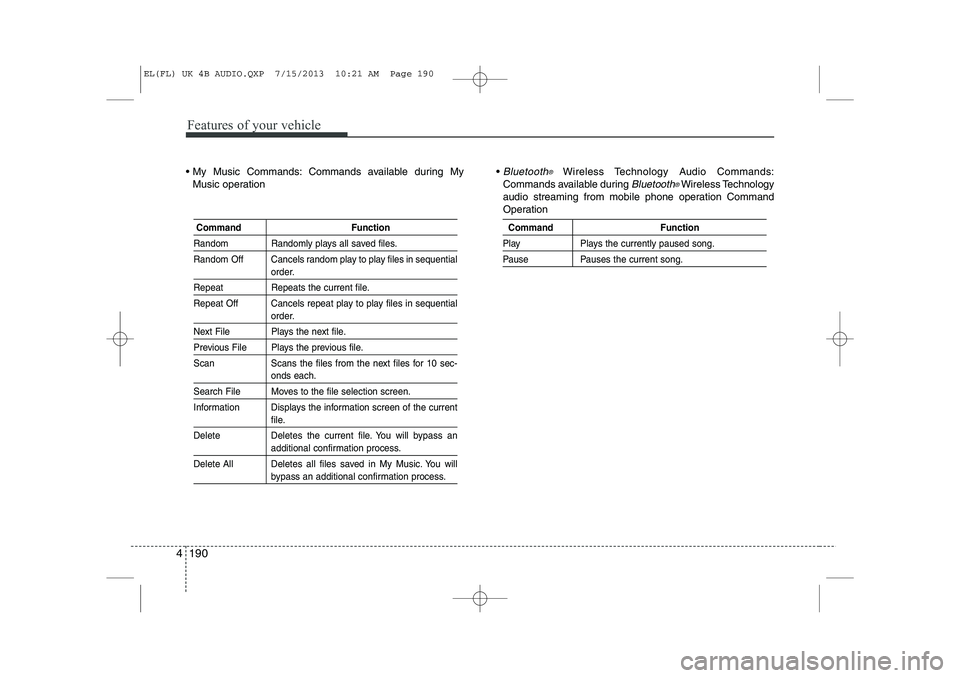
My Music Commands: Commands available during My
Music operation Bluetooth®Wireless Technology Audio Commands:
Commands available during
Bluetooth®Wireless Technology
audio streaming from mobile phone operation Command
Operation
Command Function
Random Randomly plays all saved files.
Random Off Cancels random play to play files in sequential
order.
Repeat Repeats the current file.
Repeat Off Cancels repeat play to play files in sequential
order.
Next File Plays the next file.
Previous File Plays the previous file.
Scan Scans the files from the next files for 10 sec-
onds each.
Search File Moves to the file selection screen.
Information Displays the information screen of the current
file.
Delete Deletes the current file. You will bypass an
additional confirmation process.
Delete All Deletes all files saved in My Music. You will
bypass an additional confirmation process.
Command Function
Play Plays the currently paused song.
Pause Pauses the current song.
EL(FL) UK 4B AUDIO.QXP 7/15/2013 10:21 AM Page 190
Page 1264 of 1534
4 193
Features of your vehicle
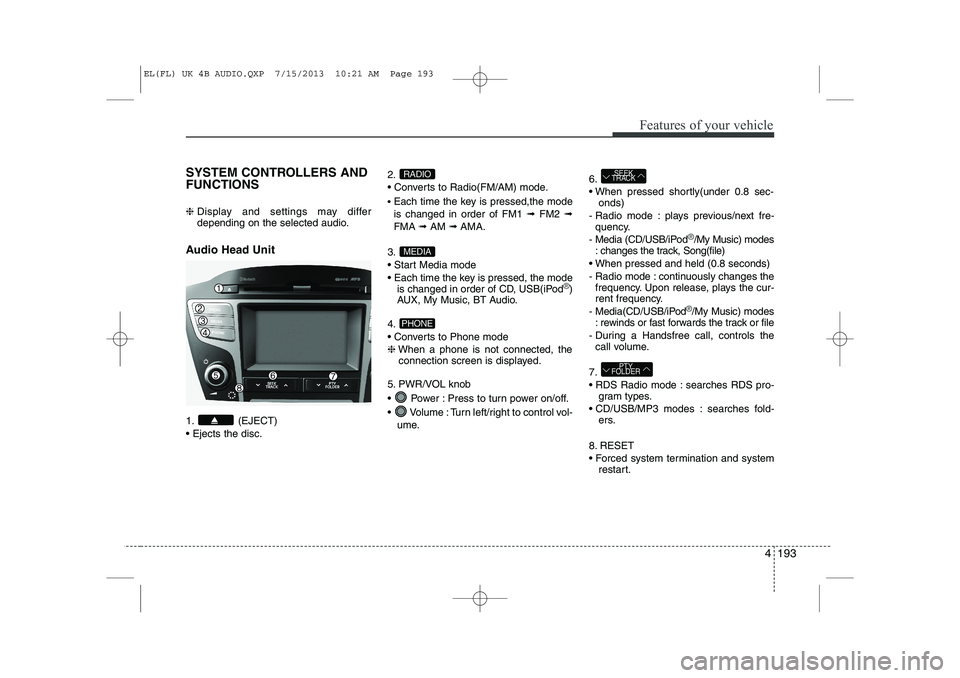
SYSTEM CONTROLLERS AND FUNCTIONS ❈ Display and settings may differ
depending on the selected audio.
Audio Head Unit
1. (EJECT) Ejects the disc. 2.
Converts to Radio(FM/AM) mode.
Each time the key is pressed,the mode is changed in order of FM1 ➟FM2 ➟
FMA ➟AM ➟AMA.
3.
Start Media mode
Each time the key is pressed, the mode is changed in order of CD, USB(iPod
®)
AUX, My Music, BT Audio.
4.
Converts to Phone mode❈ When a phone is not connected, the
connection screen is displayed.
5. PWR/VOL knob
Power : Press to turn power on/off.
Volume : Turn left/right to control vol- ume. 6.
When pressed shortly(under 0.8 sec-
onds)
- Radio mode : plays previous/next fre- quency.
- Media (CD/USB/iPod
®/My Music) modes
: changes the track, Song(file)
When pressed and held (0.8 seconds)
- Radio mode : continuously changes the frequency. Upon release, plays the cur-
rent frequency.
- Media(CD/USB/iPod
®/My Music) modes
: rewinds or fast forwards the track or file
- During a Handsfree call, controls the call volume.
7.
RDS Radio mode : searches RDS pro- gram types.
CD/USB/MP3 modes : searches fold- ers.
8. RESET
Forced system termination and system restart.
PTY
FOLDER
SEEK
TRACK
PHONE
MEDIA
RADIO
EL(FL) UK 4B AUDIO.QXP 7/15/2013 10:21 AM Page 193
Page 1301 of 1534
Features of your vehicle
230
4
Bluetooth®Wireless
Technology AUDIO MODE Using
Bluetooth®Wireless
Technology Audio Mode
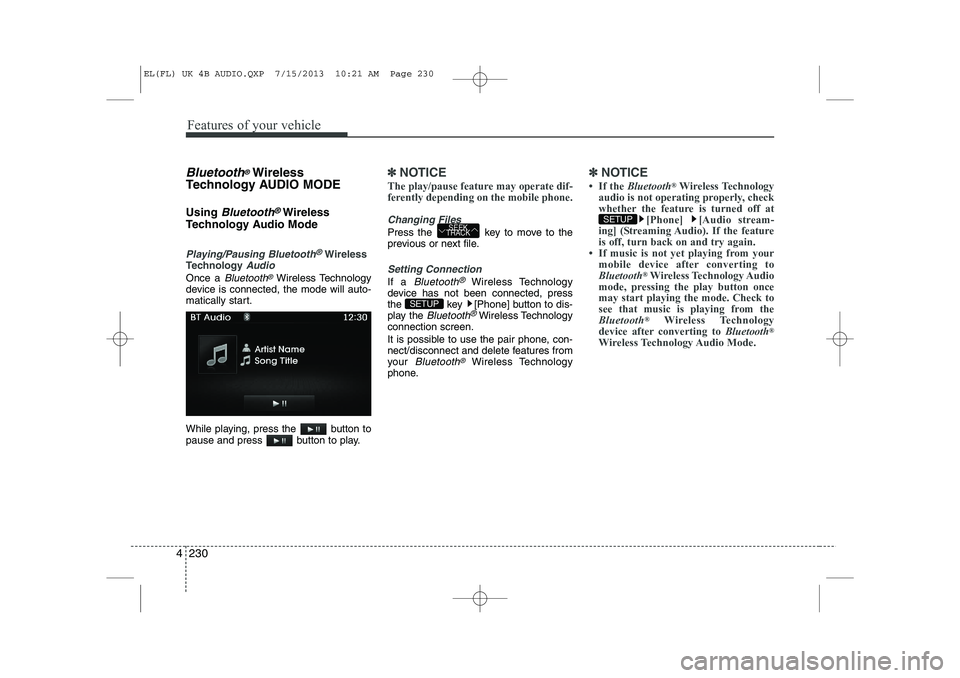
Playing/Pausing Bluetooth®Wireless
TechnologyAudio
Once a Bluetooth®Wireless Technology
device is connected, the mode will auto-
matically start.
While playing, press the button to
pause and press button to play.
✽✽ NOTICE
The play/pause feature may operate dif-
ferently depending on the mobile phone.
Changing Files
Press the key to move to the
previous or next file.
Setting Connection
If a Bluetooth®Wireless Technology
device has not been connected, press
the key [Phone] button to dis-
play the
Bluetooth®Wireless Technology
connection screen.
It is possible to use the pair phone, con-
nect/disconnect and delete features from
your
Bluetooth®Wireless Technology
phone.
✽✽ NOTICE
Page 1302 of 1534
4 231
Features of your vehicle
Bluetooth®Wireless Technology
Using Bluetooth®Wireless
Technology Handsfree
Bluetooth®Wireless Technology refers to
a short-distance wireless networking technology which uses a 2.4GHz ~
2.48GHz frequency to connect various
devices within a certain distance.
Supported within PCs, external devices,
Bluetooth®Wireless Technology
phones, PDAs, various electronic
devices, and automotive environments,
Bluetooth®Wireless Technology allows
data to be transmitted at high speeds
without having to use a connector cable.
Bluetooth®Wireless Technology
Handsfree refers to a device which
allows the user to conveniently makephone calls with
Bluetooth®Wireless
Technology mobile phones through theaudio system.
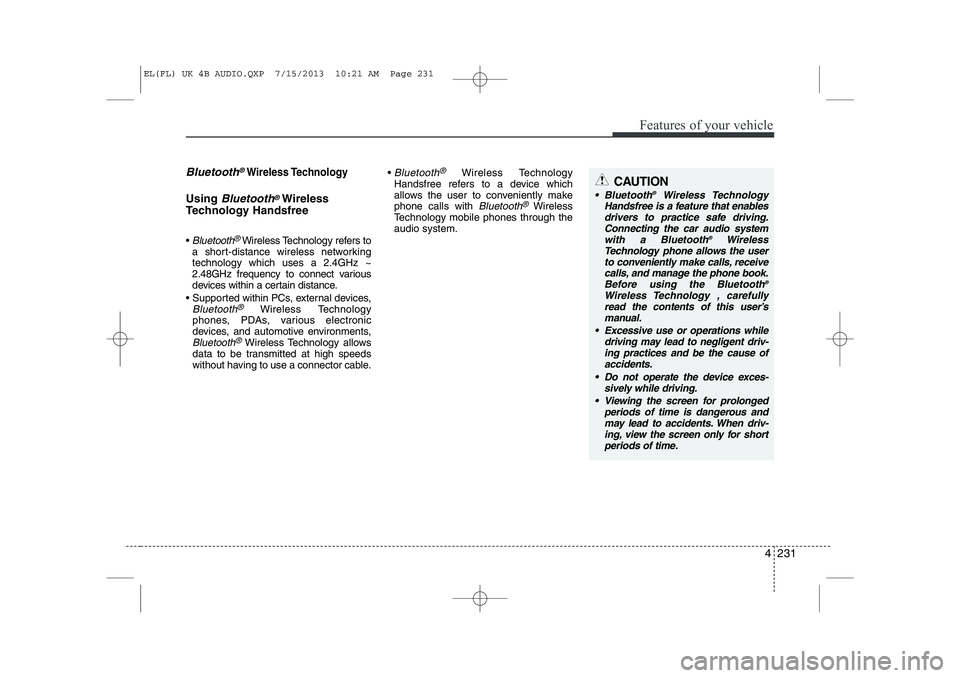
CAUTION
Bluetooth ®
Wireless Technology
Handsfree is a feature that enables
drivers to practice safe driving.Connecting the car audio systemwith a Bluetooth ®
Wireless
Technology phone allows the user to conveniently make calls, receive
calls, and manage the phone book.Before using the Bluetooth ®
Wireless Technology , carefully read the contents of this user’s manual.
Excessive use or operations while driving may lead to negligent driv-ing practices and be the cause of accidents.
Do not operate the device exces- sively while driving.
Viewing the screen for prolonged periods of time is dangerous andmay lead to accidents. When driv- ing, view the screen only for short
periods of time.
EL(FL) UK 4B AUDIO.QXP 7/15/2013 10:21 AM Page 231
Page 1303 of 1534
Features of your vehicle
232
4
✽✽
NOTICE - USING UPON CONNECTING
Bluetooth®
Wireless Technology PHONE
Page 1305 of 1534
Features of your vehicle
234
4
Pairing a Bluetooth®Wireless
Technology De vice
What is
Bluetooth®Wireless
Technology Pairing?
Pairing refers to the process of synchro-
nizing your
Bluetooth®Wireless
Technology phone or device with the car
audio system for connection. Pairing is
necessary to connect and use the
Bluetooth®Wireless Technology feature. Pairing Key / Key on
the Steering Remote Controller
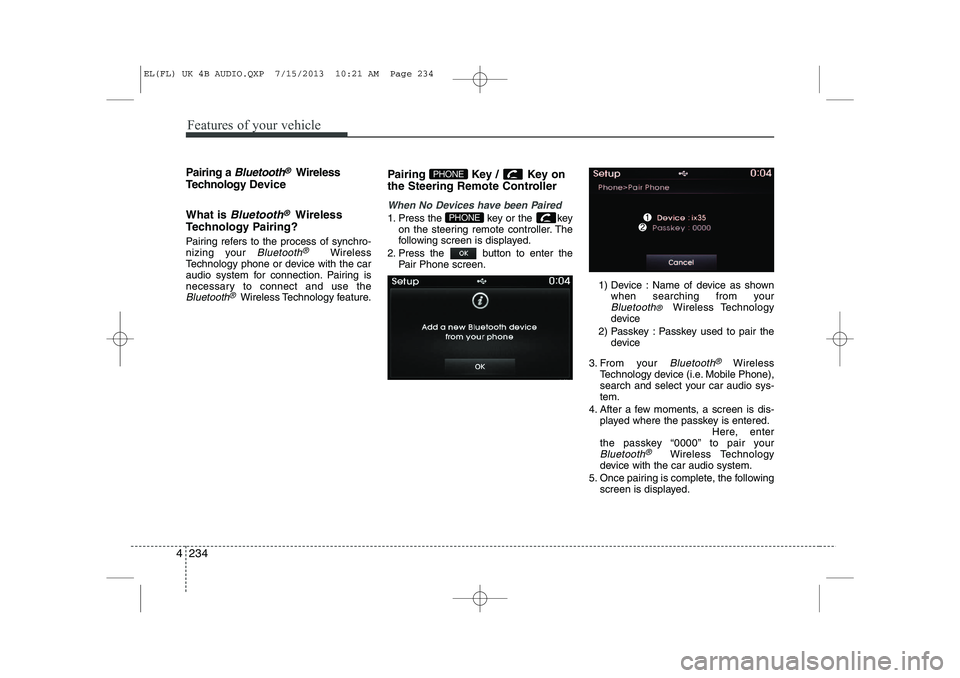
When No Devices have been Paired
1. Press the key or the key
on the steering remote controller. The
following screen is displayed.
2. Press the button to enter the Pair Phone screen.
1) Device : Name of device as shownwhen searching from your
Bluetooth® Wireless Technology
device
2) Passkey : Passkey used to pair the device
3. From your
Bluetooth®Wireless
Technology device (i.e. Mobile Phone),
search and select your car audio sys-tem.
4. After a few moments, a screen is dis- played where the passkey is entered. Here, enter
the passkey “0000” to pair your
Bluetooth®Wireless Technology
device with the car audio system.
5. Once pairing is complete, the following screen is displayed.
PHONE
PHONE
EL(FL) UK 4B AUDIO.QXP 7/15/2013 10:21 AM Page 234