Page 1094 of 1534
423
Features of your vehicle
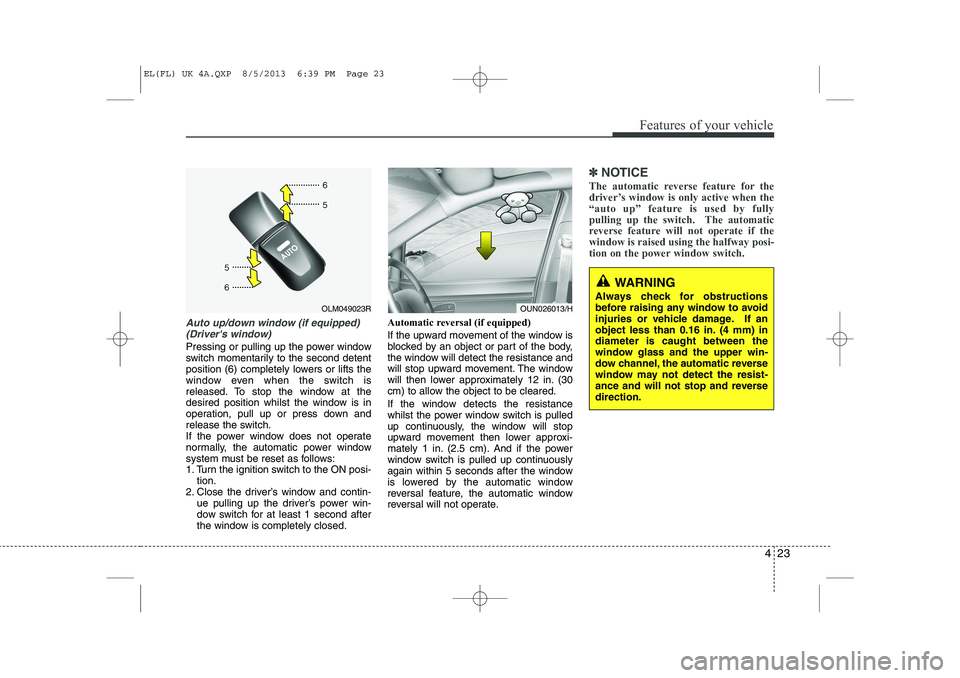
Auto up/down window (if equipped)(Driver's window)
Pressing or pulling up the power window
switch momentarily to the second detent
position (6) completely lowers or lifts the
window even when the switch is
released. To stop the window at the
desired position whilst the window is in
operation, pull up or press down and
release the switch.
If the power window does not operate
normally, the automatic power window
system must be reset as follows:
1. Turn the ignition switch to the ON posi- tion.
2. Close the driver’s window and contin- ue pulling up the driver’s power win-
dow switch for at least 1 second after
the window is completely closed. Automatic reversal (if equipped)
If the upward movement of the window is
blocked by an object or part of the body,
the window will detect the resistance and
will stop upward movement. The window
will then lower approximately 12 in. (30
cm) to allow the object to be cleared.
If the window detects the resistance
whilst the power window switch is pulled
up continuously, the window will stop
upward movement then lower approxi-
mately 1 in. (2.5 cm). And if the power
window switch is pulled up continuously
again within 5 seconds after the window
is lowered by the automatic window
reversal feature, the automatic window
reversal will not operate.
✽✽
NOTICE
The automatic reverse feature for the
driver’s window is only active when the
“auto up” feature is used by fully
pulling up the switch. The automatic
reverse feature will not operate if thewindow is raised using the halfway posi-
tion on the power window switch.
OLM049023ROUN026013/H
WARNING
Always check for obstructions
before raising any window to avoid
injuries or vehicle damage. If an
object less than 0.16 in. (4 mm) indiameter is caught between the
window glass and the upper win-
dow channel, the automatic reverse
window may not detect the resist-
ance and will not stop and reversedirection.
EL(FL) UK 4A.QXP 8/5/2013 6:39 PM Page 23
Page 1095 of 1534
Features of your vehicle
24
4
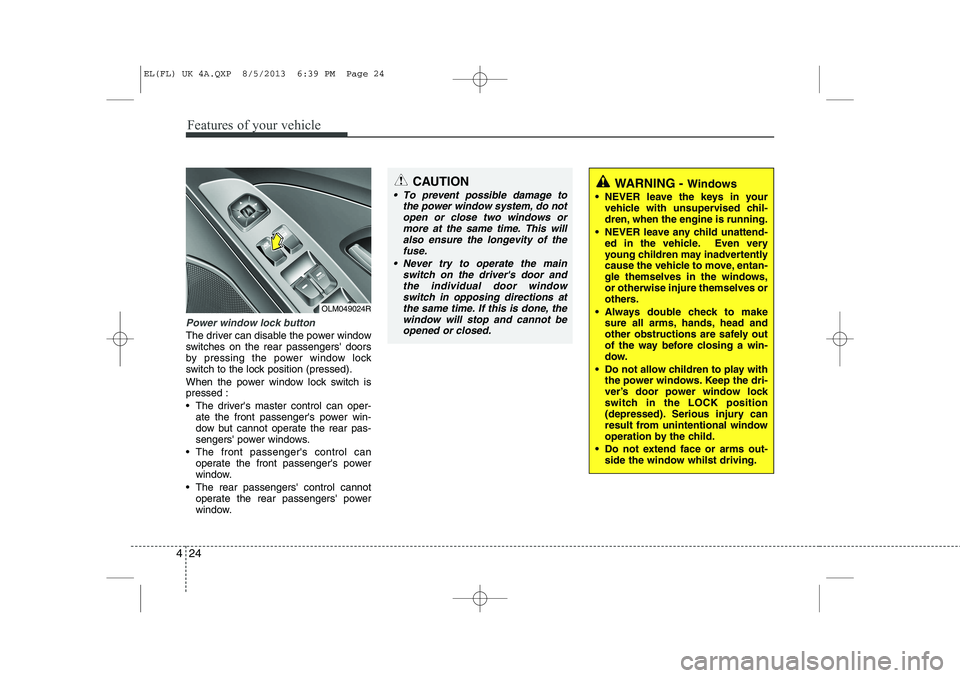
Power window lock button
The driver can disable the power window
switches on the rear passengers' doors
by pressing the power window lock
switch to the lock position (pressed).
When the power window lock switch is pressed :
The driver's master control can oper-
ate the front passenger's power win-
dow but cannot operate the rear pas-
sengers' power windows.
The front passenger's control can operate the front passenger's power
window.
The rear passengers' control cannot operate the rear passengers' power
window.
OLM049024R
CAUTION
To prevent possible damage to
the power window system, do not
open or close two windows ormore at the same time. This willalso ensure the longevity of thefuse.
Never try to operate the main switch on the driver's door andthe individual door windowswitch in opposing directions at
the same time. If this is done, the window will stop and cannot beopened or closed.WARNING - Windows
NEVER leave the keys in your vehicle with unsupervised chil-
dren, when the engine is running.
NEVER leave any child unattend- ed in the vehicle. Even very
young children may inadvertently
cause the vehicle to move, entan-
gle themselves in the windows,or otherwise injure themselves or
others.
Always double check to make sure all arms, hands, head and
other obstructions are safely out
of the way before closing a win-
dow.
Do not allow children to play with the power windows. Keep the dri-
ver’s door power window lock
switch in the LOCK position
(depressed). Serious injury can
result from unintentional window
operation by the child.
Do not extend face or arms out- side the window whilst driving.
EL(FL) UK 4A.QXP 8/5/2013 6:39 PM Page 24
Page 1096 of 1534
425
Features of your vehicle
Opening the bonnet
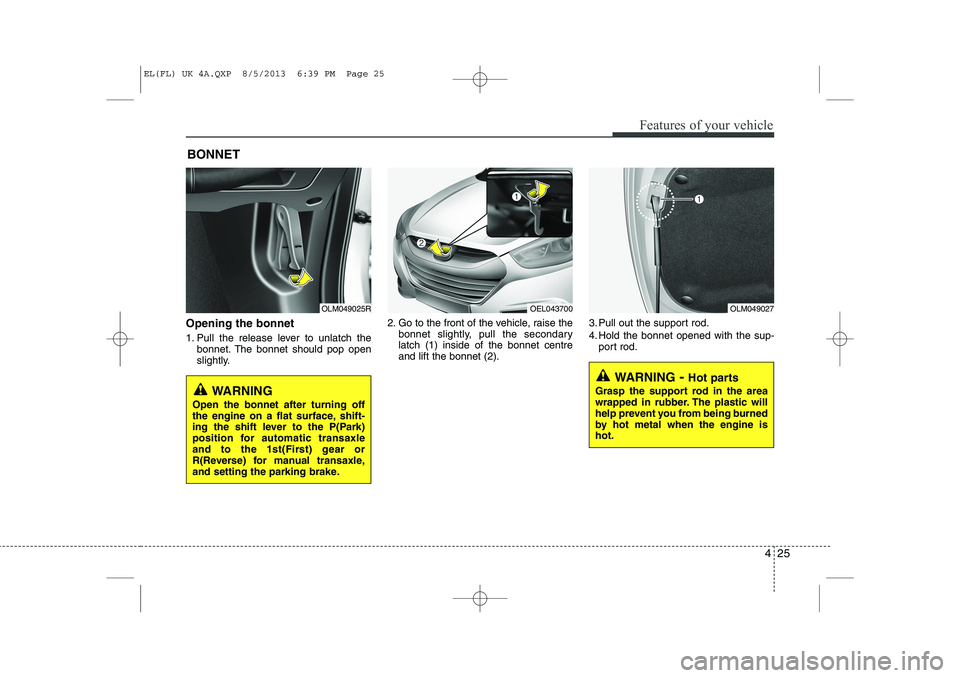
1. Pull the release lever to unlatch thebonnet. The bonnet should pop open
slightly. 2. Go to the front of the vehicle, raise the
bonnet slightly, pull the secondarylatch (1) inside of the bonnet centreand lift the bonnet (2). 3. Pull out the support rod.
4. Hold the bonnet opened with the sup-
port rod.
BONNET
OLM049025ROLM049027
WARNING
- Hot parts
Grasp the support rod in the area
wrapped in rubber. The plastic will
help prevent you from being burned
by hot metal when the engine ishot.
WARNING
Open the bonnet after turning off
the engine on a flat surface, shift-
ing the shift lever to the P(Park)
position for automatic transaxle
and to the 1st(First) gear or
R(Reverse) for manual transaxle,
and setting the parking brake.
OEL043700
EL(FL) UK 4A.QXP 8/5/2013 6:39 PM Page 25
Page 1097 of 1534
Features of your vehicle
26
4
Closing the bonnet
1. Before closing the bonnet, check the
following:
All filler caps in engine compartment must be correctly installed.
Gloves, rags or any other com- bustible material must be removed
from the engine compartment.
2. Return the support rod to its clip to prevent it from rattling.
3. Lower the bonnet until it is about 12 in. (30 cm) above the closed position and
let it drop. Make sure that it locks into
place.
WARNING - Bonnet
Before closing the bonnet, ensure that all obstructions are
removed from the bonnet open-
ing. Closing the bonnet with anobstruction present in the bonnet
opening may result in property
damage or severe personal
injury.
Do not leave gloves, rags or any other combustible material in the
engine compartment. Doing so
may cause a heat-induced fire.WARNING
Always double check to be sure that the bonnet is firmly latched
before driving away. If it is not
latched, the bonnet could fly
open whilst the vehicle is being
driven, causing a total loss of vis-
ibility, which might result in anaccident.
The support rod must be inserted completely into the hole whenev-
er you inspect the engine com-
partment. This will prevent the
bonnet from falling and possibly
injuring you.
Do not move the vehicle with the bonnet raised. The view will be
blocked and the bonnet could fall
or be damaged.
EL(FL) UK 4A.QXP 8/5/2013 6:39 PM Page 26
Page 1099 of 1534
Features of your vehicle
28
4
WARNING - Refuelling
If pressurized fuel sprays out, it can cover your clothes or skin
and thus subject you to the risk
of fire and burns. Always remove
the fuel cap carefully and slowly.
If the cap is venting fuel or if you
hear a hissing sound, wait until
the condition stops before com-
pletely removing the cap.
Do not "top off" after the nozzle automatically shuts off whenrefuelling.
Always check that the fuel cap is installed securely to prevent fuel
spillage in the event of an acci-dent.(Continued)
Do not get back into a vehicle once you have begun refuelling
since you can generate static
electricity by touching, rubbing
or sliding against any item or fab-
ric (polyester, satin, nylon, etc.)
capable of producing static elec-
tricity. Static electricity discharge
can ignite fuel vapours resulting
in rapid burning. If you must re-
enter the vehicle, you should
once again eliminate potentially
dangerous static electricity dis-
charge by touching a metal part
of the vehicle, away from the fuel
filler neck, nozzle or other petrol
source.
When using an approved portable fuel container, be sure toplace the container on the
ground prior to refuelling. Static
electricity discharge from the
container can ignite fuel vapours
causing a fire. Once refuelling
has begun, contact with the vehi-
cle should be maintained until
the filling is complete.
(Continued)WARNING - Refuelling
dangers
Automotive fuels are flammable
materials. When refuelling, please
note the following guidelines care-
fully. Failure to follow these guide-
lines may result in severe personal
injury, severe burns or death by fire
or explosion.
Read and follow all warning post- ed at the gas station facility.
Before refuelling note the loca- tion of the Emergency Petrol
Shut-Off, if available, at the gas
station facility.
Before touching the fuel nozzle, you should eliminate potentially
dangerous static electricity dis-
charge by touching another metal
part of the vehicle, a safe dis-
tance away from the fuel filler
neck, nozzle, or other gas source.
(Continued)
EL(FL) UK 4A.QXP 8/5/2013 6:40 PM Page 28
Page 1101 of 1534
Features of your vehicle
30
4
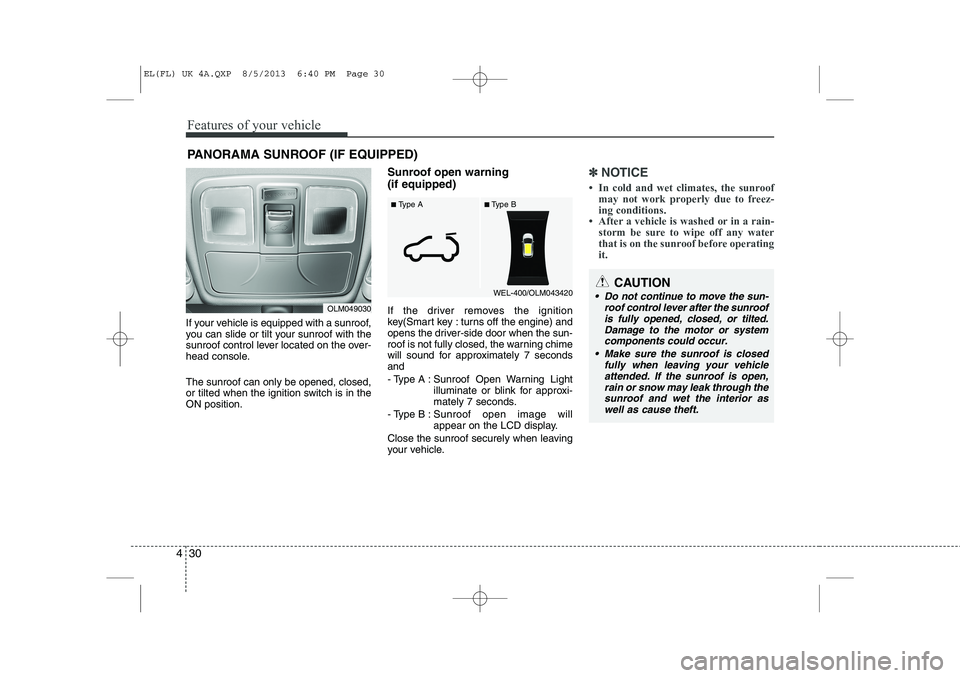
If your vehicle is equipped with a sunroof,
you can slide or tilt your sunroof with the
sunroof control lever located on the over-
head console. The sunroof can only be opened, closed,
or tilted when the ignition switch is in theON position. Sunroof open warning (if equipped)
If the driver removes the ignition
key(Smart key : turns off the engine) and
opens the driver-side door when the sun-
roof is not fully closed, the warning chime
will sound for approximately 7 secondsand
- Type A : Sunroof Open Warning Light
illuminate or blink for approxi-
mately 7 seconds.
- Type B : Sunroof open image will
appear on the LCD display.
Close the sunroof securely when leaving
your vehicle.
✽✽ NOTICE
Page 1102 of 1534
431
Features of your vehicle
✽✽NOTICE
The sunroof cannot tilt when it is in the slide position but can be slid whilst in atilt position.
Sliding the sunroof
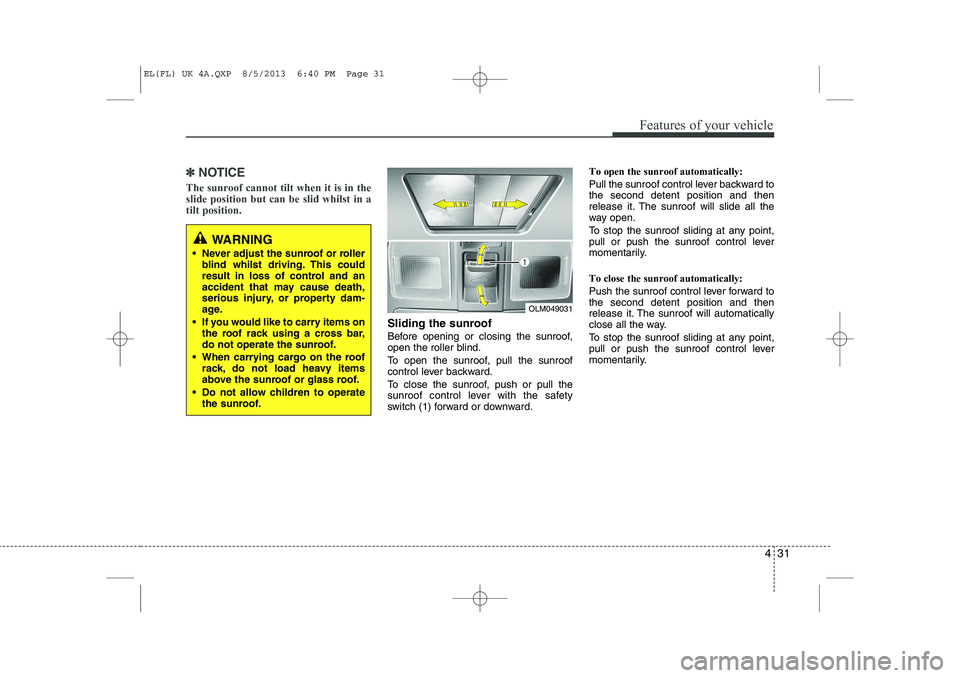
Before opening or closing the sunroof,
open the roller blind.
To open the sunroof, pull the sunroof
control lever backward.
To close the sunroof, push or pull the
sunroof control lever with the safety
switch (1) forward or downward. To open the sunroof automatically:
Pull the sunroof control lever backward to the second detent position and then
release it. The sunroof will slide all the
way open.
To stop the sunroof sliding at any point,
pull or push the sunroof control lever
momentarily. To close the sunroof automatically:
Push the sunroof control lever forward to the second detent position and then
release it. The sunroof will automatically
close all the way.
To stop the sunroof sliding at any point,
pull or push the sunroof control lever
momentarily.
OLM049031
WARNING
Never adjust the sunroof or roller blind whilst driving. This could
result in loss of control and an
accident that may cause death,
serious injury, or property dam-
age.
If you would like to carry items on the roof rack using a cross bar,
do not operate the sunroof.
When carrying cargo on the roof rack, do not load heavy items
above the sunroof or glass roof.
Do not allow children to operate the sunroof.
EL(FL) UK 4A.QXP 8/5/2013 6:40 PM Page 31
Page 1103 of 1534
Features of your vehicle
32
4
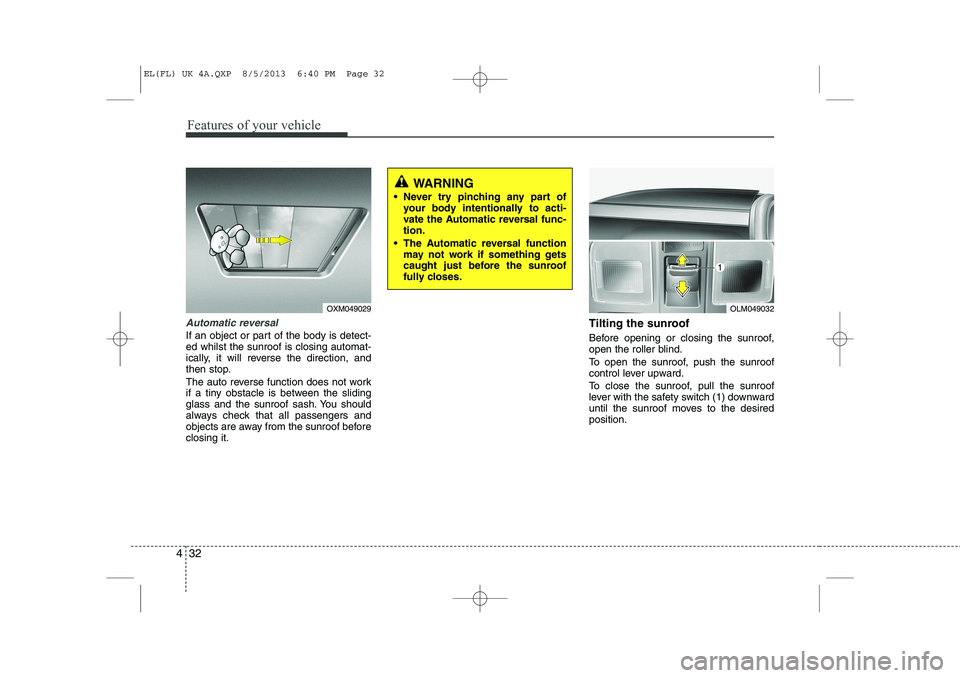
Automatic reversal
If an object or part of the body is detect- ed whilst the sunroof is closing automat-
ically, it will reverse the direction, and
then stop.
The auto reverse function does not work
if a tiny obstacle is between the sliding
glass and the sunroof sash. You should
always check that all passengers and
objects are away from the sunroof beforeclosing it. Tilting the sunroof
Before opening or closing the sunroof,
open the roller blind.
To open the sunroof, push the sunroof
control lever upward.
To close the sunroof, pull the sunroof
lever with the safety switch (1) downward
until the sunroof moves to the desiredposition.
OLM049032
WARNING
Never try pinching any part of your body intentionally to acti-
vate the Automatic reversal func-tion.
The Automatic reversal function may not work if something gets
caught just before the sunroof
fully closes.
OXM049029
EL(FL) UK 4A.QXP 8/5/2013 6:40 PM Page 32