Page 347 of 1534
753
Maintenance
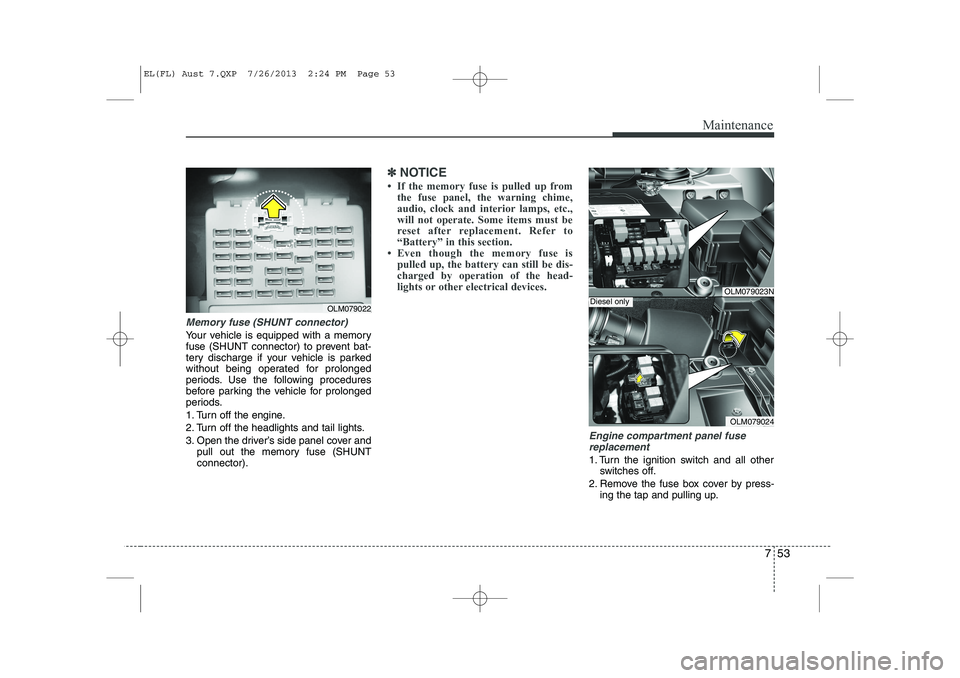
Memory fuse (SHUNT connector)
Your vehicle is equipped with a memory
fuse (SHUNT connector) to prevent bat-
tery discharge if your vehicle is parked
without being operated for prolonged
periods. Use the following procedures
before parking the vehicle for prolonged
periods.
1. Turn off the engine.
2. Turn off the headlights and tail lights.
3. Open the driver’s side panel cover andpull out the memory fuse (SHUNT connector).
✽✽ NOTICE
Page 357 of 1534

763
Maintenance
LIGHT BULBS
Use only the bulbs of the specifiedwattage.
✽✽ NOTICE
After heavy, driving rain or washing, headlight and taillight lenses could
appear frosty. This condition is caused by
the temperature difference between the
lamp inside and outside. This is similar
to the condensation on your windows
inside your vehicle during the rain and
doesn’t indicate a problem with your
vehicle. If water leaks into the lamp bulb
circuitry, we recommend that the systembe checked by an authorised HYUNDAI
dealer.WARNING - Working on
the lights
Prior to working on the light, firmly
apply the parking brake, ensure
that the ignition switch is turned to
the “LOCK” position and turn off
the lights to avoid sudden move-
ment of the vehicle and burning
your fingers or receiving an electric
shock.
CAUTION
Be sure to replace the burned-out bulb with one of the same wattage rating. Otherwise, it may causedamage to the fuse or electricwiring system.
CAUTION
If you don’t have necessary tools, the correct bulbs and the expertise,
we recommend that you consult anauthorised HYUNDAI dealer. In many cases, it is difficult to replacevehicle light bulbs because other
parts of the vehicle must beremoved before you can get to the bulb. This is especially true if you
have to remove the headlight assembly to
get to the bulb(s).
Removing/installingthe headlight
assembly can result in damage to the vehicle.
EL(FL) Aust 7.QXP 7/26/2013 2:25 PM Page 63
Page 370 of 1534
Maintenance
76
7
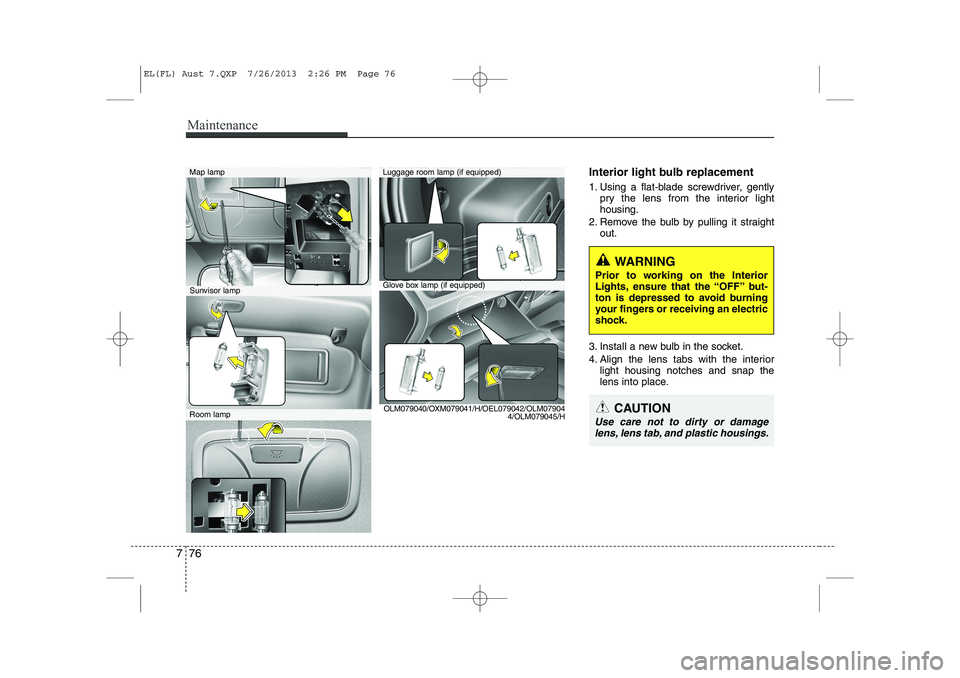
Interior light bulb replacement
1. Using a flat-blade screwdriver, gently
pry the lens from the interior light housing.
2. Remove the bulb by pulling it straight out.
3. Install a new bulb in the socket.
4. Align the lens tabs with the interior light housing notches and snap the
lens into place.Map lamp
Glove box lamp (if equipped)
Luggage room lamp (if equipped)
Sunvisor lamp
Room lamp OLM079040/OXM079041/H/OEL079042/OLM07904
4/OLM079045/H
WARNING
Prior to working on the Interior
Lights, ensure that the “OFF” but-
ton is depressed to avoid burning
your fingers or receiving an electric
shock.
CAUTION
Use care not to dirty or damage lens, lens tab, and plastic housings.
EL(FL) Aust 7.QXP 7/26/2013 2:26 PM Page 76
Page 383 of 1534
83
Specifications & Consumer information
BULB WATTAGE
* If equipped
Light BulbWattage
Headlights (Low/High)55 or 35 (HID)
Front turn signal lights21
Position lightsLED
Side repeater lights (Outside mirror)*LED
Side repeater lights* 5
Front fog lights* 27
Rear fog light*21
Stop and tail lights (Outside)21/5/LED
Stop and tail lights (Inside)LED
Rear turn signal lights (Outside)21
Tail light* (Inside)5
Back-up lights (Inside)16
High mounted stop lightLED
License plate lights5
Map lamps10
Room lamps10
Luggage lamp*5
Glove box lamp*5
Vanity mirror lamps*5
EL(FL) Aust 8.QXP 26.7.2013 17:46 Page 3
Page 443 of 1534

Safety features of your vehicle
18
3
Seat belt warning
■■
Type A
As a reminder to the driver, the seat belt
warning light will blink for approximately
6 seconds each time you turn the ignition
switch ON regardless of belt fastening.
If the driver’s seat belt is unfastened after
the ignition switch is ON, the seat belt
warning light blinks again for approxi-
mately 6 seconds.
If the driver's seat belt is not fastened
when the ignition switch is turned ON or
if it is unfastened after the ignition switch
is ON, the seat belt warning chime will
sound for approximately 6 seconds. At
this time, if the seat belt is fastened, the
chime will stop at once. (if equipped) ■
■
Type B
(1) Driver’s seat belt warning light
(2) Front passenger’s seat belt warning light
As a reminder to the driver and front pas-
senger, the driver’s and front passenger’s
seat belt warning lights will illuminate for
approximately 6 seconds each time you
turn the ignition switch ON regardless of
belt fastening.
If the driver’s or front passenger’s seat
belt is not fastened when the ignition
switch is turned ON or if it is disconnect-
ed after the ignition switch is turned ON,
the corresponding seat belt warning light
will illuminate until the belt is fastened.
1GQA2083OEL039060
WARNING
No modifications or additions should be made by the user
which will either prevent the seat
belt adjusting devices from oper-
ating to remove slack, or prevent
the seat belt assembly from being
adjusted to remove slack.
When you fasten the seat belt, be careful not to latch the seat belt
in buckles of other seat. It's very
dangerous and you may not be
protected by the seat belt proper-
ly.
Do not unfasten the seat belt and do not fasten and unfasten the
seat belt repeatedly while driving.This could result in loss of con-
trol, and an accident causing
death, serious injury, or property
damage.
When fastening the seat belt, make sure that the seat belt does
not pass over objects that are
hard or can break easily.
Make sure there is nothing in the buckle. The seat belt may not be
fastened securely.
EL(FL) Eng 3.QXP 7/11/2013 10:56 AM Page 18
Page 497 of 1534
47
Features of your vehicle
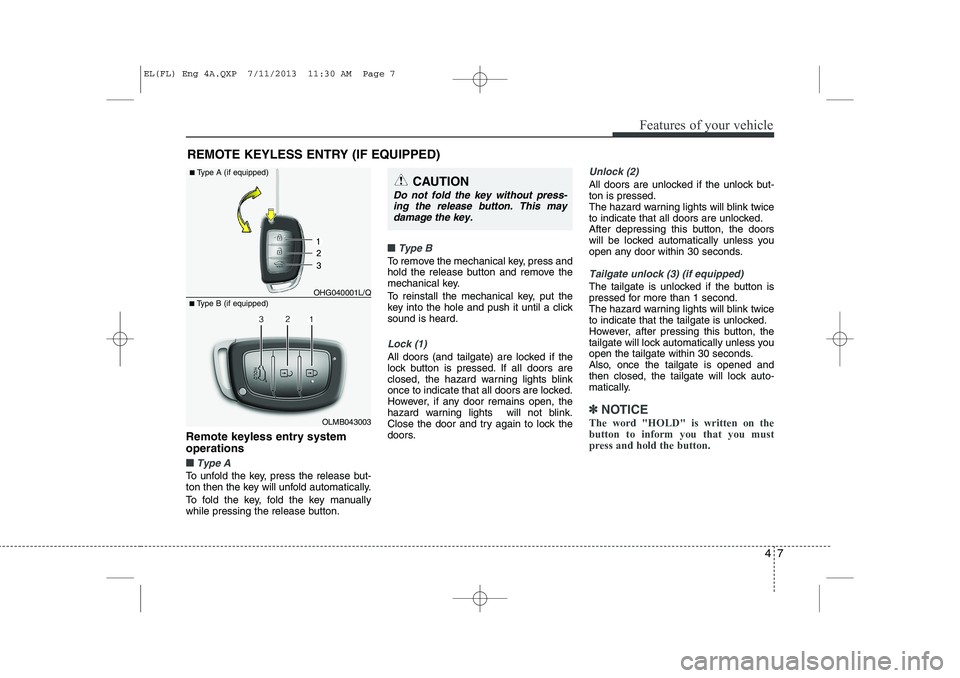
Remote keyless entry system operations
■■Type A
To unfold the key, press the release but-
ton then the key will unfold automatically.
To fold the key, fold the key manually
while pressing the release button.
■■Type B
To remove the mechanical key, press and
hold the release button and remove the
mechanical key.
To reinstall the mechanical key, put the
key into the hole and push it until a clicksound is heard.
Lock (1)
All doors (and tailgate) are locked if the
lock button is pressed. If all doors are
closed, the hazard warning lights blink
once to indicate that all doors are locked.
However, if any door remains open, the
hazard warning lights will not blink.
Close the door and try again to lock the
doors.
Unlock (2)
All doors are unlocked if the unlock but- ton is pressed.
The hazard warning lights will blink twice
to indicate that all doors are unlocked.
After depressing this button, the doors
will be locked automatically unless you
open any door within 30 seconds.
Tailgate unlock (3) (if equipped)
The tailgate is unlocked if the button is
pressed for more than 1 second.
The hazard warning lights will blink twice
to indicate that the tailgate is unlocked.
However, after pressing this button, the
tailgate will lock automatically unless you
open the tailgate within 30 seconds.
Also, once the tailgate is opened and
then closed, the tailgate will lock auto-
matically.
✽✽NOTICE
The word "HOLD" is written on the button to inform you that you must
press and hold the button.
REMOTE KEYLESS ENTRY (IF EQUIPPED)
OLMB043003
■
Type B (if equipped) OHG040001L/Q
■
Type A (if equipped)
CAUTION
Do not fold the key without press-
ing the release button. This may
damage the key.
EL(FL) Eng 4A.QXP 7/11/2013 11:30 AM Page 7
Page 500 of 1534

Features of your vehicle
10
4
With a smart key, you can lock or unlock
a door (and tailgate) and even start the
engine without inserting the key.
The functions of the buttons on a smart
key are similar to the remote keyless
entry. (Refer to the “Remote keyless
entry” in this section.) Smart key functions
Carrying the smart key, you may lock and
unlock the vehicle doors (and tailgate).
Also, you may start the engine. Refer to
the following, for more details.
Locking
Pressing the button of the front outside door handles with all doors (and tailgate)
closed and any door unlocked, locks all
the doors (and tailgate). The hazard
warning lights will blink once to indicate
that all doors (and tailgate) are locked.
The button will only operate when the
smart key is within 0.7~1 m (28~40 in.)
from the outside door handle. If you want
to make sure that a door has locked or
not, you should check the door lock but-
ton inside the vehicle or pull the outside
door handle.
SMART KEY (IF EQUIPPED)
OLM049007OLMB043005
EL(FL) Eng 4A.QXP 7/11/2013 11:30 AM Page 10
Page 501 of 1534

411
Features of your vehicle
Even though you press the button, the
doors will not lock and the chime sounds
3 seconds if any of the following occurs:
The smart key is in the vehicle.
The engine start/stop button is in theACC or ON position.
Any door except the tailgate is opened.Unlocking
Pressing the button of the front outside door handles with all doors (and tailgate)
closed and locked, unlocks all the doors
(and tailgate). The hazard warning lights
will blink twice to indicate that all doors
(and tailgate) are unlocked. The button
will only operate when the smart key iswithin 0.7~1 m (28~40 in.) from the out-
side door handle.
When the smart key is recognized in the area of 0.7~1 m (28~40 in.) from the front
outside door handle, other people canalso open a door without possession of
the smart key.
Tailgate unlocking
If you are within 0.7 ~ 1 m (28 ~ 40 in.)
from the outside tailgate handle, with
your smart key in possession, the tail-
gate will unlock and open when you
press the tailgate handle switch.
The hazard warning lights will blink twice
to indicate that the tailgate is unlocked.
Also, once the tailgate is opened and
then closed, the tailgate will lock auto-
matically.
Start-up
You can start the engine without inserting
the key. For detailed information refer to
“Starting the engine with a smart key” insection 5.
EL(FL) Eng 4A.QXP 7/11/2013 11:30 AM Page 11