2014 HYUNDAI IX35 warning
[x] Cancel search: warningPage 574 of 1534

Features of your vehicle
84
4
✽✽
NOTICE
This system can only sense objects with- in the range and location of the sensors;
It can not detect objects in other areas
where sensors are not installed. Also,
small or slim objects, such as poles orobjects located between sensors may notbe detected by the sensors.Always visually check behind the vehi-cle when backing up.
Be sure to inform any drivers of the
vehicle that may be unfamiliar with the
system regarding the systems capabili-ties and limitations.Self-diagnosis
If you don’t hear an audible warning
sound or if the buzzer sounds intermit-tently when shifting the gear to the R
(Reverse) position, this may indicate a
malfunction in the rear parking assist
system. If this occurs, we recommend
that the system be checked by an author-
ized HYUNDAI dealer.WARNING
Pay close attention when the vehi-
cle is driven close to objects on the
road, particularly pedestrians, and
especially children. Be aware that
some objects may not be detected
by the sensors, due to the object’s
distance, size or material, all of
which can limit the effectiveness of
the sensor. Always perform a visu-al inspection to make sure the vehi-
cle is clear of all obstructions
before moving the vehicle in anydirection.
WARNING
Your new vehicle warranty does not
cover any accidents or damage to
the vehicle or injuries to its occu-pants due to a rear parking assist
system malfunction. Always drive
safely and cautiously.* 1
* 1
EL(FL) Eng 4A.QXP 7/11/2013 11:34 AM Page 84
Page 575 of 1534

485
Features of your vehicle
Front/Rear parking assist system type (if equipped)
The front/rear parking assist system
detects the object distance by using the
front/rear sensor and front side sensor.
When you select the smart parking assist
system*, the front/rear parking assist
system will be operated.When it is the step controlling the steer-
ing wheel if you cancel the front/rear
parking assist system, the smart parkingassist system will be cancelled.
Operating condition
This parking assist system activates
and the indicator on the button illumi-
nates when the parking assist button
( ) is pressed with the ignition
switch ON. And it operates in forward,
reverse and neutral position of the shift
lever.
The parking assist button turns on
automatically and activates the parking
assist system when you shift the gear
to the R (Reverse) position. If you drive
the vehicle above 10km/h, the warning
will not activate.
When more than two objects are sensed at the same time, warning indi-
cator is displayed all.
When more than two objects are sensed at the same time, the closest
one will be warned by warning sound.
While backing up, if the front and rear sensor recognizes an object at the
same distance, the rear will be warnedfirst.
The warnings by side sensors are operated when the shift lever is in R
(Reverse) position.
Types of warning sound
When driving forward
When an object is 100 cm to 61 cm (39 in. to 24 in.) from the bumper:
Buzzer beeps intermittently.
When an object is 60 cm to 31 cm (23 in. to 12 in.) from the bumper:
Buzzer beeps more frequently.
When an object is within 30 cm (11 in.) of the bumper:
Buzzer sounds continuously.
When driving rearward or the shift lever is in N position
When an object is 120 cm to 61 cm (47.2 in. to 24 in.) from the bumper:
Buzzer beeps intermittently.
When an object is 60 cm to 31 cm (23 in. to 12 in.) from the bumper:
Buzzer beeps more frequently.
When an object is within 30 cm (11 in.) of the bumper:
Buzzer sounds continuously.
■Left-Hand type
OLM042247R
■Right-Hand typeOLM041247K
EL(FL) Eng 4A.QXP 7/11/2013 11:34 AM Page 85
Page 576 of 1534
Features of your vehicle
86
4
Self-diagnosis
When the front/rear parking assist sys-
tem has a malfunction, if you operate the
system, the warning sound sounds 3
times. In this time, the indicator on switch
will blink and the warning on the cluster
will blink. However, the warning regardingobject will not sound.
In this time, we recommend that the sys-
tem be checked by an authorized
HYUNDAI dealer.WARNING
Pay close attention when the vehi-
cle is driven close to objects on the
road, particularly pedestrians, and
especially children. Be aware that
some objects may not be detected
by the sensors, due to the object's
distance, size or material, all of
which can limit the effectiveness of
the sensor. Always perform a visual
inspection to make sure the vehicle
is clear of all obstructions before
moving the vehicle in any direction.CAUTION
This system can only sense objects within the range and loca-
tion of the sensors;
It can not detect objects in otherareas where sensors are notinstalled. Also, small or slim
objects, such as poles or objects located between sensors may notbe detected by the sensors.
Always visually check front orbehind the vehicle when getting
forward or backing up.
Be sure to inform any drivers of the vehicle that may be unfamiliarwith the system regarding the
systems capabilities and limita-tions.
WARNING
Your new vehicle warranty does not
cover any accidents or damage to
the vehicle or injuries to its occu-pants related to a parking assist
system. Always drive safely and
cautiously.
EL(FL) Eng 4A.QXP 7/11/2013 11:34 AM Page 86
Page 577 of 1534

487
Features of your vehicle
The smart parking assist system allows
you to park the vehicle to search a space
by sensors. This system is a supplemen-
tal system that shows message and
gives auditory warning by controlling the
steering wheel.
The sensing range and objects
detectable by the sensors are limited.
Whenever moving pay as much attention
to what is in front and behind of you as
you would in a vehicle without a parkingassist system.
The rear parallel parking is only possible
in this smart parking assist system.
Use this smart parking assist system in
parking lot or parking space.If there are no vehicles in front of space
that you want to park the vehicle, the
smart parking assist system is not sup-
ported. Also the diagonal line parking is
not supported.
After parking the vehicle, the parking sit-
uation may be not desired parking posi-
tion by arrangement situation between
vehicle and vehicle or between wall and
vehicle.
By necessity, turn off the smart parking
assist system and park the vehicle by
manual parking.
If you select this system, the warning
sound always let you know whether there
are the objects or not by distance with
operating the front/rear parking assistsystem.
While operating this system, if you turn
off the front/rear parking assist system
after searching parking space, the smart
parking assist system is also turned off.
SMART PARKING ASSIST SYSTEM (IF EQUIPPED)
OLM041270
WARNING
The smart parking assist system can not be operated normally by
surround situations and other
conditions. The driver alwaysneeds to confirm the objects.
This system is for parking assist, do not depend on this system
only. By surrounding conditions,
park the vehicle carefully and
safely like applying the brakepedal.
If the vehicle is necessary to con- trol wheel alignment, this system
is not operated normally. We rec-ommend that the system be
checked by an authorized
HYUNDAI dealer.
If you change the genuine tires to other tires type and size, the
parking ability may change. When
you change the tires, use the
same tires and size.
EL(FL) Eng 4A.QXP 7/11/2013 11:34 AM Page 87
Page 579 of 1534

489
Features of your vehicle
WARNING
In following conditions, when smart parking assist system is operated,
the unexpected result may occur
and it could result in serious injury.
Do not use the smart parking assistsystem.
1. Slope road parking
When the smart parking assist sys-
tem is operated in slope road, driv-
er needs to apply to accelerator
and brake pedal by himself. If driv-
er is unfamiliar with controlling the
pedal, the crash accident may
occur.
(Continued)(Continued)
2. Parking in snowed space
Following amount of snow cover,
the sensing ability could be low.
When the vehicle is slipped during
parking by smart parking assist
System, system can be canceled, If
driver is unfamiliar with controlling
the accelerator and brake pedal, the
crash accident may occur.(Continued)(Continued)
3. Narrow parking space
When the space for parking is not
enough, space searching may not
operate in narrow road. Even if
space searching is sensed, be care-ful.(Continued)
OLM041292OSL040144
OLM041290
EL(FL) Eng 4A.QXP 7/11/2013 11:34 AM Page 89
Page 582 of 1534
Features of your vehicle
92
4
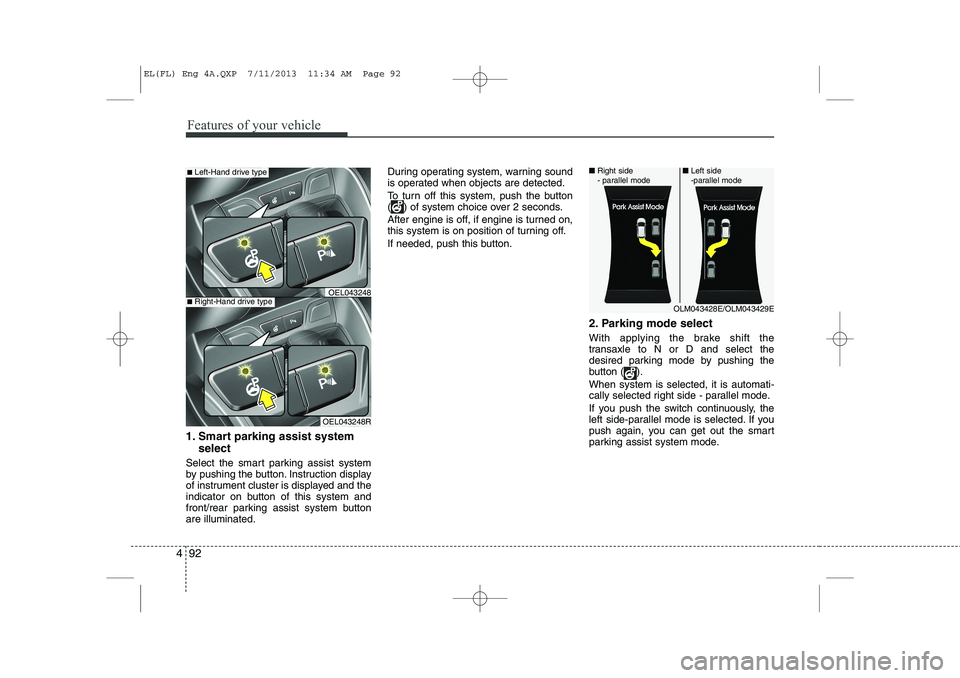
1. Smart parking assist system
select
Select the smart parking assist system
by pushing the button. Instruction display
of instrument cluster is displayed and the
indicator on button of this system and
front/rear parking assist system buttonare illuminated. During operating system, warning sound
is operated when objects are detected.
To turn off this system, push the button
( ) of system choice over 2 seconds.
After engine is off, if engine is turned on,
this system is on position of turning off.
If needed, push this button.
2. Parking mode select
With applying the brake shift the
transaxle to N or D and select the
desired parking mode by pushing the
button ( ). When system is selected, it is automati-
cally selected right side - parallel mode.
If you push the switch continuously, the
left side-parallel mode is selected. If you
push again, you can get out the smart
parking assist system mode.
OLM043428E/OLM043429E
■
Right side
- parallel mode ■
Left side
-parallel mode
■Left-Hand drive type
OEL043248R
■Right-Hand drive typeOEL043248
EL(FL) Eng 4A.QXP 7/11/2013 11:34 AM Page 92
Page 583 of 1534
493
Features of your vehicle
3. Parking space search
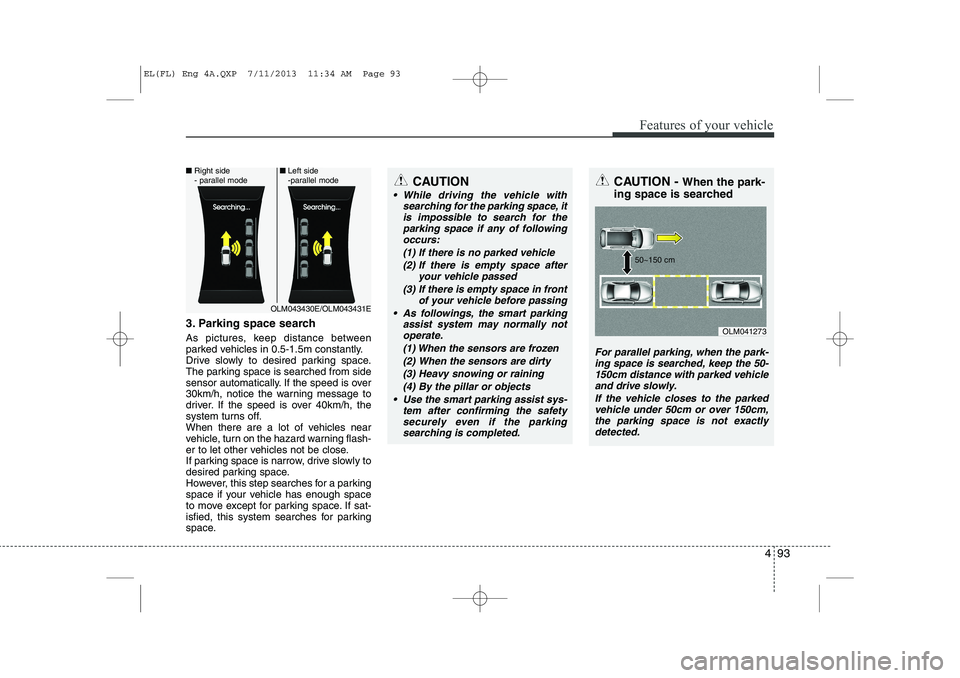
As pictures, keep distance between
parked vehicles in 0.5-1.5m constantly.
Drive slowly to desired parking space.
The parking space is searched from side
sensor automatically. If the speed is over
30km/h, notice the warning message to
driver. If the speed is over 40km/h, the
system turns off.
When there are a lot of vehicles near
vehicle, turn on the hazard warning flash-
er to let other vehicles not be close.
If parking space is narrow, drive slowly to
desired parking space.
However, this step searches for a parking
space if your vehicle has enough space
to move except for parking space. If sat-
isfied, this system searches for parking
space.
CAUTION
While driving the vehicle withsearching for the parking space, it
is impossible to search for the parking space if any of followingoccurs:
(1) If there is no parked vehicle(2) If there is empty space after your vehicle passed
(3) If there is empty space in front of your vehicle before passing
As followings, the smart parking assist system may normally notoperate.
(1) When the sensors are frozen
(2) When the sensors are dirty(3) Heavy snowing or raining (4) By the pillar or objects
Use the smart parking assist sys- tem after confirming the safetysecurely even if the parking searching is completed.
CAUTION - When the park-
ing space is searched
For parallel parking, when the park- ing space is searched, keep the 50-150cm distance with parked vehicleand drive slowly.
If the vehicle closes to the parkedvehicle under 50cm or over 150cm, the parking space is not exactlydetected.
OLM041273
50~150 cm
OLM043430E/OLM043431E
■
Right side
- parallel mode ■
Left side
-parallel mode
EL(FL) Eng 4A.QXP 7/11/2013 11:34 AM Page 93
Page 585 of 1534

495
Features of your vehicle
System cancellation while park- ing
Push the smart parking assist system or
turn the steering wheel left side or right
side.5-1. Gear shifting while control-ling the steering wheel
By parking circumstance, if the buzzer
beep sounds with warning messages,
shift the transaxle to desired gear on
cluster, park the vehicle with using brake.CAUTION
If you go forward or backward without notice like warning mes-
sage, the parking state may benot good.
However, if the 3rd warning sound(continuous sound) occurs, drive
the vehicle reverse direction slowly after confirming surround-ing objects.
When parking the vehicle, care- fully go forward or backward with
depressing the brake pedal after completing steering wheel con-trol support.
If the speed of vehicle is high, the crash accident may occur.
While parking the vehicle, if the 3rd warning sound (continuoussound) occurs, it means the vehi- cle is close to objects. Check the
surround objects by yourself.
OLM043434E/OLM043435E
OLM043422E
EL(FL) Eng 4A.QXP 7/11/2013 11:35 AM Page 95