2014 HYUNDAI IX35 4WD
[x] Cancel search: 4WDPage 419 of 1534

23
Your vehicle at a glance
1. Door lock/unlock button ........................4-16
2. Power window switches* ........................4-21
3. Central door lock switch* ......................4-16
4. Power window lock switch* ....................4-24
5. Outside rearview mirror control switch* ....................................................4-44
6. Outside rearview mirror folding button* ....................................................4-45
7. Fuel filler lid release lever ......................4-27
8. Instrument panel illumination control switch* ......................................4-47
9. 4WD Lock button* ..................................5-2910.
Idle Stop and Go system OFF
button* ..................................................5-17
11. Heated steering wheel button* ............4-35
12. DBC button* ........................................5-45
13. ESC OFF button* ................................5-41
14. Fuse box ..............................................7-81
15. Steering wheel ....................................4-34
16. Seat........................................................3-2
17. Brake pedal ..........................................5-35
18. Accelerator pedal
19. Hood release lever ..............................4-25
* : if equipped
OEL013001R-1
Right-Hand drive type
❈The actual shape may differ from the illustration.
EL(FL) Eng 2.QXP 8/9/2013 1:18 PM Page 3
Page 420 of 1534
Your vehicle at a glance
4
2
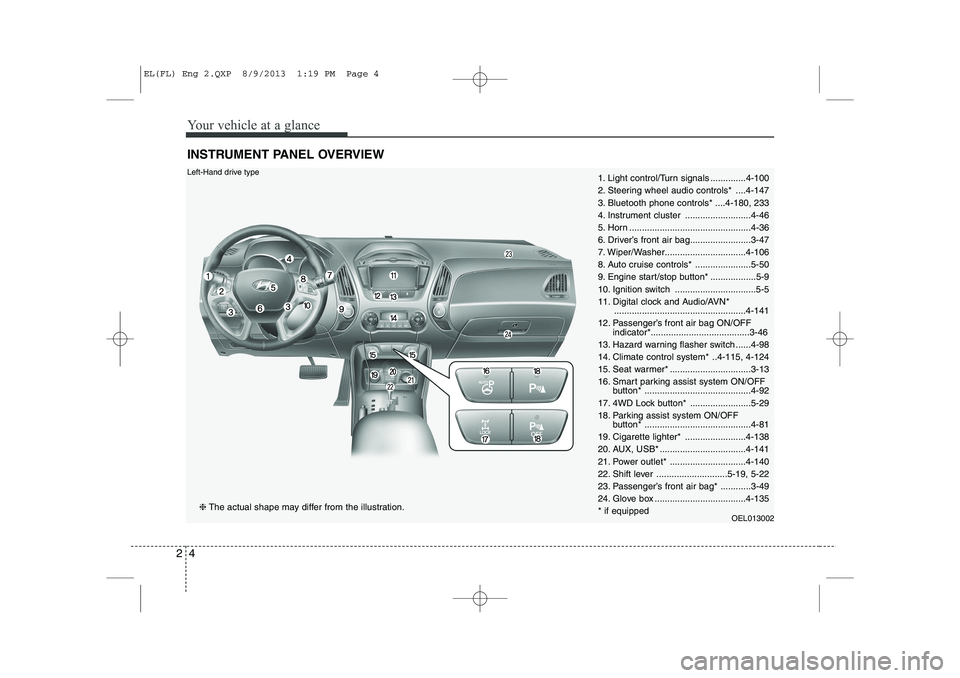
INSTRUMENT PANEL OVERVIEW
1. Light control/Turn signals ..............4-100
2. Steering wheel audio controls* ....4-147
3. Bluetooth phone controls* ....4-180, 233
4. Instrument cluster ..........................4-46
5. Horn ................................................4-36
6. Driver’s front air bag........................3-47
7. Wiper/Washer................................4-106
8. Auto cruise controls* ......................5-50
9. Engine start/stop button* ..................5-9
10. Ignition switch ................................5-5
11. Digital clock and Audio/AVN*
....................................................4-141
12. Passenger’s front air bag ON/OFF indicator*.......................................3-46
13. Hazard warning flasher switch ......4-98
14. Climate control system* ..4-115, 4-124
15. Seat warmer* ................................3-13
16. Smart parking assist system ON/OFF button* ..........................................4-92
17. 4WD Lock button* ........................5-29
18. Parking assist system ON/OFF button* ..........................................4-81
19. Cigarette lighter* ........................4-138
20. AUX, USB* ..................................4-141
21. Power outlet* ..............................4-140
22. Shift lever ............................5-19, 5-22
23. Passenger’s front air bag* ............3-49
24. Glove box ....................................4-135* if equipped OEL013002Left-Hand drive type
❈The actual shape may differ from the illustration.
EL(FL) Eng 2.QXP 8/9/2013 1:19 PM Page 4
Page 421 of 1534
25
Your vehicle at a glance
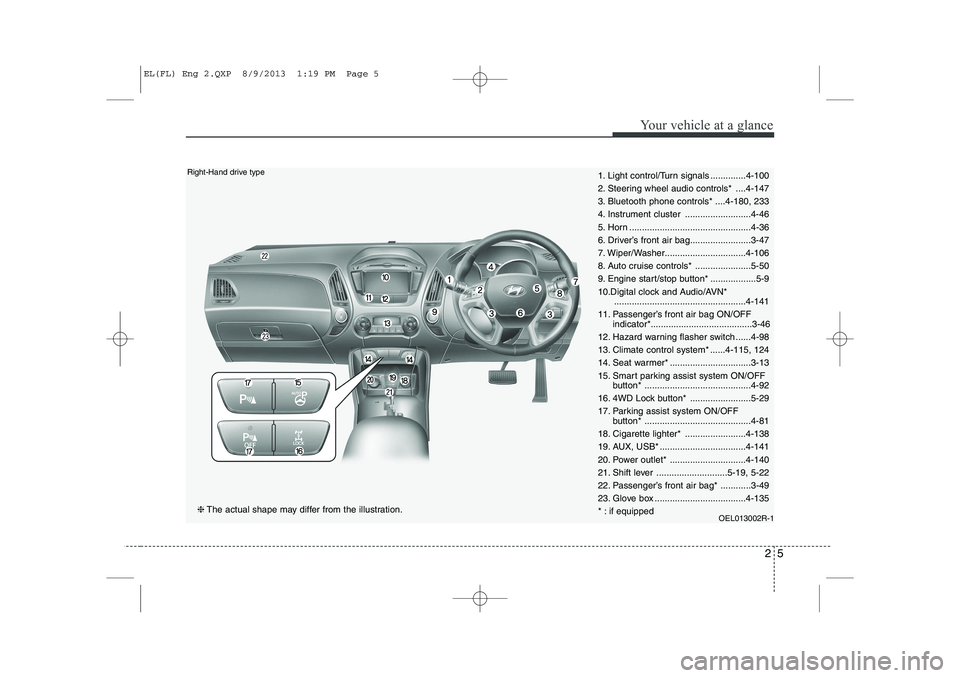
1. Light control/Turn signals ..............4-100
2. Steering wheel audio controls* ....4-147
3. Bluetooth phone controls* ....4-180, 233
4. Instrument cluster ..........................4-46
5. Horn ................................................4-36
6. Driver’s front air bag........................3-47
7. Wiper/Washer................................4-106
8. Auto cruise controls* ......................5-50
9. Engine start/stop button* ..................5-9
10.Digital clock and Audio/AVN*....................................................4-141
11. Passenger’s front air bag ON/OFF indicator*........................................3-46
12. Hazard warning flasher switch ......4-98
13. Climate control system* ......4-115, 124
14. Seat warmer* ................................3-13
15. Smart parking assist system ON/OFF button* ..........................................4-92
16. 4WD Lock button* ........................5-29
17. Parking assist system ON/OFF button* ..........................................4-81
18. Cigarette lighter* ........................4-138
19. AUX, USB* ..................................4-141
20. Power outlet* ..............................4-140
21. Shift lever ............................5-19, 5-22
22. Passenger’s front air bag* ............3-49
23. Glove box ....................................4-135
* : if equipped OEL013002R-1Right-Hand drive type
❈The actual shape may differ from the illustration.
EL(FL) Eng 2.QXP 8/9/2013 1:19 PM Page 5
Page 569 of 1534

479
Features of your vehicle
Glow indicator (Dieselengine)
The indicator light illuminates when the
ignition switch is placed at the ON posi-
tion. The engine can be started after the
preheat indicator light goes off. The illu-
minating time varies with the water tem-
perature, air temperature and batterycondition.
✽✽ NOTICE
If the engine was not started within 10
seconds after the preheating is complet-
ed, turn the ignition key once more tothe LOCK position during 10 seconds,
and then to the ON position, in order to
preheat again.
Fuel filter warning light (Diesel engine)
This warning light illuminates for 3 sec-
onds after the ignition switch is set to the
ON position and then it will go out. If it
lights up while the engine is running, it
indicates that water has accumulated
inside the fuel filter. If this happens,
remove the water from the fuel filter. For
more Information, refer to “Fuel filter” insection 7.
4WD system warning light (if equipped)
When the ignition switch is turned to the ON position, the 4WD indicator will illumi-
nate and then go off in a few seconds.
If the 4WD system warning light
illuminates, this indicates that there is a
malfunction in the 4WD system. If this
occurs, we recommend that the system
be checked by an authorized HYUNDAI
dealer.
CAUTION
When the fuel filter warning light is
illuminated, engine power (vehiclespeed & idle speed) may decrease. If you keep driving with the warning
light on, you can damage your vehi- cle's engine parts and injection sys-tem of the Common Rail. If this occurs, we recommend that thesystem be checked by an author-
ized HYUNDAI dealer.
CAUTION
If the preheat indicator continues to illuminate or flash on and off after
the engine has warmed up or whiledriving, we recommend that thesystem be checked by an author- ized HYUNDAI dealer.
EL(FL) Eng 4A.QXP 7/11/2013 11:34 AM Page 79
Page 570 of 1534
Features of your vehicle
80
4
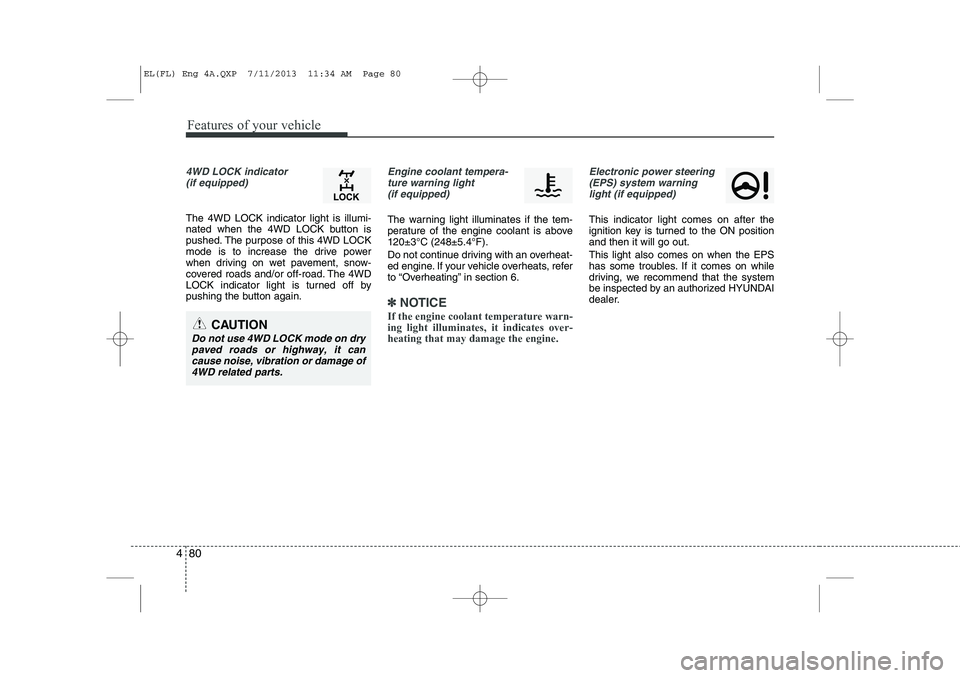
4WD LOCK indicator
(if equipped)
The 4WD LOCK indicator light is illumi-
nated when the 4WD LOCK button is
pushed. The purpose of this 4WD LOCK
mode is to increase the drive power
when driving on wet pavement, snow-
covered roads and/or off-road. The 4WD
LOCK indicator light is turned off by
pushing the button again.
Engine coolant tempera-ture warning light (if equipped)
The warning light illuminates if the tem-
perature of the engine coolant is above120±3°C (248±5.4°F).
Do not continue driving with an overheat-
ed engine. If your vehicle overheats, refer
to “Overheating” in section 6.
✽✽ NOTICE
If the engine coolant temperature warn- ing light illuminates, it indicates over-heating that may damage the engine.
Electronic power steering (EPS) system warninglight (if equipped)
This indicator light comes on after the
ignition key is turned to the ON positionand then it will go out. This light also comes on when the EPS
has some troubles. If it comes on while
driving, we recommend that the system
be inspected by an authorized HYUNDAI
dealer.
CAUTION
Do not use 4WD LOCK mode on dry paved roads or highway, it cancause noise, vibration or damage of
4WD related parts.
EL(FL) Eng 4A.QXP 7/11/2013 11:34 AM Page 80
Page 782 of 1534

Driving your vehicle
28
5
Engine power can be delivered to all front
and rear wheels for maximum traction.
4WD is useful when extra traction is
required on road, such as, when driving
on slippery, muddy, wet, or snow-covered
roads. These vehicles are not designed
for challenging off-road use. Occasional
off-road use such as established
unpaved roads and trails are OK. It is
always important when traveling off-high-
way that the driver carefully reduces the
speed to a level that does not exceed the
safe operating speed for those condi-
tions. In general, off-road conditions pro-
vide less traction and braking effective-
ness than normal road conditions. The
driver must be especially alert to avoid
driving on slopes which tilt the vehicle to
either side.
These factors must be carefully consid-
ered when driving off-road. Keeping the
vehicle in contact with the driving surfaceand under control in these conditions is
always the driver's responsibility for the
safety of him/herself and his or her pas-
sengers. Tight corner brake effect
Tight corner brake effect is a unique
characteristic of four-wheel drive vehicles
caused by the difference in tire rotation at
the four wheels and the zero-degreealignment of the front wheels and sus-pension.
Sharp turns at low speeds should be car-
ried out with caution.
FOUR WHEEL DRIVE (4WD) (IF EQUIPPED)
WARNING
- Off road driving
This vehicle is designed primarily
for on road use although it can oper-
ate effectively off road. However, it
was not designed to drive in chal-
lenging off-road conditions. Driving
in conditions that exceed the vehi-
cle's intended design or the driver's
experience level may result in
severe injury or death.
CAUTION - 4WD
When turning sharply on a paved
road at low speed while in four-wheel drive, steering control will be difficult.
WARNING
If the 4WD system warning light
( ) illuminates, this indicates thatthere is a malfunction in the 4WDsystem.
If this occurs, we recommend that
the system be checked by an
authorized HYUNDAI dealer.
EL(FL) Eng 5.QXP 7/11/2013 11:03 AM Page 28
Page 783 of 1534

529
Driving your vehicle
This mode is used for climbing or descending sharp grades,off-road driving, driving on sandy and muddy roads, etc., to
maximize traction.
This mode automatically begins to deactivate at speeds above 30 km/h (19 mph) and is shifted to 4WD AUTO mode
at speed above 40 km/h (25 mph). If the vehicle decelerates
to speeds below 30 km/h (19 mph), however, the transfermode is shifted into 4WD LOCK mode again.
4WD AUTO
(4WD LOCK is deactivated)
(Indicator light isnot illuminated)
✽✽ NOTICE
Page 785 of 1534

531
Driving your vehicle
You must consciously take the effort tolearn how to corner in a 4WD vehicle.
Do not rely on your experience in con-
ventional 2WD vehicles in choosing
safe cornering speed in 4WD mode.
For starters, you must drive more slow-
ly in 4WD.
Drive carefully off-road because your vehicle may be damaged by rocks or
roots of trees. Become familiar with the
off-road conditions where you are
going to drive before you begin driving.
Always hold the steering wheel firmlywhen you are driving off-road.
Make sure all passengers are wearing seat belts. If you need to drive in the water, stop
your vehicle, set your transfer to the
4WD LOCK mode and drive at lessthan 8 km/h (5 mph).
WARNING - Steering wheel
Do not grab the inside of the steer-
ing wheel when you are driving off-
road. You may hurt your arm by a
sudden steering maneuver or fromsteering wheel rebound due to
impact with objects on the ground.
You could lose control of the steer-ing wheel.
WARNING - Wind danger
If you are driving in heavy wind, the
vehicle's higher center of gravity
decreases your steering control
capacity and requires you to drive
more slowly.
WARNING - Driving
through water
Drive slowly. If you are driving too
fast in water, the water can get into
the engine compartment and wet
the ignition system, causing your
vehicle to suddenly stop. If this
happens and your vehicle is in a
tilted position, your vehicle may roll
over.
OLM059022L
WARNING - 4WD
Reduce speed when you turn cor-
ners. The center of gravity of 4WD
vehicles is higher than that of con-
ventional 2WD vehicles, making
them more likely to roll over when
you turn corners too fast.
EL(FL) Eng 5.QXP 7/11/2013 11:03 AM Page 31