2014 HYUNDAI IX35 door lock
[x] Cancel search: door lockPage 93 of 1534
421
Features of your vehicle
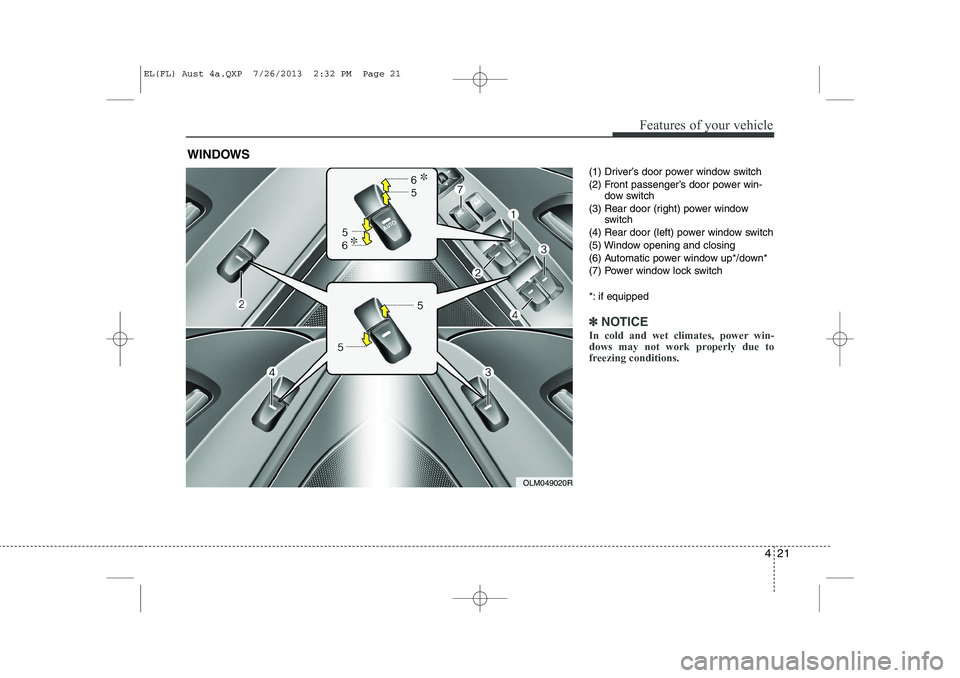
(1) Driver’s door power window switch
(2) Front passenger’s door power win-dow switch
(3) Rear door (right) power window switch
(4) Rear door (left) power window switch
(5) Window opening and closing
(6) Automatic power window up*/down*
(7) Power window lock switch
*: if equipped
✽✽ NOTICE
In cold and wet climates, power win-
dows may not work properly due to
freezing conditions.
WINDOWS
OLM049020R
EL(FL) Aust 4a.QXP 7/26/2013 2:32 PM Page 21
Page 94 of 1534

Features of your vehicle
22
4
Power windows
The ignition switch must be in the ON
position for power windows to operate.
Each door has a power window switch
that controls the door’s window. The driv-
er has a power window lock switch which
can block the operation of rear (or front)
passenger windows.
The power windows can be operated for
approximately 30 seconds after the igni-
tion key is removed or turned to the ACC
or LOCK position. However, if the front
doors are opened, the power windows
cannot be operated even within the 30
seconds period. The driver’s door has a
master power window switch that con-
trols all the windows in the vehicle
✽✽
NOTICE
Whilst driving with the rear windows
down or with the sunroof (if equipped)
in an open (or partially open position),
your vehicle may demonstrate a wind
buffeting or pulsation noise. This
noise is a normal occurrence and can be
reduced or eliminated by taking the fol-
lowing actions. If the noise occurs with
one or both of the rear windows down,
partially lower both front windows
approximately one inch. If you experi-
ence the noise with the sunroof open,
slightly reduce the size of the sunroofopening.
Window opening and closing
To open or close a window, press down
or pull up the front portion of the corre-
sponding switch to the first detent posi-tion (5).
Auto down window (if equipped) (Driver’s window)
Pressing the power window switch
momentarily to the second detent posi-
tion (6) completely lowers the driver’s
window even when the switch is
released. To stop the window at the
desired position whilst the window is in
operation, pull up the switch momentarily
to the opposite direction of the window
movement.
OLM049022ROLM049021R
EL(FL) Aust 4a.QXP 7/26/2013 2:32 PM Page 22
Page 96 of 1534

Features of your vehicle
24
4
Power window lock button
The driver can disable the power window
switches on the rear passengers' doors
by pressing the power window lock
switch to the lock position (pressed).
When the power window lock switch is pressed :
The driver's master control can oper-
ate the front passenger's power win-
dow but cannot operate the rear pas-
sengers' power windows.
The front passenger's control can operate the front passenger's power
window.
The rear passengers' control cannot operate the rear passengers' power
window.
CAUTION
To prevent possible damage to
the power window system, do not
open or close two windows ormore at the same time. This willalso ensure the longevity of thefuse.
Never try to operate the main switch on the driver's door andthe individual door windowswitch in opposing directions at
the same time. If this is done, the window will stop and cannot beopened or closed.WARNING - Windows
NEVER leave the keys in your vehicle with unsupervised chil-
dren, when the engine is running.
NEVER leave any child unattend- ed in the vehicle. Even very
young children may inadvertently
cause the vehicle to move, entan-
gle themselves in the windows,or otherwise injure themselves or
others.
Always double check to make sure all arms, hands, head and
other obstructions are safely out
of the way before closing a win-
dow.
Do not allow children to play with the power windows. Keep the dri-
ver’s door power window lock
switch in the LOCK position
(depressed). Serious injury can
result from unintentional window
operation by the child.
Do not extend face or arms out- side the window whilst driving.
OLM049024R
EL(FL) Aust 4a.QXP 7/26/2013 2:32 PM Page 24
Page 127 of 1534

455
Features of your vehicle
User Settings Mode
Description
On this mode, you can change setting of
the doors, lamps, and so on.
Door
Auto Door Lock (if equipped)
Off:The auto door lock operation will bedeactivated.
Speed: All doors will be automatically lockedwhen the vehicle speed exceeds 15km/h (9.3mph).
Shift Lever: All doors will be automatically locked ifthe automatic transaxle shift lever is
shifted from the P (Park) position to the
R (Reverse), N (Neutral), or D (Drive)position. Auto Door Unlock (if equipped)
Off:
The auto door unlock operation will becanceled.
Key Out or Power Off: All doors will be automatically unlockedwhen the ignition key is removed from
ignition switch or Engine Star/StopButton is set to the OFF position.
Driver Door Unlock: All doors will be automatically unlocked
if the driver's door is unlocked.
Shift Lever: All doors will be automatically unlocked
if the automatic transaxle shift lever is
shifted to the P (Park) position.
OLM043406E
EL(FL) Aust 4a.QXP 7/26/2013 2:34 PM Page 55
Page 128 of 1534

Features of your vehicle
56
4
Horn Feedback (if equipped)
If this item is checked, the horn feedback
operation will be activated.
After locking the door by pressing the
lock button on the transmitter, if you
press the lock button again within 4 sec-
onds, the warning sound will operate
once to indicate that all doors are locked.Lamp
Head Lamp Delay (if equipped)
If this item is checked, the headlamp
delay and headlamp welcome function
will be activated.
Settings
Language (if equipped)
Choose the language you prefer within
the LCD display. SPAS Voice (if equipped)
Adjust the volume of SPAS voice infor- mation. Temperature Unit
Convert the temperature unit from °C to
°F or from °F to °C. AVG Fuel Eco Reset
Auto Reset:
The average fuel economy will reset automatically when refuelling.
Manual Reset: The average fuel economy will not
reset automatically whenever refu-elling.
For more details, refer to “Trip Computer”
in this chapter.
EL(FL) Aust 4a.QXP 7/26/2013 2:34 PM Page 56
Page 148 of 1534

Features of your vehicle
76
4
DBC (Downhill brake con-
trol) indicator (if equipped)
The DBC indicator will illuminate when
the ignition switch is turned ON, but
should go off after approximately 3 sec-
onds. The DBC indicator will illuminate when
the DBC button is pressed and the sys-tem is on.
When driving down a steep hill at a speed under 35 km/h (22 mph), the DBC
will operate and the DBC indicator will
blink to indicate the DBC is operating.
If the red indicator illuminates, the DBC
system may have malfunctioned. We rec-
ommend that the system be checked by
an authorised HYUNDAI dealer.
KEY OUT indicator (if equipped)
When the ENGINE START/STOP button
is in the ACC or ON position, if any door
is open, the system checks for the smart
key. If the smart key is not in the vehicle,
the indicator will blink, and if all doors are
closed, the chime will also sound for
about 5 seconds. The indicator will go off
whilst the vehicle is moving. Keep the
smart key in the vehicle.
Key reminder warning chime (if equipped)
If the driver’s door is opened whilst the
ignition key is left in the ignition switch
(ACC or LOCK position), the key
reminder warning chime will sound. This
is to prevent you from locking your keys
in the vehicle. The chime sounds until the
key is removed from the ignition switch or
the driver’s door is closed.
KEY
OUT
EL(FL) Aust 4a.QXP 7/26/2013 2:35 PM Page 76
Page 160 of 1534

Features of your vehicle
88
4
Battery saver function
The purpose of this feature is to pre-
vent the battery from being dis-
charged. The system automatically
turns off the parking lights when the
driver removes the ignition key and
opens the driver- side door.
With this feature, the parking lights will be turned off automatically if the driver
parks on the side of road at night.
If necessary, to keep the lights on
when the ignition key is removed, per-
form the following :
1) Open the driver-side door.
2) Turn the parking lights OFF and ON again using the light switch on the
steering column. Headlight escort function (if equipped) The headlights (and/or taillights) remain
on for approximately 5 minutes after the
ignition key is removed or turned to the
ACC or LOCK position. However, if the
driver’s door is opened and closed, the
headlights are turned off after 15 sec-
onds.
The headlights can be turned off by
pressing the lock button on the transmit-
ter (or smart key) twice or turning off the
light switch from the headlight or Autolight position.
Headlight welcome function (if equipped)
When the headlight switch is in the ON or
AUTO position and all doors (and tail-
gate) are closed and locked, if you press
the door unlock button on the transmitter
(or smart key), the headlights will come
on for about 15 seconds.
If the headlight switch is in the AUTO
position, the function can only operate atnight.
At this time, if you press the door unlock
button again or door lock button on the
transmitter (or smart key), the headlights
will turn off immediately.
LIGHTING
CAUTION
If the driver gets out of the vehicle
through other doors (except dri- ver’s door), the battery saver func-tion does not operate and the head-
light escort function does not turnoff automatically. Therefore, it caus- es the battery to be discharged. Inthis case, make sure to turn off the
lamp before getting out of the vehi- cle.
EL(FL) Aust 4a.QXP 7/26/2013 2:35 PM Page 88
Page 171 of 1534

499
Features of your vehicle
Map lamp (if equipped)
Push the lens (1) to turn the map lamp on
or off.
: The light (with room lamp) stayson at all times.
: The light (with room lamp) comes on when any door (except tail- gate) is opened regardless of the
ignition switch position. When
doors (except tailgate) are
unlocked by the transmitter (or
smart key), the light (with room
lamp) comes on for approximate-
ly 30 seconds as long as any door
(except tailgate) is not opened. Also, the light (with room lamp)
goes out gradually after approxi-mately 30 seconds if the door
(except tailgate) is closed.
However, if the ignition switch is
ON or all doors (except tailgate)
are locked, the light will turn off
immediately.
If a door (except tailgate) is
opened with the ignition switch in
the ACC or LOCK position, the
light (with room lamp) stays on for
about 20 minutes. However, if a
door (except tailgate) is opened
with the ignition switch in the ONposition, the light (with room lamp)
stays on continuously.
: The lights turn off even if a door is opened.
❈ When the lamp is turned ON by
pressing the lens (1), the lamp
does not turn off even if the
switch (2) is in the OFF posi-tion.
INTERIOR LIGHT
CAUTION
Do not use the interior lights for
extended periods when the engine
is not running.
It may cause battery discharge.
OEL049100
WARNING
Do not use the interior lights when
driving in the dark. Accidents could
happen because the view may be
obscured by interior lights.
EL(FL) Aust 4a.QXP 7/26/2013 2:36 PM Page 99