Page 320 of 546

5-44
Driving your vehicle
When Active ECO is activated:
• The acceleration response may be
slightly reduced as the accelerator
pedal is depressed moderately.
• The air conditioner performance
may be limited.
• The shift pattern of the automatic
transmission may change.
• The engine noise may get louder.
The above situations are normal
conditions when the Active ECO sys-
tem is activated to improve fuel effi-
ciency.Limitation of Active ECO opera-
tion:
If the following conditions occur while
Active ECO is operating, the system
operation is limited even though
there is no change in the ECO indi-
cator.
• When the coolant temperature is
low:
The system will be limited until
engine performance becomes nor-
mal.
• When driving up a hill:
The system will be limited to gain
power when driving uphill because
engine torque is restricted.
• When using the automatic trans-
mission Sports mode:
The system will be limited accord-
ing to the shift location.
SPORT mode
SPORT mode focuses on
dynamic driving by auto-
matically controlling the
steering wheel, engine
and transmission system.
• When the DRIVE MODE button is
pressed and the SPORT mode is
selected, the SPORT indicator
(yellow) will illuminate.
• When the SPORT mode is activat-
ed, and the engine is turned off
and on it will change to NORMAL
mode. To turn on the SPORT
mode, press the DRIVE MODE
button again.
• If the system is activated:
- After accelerating and releasing
the accelerator pedal, the gear and
engine speed RPM may not drop
as soon as in NORMAL mode.
- Up-shifting is delayed.
✽NOTICE
In SPORT mode, the fuel efficiency
may decrease.
SPORT
Page 334 of 546
5-58
Driving your vehicle
To temporarily accelerate with
the Smart Cruise Control on
If you want to speed up temporarily
when the Smart Cruise Control is on,
depress the accelerator pedal.
Increased speed will not interfere
with Smart Cruise Control operation
or change the set speed.
To return to the set speed, take your
foot off the accelerator.
If you push the lever down (SET-) at
increased speed, the cruising speed
will be set again.
✽NOTICE
Be careful when accelerating tem-
porarily, because the speed is not
controlled automatically at this
time even if there is a vehicle in front
of you.
Smart Cruise Control will be
temporarily canceled when:
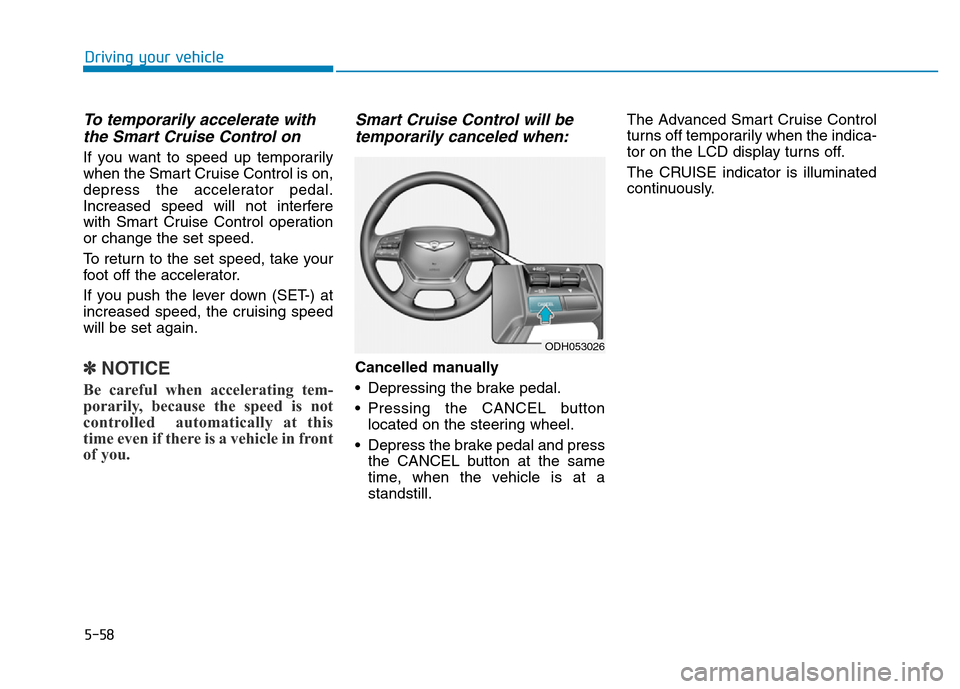
Cancelled manually
• Depressing the brake pedal.
• Pressing the CANCEL button
located on the steering wheel.
• Depress the brake pedal and press
the CANCEL button at the same
time, when the vehicle is at a
standstill.The Advanced Smart Cruise Control
turns off temporarily when the indica-
tor on the LCD display turns off.
The CRUISE indicator is illuminated
continuously.
ODH053026
Page 343 of 546
5-67
Driving your vehicle
5
A vehicle ahead cannot be recog-
nized correctly by the sensor if any of
following occurs:
- When the vehicle is pointing
upwards due to overloading in the
trunk
- While the steering wheel is operat-
ing
- When driving to one side of the lane
- When driving on narrow lanes or on
curves
Apply the brake or accelerator pedal
if necessary.• Your vehicle may accelerate when
a vehicle ahead of you disappears.
• When you are warned that the
vehicle ahead of you is not detect-
ed, drive with caution.• When vehicles are at a standstill
and the vehicle in front of you
changes to the next lane, be care-
ful when your vehicle starts to
move because it may not recog-
nize the stopped vehicle in front of
you.
ODH053097ODH053098
Page 346 of 546

5-70
Driving your vehicle
This Lane Departure Warning
System detects the lane with the
sensor at the front windshield and
warns you when your vehicle leaves
the lane.
LANE DEPARTURE WARNING SYSTEM (LDWS) (IF EQUIPPED)
ODH053029
ODH053030
Take the following precautions
when using the Lane Departure
Warning System (LDWS):
•ALWAYS check the road con-
ditions. The LDWS does not
make the vehicle change
lanes.
•Do not turn the steering wheel
suddenly if the LDWS warns
that your vehicle is leaving the
lane.
•If the sensor cannot detect the
lane or if the vehicle speed
does not exceed 60 km/h (38
mph), the LDWS will not be
able to notify you if the vehi-
cle leaves the lane.
•If your vehicle has window tint
or other types of coating and
accessory on the front wind-
shield, the LDWS may not
work properly.
(Continued)
(Continued)
•Do not allow any water or liq-
uid to contact the LDWS sen-
sor or the sensor may be dam-
aged.
•Do not remove the LDWS
parts and do not damage the
sensor by a strong impact.
•Do not put objects that reflect
light on the dash board.
•The operation of the LDWS
can be affected by several fac-
tors (including environmental
conditions). It is the responsi-
bility of the driver to pay
attention to the roadway and
to maintain the vehicle in its
lane at all times.
WARNING
Page 352 of 546
5-76
Driving your vehicle
LKAS activation
• The LKAS screen will appear on
the LCD display if the system is
activated.
• When both lane lines are detected
and all the conditions to activate
the LKAS are satisfied (green
steering wheel indicator will illumi-
nate and the LKAS indicator light
will change from white to green),
the steering wheel will be con-
trolled.If the system detects a lane line, the
color changes from gray to white. The Lane Keeping Assist System
is a system to prevent the driver
from leaving the lane. However,
the driver should not solely rely
on the system but always check
the road conditions when driving.
WARNING ■Lane line undetected■Lane line detected
ODH053154L
ODH053140L/ODH053141L
Page 353 of 546
5-77
Driving your vehicle
5
• If the system detects the left lane
line, the left lane line color will
change from gray to white.
• If the system detects the right lane
line, the right lane line color will
change from gray to white.
• Both lane lines must be detected
for the system to fully activate.
Warning
• If you cross a lane line, the lane
line you cross will blink (yellow) on
the LCD display with steering
wheel vibration warning.
• If the steering wheel appears, the
system will control the vehicle’s
steering to prevent the vehicle from
crossing the lane line.If all the conditions to activate LKAS
is not satisfied, the system will con-
vert to LDWS and warn the driver
only when the driver crosses the lane
lines.
■Left lane line
detected■Right lane line
detected
ODH053142L/ODH053143L
■Left lane line■Right lane line
ODH053144L/ODH053145L
■Left lane line■Right lane line
ODH053142L/ODH053143L
Page 355 of 546

5-79
Driving your vehicle
5
A message will appear on the LCD
display if the condition to activate the
LKAS is not satisfied. Also, there will
be acoustic warning. The warning
will disappear when the conditions
are met.
The system will be cancelled when:
• Vehicle speed is below 60 km/h
(37.3 mph) and over 180 km/h
(111.8 mph).
• Only one lane line is detected.
• Using the turn signal to change
lanes. If you change lanes without
the turn signal on, the steering
wheel might be controlled.
• The hazard warning flasher is on.
• The width of the lane is below 2.8
m and over 4.5 m.
• ESC (Electronic Stability Control)
is activated.
• When the system is on or after
changing a lane, drive in the mid-
dle of the lane.
• The steering will not be assisted
when you drive fast on a sharp
curve.
• The steering will not be assisted
when you change lanes fast.
• The steering will not be assisted
when you brake suddenly.
DRIVER'S ATTENTION
The driver must be cautious in the
below situations may not work prop-
erly when :
• The lane is not visible due to snow,
rain, stain, a puddle or other fac-
tors.
• The brightness outside changes
suddenly such as when entering or
exiting a tunnel.
• The headlamps are not on at night
or in a tunnel, or light level is low.
• It is difficult to distinguish the color
of the lane marking from the road
or the lane line is damaged or indis-
tinct.
• Driving on a steep grade or a curve.
• Light such as street light, sunlight
or oncoming vehicle light reflects
from the water on the road.
• The lens or windshield is covered
with foreign matter.
• The sensor cannot detect the lane
because of fog, heavy rain, or heavy
snow.
• The surrounding of the inside rear
view mirror temperature is high
due to direct sun light.
(Continued)
ODH053148L
Page 361 of 546
5-85
Driving your vehicle
5
First stage alert
If a vehicle is detected within the
boundary of the system, a warning
light will illuminate on the outside
rearview mirror and the head up dis-
play.
If the detected vehicle is not in warn-
ing range, the warning will turn off
according to driving conditions.
ODH053119
■ Left side
■ Right side
ODH053120
■ Left side
ODH053121
■ Right side
Second stage alert
The second stage alarm will activate when:
1.The first stage alert is on.
2.The turn signal light is on to change a lane.
When the second stage alert is activated, a warning light will blink on the
outside rearview mirror, the head up display and an alarm will sound. Also,
a steering wheel will vibrate (if equipped with LKAS/LDWS).
If you turn off the turn signal light, the second stage alert will be deactivated.


