2014 Hyundai Equus lcd display
[x] Cancel search: lcd displayPage 290 of 479

533
Driving your vehicle
If it is impossible to apply EPB from
Auto Hold, the notice will illuminate
on the LCD display. Also warning
chime sounds once. In that time,
apply the brake pedal.If you did not apply the brake pedal
when you release the Auto Hold by
pressing the [AUTO HOLD] switch,
the notice will illuminate on the LCD
display. Also warning chime sounds
once.When you press the [AUTO HOLD]
switch, if the driver door, engine
hood and trunk are not closed or the
driver seat belt is not fastened, the
notice will illuminate on the LCD dis-
play. Also warning chime sounds
once. In that time, press the [AUTO
HOLD] button after closing the driver
door, engine hood and trunk and fas-
tening the seat belt.
OVIEDR2915OVIEDR2916
CAUTION
If this notice illuminates, the
Auto Hold and EPB may not be
operated. For your safety, apply
the brake pedal.
OVIEDR2913
Page 302 of 479

545
Driving your vehicle
SPORT mode
SPORT mode focuses on dynamic
driving by automatically controlling
the steering wheel, engine and
transaxle system.
• When the DRIVE MODE
button is pressed and
the SPORT mode is
selected, the SPORT
indicator will illuminate.
• If the SPORT mode is activated,
and the engine start/stop button is
turned off and on DRIVE MODE
would be changed to NORMAL
mode. To turn on the SPORT mode
press DRIVE MODE button again.
• If the system is activated:
- Deceleration from release of
accelerator pedal will result in less
rapid fall in RPM (revolutions per
minute) than in the NORMAL
mode.
- Up-shifting is delayed.
✽ NOTICE
In Sport drive mode, the fuel effi-
ciency may decrease.
✽ NOTICE
If you activate the Driving Mode
Theme on the User Settings Mode of
the LCD display (if equipped), the
SPORT and SNOW indicators will
not turn on the instrument cluster.
SNOW mode (if equipped)
Snow mode helps the driver to drive
more effectively on slippery roads
such as snowy or muddy roads.
• When the DRIVE MODE
button is pressed and
the SNOW mode is
selected, the SNOW
indicator will illuminate.
SPORTSNOW
Page 315 of 479

Driving your vehicle
58 5
Smart Cruise control will be tem-
porarily canceled when:
Cancelled manually
• While driving
- The brake pedal is depressed.
- Pull the lever (to CANCEL) locat-
ed on the steering wheel.
• While stopping with operating sys-
tem
- Depress the brake pedal and pull
the lever (to CANCEL)
The advanced smart cruise control
turns off temporarily when the indica-
tor on the LCD display turns off.
The CRUISE indicator is illuminated
continuously.Cancelled automatically
• The driver's door is opened.
• The shift lever is shifted to N
(Neutral), R (Reverse) or P (Park).
• The EPB (electric parking brake) is
applied.
• The vehicle speed is over 190
km/h (120 mph).
• The vehicle stops on a steep
incline.
• The ESC, ABS or TCS is operat-
ing.
• The ESC is turned off.
• The sensor or the cover is dirty or
blocked with foreign matters.
• When the vehicle is stopped for
over 5 minutes.
• The vehicle stops and go repeat-
edly for a long period of time.
• The driver starts driving by
depressing the accelerator pedal
or pressing the RES+ button, if a
vehicle stops far away ahead of
your vehicle.• The accelerator pedal is continu-
ously depressed for more than 1
minute.
Each of these actions will cancel
the smart cruise control operation.
(the SET indicator, set speed and
vehicle to vehicle distance on the
LCD display will go off.)
In a condition the smart cruise con-
trol is cancelled automatically, the
smart cruise control will not
resume even though the RES+ or
SET- button is pressed. Also, the
EPB (electric parking brake) will be
applied when the vehicle is
stopped.
OVI053031N
CAUTION
If the smart cruise control is
cancelled by other than the rea-
sons mentioned, we recom-
mend have the system checked
by an authorized HYUNDAI deal-
er.
Page 318 of 479

561
Driving your vehicle
• The vehicle will maintain the set
speed, when the lane ahead is
clear.
• The vehicle will slow down or
speed up to maintain the selected
distance, when there is a vehicle
ahead of you in the lane. (A vehicle
will appear in front of your vehicle
in the LCD display only when there
is an actual vehicle in front of you) • If the vehicle ahead speeds up,
your vehicle will travel at a steady
cruising speed after accelerating to
the selected speed.
CAUTION
• The warning chime sounds
and malfunction indicator
blinks if it is hard to maintain
the selected distance to the
vehicle ahead.
• If the warning chime sounds,
actively adjust the vehicle
speed by depressing the
brake pedal according to the
road condition ahead and
driving condition.
• Even if the warning chime is
not activated, always pay
attention to the driving condi-
tions to prevent dangerous
situations from occurring.
OVIDDR2911/OVI053126
OVIDDR2913/OVIDDR2912
Page 329 of 479

Driving your vehicle
72 5
1. Visual warning
If you leave the lane, the lane you
leave on the LCD display blinks yel-
low.
2. Auditory warning
If you leave the lane, the warning
sound operates.3. Haptic warning (if equipped with
pre-safe seat belt)
If you leave the lane for about 3 sec-
onds, the pre-safe seat belt provides
haptic warning.
You can turn off the haptic warning in
User Settings Mode.
The LDWS does not operate
when:
• The driver turns on the turn signal
to change lane.
But, when the hazard warning
flasher is operating, the LDWS
operates normally.
• Driving on the lane line.
✽NOTICE
To change lane, operate the turn sig-
nal switch then change the lane.OVI059063OVIDDR2922/OVIDDR2921
LeftRight
Page 364 of 479
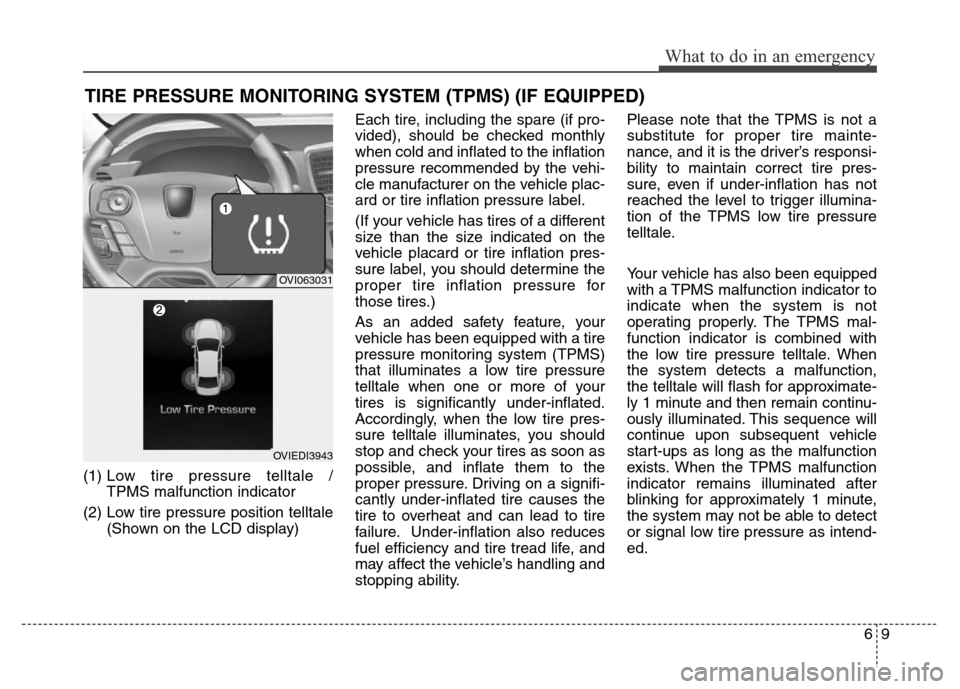
69
What to do in an emergency
TIRE PRESSURE MONITORING SYSTEM (TPMS) (IF EQUIPPED)
(1) Low tire pressure telltale /
TPMS malfunction indicator
(2) Low tire pressure position telltale
(Shown on the LCD display)Each tire, including the spare (if pro-
vided), should be checked monthly
when cold and inflated to the inflation
pressure recommended by the vehi-
cle manufacturer on the vehicle plac-
ard or tire inflation pressure label.
(If your vehicle has tires of a different
size than the size indicated on the
vehicle placard or tire inflation pres-
sure label, you should determine the
proper tire inflation pressure for
those tires.)
As an added safety feature, your
vehicle has been equipped with a tire
pressure monitoring system (TPMS)
that illuminates a low tire pressure
telltale when one or more of your
tires is significantly under-inflated.
Accordingly, when the low tire pres-
sure telltale illuminates, you should
stop and check your tires as soon as
possible, and inflate them to the
proper pressure. Driving on a signifi-
cantly under-inflated tire causes the
tire to overheat and can lead to tire
failure. Under-inflation also reduces
fuel efficiency and tire tread life, and
may affect the vehicle’s handling and
stopping ability.Please note that the TPMS is not a
substitute for proper tire mainte-
nance, and it is the driver’s responsi-
bility to maintain correct tire pres-
sure, even if under-inflation has not
reached the level to trigger illumina-
tion of the TPMS low tire pressure
telltale.
Your vehicle has also been equipped
with a TPMS malfunction indicator to
indicate when the system is not
operating properly. The TPMS mal-
function indicator is combined with
the low tire pressure telltale. When
the system detects a malfunction,
the telltale will flash for approximate-
ly 1 minute and then remain continu-
ously illuminated. This sequence will
continue upon subsequent vehicle
start-ups as long as the malfunction
exists. When the TPMS malfunction
indicator remains illuminated after
blinking for approximately 1 minute,
the system may not be able to detect
or signal low tire pressure as intend-
ed.
OVI063031
OVIEDI3943
Page 365 of 479

What to do in an emergency
10
6
TPMS malfunctions may occur for a
variety of reasons, including the
installation of replacement or alter-
nate tires or wheels on the vehicle
that prevent the TPMS from function-
ing properly. Always check the TPMS
malfunction telltale after replacing
one or more tires or wheels on your
vehicle to ensure that the replace-
ment or alternate tires and wheels
allow the TPMS to continue to func-
tion properly.
✽ ✽
NOTICE
If any of the below happens, we rec-
ommend that the system be checked
by an authorized HYUNDAI dealer.
1.The low tire pressure telltale/
TPMS malfunction indicator does
not illuminate for 3 seconds when
the ignition switch is turned to the
ON or engine is running.
2. The TPMS malfunction indicator remains illuminated after blinking
for approximately 1 minute.
3. The Low tire pressure position telltale remains illuminated.
Low tire pressure
telltale
Low tire pres-
sure position
telltale
When the tire pressure monitoring
system warning indicators are illumi-
nated and warning message dis-
played on the cluster LCD display,
one or more of your tires is signifi-
cantly under-inflated. The low tire
pressure position telltale light will
indicate which tire is significantly
under-inflated by illuminating the cor-
responding position light. If either telltale illuminates, immedi-
ately reduce your speed, avoid hard
cornering and anticipate increased
stopping distances. You should stop
and check your tires as soon as pos-
sible. Inflate the tires to the proper
pressure as indicated on the vehi-
cle’s placard or tire inflation pressure
label located on the driver’s side cen-
ter pillar outer panel. If you cannot
reach a service station or if the tire
cannot hold the newly added air,
replace the low pressure tire with a
spare tire.
If you drive the vehicle for about 10
minutes at speeds above 25 km/h
after replacing the low pressure tire
with the spare tire, the below will
happen:
The TPMS malfunction indicator
may blink for approximately 1
minute and then remain continu-
ously illuminated because the
TPMS sensor is not mounted on
the spare wheel.
OKH042081L
Page 439 of 479

Maintenance
54 7
SymbolFuse NameFuse ratingProtected component
PDM B+25ASmart Key Control Module
Hazard10ACenter Facia Switch
EPB10AElectric Parking Brake Switch, Crash Pad Switch
RF Receiver10ARF Receiver, Security Indicator
PDM IG110ASmart Key Control Module
Shift Lever IG110AElectric ATM Shift Lever, ATM Shift Lever IND.
Air Bag IND.10AInstrument Cluster
Smart Key10AStart/Stop Button Switch
Power Handle15ASteering Tilt & Telescopic Module
Memory10A
Power Trunk Lid Control Module, Relax Module Driver/Passenger Door Module, Rear Door
Module LH/RH, Passenger Door Lamp, Passenger Door Mood Lamp, Rear Door Lamp LH/RH,
Rear Door Mood Lamp LH/RH, Instrument Cluster, Driver IMS Control Module, BCM, Analogue
Clock, LCD Panel Switch, A/C Control Module, Data Link Connector
TPMS10ATire Pressure Monitoring Module
Active Head
Rest10AActive Head Rest Sensor Module
Cluster10AInstrument Cluster, Head-Up Display
Stop Lamp10AStop Lamp Switch, Smart Key Control Module