Page 17 of 668

Your vehicle at a glance
42
INTERIOR OVERVIEW
OMD014001N
1. Inside door handle .............................4-16
2. Outside rearview mirror control switch* ...............................................4-49
3. Central door lock switch ....................4-17
4. Power window lock switch* ................4-27
5. Power window switches .....................4-24
6. Hood release lever ............................4-29
7. Active ECO ........................................5-41
8. Instrument panel illumination.............4-52
9. ESC (Electronic Stability Control) OFF button ........................................5-34
10. Fuse box ...........................................7-64
11. Brake pedal .....................................5-29
12. Accelerator pedal .....................5-8, 5-15
13. Trunk lid release lever......................4-21
14. Fuel filler door opener .....................4-31
15. Steering wheel.................................4-38
16. Steering wheel tilt lever ...................4-39
17. Inside rearview mirror ......................4-42
*: if equipped
Page 23 of 668
SEATS Safety features of your vehicle
43
Driver’s seat
(1) Seat adjustment, forward/rearward
(2) Seatback recliner
(3) Seat adjustment, height
(4) Lumbar support*
(5) Seat warmer*
(6) Headrest adjustment
Front passenger seat
(7) Seat adjustment, forward/rearward
(8) Seatback recliner
(9) Seat warmer*
(10) Headrest adjustment
Rear seat
(11) Seat warmer*
(12) Armrest
(13) Headrest adjustment
(14) Seat back folding knob (trunk)*
* : if equipped
OUD034001N
■Manual seat
■Power seat
■Type A■Type B
Page 27 of 668

Safety features of your vehicle
83
Seat belts must be snug against your
hips and chest to work properly.
When the seatback is reclined, the
shoulder belt cannot do its job
because it will not be snug against
your chest. Instead, it will be in front
of you. During an accident, you could
be thrown into the seat belt, causing
neck or other injuries.
The more the seatback is reclined,
the greater chance the passenger’s
hips will slide under the lap belt or
the passenger’s neck will strike the
shoulder belt.
Seat cushion height
(for driver’s seat)
To change the height of the seat
cushion:
Push down on the lever several
times, to lower the seat cushion.
Pull up on the lever several times, to raise the seat cushion.
Power adjustment
The front seat can be adjusted by
using the control switches located on
the outside of the seat cushion. Before
driving, adjust the seat to the proper
position so that you can easily control
the steering wheel, foot pedals and
controls on the instrument panel.
OMD030004
WARNING
NEVER allow children in the
vehicle unattended. The power
seats are operable when the
engine is turned off.
Page 89 of 668

43
Features of your vehicle
Remote key
Your HYUNDAI uses a remote key,
which you can use to lock or unlock
a door (and trunk).
1. Door Lock
2. Door Unlock
3. Trunk Unlock
4. Panic
Locking
To lock :
1. Close all doors, engine hood andtrunk.
2. Press the Door Lock button (1) on the remote key.
3. The hazard warning lights will blink and the chime will sound
once if the lock button is pressed
once more within four seconds.
4. Make sure the doors are locked by checking the position of the door
lock button inside the vehicle.
✽ ✽NOTICE
After locking the doors, if you press
the Door Lock button again within
four seconds, the hazard warning
lights will blink and the horn will
sound one time to confirm that the
doors are locked.
ACCESSING YOUR VEHICLE
ONF048011
WARNING
Do not leave the keys in your
vehicle with unsupervised chil-
dren. Unattended children
could place the key in the igni-
tion switch and may operate
power windows or other con-
trols, or even make the vehicle
move, which could result in
serious injury or death.
Page 94 of 668
Features of your vehicle
84
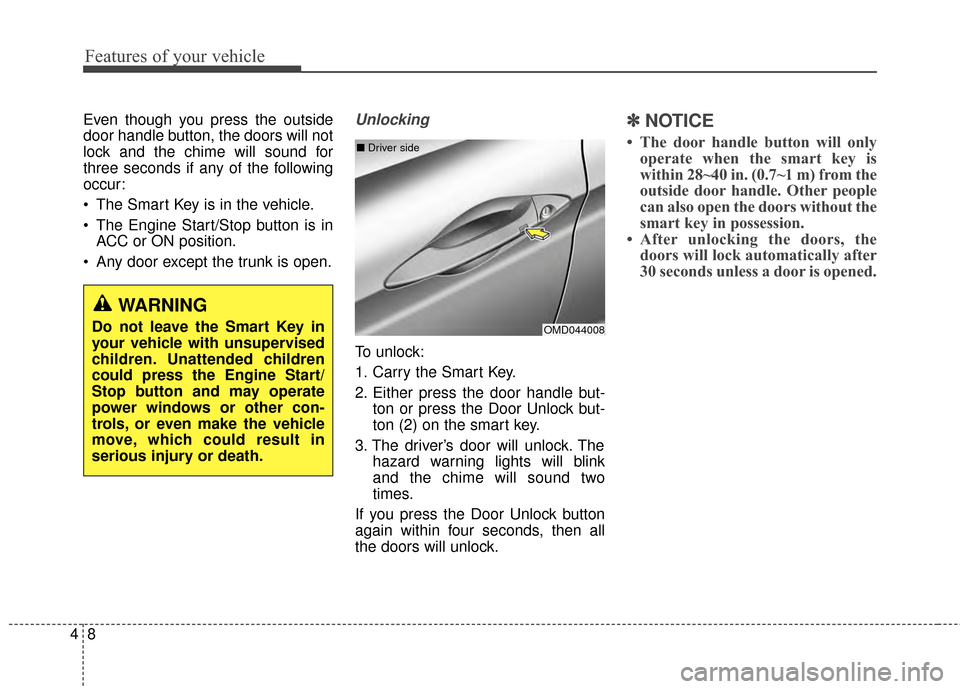
Even though you press the outside
door handle button, the doors will not
lock and the chime will sound for
three seconds if any of the following
occur:
The Smart Key is in the vehicle.
The Engine Start/Stop button is inACC or ON position.
Any door except the trunk is open.Unlocking
To unlock:
1. Carry the Smart Key.
2. Either press the door handle but- ton or press the Door Unlock but-
ton (2) on the smart key.
3. The driver’s door will unlock. The hazard warning lights will blink
and the chime will sound two
times.
If you press the Door Unlock button
again within four seconds, then all
the doors will unlock.
✽ ✽ NOTICE
• The door handle button will only
operate when the smart key is
within 28~40 in. (0.7~1 m) from the
outside door handle. Other people
can also open the doors without the
smart key in possession.
• After unlocking the doors, the doors will lock automatically after
30 seconds unless a door is opened.
OMD044008
■
Driver side
WARNING
Do not leave the Smart Key in
your vehicle with unsupervised
children. Unattended children
could press the Engine Start/
Stop button and may operate
power windows or other con-
trols, or even make the vehicle
move, which could result in
serious injury or death.
Page 102 of 668

Features of your vehicle
16
4
Operating door locks from
inside the vehicle
With the door lock button
To unlock a door, push the door
lock button (1) to the “Unlock” posi-
tion. The red mark (2) on the door
lock button will be visible.
To lock a door, push the door lock button (1) to the “Lock” position. If
the door is locked properly, the red
mark (2) on the door lock button
will not be visible. To open a door, pull the door han-
dle (3) outward.
If the inner door handle of the dri- ver’s (or front passenger’s) door is
pulled when the door lock button is
in the lock position, the button is
unlocked and door opens.
Front doors cannot be locked if the key is in the ignition switch and any
front door is open.
Doors cannot be locked if the smart key is in the vehicle and any
door is open.
✽ ✽ NOTICE
If a power door lock ever fails to
function while you are in the vehicle
try one or more of the following
techniques to exit:
Operate the door unlock feature
repeatedly (both electronic and
manual) while simultaneously
pulling on the door handle.
Operate the other door locks and
handles, front and rear.
Lower a front window and use the
mechanical key to unlock the door
from outside.
OMD040011
Lock
Unlock
Page 110 of 668
Features of your vehicle
24
4
Power windows (1) Driver’s door power window
switch
(2) Front passenger’s door power window switch
(3) Rear door (left) power window switch
(4) Rear door (right) power window switch
(5) Window opening and closing
(6) Automatic power window*
(7) Power window lock switch
* : if equipped
WINDOWS
OMD040016N
Page 111 of 668

425
Features of your vehicle
The ignition switch must be in the ON
position to be able to raise or lower
the windows. Each door has a Power
Window switch to control that door's
window. The driver has a Power
Window Lock switch which can block
the operation of passenger windows.
The power windows will operate for
approximately 30 seconds after the
ignition switch is placed in the ACC
or LOCK/OFF position. However, if
the front doors are opened, the
Power Windows cannot be operated
even within the 30 second period.✽ ✽NOTICE
• In cold and wet climates, power
windows may not work properly
due to freezing conditions.
• While driving with the rear win- dows down or with the sunroof (if
equipped) opened (or partially
opened), your vehicle may demon-
strate a wind buffeting or pulsation
noise. This noise is normal and can
be reduced or eliminated by taking
the following actions. If the noise
occurs with one or both of the rear
windows down, partially lower
both front windows approximately
one inch. If you experience the
noise with the sunroof open, slight-
ly close the sunroof.
Window opening and closing
To open or close a window, press
down or pull up the front portion of
the corresponding switch to the first
detent position (5).
OMD040017

