Page 112 of 668

Features of your vehicle
26
4
Auto down window (if equipped)
Pressing the power window switch
momentarily to the second detent
position (6) completely lowers the
window even when the switch is
released. To stop the window at the
desired position while the window is
in operation, pull up or press down
and release the switch. Auto up/down window (if equipped)
Pressing or pulling up the power win-
dow switch momentarily to the sec-
ond detent position (6) completely
lowers or lifts the window even when
the switch is released. To stop the
window at the desired position while
the window is in operation, pull up or
press down and release the switch.
To reset the power windows
If the power windows do not operate
normally, the automatic power win-
dow system must be reset as follows:
1. Place the ignition switch to the ON
position.
2. Close the window and continue pulling up on the power window
switch for at least one second.
If the power windows do not operate
properly after resetting, have the
system checked by an authorized
HYUNDAI dealer.
OMD040019OMD040018
Page 113 of 668

427
Features of your vehicle
Automatic reversal (if equipped)
If a window senses any obstacle while
it is closing automatically, it will stop
and lower approximately 12 inches
(30 cm) to allow the object to be
cleared.
If the window detects the resistance
while the power window switch is
pulled up continuously, the window will
stop upward movement then lower
approximately 1 inch (2.5 cm).
If the power window switch is pulled
up continuously again within 5 sec-
onds after the window is lowered by
the automatic window reversal fea-
ture, the automatic window reversal
will not operate.
✽ ✽NOTICE
The automatic reverse feature is
only active when the “auto up” fea-
ture is used by fully pulling up the
switch to the second detent.
Power window lock switch
The driver can disable the power
window switches on the passengers’
doors by pressing the power window
lock switch.
The driver’s control can operate
the driver’s power window.
The front passenger’s control can- not operate the front passenger’s
power window.
The rear passenger’s control can- not operate the rear passenger’s
power window.
OMD040020N
WARNING
Make sure body parts or otherobjects are safely out of the
way before closing the win-
dows to avoid injuries or vehi-
cle damage.
Objects less than 0.16 inch (4 mm) in diameter caught
between the window glass
and the upper window chan-
nel may not be detected by
the automatic reverse window
and the window will not stop
and reverse direction.
OUN026013
Page 114 of 668

Features of your vehicle
28
4
WARNING - Windows
NEVER leave the keys in your vehicle with unsupervised
children, when the engine is
running.
NEVER leave any child unat- tended in the vehicle. Even
very young children may inad-
vertently cause the vehicle to
move, entangle themselves in
the windows, or otherwise
injure themselves or others.
Always double check to make sure all arms, hands, head
and other obstructions are
safely out of the way before
closing a window.
Do not allow children to play with the power windows. Keep
the driver’s door power window
lock switch in the LOCK posi-
tion (pressed). Serious injury
can result from unintentional
window operation by the child.
Do not extend your head, arms or body outside the win-
dows while driving.CAUTION
To prevent possible damage to the power window system,do not open or close two win-dows or more at the sametime. This will also ensure thelongevity of the fuse.
Never try to operate the main switch on the driver's doorand the individual door win-dow switch in opposite direc-tions at the same time. If this isdone, the window will stop andcannot be opened or closed.
Page 124 of 668

Features of your vehicle
38
4
Electric power steering (EPS)
The system assists you with steering
the vehicle. If the engine is off or if
the power steering system becomes
inoperative, the vehicle may still be
steered, but it will require increased
steering effort.
Also, the steering effort becomes
heavier as the vehicle’s speed
increases and becomes lighter as
the vehicle’s speed decreases for
better control of the steering wheel.
Should you notice any change in the
effort required to steer during normal
vehicle operation, we recommend
that the system be checked by an
authorized HYUNDAI dealer.
✽ ✽
NOTICE
The following symptoms may occur
during normal vehicle operation:
• The steering effort may be high
immediately after placing the igni-
tion switch in the ON position.
This happens as the system per-
forms the EPS system diagnostics.
When the diagnostics is complet-
ed, the steering wheel will return
to its normal condition.
• A click noise may be heard from the EPS relay after the ignition
switch is placed to the ON or
LOCK/OFF position.
• A motor noise may be heard when the vehicle is at stop or at a low
driving speed.
• When you operate the steering wheel in low temperature, abnor-
mal noise may occur. If tempera-
ture rises, the noise will disappear.
This is a normal condition.
STEERING WHEEL
CAUTION
If the Electric Power Steering
System does not operate nor-mally, the warning light ( ) willilluminate on the instrumentcluster. The steering wheel maybecome difficult to control oroperate. Take your vehicle to anauthorized HYUNDAI dealer andhave the system checked assoon as possible.
Page 127 of 668
441
Features of your vehicle
COMFORT mode
The steering effort comes lighter in
COMFORT mode.
✽ ✽NOTICE
For your safety, if you press the
steering mode button to change the
mode while turning the steering
wheel, the cluster will change as you
have selected, but the steering effort
will not change. The steering effort
will change to the selected mode,
when the steering wheel is posi-
tioned to the center.
Horn
To sound the horn, press the area
indicated by the horn symbol on your
steering wheel (see illustration). The
horn will operate only when this area
is pressed.
OMD044720CAUTION
Be careful when changing the
steering mode while driving.
When the Electric Power Steering is not working prop-erly, the Driver SelectableSteering Mode will not work.OMD040030
CAUTION
Do not strike the horn severelyto operate it, or hit it with yourfist. Do not press on the hornwith a sharp-pointed object.
Page 145 of 668
459
Features of your vehicle
✽
✽NOTICE
• If the vehicle is not on level ground
or the battery power has been
interrupted, the “Distance to
empty” function may not operate
correctly.
The trip computer may not register
additional fuel if less than 1.6 gal-
lons (6 liters) of fuel are added to
the vehicle.
• The fuel consumption and dis- tance to empty values may vary
significantly based on driving con-
ditions, driving habits, and condi-
tion of the vehicle.
• The distance to empty value is an estimate of the available driving
distance. This value may differ
from the actual driving distance
available.
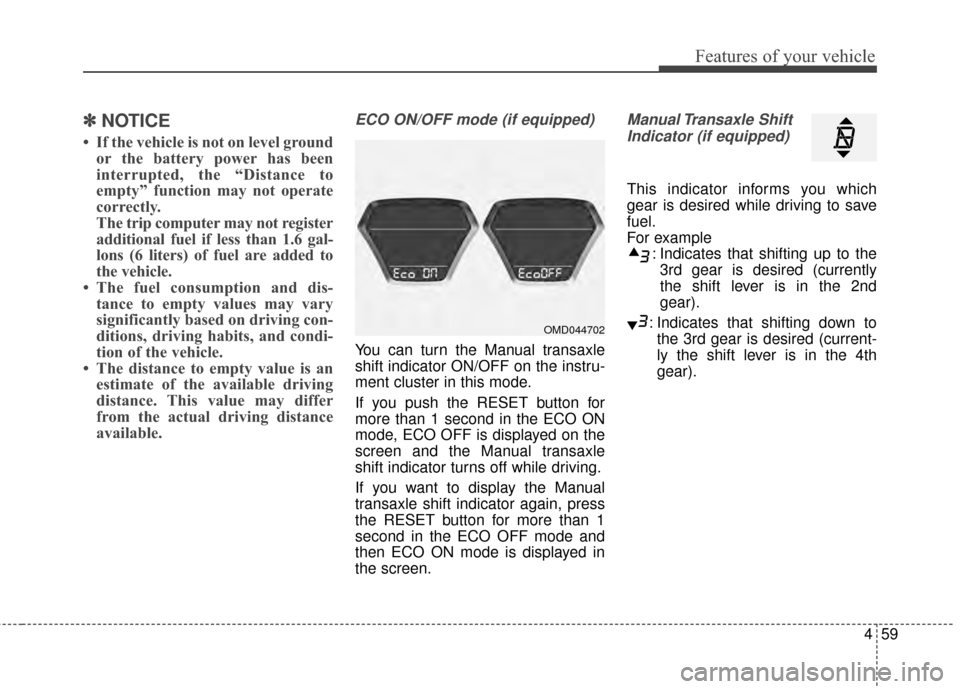
ECO ON/OFF mode (if equipped)
You can turn the Manual transaxle
shift indicator ON/OFF on the instru-
ment cluster in this mode.
If you push the RESET button for
more than 1 second in the ECO ON
mode, ECO OFF is displayed on the
screen and the Manual transaxle
shift indicator turns off while driving.
If you want to display the Manual
transaxle shift indicator again, press
the RESET button for more than 1
second in the ECO OFF mode and
then ECO ON mode is displayed in
the screen.
Manual Transaxle Shift
Indicator (if equipped)
This indicator informs you which
gear is desired while driving to save
fuel.
For example : Indicates that shifting up to the3rd gear is desired (currently
the shift lever is in the 2nd
gear).
: Indicates that shifting down to the 3rd gear is desired (current-
ly the shift lever is in the 4th
gear).
OMD044702
Page 149 of 668

463
Features of your vehicle
Electric Power Steering(EPS) Warning Light(if equipped)
This warning light illuminates:
Once you set the ignition switch or Engine Start/Stop Button to the ON
position.
- It remains on until the engine isstarted.
When there is a malfunction with the EPS.
In this case, have your vehicle
inspected by an authorized
HYUNDAI dealer.
Malfunction Indicator
Lamp (MIL)
This warning light illuminates:
Once you set the ignition switch or Engine Start/Stop Button to the ON
position.
- It remains on until the engine isstarted.
When there is a malfunction with the emission control system.
In this case, have your vehicle
inspected by an authorized
HYUNDAI dealer.
CAUTION - Malfunction
Indicator
Lamp (MIL)
Driving with the MalfunctionIndicator Lamp (MIL) on maycause damage to the emissioncontrol systems which couldeffect drivability and/or fueleconomy.
CAUTION - Gasoline
Engine
If the Malfunction IndicatorLamp (MIL) illuminates, poten-tial catalytic converter damageis possible which could result inloss of engine power.
In this case, have your vehicleinspected by an authorizedHYUNDAI dealer as soon aspossible.
Page 162 of 668

Features of your vehicle
76
4
One-touch lane change function
To activate an one-touch lane
change function, move the turn sig-
nal lever slightly and then release it.
The lane change signals will blink 3
times.
✽ ✽
NOTICE
If the turn signal indicator stays on
and does not flash, or if it flashes
abnormally, a bulb may be burned
out or have a poor electrical connec-
tion in the circuit. The bulb may
require replacement.
Front fog light (if equipped)
Fog lights are used to provide
improved visibility when visibility is
poor due to fog, rain or snow, etc. Use
the switch next to the headlight switch
to turn the fog lights ON and OFF. The
fog lights will turn on when fog light
switch (1) is turned to ON after the
parking lights are turned on.
To turn off the fog lights, turn the
switch to the OFF position. You can use the fog lights only when
the headlights are on low beam.
When the headlight switch is in the
AUTO position, you can also use the
fog lights when the headlights turn
on automatically. The fog lights will
go OFF when the headlights turn
OFF.
CAUTION
When in operation, the fog
lights consume large amountsof vehicle electrical power. Onlyuse the fog lights when visibilityis poor.OYFH041905N
OGD044905N
■Type A
■Type B
