2014 HYUNDAI ELANTRA GT locks
[x] Cancel search: locksPage 6 of 476

1
2
3
4
5
6
7
8
I
IntroductionHow to use this manual / Fuel requirements / Vehicle break-in process /
Vehicle data collection and event data recorders / Indicator symbols on the instrument cluster
Your vehicle at a glance
Exterior overview / Interior overview / Instrument panel overview / Engine compartment
Safety features of your vehicle
Seats / Seat belts / Child restraint system / Air bag
Features of your vehicleKeys / Door locks / Tailgate / Windows / Hood / Fuel filler lid / Panorama sunroof / Steering wheel / Mirrors /
Instrument cluster / Lighting / Wipers & Washers / Climate control system / Multimedia system / Etc.
Driving your vehicleBefore driving / Engine start/stop button / Transaxle / Brake system / Cruise control system /
Active ECO system / Winter driving / Vehicle load limit / Etc.
What to do in an emergencyRoad warning / Emergency while driving / Emergency starting / Engine overheat / TPMS / Flat tire / Towing / Etc.
MaintenanceEngine compartment / Maintenance service / Engine oil / Engine coolant / Brake fluid / Washer fluid /
Parking brake / Air cleaner / Wiper blades / Battery / Tire and wheels / Fuses / Light bulbs / Etc.
Specifications, Consumer information and Reporting safety defects
Index
table of contents
Page 28 of 476

39
Safety features of your vehicle
Removal
To remove the headrest, raise it as
far as it can go then press the
release button (1) while pulling
upward (2).
To reinstall the headrest, put the
headrest poles (3) into the holes
while pressing the release button
(1). Then adjust it to the appropri-
ate height.
Make sure the headrest locks in
position after adjusting it to proper-
ly protect the occupants.
Seat warmer (if equipped)
The seat warmer is provided to warm
the front seats during cold weather.With the ignition switch in the ON
position, push either of the switches
to warm the driver's seat or the front
passenger's seat.
During mild weather or under condi-
tions where the operation of the seat
warmer is not needed, keep the
switches in the OFF position.
Each time you push the button, the
temperature setting of the seat is
changed as follows :
The seat warmer defaults to the
OFF position whenever the ignition
switch is turned on.
With the seat warmer switch in the
ON position, the heating system in
the seat turns off or on automati-
cally depending on the seat tem-
perature.
OGDE031010OGD032014N
OGD032015N
■Type A
■Type BOFF → HIGH( ) → LOW( )
→
Page 31 of 476

Safety features of your vehicle
12 3
Adjusting the height up and down
To raise the headrest, pull it up (1). To
lower the headrest, push and hold
the release button (2) on the headrest
support and lower the headrest (3).Removal
To remove the headrest, do as follows.
1. Pull the rear seat back lock
release lever.
2. Tilt the rear seat back forward.
3. Raise the headrest as far as it can
go.
4. Press the release button (1) while
pulling upward (2).Reinstall
To reinstall the headrest, put the
headrest poles (3) into the holes
while pressing the release button (1).
Then adjust it to the appropriate
height.
WARNING
Make sure the headrest locks in
position after adjusting it to
properly protect the occupants.
OMD030016OMD030015
Page 38 of 476
319
Safety features of your vehicle
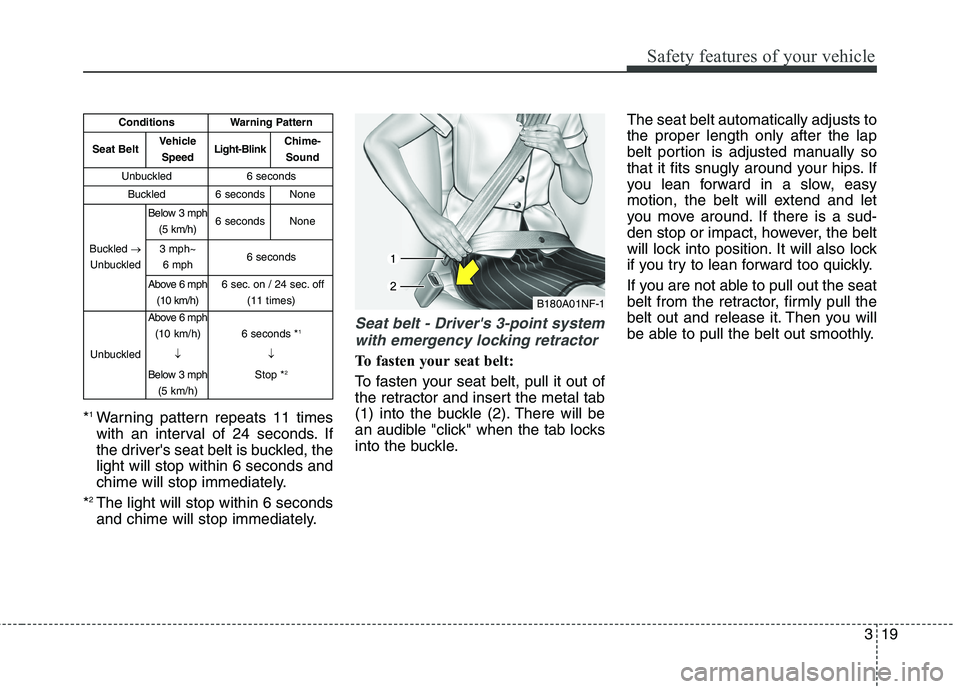
*1Warning pattern repeats 11 times
with an interval of 24 seconds. If
the driver's seat belt is buckled, the
light will stop within 6 seconds and
chime will stop immediately.
*
2The light will stop within 6 seconds
and chime will stop immediately.
Seat belt - Driver's 3-point system
with emergency locking retractor
To fasten your seat belt:
To fasten your seat belt, pull it out of
the retractor and insert the metal tab
(1) into the buckle (2). There will be
an audible "click" when the tab locks
into the buckle.The seat belt automatically adjusts to
the proper length only after the lap
belt portion is adjusted manually so
that it fits snugly around your hips. If
you lean forward in a slow, easy
motion, the belt will extend and let
you move around. If there is a sud-
den stop or impact, however, the belt
will lock into position. It will also lock
if you try to lean forward too quickly.
If you are not able to pull out the seat
belt from the retractor, firmly pull the
belt out and release it. Then you will
be able to pull the belt out smoothly.
B180A01NF-1
ConditionsWarning Pattern
Seat BeltVehicle
SpeedLight-BlinkChime-
Sound
Unbuckled6 seconds
Buckled6 secondsNone
Buckled →
Unbuckled
Below 3 mph
(5 km/h)6 secondsNone
3 mph~
6 mph6 seconds
Above 6 mph
(10 km/h)6 sec. on / 24 sec. off
(11 times)
Unbuckled
Above 6 mph
(10 km/h)
↓
Below 3 mph
(5 km/h)
6 seconds *1
↓
Stop *
2
Page 40 of 476

321
Safety features of your vehicle
Seat belts - Front passenger and
rear seat 3-point system with
combination locking retractor
To fasten your seat belt:
Combination retractor type seat belts
are installed in the rear seat positions
to help accommodate the installation
of child restraint systems. Although a
combination retractor is also installed
in the front passenger seat position, it
is strongly recommended that children
always be seated in the rear seat.
NEVER place any infant restraint sys-
tem in the front seat of the vehicle.
This type of seat belt combines the
features of both an emergency lock-
ing retractor seat belt and an auto-
matic locking retractor seat belt. To
fasten your seat belt, pull it out of the
retractor and insert the metal tab into
the buckle. There will be an audible
"click" when the tab locks into the
buckle. When not securing a child
restraint, the seat belt operates in the
same way as the driver's seat belt
(Emergency Locking Retractor Type).
It automatically adjusts to the proper
length only after the lap belt portion of
the seat belt is adjusted manually so
that it fits snugly around your hips.When the seat belt is fully extended
from the retractor to allow the instal-
lation of a child restraint system, the
seat belt operation changes to allow
the belt to retract, but not to extend
(Automatic Locking Retractor Type).
Refer to “Using a child restraint sys-
tem” in this section.
To convert from the automatic lock-
ing feature to the emergency locking
operation mode, allow the unbuckled
seat belt to fully retract.
When using the rear center seat belt,
the buckle with the “CENTER” mark
must be used.
OFD037056
Page 86 of 476

Features of your vehicle
Keys ............................................................................4-4
• Record your key number ..............................................4-4
................................................................4-4
........................................................4-5
Smart key ..................................................................4-7
........................................................4-7
..................................................4-10
................................................4-10
....................................4-11
....................................................4-12
............4-13
Remote keyless entry ..............................................4-14
..............................................4-15
....................................................4-16
Theft-alarm system ................................................4-17
stage ..................................................................4-17
........................................................4-19
Door locks ................................................................4-21
................................................................4-21
..................................................................4-22
..................................4-24
Tailgate ....................................................................4-25
....................................................4-25
......................................................4-25
..............................4-26
Windows ..................................................................4-27
Hood..........................................................................4-32
........................................................4-32
..........................................................4-33
Fuel filler lid ............................................................4-34
............................................4-34
..............................................4-35
Panorama sunroof ..................................................4-38
......................................................................4-39
......................................................4-39
........................................................4-40
......................................................4-40
..................................................4-41
Steering wheel ..........................................................4-43
................................................4-43
............................................4-44
..............................................................................4-45
......................................................................4-45
4
Page 106 of 476
421
Features of your vehicle
Operating door locks from
outside the vehicle
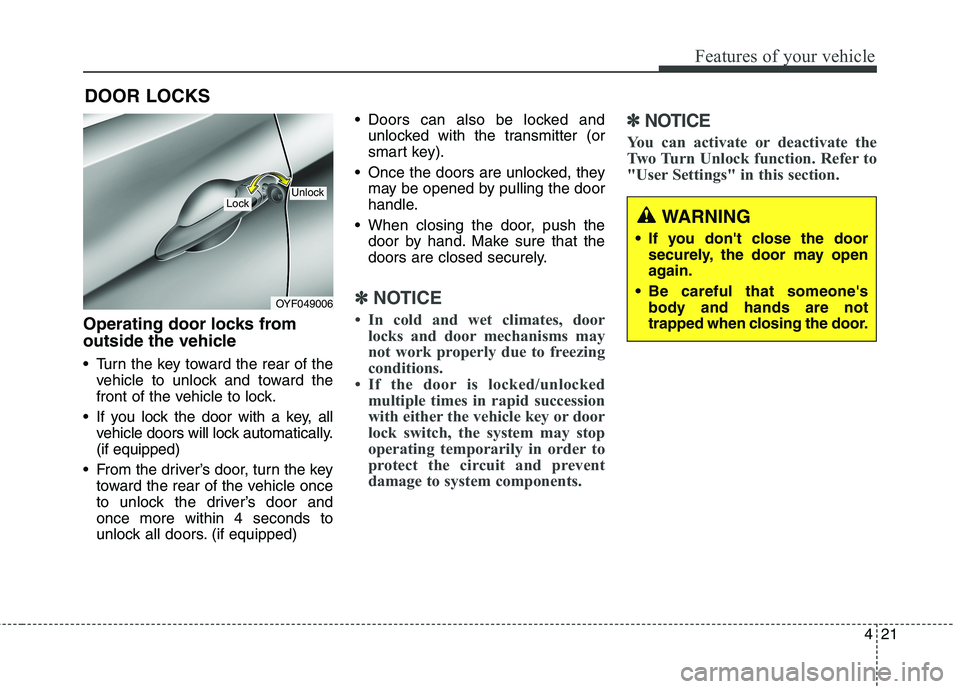
Turn the key toward the rear of the
vehicle to unlock and toward the
front of the vehicle to lock.
If you lock the door with a key, all
vehicle doors will lock automatically.
(if equipped)
From the driver’s door, turn the key
toward the rear of the vehicle once
to unlock the driver’s door and
once more within 4 seconds to
unlock all doors. (if equipped) Doors can also be locked and
unlocked with the transmitter (or
smart key).
Once the doors are unlocked, they
may be opened by pulling the door
handle.
When closing the door, push the
door by hand. Make sure that the
doors are closed securely.
✽ ✽
NOTICE
• In cold and wet climates, door
locks and door mechanisms may
not work properly due to freezing
conditions.
• If the door is locked/unlocked
multiple times in rapid succession
with either the vehicle key or door
lock switch, the system may stop
operating temporarily in order to
protect the circuit and prevent
damage to system components.
✽ ✽
NOTICE
You can activate or deactivate the
Two Turn Unlock function. Refer to
"User Settings" in this section.
DOOR LOCKS
OYF049006
LockUnlock
WARNING
If you don't close the door
securely, the door may open
again.
Be careful that someone's
body and hands are not
trapped when closing the door.
Page 107 of 476
Features of your vehicle
22 4
Operating door locks from
inside the vehicle
With the door lock button
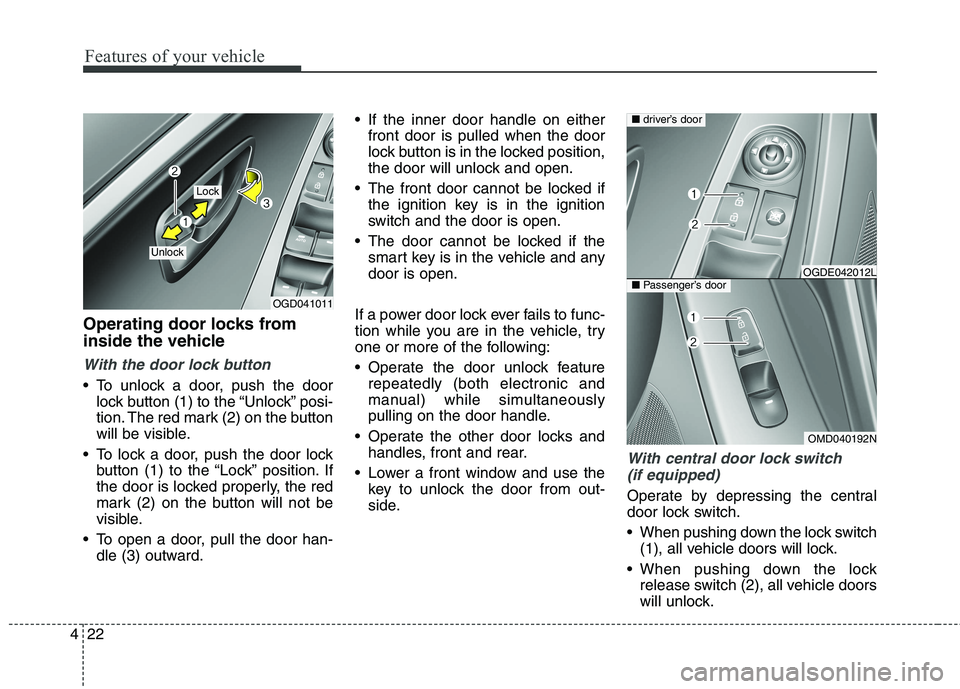
To unlock a door, push the door
lock button (1) to the “Unlock” posi-
tion. The red mark (2) on the button
will be visible.
To lock a door, push the door lock
button (1) to the “Lock” position. If
the door is locked properly, the red
mark (2) on the button will not be
visible.
To open a door, pull the door han-
dle (3) outward. If the inner door handle on either
front door is pulled when the door
lock button is in the locked position,
the door will unlock and open.
The front door cannot be locked if
the ignition key is in the ignition
switch and the door is open.
The door cannot be locked if the
smart key is in the vehicle and any
door is open.
If a power door lock ever fails to func-
tion while you are in the vehicle, try
one or more of the following:
Operate the door unlock feature
repeatedly (both electronic and
manual) while simultaneously
pulling on the door handle.
Operate the other door locks and
handles, front and rear.
Lower a front window and use the
key to unlock the door from out-
side.
With central door lock switch
(if equipped)
Operate by depressing the central
door lock switch.
When pushing down the lock switch
(1), all vehicle doors will lock.
When pushing down the lock
release switch (2), all vehicle doors
will unlock.
OGD041011
Lock
Unlock
OMD040192N
■driver’s door
■Passenger’s doorOGDE042012L