2014 HYUNDAI ELANTRA GT lock
[x] Cancel search: lockPage 86 of 476

Features of your vehicle
Keys ............................................................................4-4
• Record your key number ..............................................4-4
................................................................4-4
........................................................4-5
Smart key ..................................................................4-7
........................................................4-7
..................................................4-10
................................................4-10
....................................4-11
....................................................4-12
............4-13
Remote keyless entry ..............................................4-14
..............................................4-15
....................................................4-16
Theft-alarm system ................................................4-17
stage ..................................................................4-17
........................................................4-19
Door locks ................................................................4-21
................................................................4-21
..................................................................4-22
..................................4-24
Tailgate ....................................................................4-25
....................................................4-25
......................................................4-25
..............................4-26
Windows ..................................................................4-27
Hood..........................................................................4-32
........................................................4-32
..........................................................4-33
Fuel filler lid ............................................................4-34
............................................4-34
..............................................4-35
Panorama sunroof ..................................................4-38
......................................................................4-39
......................................................4-39
........................................................4-40
......................................................4-40
..................................................4-41
Steering wheel ..........................................................4-43
................................................4-43
............................................4-44
..............................................................................4-45
......................................................................4-45
4
Page 89 of 476

Features of your vehicle
4 4
Record your key number
The key code number is stamped on
the bar code tag attached to the key
set. Should you lose your keys, this
number will enable an authorized
HYUNDAI dealer to duplicate the
keys easily. Remove the bar code tag
and store it in a safe place. Also,
record the code number and keep it
in a safe place (not in the vehicle).
Key operations
Used to start the engine, lock and
unlock the doors.
KEYS (IF EQUIPPED)
WARNING - Ignition key
Leaving children unattended in a
vehicle with the ignition key is
dangerous even if the key is not
in the ignition switch. Children
copy adults and they could place
the key in the ignition switch.
The ignition key would enable
children to operate power win-
dows or other controls, or even
make the vehicle move, which
could result in serious bodily
injury or even death. Never leave
the keys in your vehicle with
unsupervised children.
OBK049113N
CAUTION
Use only HYUNDAI original
parts for the ignition key in your
vehicle. If an aftermarket key is
used, the ignition switch may
not return to ON after START. If
this happens, the starter will
continue to operate causing
damage to the starter motor and
possible fire due to excessive
current in the wiring.
Page 92 of 476

47
Features of your vehicle
Smart key function
1. Door lock
2. Door unlock
3. Tailgate unlock
4. Panic
With a smart key, you can lock or
unlock a door (and Tailgate) and
even start the engine without insert-
ing the key.
Refer to the following for more
details.
Locking
Using the door handle button
1. Carry the smart key.
2. Close all doors, engine hood and
tailgate.
3. Press the button of the outside
door handle.
4. The hazard warning lights will blink
and the chime will sound once.
5. Make sure that doors are locked
by pulling the outside door handle.
SMART KEY
OLM049003OGD041008
WARNING - Smart key
Leaving children unattended in a
vehicle with the smart key is
dangerous. Children copy adults
and they could press the engine
start/stop button. It would enable
children to operate power win-
dows or other controls, or even
make the vehicle move, which
could result in serious bodily
injury or even death. Never leave
the keys in your vehicle with
unsupervised children.
Page 93 of 476

Features of your vehicle
8 4
✽
✽
NOTICE
• The button will only operate when
the smart key is within 28~40in.
(0.7~1m) from the outside door
handle.
• Even though you press the outside
door handle button, the doors will
not lock and the chime will sound
for 3 seconds if any of following
occur:
- The smart key is in the vehicle.
- The engine start/stop button is
in ACC or ON position.
- Any door except the tailgate is
open.
Using the button on the smart key
1 Close all doors, engine hood and
tailgate.
2. Press the lock button(1).
3. The hazard warning lights will blink
and the chime will sound once.
4. Make sure that doors are locked
by pulling the outside door handle.
Unlocking
Using the door handle button
1. Carry the smart key.
2. Press the button of the driver's
outside door handle.
3. The driver’s door will unlock. The
hazard warning lights will blink and
the chime will sound two times.
4. Press the button once more within
4 seconds.
5. All doors and the tailgate will
unlock and the hazard warning
lights will blink and the chime will
sound two times.
❈If you press the button of the front
passenger’s outside door handle
while carrying the smart key, all
doors will unlock.
✽ ✽
NOTICE
• The button will only operate when
the smart key is within 28~40in.
(0.7~1m) from the outside door
handle.
• When the smart key is recognized
in the area of 28~40in. (0.7~1m)
from the front outside door han-
dle, other people can also open the
doors.
• After unlocking the driver’s door
or all doors, the door(s) will lock
automatically unless the door is
opened.
Page 94 of 476

49
Features of your vehicle
Using the button on the smart key
1. Press the unlock button (2) of the
smart key.
2. The driver’s door will unlock. The
hazard warning lights will blink and
the chime will sound two times.
3. Press the unlock button (2) once
more within 4 seconds.
4. All doors and the tailgate will
unlock. The hazard warning lights
will blink and the chime will sound
two times.
✽ ✽
NOTICE
After pressing the button, the doors
will lock automatically unless any
door is opened within 30 seconds.
✽ ✽
NOTICE
You can activate or deactivate the
Two Turn Unlock function. Refer to
"User settings" in this section.
Tailgate unlocking
Using the tailgate handle button
1. Carry the smart key.
2. Press the tailgate handle button.
3. When all doors are locked, the
hazard warning lights will blink two
times.
Once the tailgate is opened and
then closed, the tailgate will lock
automatically.
✽ ✽
NOTICE
The button will only operate when
the smart key is within 28~40in.
(0.7~1m) from the tailgate handle.
Using the button on the smart key
1. Press the tailgate unlock button(3)
for more than 1 second.
2. When all doors are locked, the
hazard warning lights will blink two
times.
Panic
1. Press the panic button(4) for more
than 1.5 second.
2. The horn sounds and hazard
warning light flash for about 30
seconds.
✽ ✽
NOTICE
To stop the horn and lights, press
any button on the smart key.
Start-up
You can start the engine without
inserting the key. For detailed infor-
mation refer to the “Engine start/stop
button” in section 5.
OGD041013
Page 95 of 476
Features of your vehicle
10 4
Loss of the smart key
A maximum of 2 smart keys can be
registered to a single vehicle.
If you happen to lose your smart key,
you will not be able to start the
engine. You should immediately take
the vehicle and remaining key to your
authorized HYUNDAI dealer(tow the
vehicle, if necessary) to protect it
from potential theft.
Smart key precautions
The smart key may not work if any
of the following occur:
- The smart key is close to a radio
transmitter such as a radio sta-
tion or an airport which can inter-
fere with normal operation of the
smart key.
- The smart key is near a mobile
two way radio system or a cellu-
lar phone.
- Another vehicle’s smart key is
being operated close to your
vehicle.
When the smart key does not work
correctly, open and close the door
with the mechanical key and contact
an authorized HYUNDAI dealer. If the smart key is in close proximi-
ty to your cell phone or smart
phone, the signal from the smart
key could be blocked by normal
operation of your cell phone or
smart phone. This is especially
important when the phone is active
such as making a call, receiving
calls, text messaging, and/or send-
ing/receiving emails. Avoid placing
the smart key and your cell phone
or smart phone in the same pants
or jacket pocket and maintain ade-
quate distance between the two
devices.
CAUTION
Keep the smart key away from
water or any liquid. If the key-
less entry system is inoperative
due to exposure to water or
other liquids, it will not be cov-
ered by your manufacturer’s
vehicle warranty.
Page 98 of 476
413
Features of your vehicle
1. Pry open the rear cover of the
smart key.
2. Replace the battery with a new
battery (CR2032). When replacing
the battery, make sure the battery
position.
3. Install the battery in the reverse
order of removal.
you years of trouble-free use, how-
ever it can malfunction if exposed
to moisture or static electricity. If
you are unsure how to use or
replace the battery, contact an
authorized HYUNDAI dealer.
the smart key to malfunction. Be
sure to use the correct battery.
don't drop it, get it wet, or expose it
to heat or sunlight.
An inappropriately dis-
posed battery can be harm-
ful to the environment and
human health. Dispose the
battery according to your
local law(s) or regulation.
Door lock/unlock in an emer-
gency situation
If the smart key does not operate
normally, you can lock or unlock the
doors by using the mechanical key.
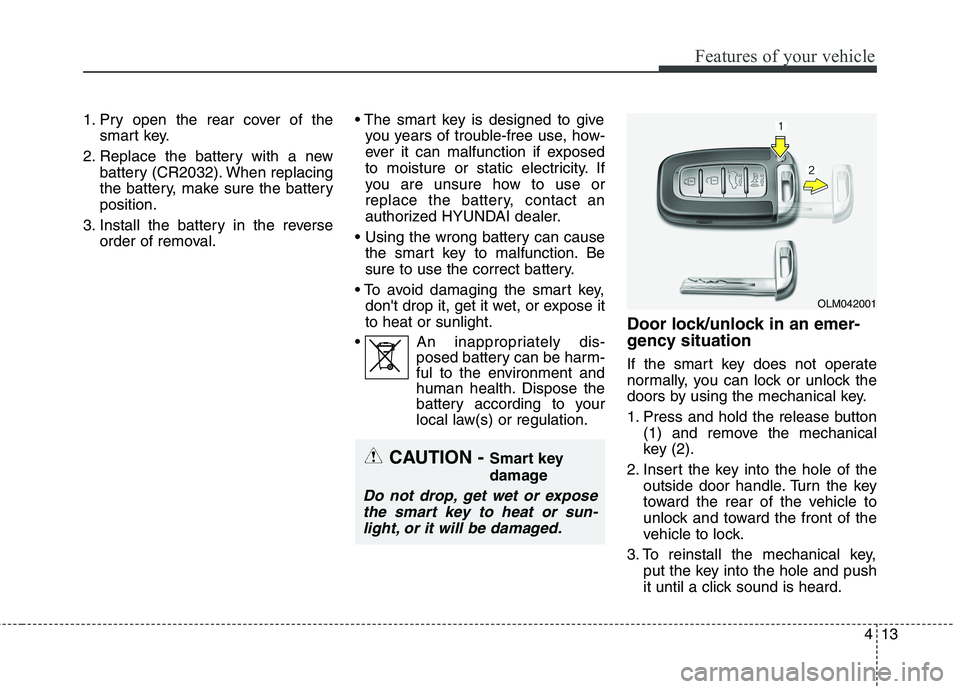
1. Press and hold the release button
(1) and remove the mechanical
key (2).
2. Insert the key into the hole of the
outside door handle. Turn the key
toward the rear of the vehicle to
unlock and toward the front of the
vehicle to lock.
3. To reinstall the mechanical key,
put the key into the hole and push
it until a click sound is heard.
OLM042001
CAUTION - Smart key
damage
Do not drop, get wet or expose
the smart key to heat or sun-
light, or it will be damaged.
Page 99 of 476

Features of your vehicle
14 4
Remote keyless entry system
operations
Lock (1)
1. Close all doors, engine hood and
tailgate.
2. Press the lock button(1).
3. All doors and tailgate will lock. The
hazard warning lights will blink
once.
4. If the lock button is pressed once
more within 4 seconds, the hazard
warning lights will blink and the
horn will sound once.
5. Make sure that doors are locked by
checking the door lock button inside
or pulling the outside door handle.
Unlock (2)
1. Press the unlock button(2).
2. The driver's door will unlock. The
hazard warning lights will blink two
times.
3. Press the unlock button(2) once
more within 4 seconds.
4. All doors and tailgate will unlock.
The hazard warning lights will
blink two times.
✽ ✽
NOTICE
You can activate or deactivate the
Two Turn Unlock function. Refer to
"User settings" in this section.
Tailgate unlock (3)
The tailgate is unlocked if the button
is pressed for more than 1 second.
Also, once the tailgate is opened and
then closed, the tailgate will be
locked automatically.
Panic (4)
The horn sounds and hazard warn-
ing lights flash for about 30 seconds
if this button is pressed for more than
1.5 second. To stop the horn and
lights, press any button except the
trunk button on the transmitter.
REMOTE KEYLESS ENTRY (IF EQUIPPED)
OGD042001N