Page 301 of 573
300
uuCustomized Features
*u
Features
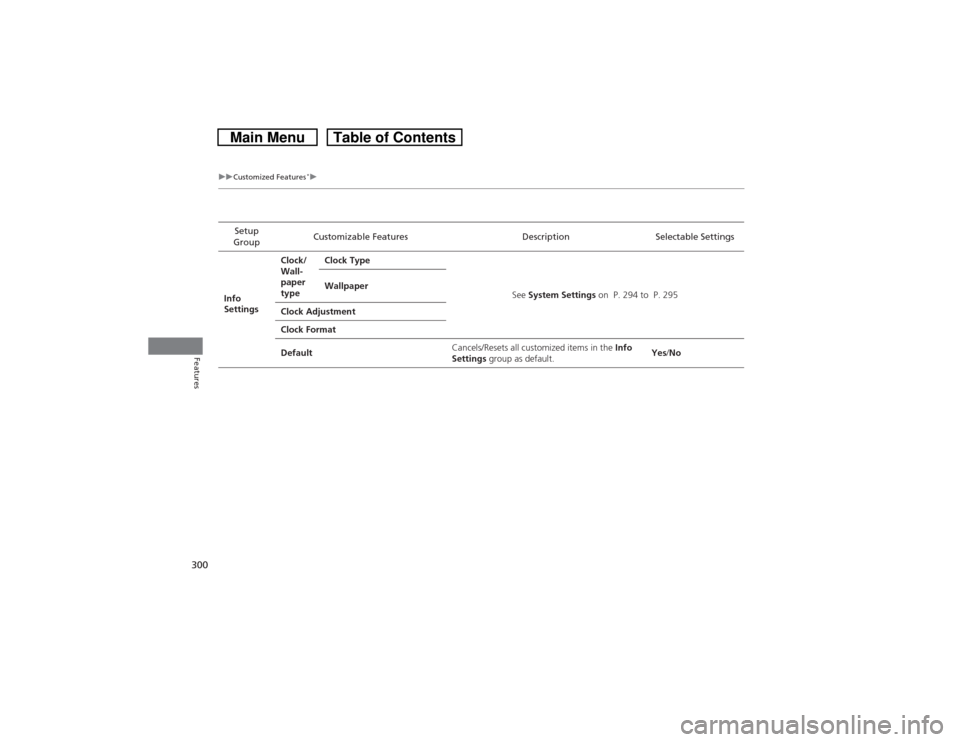
Setup
GroupCustomizable Features Description Selectable Settings
Info
SettingsClock/
Wall-
paper
typeClock Type
See System Settings on P. 294 to P. 295 Wallpaper
Clock Adjustment
Clock Format
DefaultCancels/Resets all customized items in the Info
Settings group as default.Yes/No
Page 303 of 573
302
uuCustomized Features
*u
Features
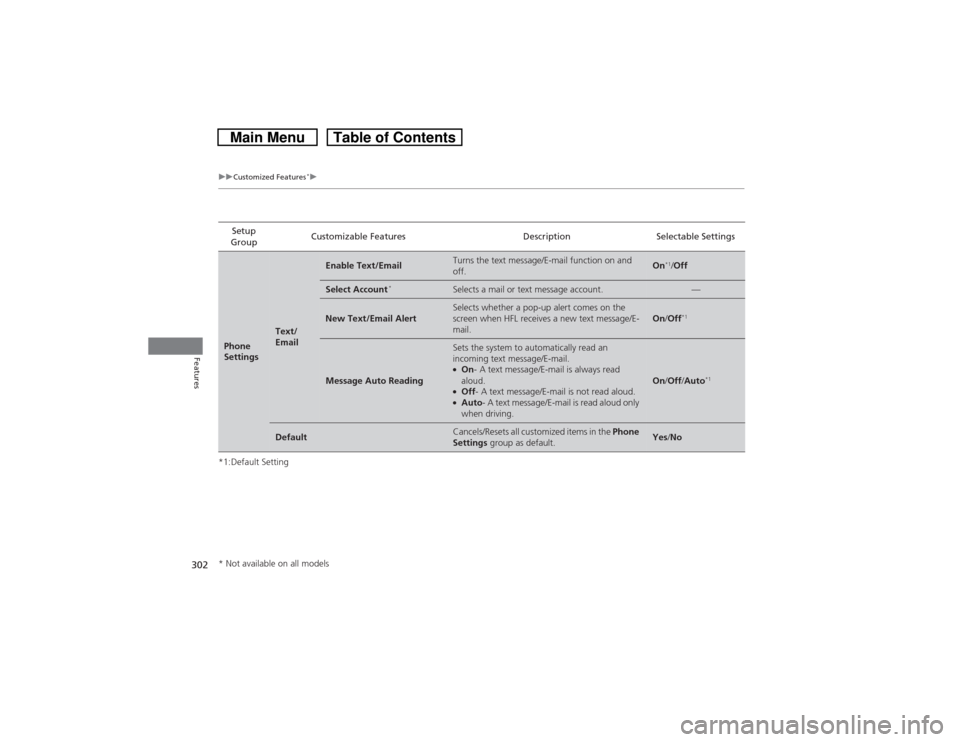
*1:Default SettingSetup
GroupCustomizable Features Description Selectable SettingsPhone
Settings
Text/
Email
Enable Text/Email
Turns the text message/E-mail function on and
off.
On
*1/Off
Select Account
*
Selects a mail or text message account.
—
New Text/Email Alert
Selects whether a pop-up alert comes on the
screen when HFL receives a new text message/E-
mail.
On/Off
*1
Message Auto Reading
Sets the system to automatically read an
incoming text message/E-mail.●On- A text message/E-mail is always read
aloud.●Off- A text message/E-mail is not read aloud.●Auto- A text message/E-mail is read aloud only
when driving.
On/Off/Auto
*1
Default
Cancels/Resets all customized items in the Phone
Settings group as default.
Yes/No
* Not available on all models
Page 304 of 573
303
uuCustomized Features
*u
Continued
Features
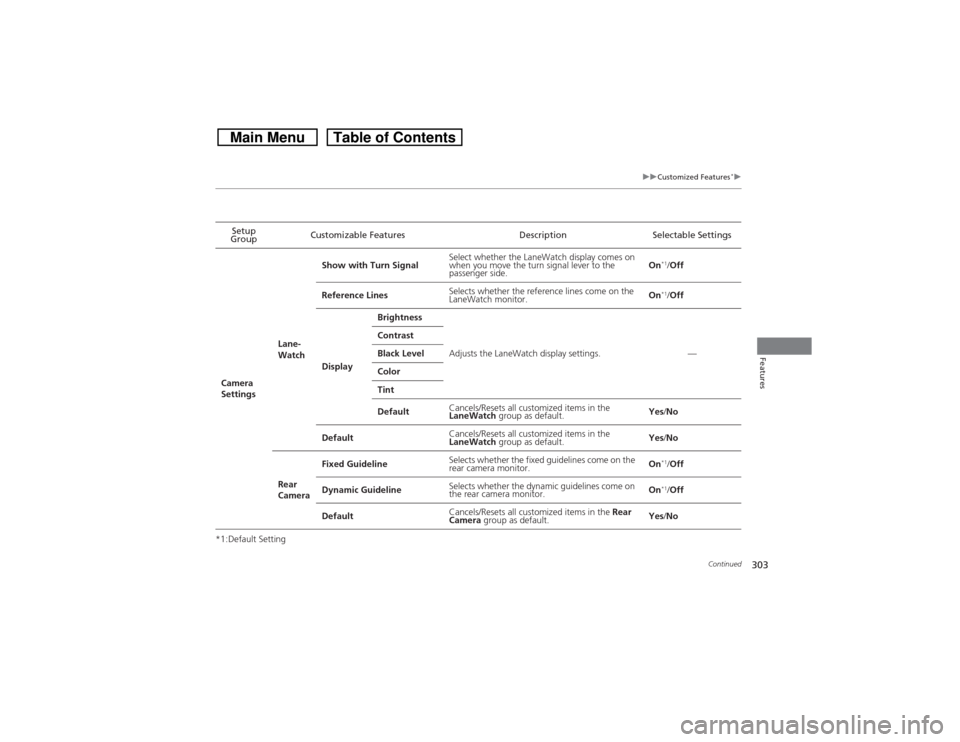
*1:Default SettingSetup
GroupCustomizable Features Description Selectable Settings
Camera
SettingsLane-
WatchShow with Turn SignalSelect whether the LaneWatch display comes on
when you move the turn signal lever to the
passenger side.On
*1/Off
Reference LinesSelects whether the reference lines come on the
LaneWatch monitor.On*1/Off
DisplayBrightness
Adjusts the LaneWatch display settings. — Contrast
Black Level
Color
Tint
DefaultCancels/Resets all customized items in the
LaneWatch group as default.Yes/No
DefaultCancels/Resets all customized items in the
LaneWatch group as default.Yes/No
Rear
CameraFixed GuidelineSelects whether the fixed guidelines come on the
rear camera monitor.On*1/Off
Dynamic GuidelineSelects whether the dynamic guidelines come on
the rear camera monitor.On*1/Off
DefaultCancels/Resets all customized items in the Rear
Camera group as default.Yes/No
Page 307 of 573

306
uuCustomized Features
*u
Features
*1:Default SettingSetup
GroupCustomizable Features Description Selectable SettingsSystem
Settings
Clock
Auto Daylight
*
Sets the navigation system to automatically adjust
the clock (“spring ahead” or “fall back” by one
hour) when a daylight saving time change occurs.
On
*1/Off
Clock Reset
Resets the settings of all items in the Clock group.
—
Others
Units
Changes the distance unit on the navigation map
screen.
mile
*1/km (U.S.)
mile/km*1 (Canada)
Language
Changes the display language.
English
*1/French/
Spanish
Voice Command Tips
Alerts you when manual control of the system is
disabled to prevent distraction while driving. Only
voice commands are available.
On
*1/Off
Background Color
Changes the background color of the audio/
information screen and the audio with touch screen.
Blue
*1/Amber/Red/
Green
Header Clock Display
Selects whether the clock display comes on.
On
*1/Off
System Device Information
Displays the system/Device information.
—
Factory Data Reset
Resets all the settings to their factory default.2Defaulting All the Settings P. 316
—
Default
Cancels /Resets all customized items in the
System Settings group as default.
Default/OK
* Not available on all models
Page 308 of 573

307
uuCustomized Features
*u
Continued
Features
*1:Default SettingSetup
GroupCustomizable Features Description Selectable SettingsVehicle
SettingsDriver
Assist
System
SetupForward Collision Warning
DistanceChanges at which distance FCW alerts, or turns
FCW on and off.Long
*1/Normal/
Short/Off
Meter
SetupAdjust Outside Temp.
DisplayAdjusts the temperature reading by a few
degrees.-5°F ~ ±0°F
*1 ~ +5°F
(U.S.)
-3°C ~ ±0°C*1 ~ +3°C
(Canada)
“Trip A” Reset TimingChanges the setting of how to reset trip meter A,
average fuel economy A, average speed A
*, and
elapsed time A
*.With Refuel/IGN Off/
Manually Reset
*1
“Trip B” Reset TimingChanges the setting of how to reset trip meter B,
average fuel economy B, average speed B
*, and
elapsed time B
*.With Refuel/IGN Off/
Manually Reset
*1
Fuel Efficiency BacklightTurns the ambient meter feature on and off.On
*1/Off
Keyless Start Guidance
ScreensDisplays the push button start guidance when
conditions are met to change power mode.On*1/Off
* Not available on all models
Page 310 of 573

309
uuCustomized Features
*u
Continued
Features
*1:Default SettingSetup
GroupCustomizable Features Description Selectable Settings
Vehicle
SettingsDoor
SetupAuto Door LockChanges the setting for when the doors
automatically lock.With Vehicle Speed
*1/
Shift from P/Off
Auto Door UnlockChanges the setting for when the doors
automatically unlock.Driver Door with Shift
to P
*1/All Doors with
Shift to P/Driver Door
with IGN Off/All Doors
with IGN Off/Off
Key And Remote Unlock
ModeSets up either the driver’s door or all doors to
unlock on the first push of the remote.Driver Door
*1/All
Doors
Keyless Lock Answer BackLOCK/UNLOCK- The exterior lights flash.
LOCK (2nd push)- The beeper sounds.On
*1/Off
Security Relock TimerChanges the time it takes for the doors and the
tailgate to relock and the security system to set
after you unlock the vehicle without opening any
door or the tailgate.90seconds/
60seconds/
30seconds
*1
Mainte-
nance
Info.Maintenance ResetResets the engine oil life display when you have
performed the maintenance service.—
DefaultCancels/Resets all customized items in the
Vehicle Settings group as default.Default/OK
Page 311 of 573
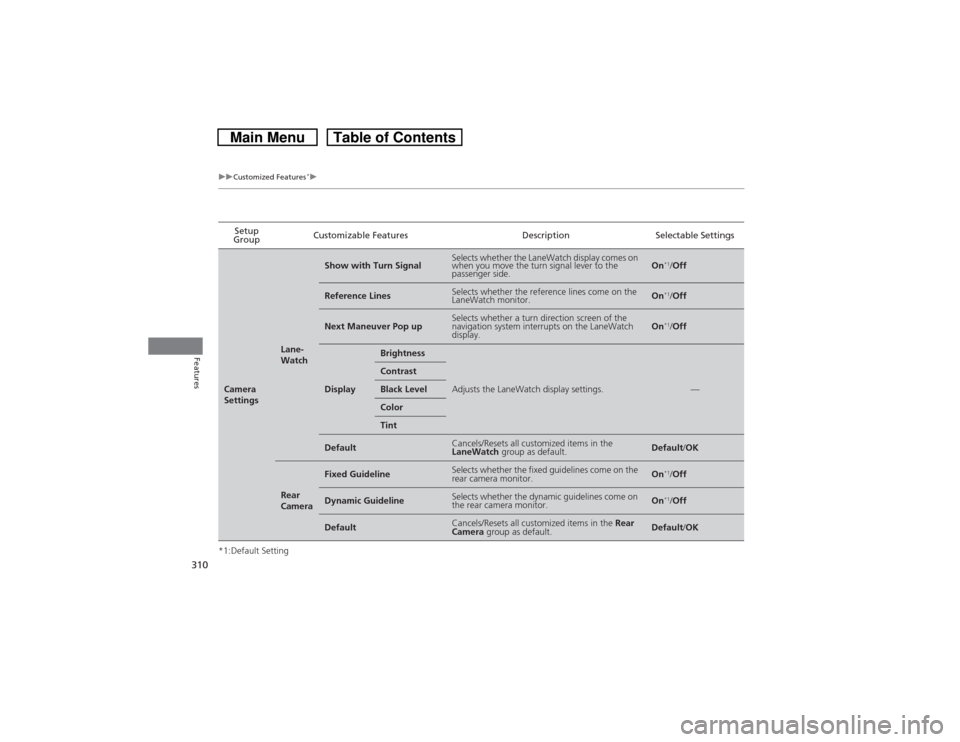
310
uuCustomized Features
*u
Features
*1:Default SettingSetup
GroupCustomizable Features Description Selectable SettingsCamera
Settings
Lane-
Watch
Show with Turn Signal
Selects whether the LaneWatch display comes on
when you move the turn signal lever to the
passenger side.
On
*1/Off
Reference Lines
Selects whether the reference lines come on the
LaneWatch monitor.
On
*1/Off
Next Maneuver Pop up
Selects whether a turn direction screen of the
navigation system interrupts on the LaneWatch
display.
On
*1/Off
Display
Brightness
Adjusts the LaneWatch display settings.
—
ContrastBlack LevelColorTint
Default
Cancels/Resets all customized items in the
LaneWatch group as default.
Default/OK
Rear
Camera
Fixed Guideline
Selects whether the fixed guidelines come on the
rear camera monitor.
On
*1/Off
Dynamic Guideline
Selects whether the dynamic guidelines come on
the rear camera monitor.
On
*1/Off
Default
Cancels/Resets all customized items in the Rear
Camera group as default.
Default/OK
Page 313 of 573
312
uuCustomized Features
*u
Features
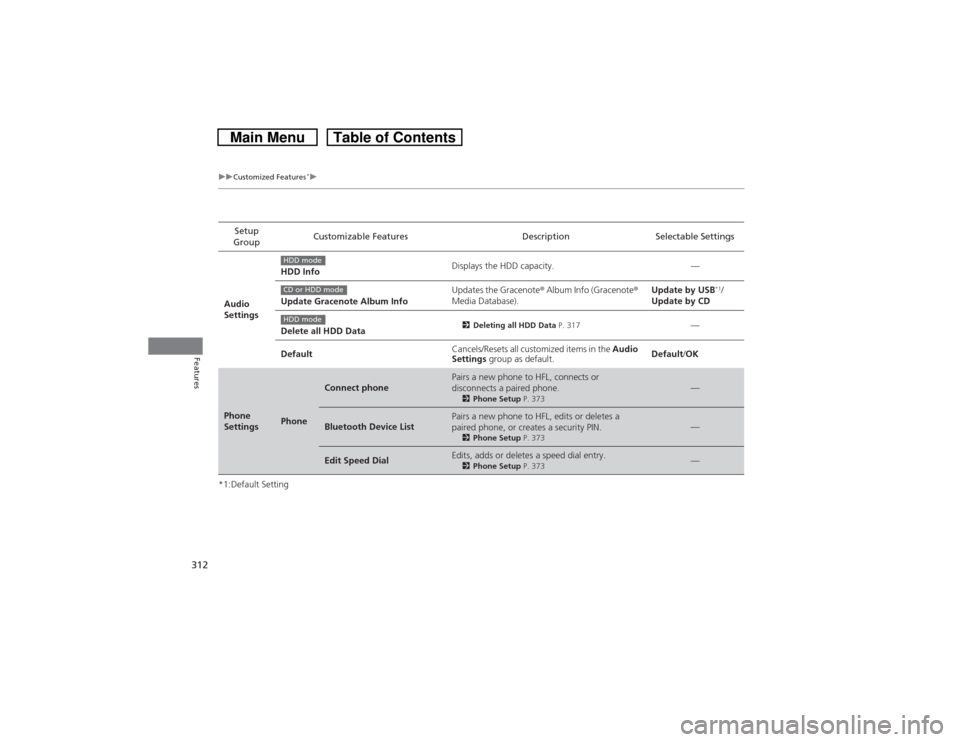
*1:Default SettingSetup
GroupCustomizable Features Description Selectable Settings
Audio
SettingsHDD InfoDisplays the HDD capacity. —
Update Gracenote Album InfoUpdates the Gracenote® Album Info (Gracenote®
Media Database).Update by USB
*1/
Update by CD
Delete all HDD Data
2Deleting all HDD Data P. 317
—
DefaultCancels/Resets all customized items in the Audio
Settings group as default.Default/OK
Phone
Settings
Phone
Connect phone
Pairs a new phone to HFL, connects or
disconnects a paired phone.2Phone Setup P. 373
—
Bluetooth Device List
Pairs a new phone to HFL, edits or deletes a
paired phone, or creates a security PIN.2Phone Setup P. 373
—
Edit Speed Dial
Edits, adds or deletes a speed dial entry.2Phone Setup P. 373
—
HDD modeCD or HDD modeHDD mode