Page 268 of 573
267
uuAudio System Basic OperationuPlaying Bluetooth® Audio
Features
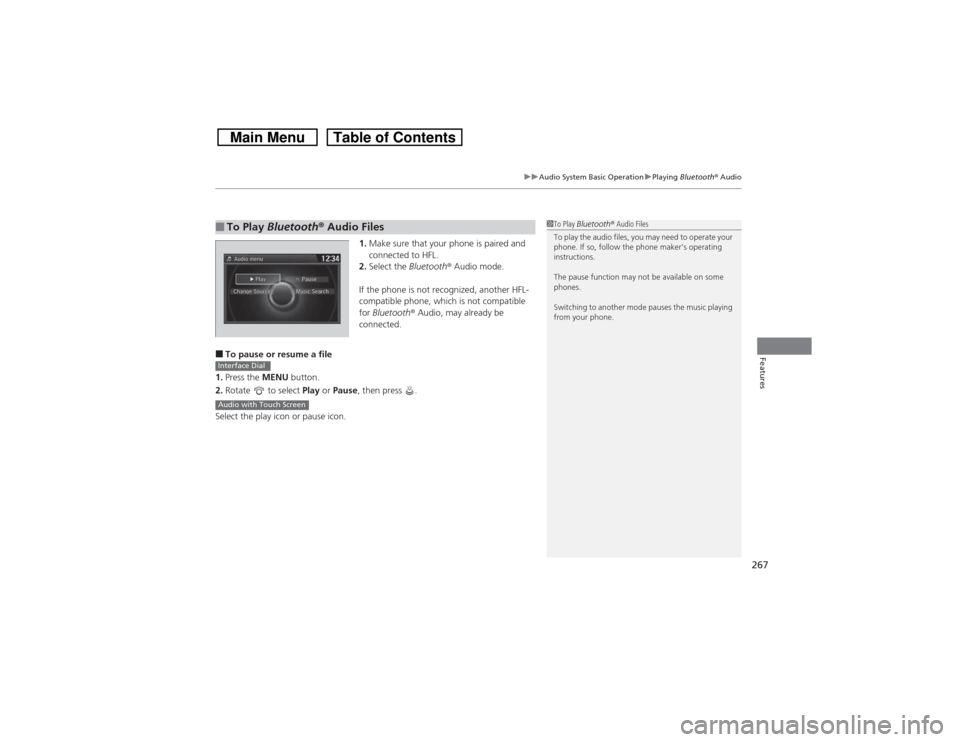
1.Make sure that your phone is paired and
connected to HFL.
2.Select the Bluetooth® Audio mode.
If the phone is not recognized, another HFL-
compatible phone, which is not compatible
for Bluetooth® Audio, may already be
connected.
■To pause or resume a file
1.Press the MENU button.
2.Rotate to select Play or Pause, then press .
Select the play icon or pause icon.■To Play Bluetooth® Audio Files
1To Play Bluetooth® Audio Files
To play the audio files, you may need to operate your
phone. If so, follow the phone maker’s operating
instructions.
The pause function may not be available on some
phones.
Switching to another mode pauses the music playing
from your phone.
Interface DialAudio with Touch Screen
Page 284 of 573
283
uuCustomized Features
*u
Continued
Features
■Customization flowModels without navigation system
Clock FormatBackground ColorHeader Clock DisplayFactory Data ResetClock Adjustment
Press and hold the DISP button.
Language
Default
Edit Pairing Code
Bluetooth
Bluetooth Device List
BrightnessContrastBlack Level
Beep
Clock/
Wallpaper
Type
Clock TypeWallpaper
System
Settings
BluetoothDisplayClockOthers
Display Operation Restriction Tips
Voice Recognition
Page 286 of 573
285
uuCustomized Features
*u
Continued
Features
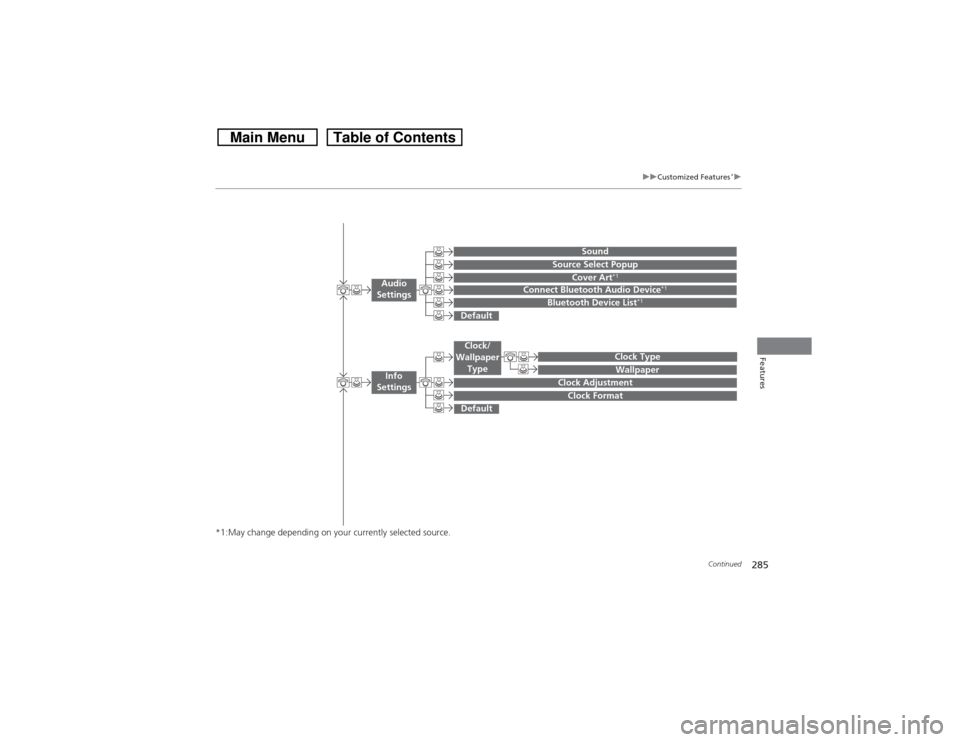
*1:May change depending on your currently selected source.
Wallpaper
Source Select Popup
Clock Type
Sound
Default
Cover Art
*1
Connect Bluetooth Audio Device
*1
Bluetooth Device List
*1
Default
Clock AdjustmentClock Format
Audio
Settings
Clock/
Wallpaper
Type
Info
Settings
Page 287 of 573
286
uuCustomized Features
*u
Features
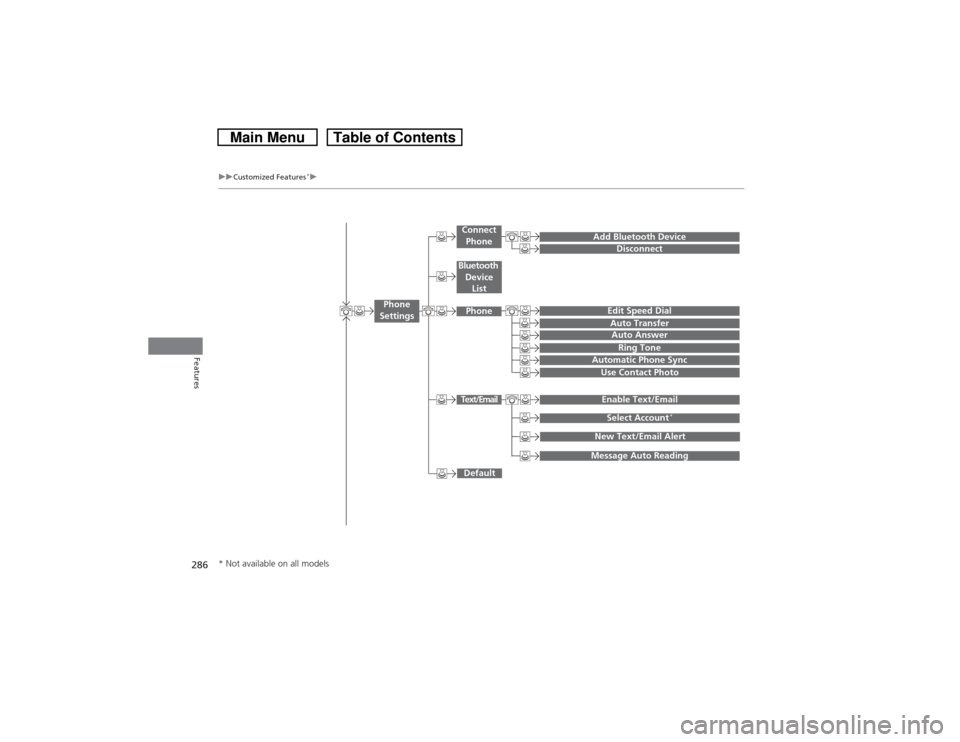
Add Bluetooth Device
DisconnectEdit Speed DialAuto Transfer
Auto AnswerRing Tone
Automatic Phone Sync
Default
Use Contact PhotoEnable Text/EmailSelect Account
*
Message Auto ReadingNew Text/Email Alert
Phone
Settings
Connect
PhoneText/EmailBluetooth
Device
ListPhone
* Not available on all models
Page 289 of 573
288
uuCustomized Features
*u
Features
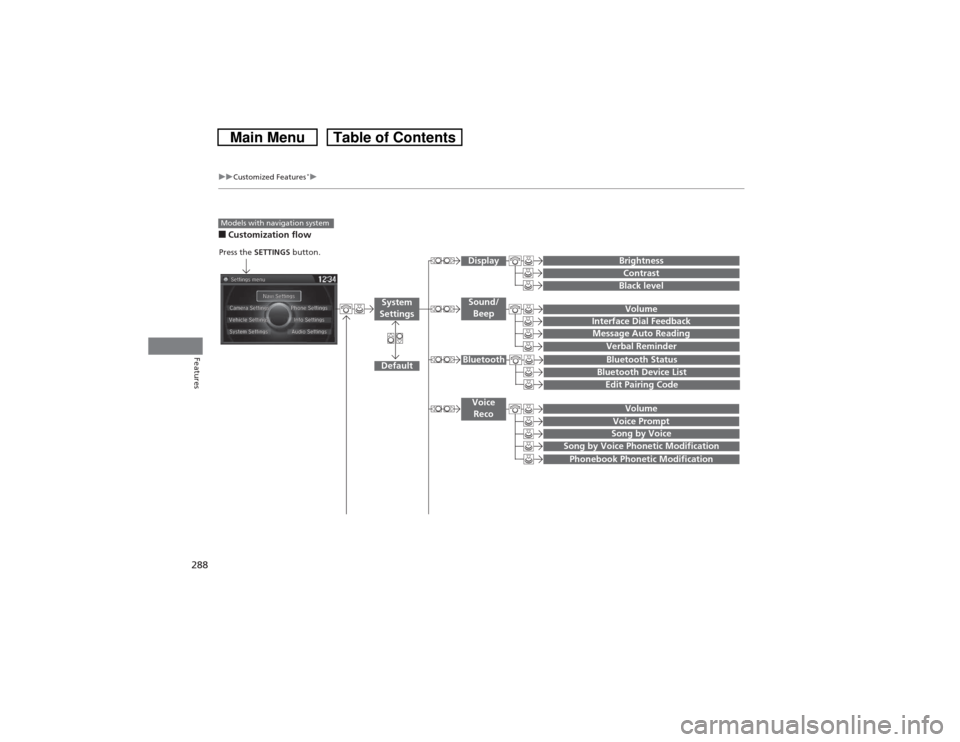
■Customization flowModels with navigation system
Song by Voice
Song by Voice Phonetic ModificationPhonebook Phonetic Modification
Press the SETTINGS button.
VolumeVoice Prompt
Message Auto Reading
Volume
Interface Dial Feedback
Verbal Reminder
BrightnessContrastBlack level
Bluetooth StatusBluetooth Device ListEdit Pairing Code
Default
Sound/
BeepDisplay
System
Settings
BluetoothVoice
Reco
Page 292 of 573
291
uuCustomized Features
*u
Continued
Features
*1:May change depending on your currently selected source.
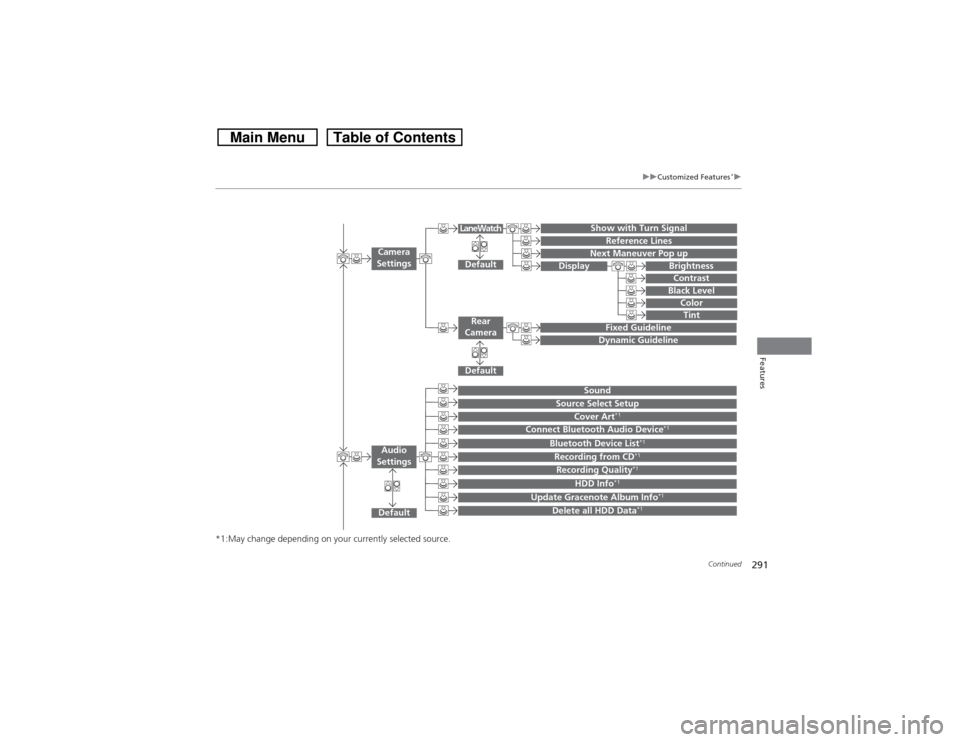
Show with Turn Signal
Reference Lines
Next Maneuver Pop up
Default
Fixed GuidelineDynamic Guideline
Default
Default
Sound
Source Select Setup
Cover Art
*1
Connect Bluetooth Audio Device
*1
Bluetooth Device List
*1
Recording from CD
*1
Recording Quality
*1
HDD Info
*1
Update Gracenote Album Info
*1
Delete all HDD Data
*1
Camera
Settings
Rear
CameraLaneWatch
Audio
Settings
Display
BrightnessContrastBlack Level
ColorTint
Page 293 of 573
292
uuCustomized Features
*u
Features
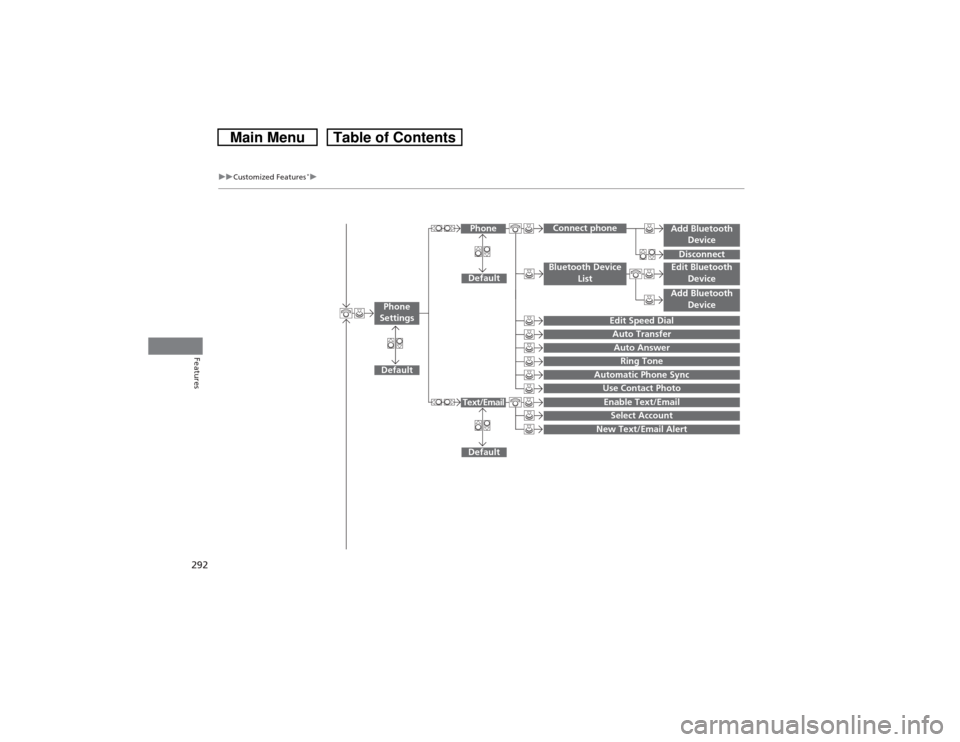
Add Bluetooth
DeviceDisconnect
Default
Phone
Connect phone
Edit Bluetooth
DeviceAdd Bluetooth
Device
Bluetooth Device
List
Edit Speed DialAuto TransferAuto AnswerRing Tone
Automatic Phone SyncUse Contact Photo
Default
Default
Enable Text/EmailSelect Account
New Text/Email Alert
Text/Email
Phone
Settings
Page 295 of 573
294
uuCustomized Features
*u
Features
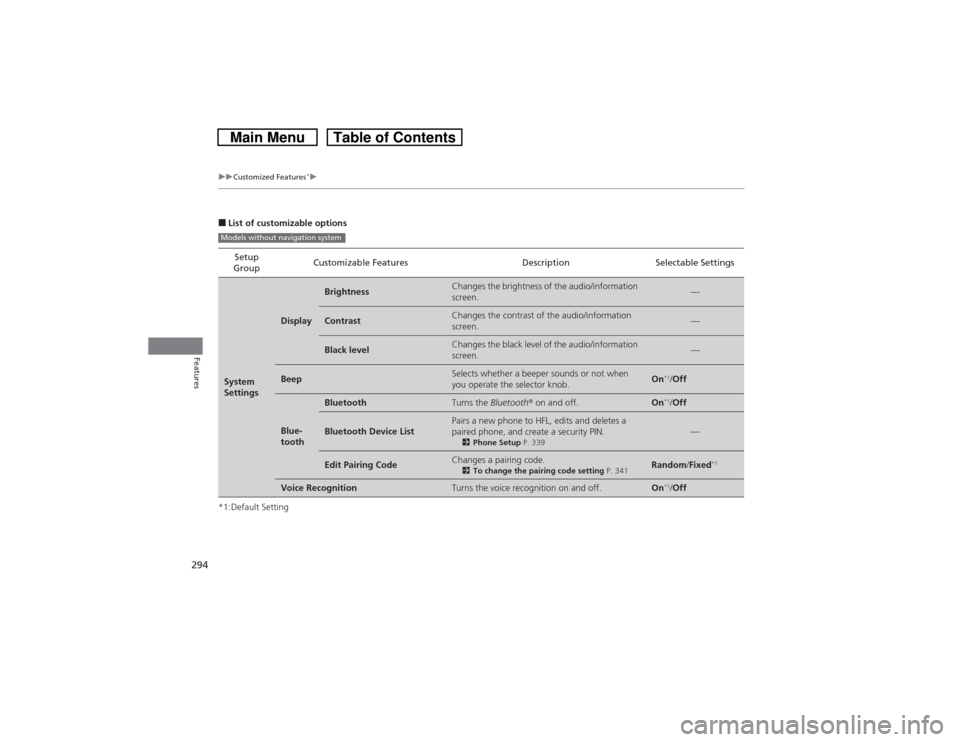
■List of customizable options
*1:Default SettingSetup
GroupCustomizable Features Description Selectable SettingsSystem
Settings
Display
Brightness
Changes the brightness of the audio/information
screen.
—
Contrast
Changes the contrast of the audio/information
screen.
—
Black level
Changes the black level of the audio/information
screen.
—
Beep
Selects whether a beeper sounds or not when
you operate the selector knob.
On
*1/Off
Blue-
tooth
Bluetooth
Turns the Bluetooth® on and off.
On
*1/Off
Bluetooth Device List
Pairs a new phone to HFL, edits and deletes a
paired phone, and create a security PIN.2Phone Setup P. 339
—
Edit Pairing Code
Changes a pairing code.2To change the pairing code setting P. 341
Random/Fixed
*1
Voice Recognition
Turns the voice recognition on and off.
On
*1/Off
Models without navigation system