Page 285 of 573
284
uuCustomized Features
*u
Features
“Trip B” Reset Timing
Adjust Outside Temp. Display
“Trip A” Reset TimingKeyless Access Light FlashAuto Light Sensitivity
Auto Door LockAuto Door Unlock
Forward Collision Warning
Distance
*
Door Unlock Mode
Interior Light Dimming TimeHeadlight Auto Off Timer
Memory Position Link
Key And Remote Unlock ModeKeyless Lock Answer BackSecurity Relock Timer
Maintenance Reset
Default All
Vehicle
Settings
Driver Assist System Setup
*
Meter
SetupDriving Position Setup
*
Keyless
Access
SetupLighting
SetupDoor
Setup
Maintenance Info.
Keyless Access Beep
* Not available on all models
Page 286 of 573
285
uuCustomized Features
*u
Continued
Features
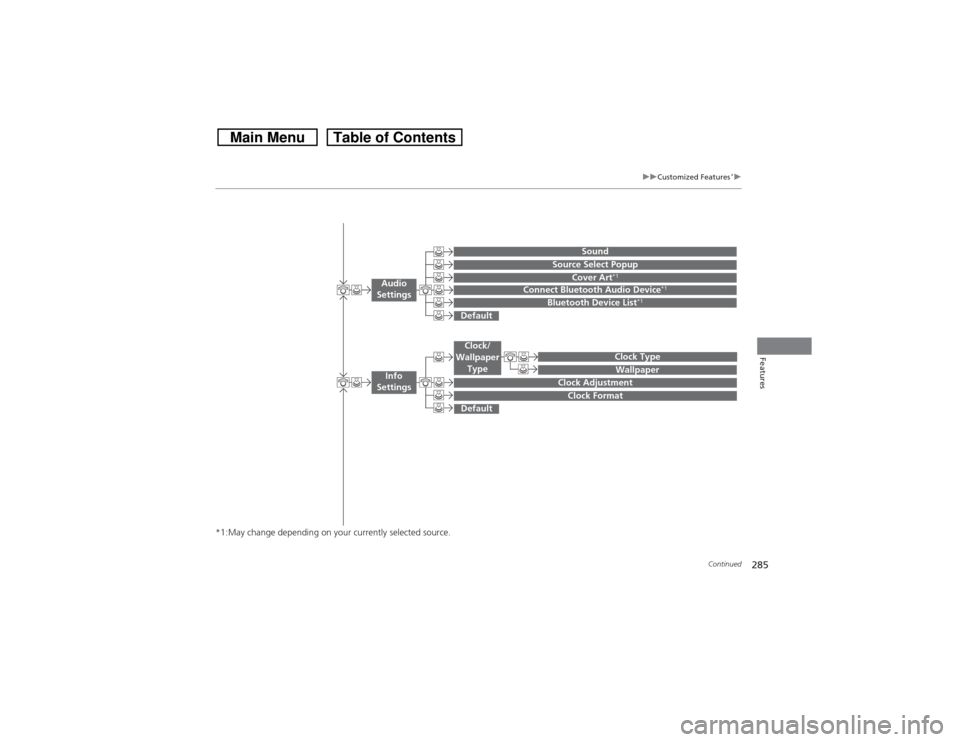
*1:May change depending on your currently selected source.
Wallpaper
Source Select Popup
Clock Type
Sound
Default
Cover Art
*1
Connect Bluetooth Audio Device
*1
Bluetooth Device List
*1
Default
Clock AdjustmentClock Format
Audio
Settings
Clock/
Wallpaper
Type
Info
Settings
Page 290 of 573
289
uuCustomized Features
*u
Continued
Features
System Device Information
Factory Data Reset
Background ColorHeader Clock Display
Clock ResetAuto Time Zone
*
Auto Daylight
*
Clock
Clock AdjustmentClock Format
Clock
UnitsLanguage
Voice Command Tips
Others
Wallpaper
Clock/Wallpaper
Type
* Not available on all models
Page 291 of 573
290
uuCustomized Features
*u
Features
“Trip A” Reset Timing“Trip B” Reset Timing
Adjust Outside Temp. Display
Forward Collision Warning Distance
Default
Memory Position Link
Door Unlock Mode
Keyless Access Light Flash
Interior Light Dimming TimeHeadlight Auto Off TimerAuto light Sensitivity
Key And Remote Unlock ModeKeyless Lock Answer BackSecurity Relock TimerAuto Door LockAuto Door Unlock
Maintenance Reset
Vehicle
Settings
Meter
SetupDriver
Assist
System
SetupDriving Position Setup
Keyless
Access
SetupLighting
SetupDoor
Setup
Maintenance Info.
Keyless Access Beep
Page 294 of 573
293
uuCustomized Features
*u
Continued
Features
Auto Daylight
*
Clock Reset
Info Screen Preference
Clock FormatAuto Time Zone
*
Clock/Wallpaper TypeClock Adjustment
Clock
Default
Others
Info
SettingsNavi
Settings
See the Navigation System Manual.
* Not available on all models
Page 296 of 573
295
uuCustomized Features
*u
Continued
Features
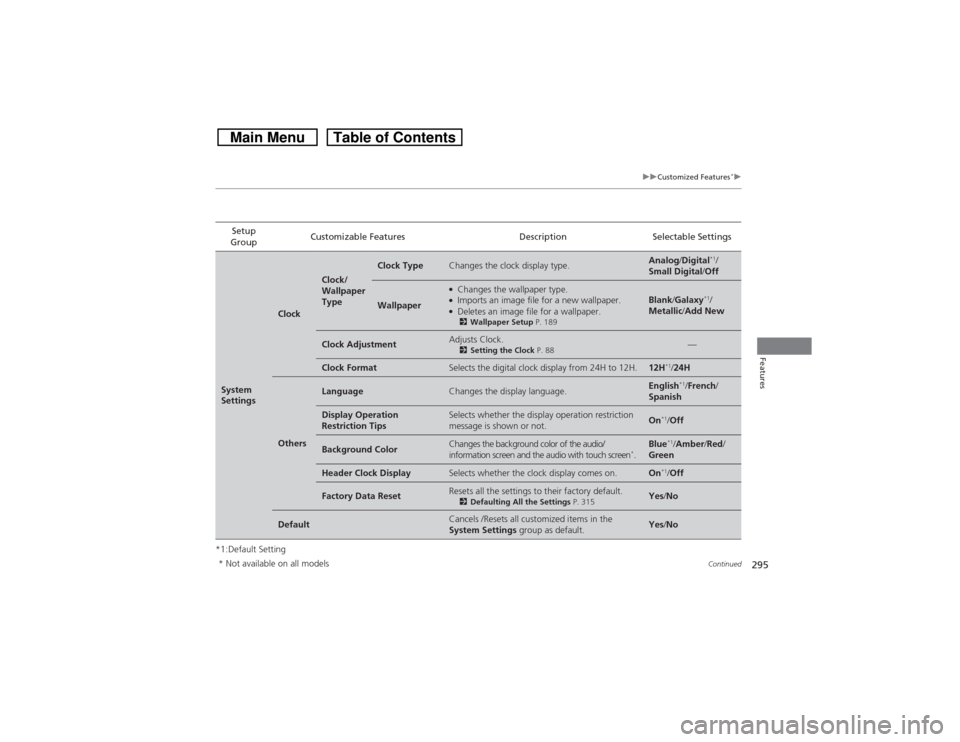
*1:Default SettingSetup
GroupCustomizable Features Description Selectable SettingsSystem
Settings
Clock
Clock/
Wallpaper
Type
Clock Type
Changes the clock display type.
Analog/Digital
*1/
Small Digital/Off
Wallpaper
●Changes the wallpaper type.●Imports an image file for a new wallpaper.●Deletes an image file for a wallpaper.2Wallpaper Setup P. 189
Blank/Galaxy
*1/
Metallic/Add New
Clock Adjustment
Adjusts Clock.2Setting the Clock P. 88
—
Clock Format
Selects the digital clock display from 24H to 12H.
12H
*1/24H
Others
Language
Changes the display language.
English
*1/French/
Spanish
Display Operation
Restriction Tips
Selects whether the display operation restriction
message is shown or not.
On
*1/Off
Background Color
Changes the background color of the audio/
information screen and the audio with touch screen
*.
Blue
*1/Amber/Red/
Green
Header Clock Display
Selects whether the clock display comes on.
On
*1/Off
Factory Data Reset
Resets all the settings to their factory default.2Defaulting All the Settings P. 315
Yes/No
Default
Cancels /Resets all customized items in the
System Settings group as default.
Yes/No
* Not available on all models
Page 298 of 573
297
uuCustomized Features
*u
Continued
Features
*1:Default SettingSetup
GroupCustomizable Features Description Selectable Settings
Vehicle
SettingsKeyless
Access
SetupDoor Unlock ModeChanges which doors unlock when you grab the
driver’s door handle.Driver Door Only
*1/
All Doors
Keyless Access Light FlashCauses some exterior lights to blink when you
unlock/lock the doors.On
*1/Off
Keyless Access BeepSets the beeper sound or not when you grab
either front door handle.On*1/Off
Lighting
SetupInterior Light Dimming
TimeChanges the length of time the interior lights stay
on after you close the doors.60seconds/
30seconds
*1/
15seconds
Headlight Auto Off TimerChanges the length of time the exterior lights
stay on after you close the driver’s door.60seconds/
30seconds/
15seconds*1/
0seconds
Auto Light SensitivityChanges the timing for the headlights to come
on.Max/High/Mid*1/
Low/Min
Page 299 of 573

298
uuCustomized Features
*u
Features
*1:Default SettingSetup
GroupCustomizable Features Description Selectable Settings
Vehicle
SettingsDoor
SetupAuto Door LockChanges the setting for when the doors
automatically lock.With Vehicle Speed
*1/
Shift from P/Off
Auto Door UnlockChanges the setting for when the doors
automatically unlock.Driver Door with Shift
to P
*1/All Doors with
Shift to P/Driver Door
with IGN Off/All Doors
with IGN Off/Off
Key And Remote Unlock
ModeSets up either the driver’s door or all doors to
unlock on the first push of the remote.Driver Door
*1/All
Doors
Keyless Lock Answer BackLOCK/UNLOCK- The exterior lights flash.
LOCK (2nd push)- The beeper sounds.On
*1/Off
Security Relock TimerChanges the time it takes for the doors and the
tailgate to relock and the security system to set
after you unlock the vehicle without opening any
door or the tailgate.90seconds/
60seconds/
30seconds
*1
Mainte-
nance
Info.Maintenance ResetResets the engine oil life display when you have
performed the maintenance service.—
Default
All
Cancels/Resets all customized items in the
Vehicle Settings group as default.Yes/No