2014 HONDA CR-V eps
[x] Cancel search: epsPage 10 of 365

9
Quick Reference Guide
Instrument Panel (P 67)
System Indicators
Malfunction
Indicator Lamp
Low Oil Pressure
Indicator
Charging System
Indicator
Anti-lock Brake
System (ABS)
Indicator
Vehicle Stability
Assist (VSA ®) System
Indicator
VSA ® OFF Indicator
Low Tire Pressure/
TPMS Indicator
Lights IndicatorsLights On Indicator
High Beam Indicator
Fog Light Indicator
*
Immobilizer System
Indicator Seat Belt Reminder
Indicator
System Indicators
Cruise Control
Indicator
Parking Brake
and Brake System
Indicator Supplemental
Restraint System
Indicator
Side Airbag Off
Indicator
Door Open Indicator
Cruise Main Indicator
Tachometer Speedometer
Fuel
Gauge
Security System
Alarm Indicator
Shift Lever Position Indicator
Low Fuel Indicator
Gauges (P 77)/Information Display (P 78)/
intelligent Multi-Inform ation Display (i-MID)
(P 81)/System Indicators (P 68)
Tailgate Open
Indicator
ECON Mode Indicator Maintenance Minder
Indicator
Washer Level
Indicator
*
Ambient MeterTemperature GaugeElectric Power
Steering (EPS)
Indicator Turn Signal and
Hazard Warning
Indicators
All-Wheel Drive
(
AWD) System
Indicator
*
System Indicators
Canada U.S.
Canada
U.S.
*
Not available on all models
14 CR-V-31T0A6200.book 9 ページ 2014年2月10日 月曜日 午後7時1分
Page 61 of 365

uuChild Safety uSafety of Infants and Small Children
60
Safe Driving1. Place the child seat on the vehicle seat.
2. Route the seat belt through the child seat
according to the seat manufacturer’s
instructions, and insert the latch plate into
the buckle.
u Insert the latch plate fully until it clicks.
3. Slowly pull the shoulder part of the belt all
the way out until it stops. This activates the
lockable retractor.
4. Let the seat belt completely wind up into
the retractor, then try to pull it out to make
sure the retractor is locked.
u If you are able to pull the shoulder belt
out, the lockable retractor is not
activated. Pull the seat belt all the way
out, and repeat steps 3 – 4.
5. Grab the shoulder part of the seat belt near
the buckle, and pull up to remove any slack
from the lap part of the belt.
u When doing this, plac e your weight on
the child seat and push it into the vehicle
seat.
■Installing a Child Seat with a Lap/Shoulder Seat Belt1 Installing a Child Seat with a Lap/Shoulder Seat Belt
A child seat that is not properly secured will not
adequately protect a child in a crash and may cause
injury to the child or other vehicle occupants.
14 CR-V-31T0A6200.book 60 ページ 2014年2月10日 月曜日 午後7時1分
Page 74 of 365
73
uuIndicators u
Continued
Instrument Panel
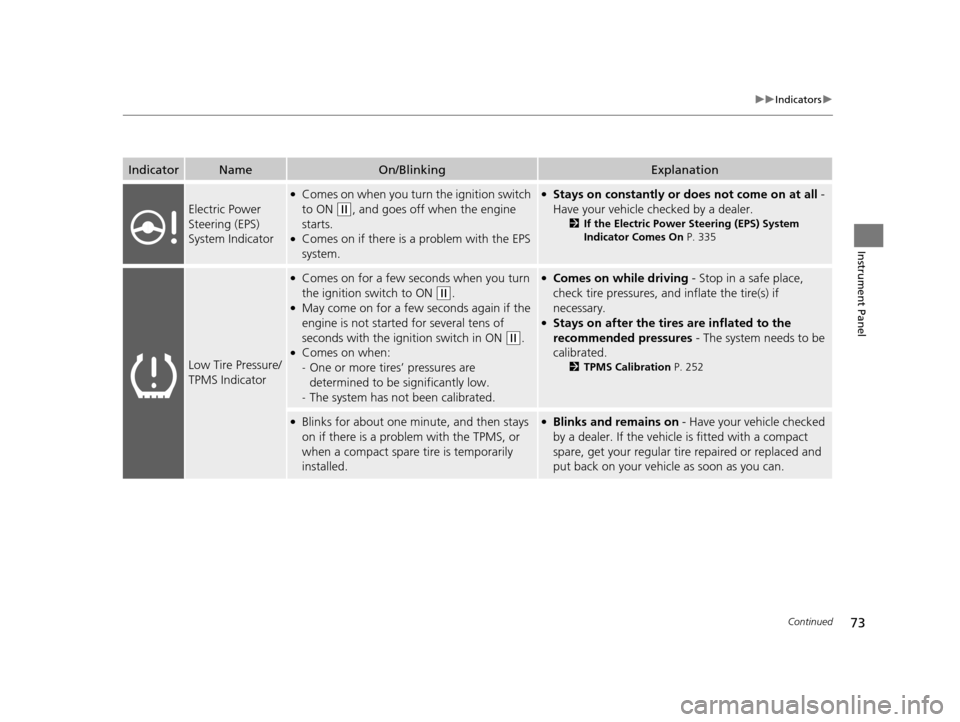
IndicatorNameOn/BlinkingExplanation
Electric Power
Steering (EPS)
System Indicator
●Comes on when you turn the ignition switch
to ON
(w, and goes off when the engine
starts.
●Comes on if there is a problem with the EPS
system.
●Stays on constantly or does not come on at all -
Have your vehicle checked by a dealer.
2 If the Electric Power Steering (EPS) System
Indicator Comes On P. 335
Low Tire Pressure/
TPMS Indicator
●Comes on for a few seconds when you turn
the ignition switch to ON
(w.●May come on for a few seconds again if the
engine is not started for several tens of
seconds with the ignition switch in ON
(w.●Comes on when:
-One or more tires’ pressures are
determined to be significantly low.
- The system has not been calibrated.
●Comes on while driving - Stop in a safe place,
check tire pressures, and inflate the tire(s) if
necessary.
●Stays on after the tires are inflated to the
recommended pressures - The system needs to be
calibrated.
2 TPMS Calibration P. 252
●Blinks for about one minute, and then stays
on if there is a problem with the TPMS, or
when a compact spare tire is temporarily
installed.●Blinks and remains on - Have your vehicle checked
by a dealer. If the vehicle is fitted with a compact
spare, get your regular tire repaired or replaced and
put back on your vehicle as soon as you can.
14 CR-V-31T0A6200.book 73 ページ 2014年2月10日 月曜日 午後7時1分
Page 97 of 365

96
Controls
Clock
Adjusting the Clock
You can adjust the time in the clock display with the ignition switch in ON (w.
■Using the MENU button
1. Press the MENU button.
2. Select Adjust Clock with the
(+ / (- button, then press the SOURCE button.
3. Press the
(+ / (- button to change the
setting between 12h and 24h.
4. Select hour or minute with the /
button.
5. Press the
(+ / (- button to adjust the
numbers up or down.
6. Select Set with the / button, then
press the SOURCE button to enter your
selection.
u The display will return to the Adjust
Clock display.
■Using the SETUP button
1. Press the SETUP button.
2. Rotate to select Adjust Clock, then press .
3. Rotate to select the item you want to change (12/24 hour mode, hour,
minute). Then press .
4. Rotate to make the adjustment.
5. Press to enter your select ion. The display returns to Adjust Clock. Repeat steps
4 to 6 to adjust other items.
6. To enter the selection, Rotate and select Set, then press .
7. Press the SETUP button to go back to the normal display.
1Adjusting the Clock
These indications are used to show how to operate
the selector knob.
Rotate to select.
Press to enter.
To set the time to the nearest hour:
Press and hold the CLOCK button until the clock
display begins to blink, then press the
( 6 (Reset)
button.
Depending on the displayed time, the clock sets
forward or backward.
Example:
1:06 will reset to 1:00
1:53 will reset to 2:00
The clock is automatica lly updated through the
navigation system, so the ti me does not need to be
adjusted.
Models with navigation system
14 CR-V-31T0A6200.book 96 ページ 2014年2月10日 月曜日 午後7時1分
Page 116 of 365

115
uuOperating the Switches Around the Steering Wheel uWipers and Washers
Continued
Controls
Wipers and Washers
The windshield wipers and washers can be
used when the ignition switch is in ON
(w.
■MIST
The wipers run at high speed until you release
the lever.
■Wiper switch (OFF, INT, LO, HI)
Change the wiper switch setting according to
the amount of rain.
■Adjusting the delay*
Turn the adjustment ring to adjust the wiper
delay.
■Washer
Sprays while you pull the lever toward you.
When you release the lever, the wipers make
two or three more sweeps before stopping.
■Windshield Wipers/Washers1 Wipers and Washers
NOTICE
Do not use the wipers when the windshield is dry.
The windshield will get sc ratched, or the rubber
blades will get damaged.
NOTICE
In cold weather, the blades may freeze to the
windshield, becoming stuck.
Operating the wipers in th is condition may damage
the wipers. Use the defroster to warm the
windshield, then turn the wipers on.
Turn the washers off if no washer fluid comes out.
The pump may get damaged.
If the vehicle speeds up while the wipers are
operating intermittently, the length of the wipe
interval shortens. When the vehicle starts moving, the
wipers make a single sweep.
When the vehicle speeds up, the wiper operation’s
shortest delay setting ( ) and the LO setting become
the same.
Models with intermittent time adjustment ring
Intermittent Time
Adjustment Ring*
MIST
INT : Low speed with
intermittent OFF
LO : Low speed wipe
HI : High speed wipe Pull to
use
washer.
Long delay
Short delay
* Not available on all models
14 CR-V-31T0A6200.book 115 ページ 2014年2月10日 月曜日 午後7時1分
Page 117 of 365

uuOperating the Switches Around the Steering Wheel uWipers and Washers
116
Controls
The rear wiper and washer can be used when
the ignition switch is in ON
(w.
■Wiper switch (OFF, INT, ON)
Change the wiper switch setting according to
the amount of rain.
■Washer ( )
Sprays while you rotate the switch to this
position.
Hold it to activate the wiper and to spray the
washer. Once released, it stops operating
after a few more sweeps.
■Operating in reverse
When you shift th e transmission to
(R with the windshield wipe rs activated, the rear
wiper operates automatically as fo llows even if its switch is off.
■Rear Wiper/Washer1Wipers and Washers
If the wiper stops operating due to any obstacle such
as the build-up of snow, pa rk the vehicle in a safe
place. Rotate the wiper switch to OFF , and turn the
ignition switch to ACCESSORY
( q or LOCK (0, then
remove the obstacle.
The wiper motor may stop motor operation
temporarily to prevent an overload. Wiper operation
will return to normal within a few minutes, once the
circuit has returned to normal.
INT : Intermittent
OFF ON : Continuous wipe
Washer
Front Wiper PositionRear Wiper Operation
INT (Intermittent)Intermittent
LO (Low speed wipe)
HI (High speed wipe)Continuous
14 CR-V-31T0A6200.book 116 ページ 2014年2月10日 月曜日 午後7時1分
Page 230 of 365

229
uuBefore Driving uMaximum Load Limit
Continued
Driving
Maximum Load Limit
The maximum load for your ve hicle is 850 lbs (385 kg).
See Tire and Loading Information label attached to the driver's doorjamb.
This figure includes the total weig ht of all occupants, cargo, and
accessories, and the tongue load if you are towing a trailer.
Steps for Determining Correct Load Limit -
(1) Locate the statement “The comb ined weight of occupants and
cargo should never exceed XXX kg or XXX lbs.” on your
vehicle’s placard.
(2) Determine the combined weight of the driver and passengers
that will be riding in your vehicle.
(3) Subtract the combined weight of the driver and passengers
from XXX kg or XXX lbs.
(4) The resulting figure equals the available amount of cargo and
luggage load capacity. For example, if the “XXX” amount
equals 1,400 lbs. and there will be five 150 lb. passengers in
your vehicle, the am ount of available cargo and luggage load
capacity is 650 lbs.
(1,400 - 750 (5 x 150) = 650 lbs.)1 Maximum Load Limit
Gross Vehicle Weight Rating (GVWR):
The maximum allowable weight of the vehicle, all
occupants, all a ccessories, all cargo, and the tongue
load. 2 Specifications P. 344
Gross Axle Weight Rating (GAWR):
The maximum allowable weight of the vehicle axle. 2 Specifications P. 344
3WARNING
Overloading or improper loading
can affect handling and stability
and cause a crash in which you
can be hurt or killed.
Follow all load limits and other
loading guidelines in this manual.Label Example
14 CR-V-31T0A6200.book 229 ページ 2014年2月10日 月曜日 午後7時1分
Page 241 of 365

uuWhen Driving uStarting the Engine
240
Driving
1. Keeping your right foot on the brake peda l, release the parking brake. Check that
the parking brake indicator has gone off.
2 Parking Brake P. 256
2.Put the shift lever in (D. Select (R when reversing.
3. Gradually release the brake pedal and gently depress the accelerator pedal to pull
away.
■Hill start assist system
Hill start assist keeps the brake engaged br iefly to help prevent the vehicle from
rolling on inclines as you move your fo ot from the brake pedal to the accelerator.
Move the shift lever to
(D or (d when facing uphill, or (R when facing downhill,
then release the brake pedal.
■Starting to Drive1 Starting the Engine
Do not hold the key in START
(e for more than 15
seconds.
•If the engine does not start right away, wait for at
least 10 seconds before trying again.
•If the engine starts, but then immediately stops,
wait at least 10 seconds before repeating step 3
while gently depressing the accelerator pedal.
Release the accelerator pedal once the engine
starts.
The immobilizer system pr otects your vehicle from
theft. If an improperly code d key (or other device) is
used, the engine's fuel system is disabled.
2 Immobilizer System P. 106
1Hill start assist system
Hill start assist may not prevent the vehicle from
rolling downhill on a very st eep or slippery slope, and
does not operate on small inclines.
Hill start assist is not a replacement for the parking
brake.
Hill start assist will operate even when VSA ® is
switched off.
14 CR-V-31T0A6200.book 240 ページ 2014年2月10日 月曜日 午後7時1分