Page 88 of 365

87
uuGauges and Displays uintelligent Multi-Information Display (i-MID)
Continued
Instrument Panel
■List of customizable options
*1: Default Setting
*2: See the Navigation System Manual Setup Group Customizable Features
Description Selectable settings
Vehicle
InformationMaintenance infoReset the Maintenance MinderTM.No/Yes
Adjust
Clock
*Selects the 12 hour or 24 hour clock display, and
adjusts the time. 12h*1/
24h
Customize
SettingsDisplay
Setup
Select
WallpaperSelects the full-size analo gue clock or the wallpaper.Clock*1/Image 1/ Image 2/
Image 3
Import
WallpaperImports an image file for a new wallpaper.Three images can be stored.2 Importing wallpapers
from USB P. 90
Delete
WallpaperDeletes an image file for a wallpaper.Image 1/Image 2/Image 3
Trip Meter
Item to DisplaySelects an item to be di splayed along with average
fuel economy.Range*1/ Elapsed time /
Average speed
Welcome
ScreenSelects whether the welcome screen comes on or
not when you turn the ig nition switch to ON (w.On*1/Off
Color ThemeChanges the color of the screen.Blue*1/Red /Amber /Gray
Turn by Turn
Display *, *2Selects whether the turn-b y-turn display comes on
or not during the route guidance.On*1/ Off
Language
SelectionChanges the displayed language.English*1/Francais /Español
* Not available on all models
14 CR-V-31T0A6200.book 87 ページ 2014年2月10日 月曜日 午後7時1分
Page 89 of 365

88
uuGauges and Displays uintelligent Multi-Information Display (i-MID)
Instrument Panel
*1: Default SettingSetup Group Customizable Features
Description Selectable settings
Customize
Settings
Trip
Computer
Setup
Adjust
Outside
Temp.
Display
Adjusts the temperature reading by a few degrees.
−5°F ~ ±0°F*1 ~ +5°F (U.S.)
−3°C ~ ±0°C*1 ~ +3°C
(Canada)
Trip A reset
triggerChanges the setting of how to reset trip meter A,
average fuel economy A, av erage speed A, and elapsed
time A.With refuel /Manual
only*1/ IGN Off
Trip B reset
triggerChanges the setting of how to reset trip meter B,
average fuel economy B, av erage speed B, and elapsed
time B.With refuel /Manual
only*1/ IGN Off
Fuel
Efficiency
Backlight
Turns the ambient meter feature on and off.On*1/Off
Lighting
Setup
Interior Light
Dimming
TimeChanges the length of time the interior lights stay on
after you close the doors.60sec /30sec*1/15sec
Headlight
Auto Off
TimerChanges the length of time the exterior lights stay on
after you close the driver’s door.60sec /30sec /15sec*1/ 0sec
Auto Light
Sensitivity*Changes the timing for the headlights to come on.Max/High /Mid*1/Low /Min
* Not available on all models
14 CR-V-31T0A6200.book 88 ページ 2014年2月10日 月曜日 午後7時1分
Page 90 of 365

89
uuGauges and Displays uintelligent Multi-Information Display (i-MID)
Continued
Instrument Panel
*1:Default SettingSetup Group Customizable Features
Description Selectable settings
Customize
Settings
Door
Setup
Auto Door
LockChanges the setting for when the doors
automatically lock.Off/With Vehicle Speed*1/
Shift from P
Door Lock
ModeSets up either the driver’s door or all doors to unlock
on the first operation of the remote or ignition key.Driver Door*1/ All Doors
Auto Door
UnlockChanges the setting for when the doors
automatically unlock.
Off /Driver Door with Shift to
P*1/ All Doors with Shift to P /
Driver Door with IGN Off /All
Doors with IGN Off
Keyless Lock
AcknowledgmentTurns on or off the keyless lock acknowledgment of:
LOCK/UNLOCK- The exterior lights flash.
LOCK (2nd push)- The beeper sounds.
On*1/ Off
Security
Relock TimerChanges the time it takes for the doors to relock and
the security system to set after you unlock the
vehicle without opening any door.
90sec /60sec /30sec*1
Default
AllCancels/Resets all the customized settings as
default.Cancel
Reset All Defaults
14 CR-V-31T0A6200.book 89 ページ 2014年2月10日 月曜日 午後7時1分
Page 91 of 365

uuGauges and Displays uintelligent Multi-Information Display (i-MID)
90
Instrument Panel
■Example of customizing wallpapers
You can customize the display from clock to wallpaper.
Importing wallpapers from USB
You can import up to three images, one at a time for wallpaper from a USB flash
drive.
Select Import Wallpaper from Customize Settings and properly connect a USB
flash drive to store an image. 1.Connect the USB flash drive to the adapter
cable.
2 USB Adapter Cable P. 151
2.Press the MENU button.
3. Select Customize Settings with the
(+ /
(- button, then press the SOURCE button.
4. Select Display Setup with the
(+ / (-
button, then press the SOURCE button.
1Customized Features
•When importing wallpaper files, the image must be
in the USB flash drive’s root directory. Images in a
folder cannot be imported.
•The file format of the im age that can be imported
is BMP (bmp) or JPEG (jpg).
•Each image file can be up to 2 MB.
•The maximum image size is 1,680 x 936 pixels. If
the image size is less than 420 x 234 pixels, the
image is displayed in the middle of the screen with
the extra area appearing in black.
•The number of files that can be selected is up to
255.
•Up to 64 characters can be displayed in the file
name.
14 CR-V-31T0A6200.book 90 ページ 2014年2月10日 月曜日 午後7時1分
Page 92 of 365
91
uuGauges and Displays uintelligent Multi-Information Display (i-MID)
Continued
Instrument Panel
5. Select Import Wallpaper with the (+ / (-
button, then press the SOURCE button.
u The file names are displayed on the
screen.
6. Press the
(- button until the file name you
want to store appears on the center of the
display, then press the SOURCE button.
7. The preview of the imported data is
displayed. Press the SOURCE button if it is
OK.
8. Press the SOURCE button to save the
image file.
Save
14 CR-V-31T0A6200.book 91 ページ 2014年2月10日 月曜日 午後7時1分
Page 93 of 365
92
uuGauges and Displays uintelligent Multi-Information Display (i-MID)
Instrument Panel
9. Select the location you want to store the
image file in with the
(+ / (- button,
then press the SOURCE button.
10. Press the MENU button to exit the
customizing screen.
14 CR-V-31T0A6200.book 92 ページ 2014年2月10日 月曜日 午後7時1分
Page 94 of 365
93
uuGauges and Displays uintelligent Multi-Information Display (i-MID)
Instrument Panel
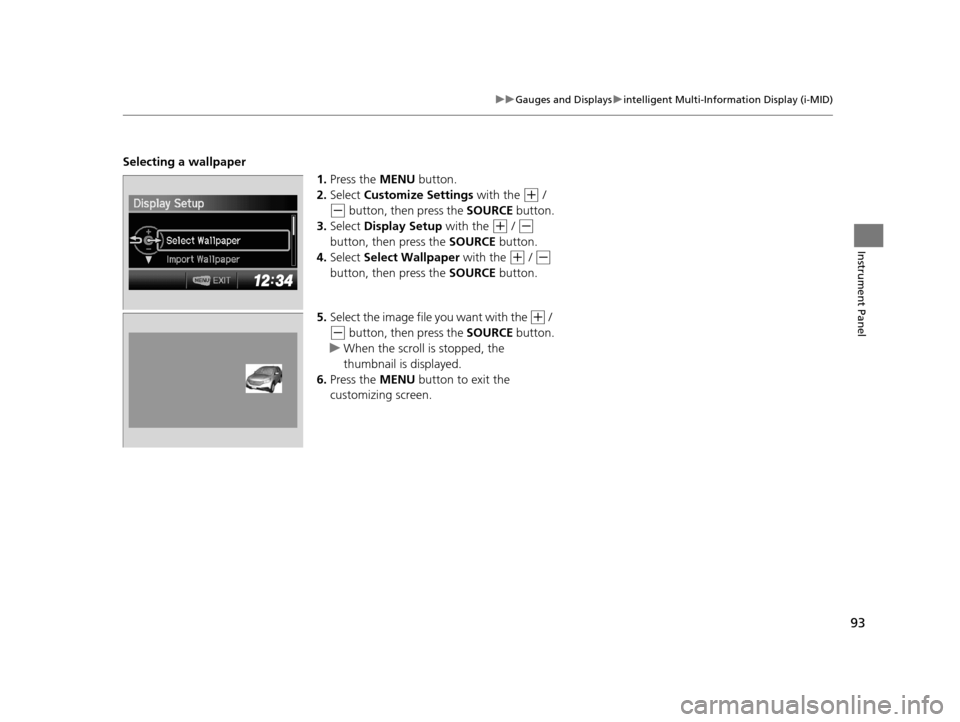
Selecting a wallpaper
1.Press the MENU button.
2. Select Customize Settings with the
(+ /
(- button, then press the SOURCE button.
3. Select Display Setup with the
(+ / (-
button, then press the SOURCE button.
4. Select Select Wallpaper with the
(+ / (-
button, then press the SOURCE button.
5. Select the image file you want with the
(+ /
(- button, then press the SOURCE button.
u When the scroll is stopped, the
thumbnail is displayed.
6. Press the MENU button to exit the
customizing screen.
14 CR-V-31T0A6200.book 93 ページ 2014年2月10日 月曜日 午後7時1分
Page 108 of 365

107
uuSecurity System uSecurity System Alarm*
Controls
■Setting the security system alarm
The security system alarm automatically sets when the following conditions have
been met:
• The ignition switch is in LOCK
(0, and the key has been removed from the
ignition switch.
• The hood and tailgate are closed.
• All doors and tailgate are locked with the key or the remote transmitter.
■When the security system alarm sets
The security system alarm indicator in the instrument panel blinks. When the
blinking interval changes after about 15 se conds, the security system alarm is set.
■To cancel the security system alarm
The security system alarm is canceled when the vehicle is unlocked using the key or
remote transmitter, or the ignition switch is turned to ON
(w. The security system
alarm indicator goes off at the same time.
■The panic button on the remote
transmitter
If you press the panic button for
approximately one second, the following will
occur for about 30 seconds:
• The horn sounds.
• Some exterior lights flash.
■Canceling panic mode
Press any button on the remote transmitter, or turn the ignition switch to ON
(w.
■Panic Mode
1 Security System Alarm*
Do not set the security system alarm when someone
is in the vehicle or a window is open. The system can
accidentally activate when unlocking the door with
the lock tab.
If the battery goes dead after you have set the
security system alarm, the security alarm may go off
once the battery is re charged or replaced.
If this occurs, deactivate the security system alarm by
unlocking a door using the ke y or remote transmitter.
Do not attempt to alter th is system or add another
device to it.
Panic
Button
* Not available on all models
14 CR-V-31T0A6200.book 107 ページ 2014年2月10日 月曜日 午後7時1分