Page 80 of 365

Continued79
uuGauges and Displays uInformation Display
Instrument Panel
Shows the total number of miles or kilomete rs driven since the last reset. Meters A
and B can be used to measure two separate trips.
■Resetting a trip meter
To reset a trip meter, display it, then pr ess and hold the knob. The trip meter is
reset to 0.0.
Shows the estimated average fuel economy of each trip meter in mpg (U.S.) or l/100
km (Canada). The display is updated at set intervals. When a trip meter is reset, the
average fuel economy is also reset.
Shows the remaining oil life and Maintenance Minder
TM.
2 Maintenance MinderTM P. 271
Shows the estimated distance you can travel on the remaining fuel. This distance is
estimated from the fuel economy of your previous trips.
Appears when the fuel fill cap is loose or is not installed.
2Check/Tighten Fuel Cap Message P. 334
■Trip Meter
■Average Fuel Economy
■Engine Oil Life
■Range
■Check Fuel Cap
1Trip Meter
Switch between trip meter A and trip meter B by
pressing the knob.
14 CR-V-31T0A6200.book 79 ページ 2014年2月10日 月曜日 午後7時1分
Page 81 of 365
uuGauges and Displays uInformation Display
80
Instrument Panel
Shows the outside temperature in Fahr enheit (U.S.) or Celsius (Canada).
■Adjusting the outside temperature display
Adjust the temperature reading up to ±5°F or ±3°C if the temperature reading
seems incorrect.
■Outside Temperature1 Outside Temperature
The temperature sensor is in the front bumper. Road
heat and exhaust from anothe r vehicle can affect the
temperature reading when your vehicle speed is less
than 19 mph (30 km/h).
It may take several minutes for the display to be
updated after the temperature reading has stabilized.
Use the i-MID’s customized features to correct the
temperature. 2 Customized Features P. 84
14 CR-V-31T0A6200.book 80 ページ 2014年2月10日 月曜日 午後7時1分
Page 82 of 365
81
uuGauges and Displays uintelligent Multi-Information Display (i-MID)
Continued
Instrument Panel
intelligent Multi-Information Display (i-MID)
Shows useful information, such as audio status. It also displays the compass
direction and clock.
Press the (display) butto n to change the display.
■Switching the Display
123456
Display
Button Fuel consumption
Audio/HFL display
Black screen
Full size analogue clock/
Wallpaper
14 CR-V-31T0A6200.book 81 ページ 2014年2月10日 月曜日 午後7時1分
Page 83 of 365

uuGauges and Displays uintelligent Multi-Information Display (i-MID)
82
Instrument Panel
Shows the estimated average fuel economy of each trip meter in mpg (U.S.) or l/100
km (Canada). The display is updated at set intervals. When a trip meter is reset, the
average fuel economy is also reset.
Shows the estimated distance you can travel on the remaining fuel. This distance is
estimated from the fuel economy of your previous trips.
Shows the time elapsed since Trip A or Trip B was reset.
Shows the average speed in mph or km/h since Trip A or Trip B was reset.
■Average Fuel Economy
■Range
■Elapsed Time
■Average Speed
1 Average Fuel Economy
You can choose an item to be displayed in the fuel
consumption screen. Range, elapsed time, or average
speed can be selected.
2 Customized Features P. 84
You can change when to reset the average fuel
economy. 2 Customized Features P. 84
1Elapsed Time
You can change when to reset the elapsed time.
2 Customized Features P. 84
1Average Speed
You can change when to reset the average speed.
2 Customized Features P. 84
14 CR-V-31T0A6200.book 82 ページ 2014年2月10日 月曜日 午後7時1分
Page 84 of 365
Continued83
uuGauges and Displays uintelligent Multi-Information Display (i-MID)
Instrument Panel
Shows the remaining oil life and Maintenance MinderTM.
2 Maintenance MinderTM P. 271
Shows the vehicle's traveling direction.
2Compass P. 223
Shows you turn-by-turn driv ing directions to your destination linked with the
navigation system.
2 See the Navigation System Manual
■Engine Oil Life and Maintenance Items
■Compass Direction
■Turn-by-Turn Directions*1Turn-by-Turn Directions*
You can select whether th e turn-by-turn display
comes on or not during the route guidance. 2 Customized Features P. 84
* Not available on all models
14 CR-V-31T0A6200.book 83 ページ 2014年2月10日 月曜日 午後7時1分
Page 85 of 365
uuGauges and Displays uintelligent Multi-Information Display (i-MID)
84
Instrument Panel
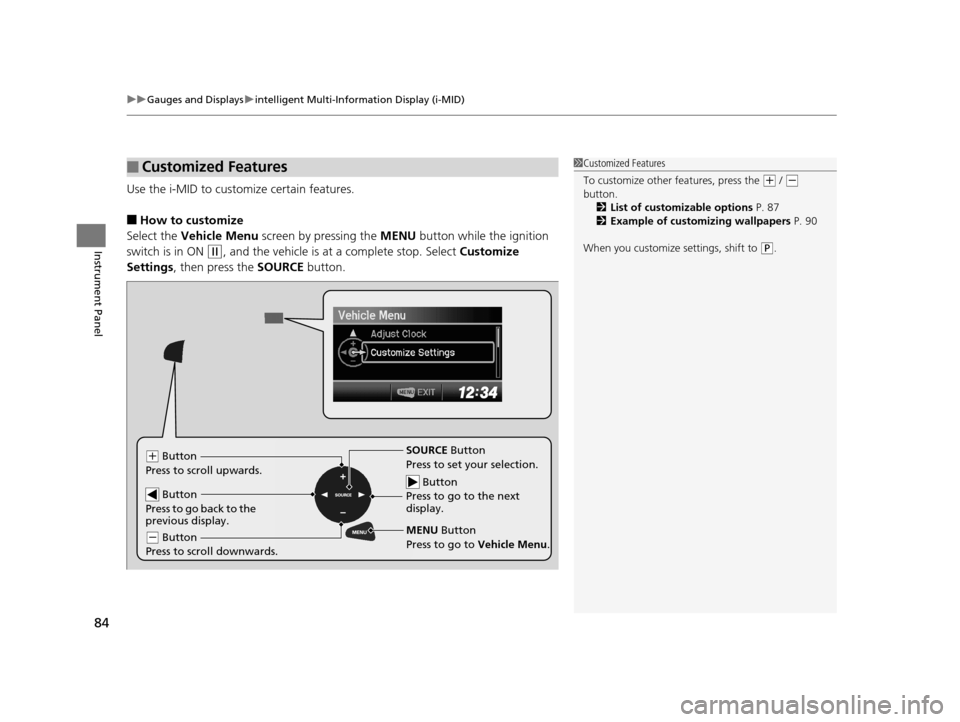
Use the i-MID to customize certain features.
■How to customize
Select the Vehicle Menu screen by pressing the MENU button while the ignition
switch is in ON
(w, and the vehicle is at a complete stop. Select Customize
Settings , then press the SOURCE button.
■Customized Features1Customized Features
To customize other features, press the
(+ / (-
button.
2 List of customizable options P. 87
2 Example of customizing wallpapers P. 90
When you customize settings, shift to
( P.
Button
Press to go to the next
display.
SOURCE Button
Press to set your selection.
MENU Button
Press to go to Vehicle Menu .(+ Button
Press to scroll upwards.
Button
Press to go back to the
previous display.
( - Button
Press to scroll downwards.
14 CR-V-31T0A6200.book 84 ページ 2014年2月10日 月曜日 午後7時1分
Page 86 of 365
85
uuGauges and Displays uintelligent Multi-Information Display (i-MID)
Continued
Instrument Panel
■Customization flow
Press the MENU button.1Customized Features
You can exit the customizing screen at any time by
pressing the MENU button.
Vehicle Menu
Vehicle Information
Adjust Clock*
* Not available on all models
14 CR-V-31T0A6200.book 85 ページ 2014年2月10日 月曜日 午後7時1分
Page 87 of 365
86
uuGauges and Displays uintelligent Multi-Information Display (i-MID)
Instrument Panel
Customize Settings
Display Setup
Trip Computer Setup
Lighting Setup
Door Setup
Default All
Select Wallpaper
Language Selection
Adjust Outside Temp. Display
Fuel Efficiency Backlight
Interior Light Dimming Time
Auto Light Sensitivity*
Auto Door Lock
Security Relock Timer
Import Wallpaper
Delete Wallpaper
Trip Meter Item to Display
Welcome Screen
Color Theme
Turn by Turn Display*
Trip A reset trigger
Trip B reset trigger
Headlight Auto Off Timer
Door Lock Mode
Auto Door Unlock
Keyless Lock Acknowledgment
* Not available on all models
14 CR-V-31T0A6200.book 86 ページ 2014年2月10日 月曜日 午後7時1分