Page 160 of 365
159
uuAudio System Basic Operation uPlaying XM ® Radio*
Continued
Features
Playing XM ® Radio*
/ Buttons
Press to skip to the
next category, and to skip
to the previous category.
(XM ®) Button
Press to select XM ® Radio.
(Power) Button
Press to turn the audio
system on and off.
Seek/Skip Buttons
Press or to previous
or next channel.SETUP Button
Press to display menu items. Selector Knob
Turn to adjust the volume.
Press and turn to select channels. Preset Buttons (1-6)
To store a channel:
1. Tune to the selected channel.
2. Pick a preset button and hold it until you hear a beep.
To listen to a stored channel, select
XM, then press the preset button.
SCAN Button
Press to sample all channels (in the
channel mode), or channels within a
category (in the category mode).
Each sampling continues for a few
seconds. Press
SCAN again to cancel
scanning and continue listening to
the channel.
* Not available on all models
14 CR-V-31T0A6200.book 159 ページ 2014年2月10日 月曜日 午後7時1分
Page 161 of 365

uuAudio System Basic Operation uPlaying XM ® Radio*
160
Features
1. Press the button to select the XM ® radio band (XM1 or XM2).
2. Press the SETUP button, rotate to select MODE/CATEGORY or MODE
CHANNEL . Each time you press , the mode switches between them. Press the
button to enter the setting.
3. Select a channel using , or the Seek/Skip, / , SCAN, or preset
button.
1.Press to display a channel list.
2. Rotate to select a channel, then press
.
■To Play the XM® Radio
■To Select a Channel from a List
1Playing XM ® Radio*
In the channel mode, you can select all available
channels. In the category mode, you can select a
channel within a ca tegory (Jazz, Rock, Classical, etc.).
You can store 12 XM ® stations in the preset buttons.
XM1 and XM2 let you store 6 stations each.
There may be instances when XM ® Radio does not
broadcast all the data fields (artist name, title). This
does not indicate a problem with your audio system.
* Not available on all models
14 CR-V-31T0A6200.book 160 ページ 2014年2月10日 月曜日 午後7時1分
Page 173 of 365

172
uuAudio System Basic Operation uPlaying Bluetooth ® Audio
Features
Playing Bluetooth ® Audio
Your audio system allows you to listen to music from your Bluetooth®-compatible
phone.
This function is available when the phone is paired and connected to the vehicle’s
Bluetooth ® HandsFreeLink ® (HFL) system.
2 Phone Setup P. 201
1Playing Bluetooth ® Audio
Not all Bluetooth -enabled phones with streaming
audio capabilities are comp atible with the system.
For a list of compatible phones:
•U.S.: Visit www.acura.com/handsfreelink , or call 1-
888-528-7876.
•Canada: Visit www.handsfreelink.ca , or call 1-888-
528-7876.
In some states, it may be il legal to perform some data
device functions while driving.
If more than one phone is paired to the HFL system,
there will be a delay before the system begins to play.
(Power) Button
Press to turn the
audio system on
and off.
SETUP Button
Press to display
menu items. Selector Knob
Turn to adjust the
volume.
Press to display the
device’s name.
AUX Button
Press to select
Bluetooth ® Audio.
Seek/Skip Buttons
Press or to
change files.
Bluetooth Indicator
Appears when your
phone is connected
to HFL.
Preset 1 Button
Press to switch the
mode between
pause and resume.
14 CR-V-31T0A6200.book 172 ページ 2014年2月10日 月曜日 午後7時1分
Page 178 of 365

177
uuRear Entertainment System*uOperating the System
Continued
Features
■System Controls and Menus for DVD
TITLE Button
Press to display the status of the
DVD that is currently playing.
Use , , , or to highlight
a menu item, and press the ENT
button to make a selection.
(Power) Button
Press to turn on the system.
CANCEL Button
Press to go back to the previous
display or operation.
Skip Buttons
Press or to change
chapters.
Stop Button
Press to stop a DVD. DVD Button
Press to
watch a DVD.
AUX Button
Press to access AUX mode.
The following options appear when you play a
DVD and press the
MENU button.
Top Menu
Menu
Play Mode
Search Subtitle Audio
Angle
Chapter Title
OFF
NumInput
Repeat
Chapter
Title
Return
The following options
appear when you play a
DVD and press the SETUP
button: Disp Adjust
Aspect Ratio
LanguageBrightness
Contrast
Black Level
Color Tint
Normal
Wide
Zoom
Full
Rewind Button
Press and hold to reverse to
chapters.
Fast-forward Button
Press and hold to fast forward to
chapters.
Play/Pause Button
Press to pause the DVD. Press
again to resume.
Reset
MENU Button
SETUP Button
14 CR-V-31T0A6200.book 177 ページ 2014年2月10日 月曜日 午後7時1分
Page 182 of 365
Continued181
uuRear Entertainment System*uOperating the System
Features
■SETUP button on the remote
Press the SETUP button while the DVD is
playing to see the ava ilable options. Use the
and buttons to highlight the option and
then press ENT.
Disp Adjust:
You can adjust the overhead screen’s Brightness, Contrast , Black Level , Color ,
and Tint. To return to the defaul t display setting, select Reset.
After you make all the adjustments, the screen goes back to the top SETUP screen,
or press the CANCEL button to return.
Aspect Ratio:
You can select the screen mode wi th a different aspect ratio from Normal , Wide ,
Zoom , and Full. After you select the mode, it t akes about one second to return to
the play mode with the selected ratio.
Language:
You can select the display language from English, French , and Spanish .1SETUP button on the remote
Not all DVD formats allow for all the available setting
adjustments.
14 CR-V-31T0A6200.book 181 ページ 2014年2月10日 月曜日 午後7時1分
Page 184 of 365
183
uuRear Entertainment System*uOperating the System
Continued
Features
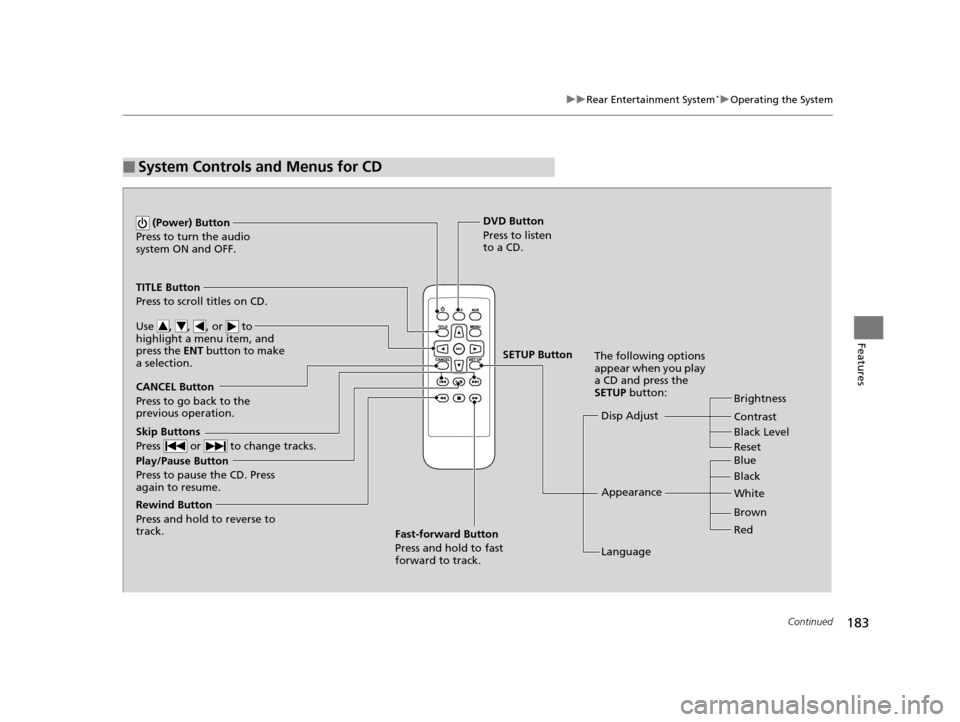
■System Controls and Menus for CD
Play/Pause Button
Press to pause the CD. Press
again to resume. (Power) Button
Press to turn the audio
system ON and OFF.
DVD Button
Press to listen
to a CD.
TITLE Button
Press to scroll titles on CD.
Use , , , or to
highlight a menu item, and
press the ENT button to make
a selection.
CANCEL Button
Press to go back to the
previous operation. Disp Adjust
LanguageBrightness
Contrast
Black Level
Appearance Black Blue
Brown White
Red
The following options
appear when you play
a CD and press the
SETUP button:
Skip Buttons
Press or to change tracks.
Rewind Button
Press and hold to reverse to
track. Fast-forward Button
Press and hold to fast
forward to track.
SETUP Button
Reset
14 CR-V-31T0A6200.book 183 ページ 2014年2月10日 月曜日 午後7時1分
Page 185 of 365

uuRear Entertainment System*uOperating the System
184
Features
■Playing a CD
Press the DVD button.
The available options that appear on the overhead screen are Repeat, Random, and Scan.
The fast-forward, rewind, , and buttons work similarly to operation a DVD.
2Playing a DVD P. 178
To scroll the audio data title, press the TITLE button for five seconds.
■SETUP button on the remote
Press the SETUP button while the CD is
playing to see the ava ilable options. Use the
and buttons to highlight the option,
then press ENT.
Disp Adjust:
You can adjust the overhead screen’s Brightness, Contrast, and Black Level . To
return to the default display setting, select Reset.
After you make adjustments, the screen goes back to the top SETUP screen, or press
the CANCEL button to return.
Appearance:
You can select the screen color from blue, black, white, brown, and red.
Language:
You can select the display language from English, French, and Spanish.
1System Controls and Menus for CD
You can insert an audio CD compatible with the
system, or recorded in MP3/WMA/AAC formats into
the slot and play.
2 Playable Discs P. 185
14 CR-V-31T0A6200.book 184 ページ 2014年2月10日 月曜日 午後7時1分
Page 212 of 365

Continued211
uuBluetooth ® HandsFreeLink ®u HFL Menus
Features
Up to 15 speed dial numbers can be stored per phone.
To store a speed dial number:
1.Press the PHONE button or the button.
2. Rotate to select Phone Setup, then
press .
u Repeat the procedure to select Speed
Dial , then Add New .
3. Rotate to select a place to choose a
number from, then press .
By Phonebook :
u Select a number from the linked cell
phone’s imported phonebook.
By Call History :
u Select a number from the call history.
By Phone Number :
u Input the number manually.
4. When the speed dial is successfully stored,
you are asked to create a voice tag for the
number. Rotate to select Yes or No,
then press .
5. Using the button, follow the prompts to
say the name for the speed dial entry.
■Speed Dial1Speed Dial
You can use the audio preset buttons during a call to
store a speed dial number:
1. Press and hold the desired audio preset button during a call.
2. The contact information for the active call will be stored for the corresponding speed dial.
When a voice tag is stored, you can press the
button and call the numbe r using voice commands.
14 CR-V-31T0A6200.book 211 ページ 2014年2月10日 月曜日 午後7時1分