Page 5 of 469
Visual Index
4Quick Reference Guide
❙Door Mirror Controls
(P 144)
❙Passenger's Front Airbag (P 42)❙Parking Brake
(P 337)
❙Glove Box
(P 156)
❙Rearview Mirror
(P 144)
❙Accessory Power Socket (P 159)❙Shift Lever
Automatic Transmission
(CVT)
(P 320)
Manual Transmission (P 322)
❙Hood Release Handle
(P 363)
❙Fuel Fill Door Release Handle
(P 344)
❙Driver’s Pocket❙Trunk Release
(P 121)
❙Power Door Lock Master Switch
* (P 116)
❙Power Window Switches
(P 128)
❙USB/HDMI® Port
* (P 171)
❙Interior Fuse Box
(P 440)
❙Driver's Front Airbag
(P 42)
❙Auxiliary Input Jack
* (P 172)
Page 95 of 469

94
uuGauges and Displays uintelligent Multi-Information Display (i-MID)
*
Instrument Panel
■List of customizable options
*1: Default Setting Setup Group Customizable
Features Description Selectable settingsVehicle
Information
Maintenance info
Resets the Maintenance Minder
TM.
No/Yes
Odometer/
Trip Meter Trip Meter Reset
Resets the trip meter. Trip A/Trip B
Select Trip/Odometer Switches between odometer, trip meter A, and trip
meter B. ODO
*1/
Trip A /Trip B
Adjust
Clock
*
Sets time display 12 hour or 24 hour and adjust the time.
12 h
*1/ 24 h
Customize
Settings TPMS Calibration
*
Calibrates the TPMS.
Cancel/Initialize
Display
Setup Select
Wallpaper
*
Selects the full-size analogue clock or the wallpaper.
Clock
*1/
Image 1 /Image 2 /
Image 3
Import
Wallpaper
*
Imports an image file for a new wallpaper. Three images can be stored.
2
Importing Wallpapers
from USB P. 98
Delete
Wallpaper
*
Deletes an image file for a wallpaper. Image 1/Image 2/ Image 3
* Not available on all models
Page 99 of 469
uuGauges and Displays uintelligent Multi-Information Display (i-MID)
*
98Instrument Panel
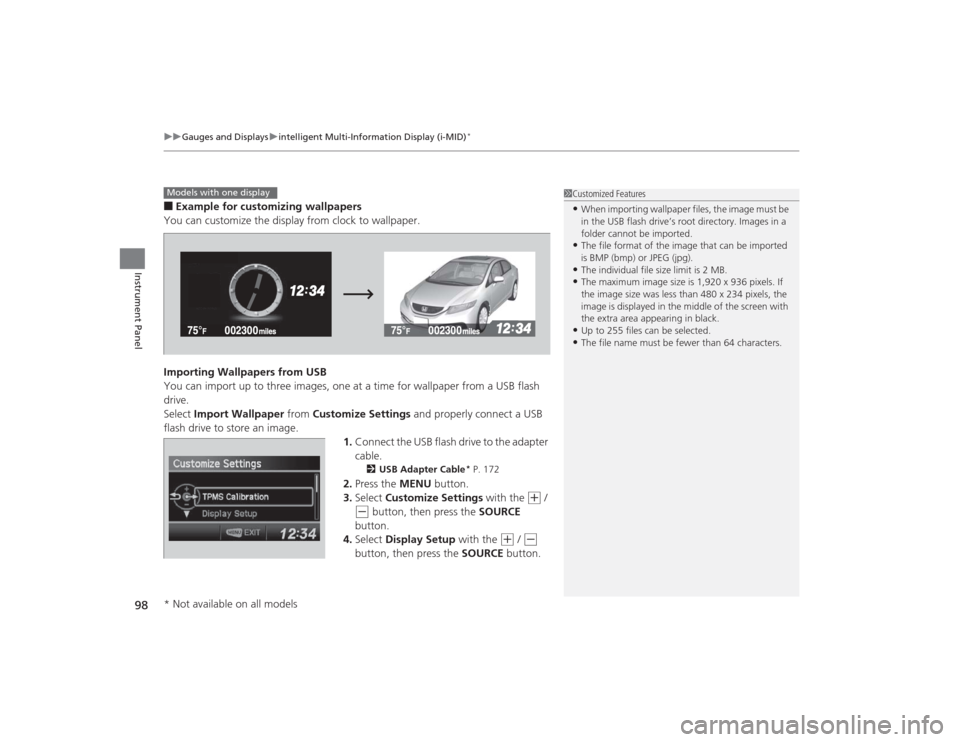
■Example for customizing wallpapers
You can customize the display from clock to wallpaper.
Importing Wallpapers from USB
You can import up to three images, one at a time for wallpaper from a USB flash
drive.
Select Import Wallpaper from Customize Settings and properly connect a USB
flash drive to store an image. 1.Connect the USB flash drive to the adapter
cable.
2 USB Adapter Cable
* P. 172
2.Press the MENU button.
3. Select Customize Settings with the
(+
/
(-
button, then press the SOURCE
button.
4. Select Display Setup with the
(+
/ (-
button, then press the SOURCE button.
1Customized Features•When importing wallpaper files, the image must be
in the USB flash drive’s root directory. Images in a
folder cannot be imported.•The file format of the image that can be imported
is BMP (bmp) or JPEG (jpg).•The individual file size limit is 2 MB.•The maximum image size is 1,920 x 936 pixels. If
the image size was less than 480 x 234 pixels, the
image is displayed in the middle of the screen with
the extra area appearing in black.•Up to 255 files can be selected.•The file name must be fewer than 64 characters.
Models with one display* Not available on all models
Page 170 of 469
169
Features
This chapter describes how to operate technology features.
Audio SystemAbout Your Audio System ................ 170
USB/HDMI ® Port
*............................. 171
USB Adapter Cable*........................ 172
Auxiliary Input Jack*........................ 172
Audio System Theft Protection
*....... 173
Audio Remote Controls
*.................. 174
Audio System Basic Operation ...... 176
Adjusting the Sound ........................ 176
Playing AM/FM Radio ....................... 177
Playing a CD .................................... 178
Models with information display
Audio System Basic Operation ...... 179
Adjusting the Sound ........................ 180
Playing AM/FM Radio ....................... 181
Playing a CD .................................... 184
Playing an iPod ................................ 187
Playing Internet Radio ...................... 190
Playing a USB Flash Drive ................. 192
Playing Bluetooth ® Audio................. 195
Audio System Basic Operation ........ 197
Audio/Information Screen ................ 198
Adjusting the Sound ........................ 202
Display Setup ................................... 203Models with one displayModels with display audio system
Playing AM/FM Radio....................... 204
Playing a CD .................................... 207
Playing an iPod ................................ 210
Playing Internet Radio ...................... 213
Playing a USB Flash Drive ................. 215
Playing Bluetooth ® Audio ................ 218
Playing a Video Using the HDMI ®..... 220
Smartphone Apps ............................ 222
Siri Eyes Free .................................... 223
Audio Error Messages ...................... 224
General Information on the Audio System ............................................. 230
Customized Features
*...................... 233
Bluetooth® HandsFreeLink ®
*... 246, 277
* Not available on all models
Page 171 of 469
170Features
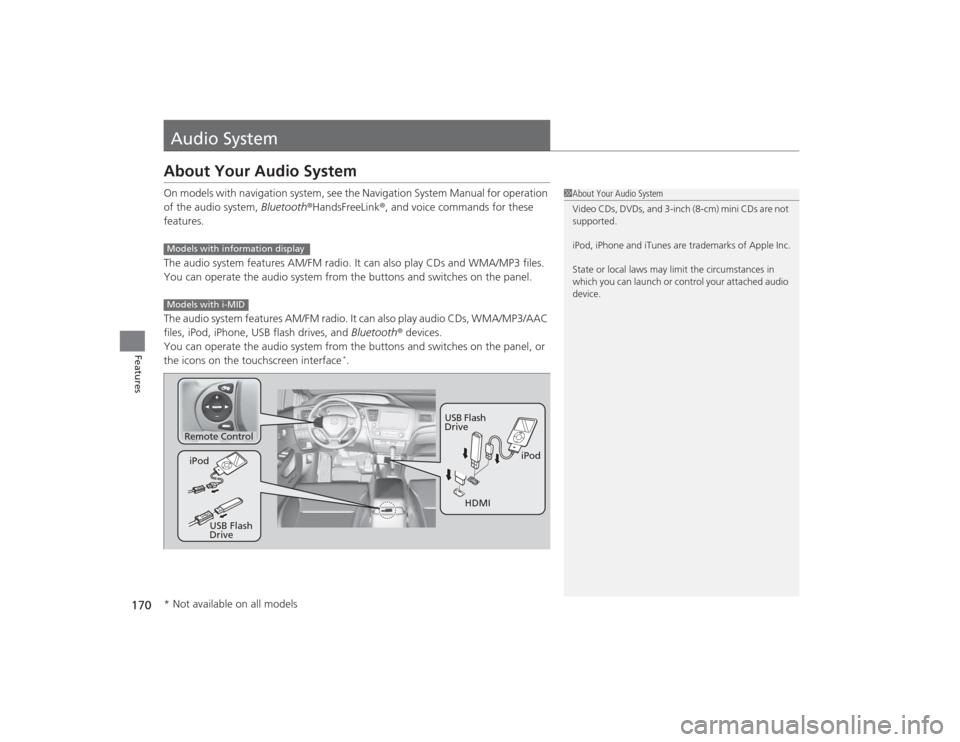
Audio SystemAbout Your Audio SystemOn models with navigation system, see the Navigation System Manual for operation
of the audio system, Bluetooth®HandsFreeLink ®, and voice commands for these
features.
The audio system features AM/FM radio. It can also play CDs and WMA/MP3 files.
You can operate the audio system from the buttons and switches on the panel.
The audio system features AM/FM radio. It can also play audio CDs, WMA/MP3/AAC
files, iPod, iPhone, USB flash drives, and Bluetooth ® devices.
You can operate the audio system from the buttons and switches on the panel, or
the icons on the touchscreen interface
*.
1 About Your Audio System
Video CDs, DVDs, and 3-inch (8-cm) mini CDs are not
supported.
iPod, iPhone and iTunes are trademarks of Apple Inc.
State or local laws may limit the circumstances in
which you can launch or control your attached audio
device.
Models with information displayModels with i-MID
Remote Control
iPod
USB Flash
Drive
iPod
USB Flash
Drive HDMI
* Not available on all models
Page 172 of 469
171
uuAudio System uUSB/HDMI ® Port
*
Features
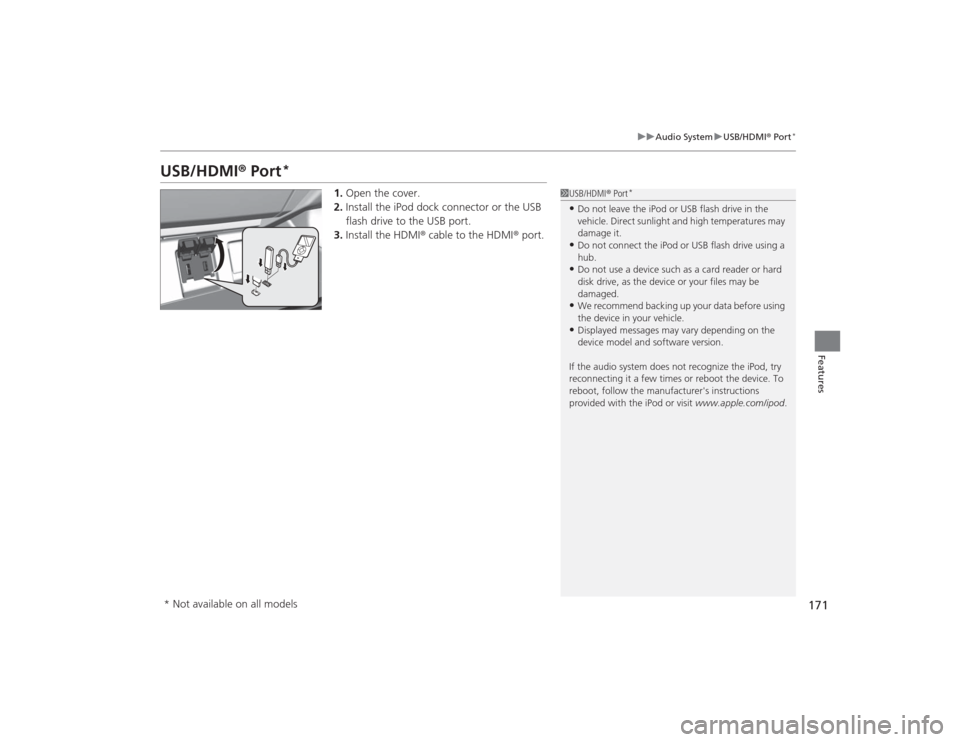
USB/HDMI ® Port
*
1. Open the cover.
2. Install the iPod dock connector or the USB
flash drive to the USB port.
3. Install the HDMI ® cable to the HDMI ® port.
1USB/HDMI ® Port
*
•Do not leave the iPod or USB flash drive in the
vehicle. Direct sunlight and high temperatures may
damage it.•Do not connect the iPod or USB flash drive using a
hub.•Do not use a device such as a card reader or hard
disk drive, as the device or your files may be
damaged.•We recommend backing up your data before using
the device in your vehicle.•Displayed messages may vary depending on the
device model and software version.
If the audio system does not recognize the iPod, try
reconnecting it a few times or reboot the device. To
reboot, follow the manufacturer's instructions
provided with the iPod or visit www.apple.com/ipod.
* Not available on all models
Page 201 of 469
uuAudio System Basic Operation uAudio/Information Screen
200Features
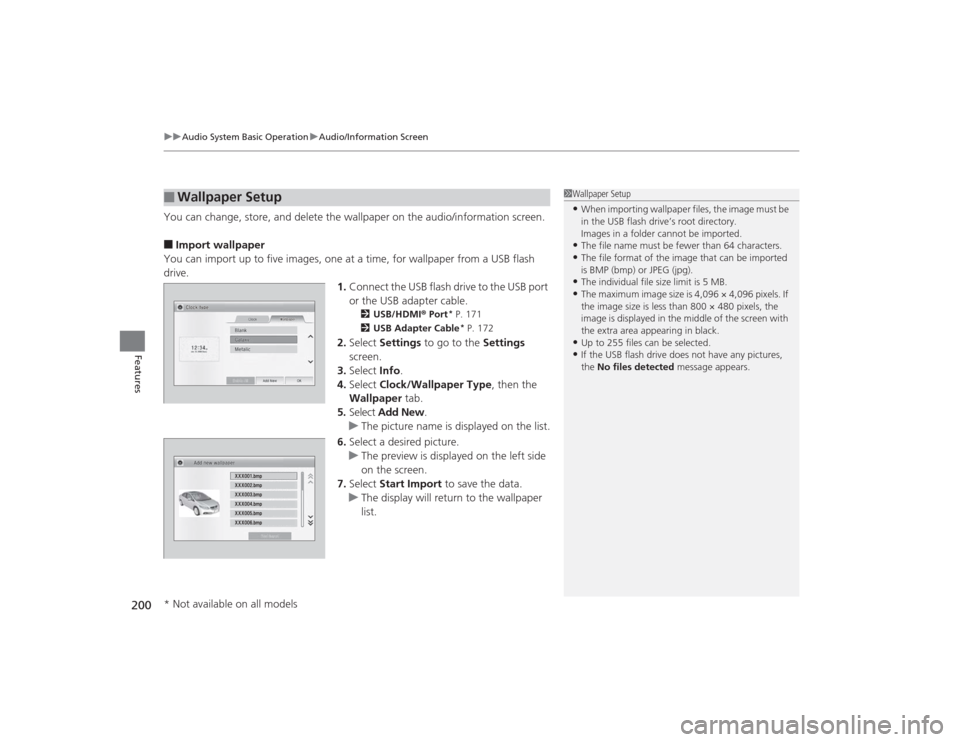
You can change, store, and delete the wallpaper on the audio/information screen.■Import wallpaper
You can import up to five images, one at a time, for wallpaper from a USB flash
drive. 1.Connect the USB flash drive to the USB port
or the USB adapter cable.
2 USB/HDMI® Port
* P. 171
2 USB Adapter Cable* P. 172
2.Select Settings to go to the Settings
screen.
3. Select Info.
4. Select Clock/Wallpaper Type , then the
Wallpaper tab.
5. Select Add New .
u The picture name is displayed on the list.
6. Select a desired picture.
u The preview is displayed on the left side
on the screen.
7. Select Start Import to save the data.
u The display will return to the wallpaper
list.
■
Wallpaper Setup
1Wallpaper Setup•When importing wallpaper files, the image must be
in the USB flash drive’s root directory.
Images in a folder cannot be imported.•The file name must be fewer than 64 characters.•The file format of the image that can be imported
is BMP (bmp) or JPEG (jpg).•The individual file size limit is 5 MB.•The maximum image size is 4,096 × 4,096 pixels. If
the image size is less than 800 × 480 pixels, the
image is displayed in the middle of the screen with
the extra area appearing in black.•Up to 255 files can be selected.•If the USB flash drive does not have any pictures,
the No files detected message appears.
* Not available on all models
Page 211 of 469
210
uuAudio System Basic Operation uPlaying an iPod
Features
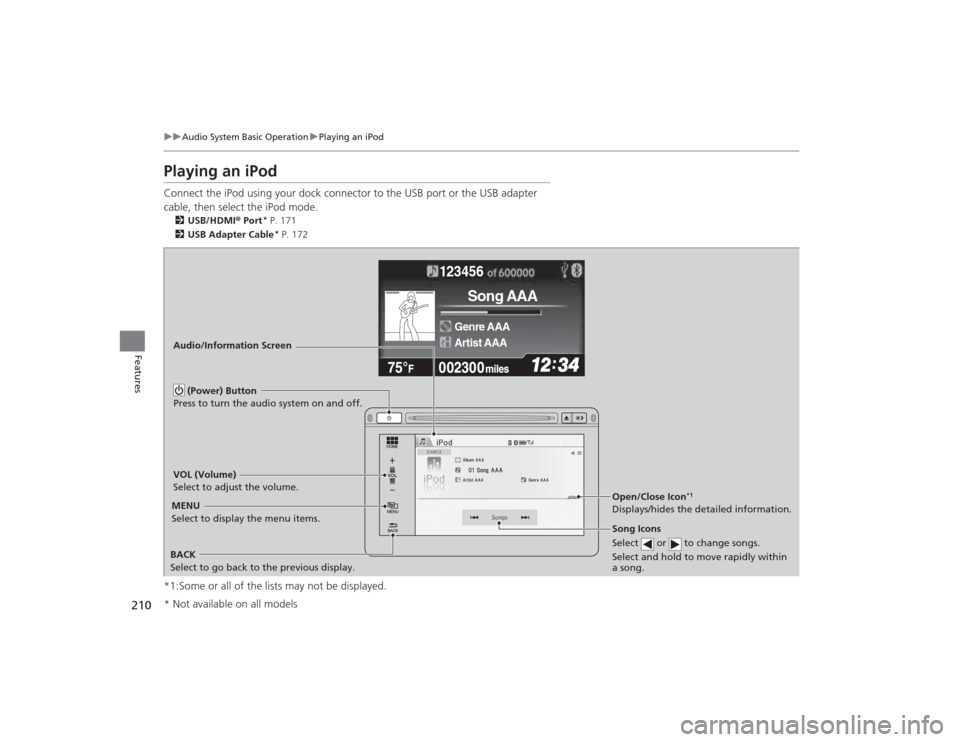
Playing an iPodConnect the iPod using your dock connector to the USB port or the USB adapter
cable, then select the iPod mode.2 USB/HDMI ® Port
* P. 171
2 USB Adapter Cable* P. 172
*1:Some or all of the lists may not be displayed.
�e�ƒ�Œ�
�_�
�N�O�>�q��_�Š�€�“�‹�>�_�_�_
123456
Genre AAA
Song AAA
Artist AAA
Audio/Information Screen
BACK
Select to go back to the previous display. VOL (Volume)
Select to adjust the volume.
Song Icons
Select or to change songs.
Select and hold to move rapidly within
a song.MENU
Select to display the menu items. (Power) Button
Press to turn the audio system on and off.
Open/Close Icon
*1
Displays/hides the detailed information.
* Not available on all models