2014 HONDA CIVIC start stop button
[x] Cancel search: start stop buttonPage 358 of 469
357
uuMaintenance Minder
TMuTo Use Maintenance Minder
TM
Continued
Maintenance
To Use Maintenance Minder
TM
Maintenance items, which should be serviced at the same time that you replace the
engine oil, appear on the i-MID.
You can view them on the Maintenance info screen at any time.
1. Turn the ignition switch to ON
(w
*1.
2. Press the MENU button to go to the Vehicle Menu screen.
3. Select Vehicle Information with the (+
button, then press the SOURCE button.
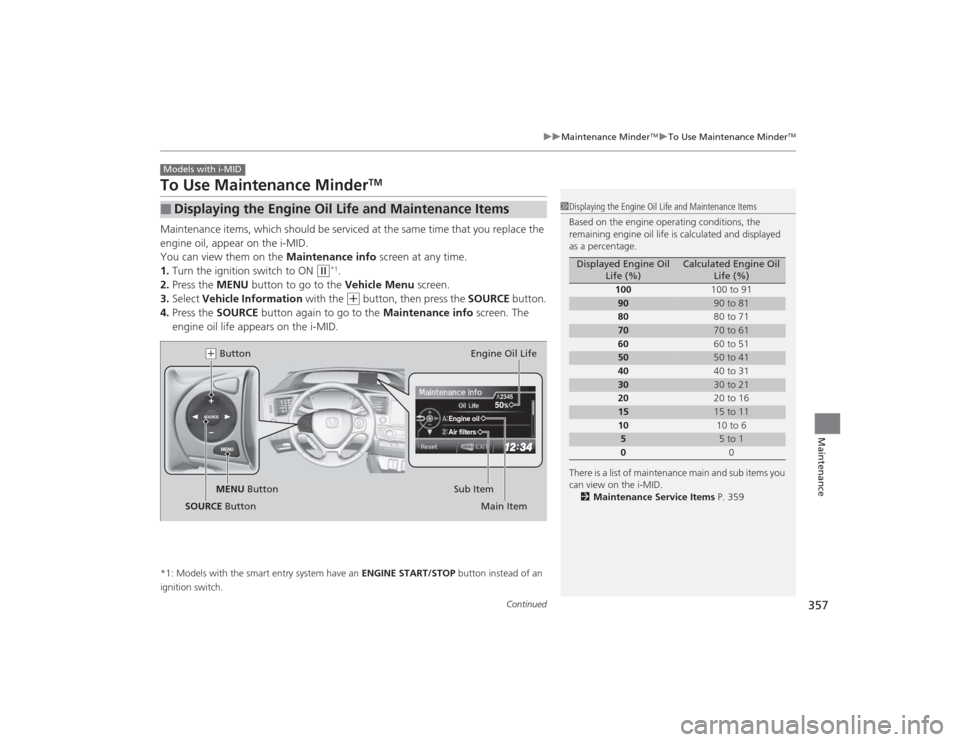
4. Press the SOURCE button again to go to the Maintenance info screen. The
engine oil life appears on the i-MID.
*1: Models with the smart entry system have an ENGINE START/STOP button instead of an
ignition switch.■
Displaying the Engine Oil Life and Maintenance ItemsModels with i-MID
1 Displaying the Engine Oil Life and Maintenance Items
Based on the engine operating conditions, the
remaining engine oil life is calculated and displayed
as a percentage.
There is a list of maintenance main and sub items you
can view on the i-MID.
2 Maintenance Service Items P. 359
Displayed Engine Oil
Life (%)
Calculated Engine Oil Life (%)
100 100 to 91
90
90 to 81
80 80 to 71
70
70 to 61
60 60 to 51
50
50 to 41
40 40 to 31
30
30 to 21
20 20 to 16
15
15 to 11
10 10 to 6
5
5 to 1
0 0
MENU
SOURCE
50
Engine oilAir filters
2345
MENU Button(+ Button
Sub ItemEngine Oil Life
Main Item
SOURCE Button
Page 361 of 469
uuMaintenance Minder
TMuTo Use Maintenance Minder
TM
360Maintenance
Reset the engine oil life display if you have performed the maintenance service.
1. Turn the ignition switch to ON
(w
*1.
2. Go to the Maintenance info screen.
2Displaying the Engine Oil Life and Maintenance Items P. 357
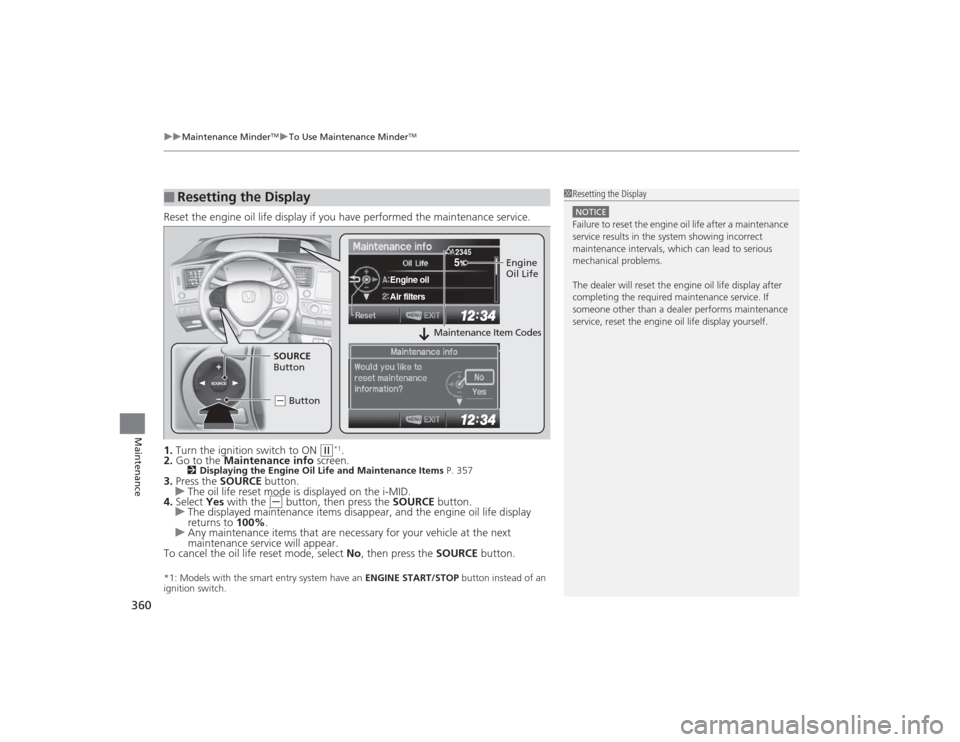
3.Press the SOURCE button.
u The oil life reset mode is displayed on the i-MID.
4. Select Yes with the
(-
button, then press the SOURCE button.
u The displayed maintenance items disappear, and the engine oil life display
returns to 100%.
u Any maintenance items that are necessary for your vehicle at the next
maintenance service will appear.
To cancel the oil life reset mode, select No, then press the SOURCE button.
*1: Models with the smart entry system have an ENGINE START/STOP button instead of an
ignition switch.■
Resetting the Display
1 Resetting the DisplayNOTICEFailure to reset the engine oil life after a maintenance
service results in the system showing incorrect
maintenance intervals, which can lead to serious
mechanical problems.
The dealer will reset th e engine oil life display after
completing the required maintenance service. If
someone other than a dealer performs maintenance
service, reset the engine oil life display yourself.
SOURCE
5
Engine oilAir filters
2345
Engine
Oil Life
SOURCE
Button
( - Button
Maintenance Item Codes
Page 412 of 469

411
Continued
Handling the Unexpected
If a Tire Goes FlatChanging a Flat TireIf a tire goes flat while driving, grasp the steering wheel firmly, and brake gradually
to reduce speed. Then, stop in a safe place. Replace the flat tire with a compact
spare tire. Go to a dealer as soon as possible to have the full-size tire repaired or
replaced.
1.Park the vehicle on firm, level, and non-slippery surface, and apply the parking
brake.
2. Put the shift lever in
(P
.
2. Put the shift lever in
(R
.
3. Turn on the hazard warning lights and turn the ignition switch to LOCK
(0
*1.
*1: Models with the smart entry system have an ENGINE START/STOP button instead of an
ignition switch.Models with compact spare tire
1 Changing a Flat Tire
Periodically check the tire pressure of the compact
spare. It should be set to the specified pressure.
Specified Pressure: 60 psi (420 kPa, 4.2 kgf/cm
2)
When driving with the compact spare tire, keep the
vehicle speed under 50 mph (80 km/h). Replace with
a full-size tire as soon as possible.
The compact spare tire and wheel in your vehicle are
specifically for this model. Do not use them with
another vehicle. Do not use another type of compact
spare tire or wheel with your vehicle.
Do not mount tire chains on a compact spare tire.
If a chain-mounted front tire goes flat, remove one of
the full-size rear tires and replace it with the compact
spare tire. Remove the flat front tire and replace it
with the full-size tire that was removed from the rear.
Mount the tire chains on the front tire.
Automatic transmission (CVT) modelsManual transmission modelsAll models
Page 419 of 469
418
uuIf a Tire Goes Flat uTemporarily Repairing a Flat Tire
Handling the Unexpected
Temporarily Repairing a Flat TireThis vehicle is not equipped with a spare tire. If the tire has a large cut or is otherwise
severely damaged, you will need to have the vehicle towed. If the tire only has a
small puncture, from a nail for instance, you can use the temporary tire repair kit so
that you can drive to the nearest service station for a more permanent repair.
If a tire goes flat while driving, grasp the steering wheel firmly, and brake gradually
to reduce speed. Then stop in a safe place.
1. Park the vehicle on firm, level, and non-slippery surface and apply the parking
brake.
2. Put the shift lever in
(P
.
3. Turn on the hazard warning lights and turn the ignition switch to LOCK
(0
*1.
u When towing a trailer, unhitch the trailer.
*1: Models with the smart entry system have an ENGINE START/STOP button instead of an
ignition switch.■
Getting Ready to Temporarily Repair the Flat TireModels with tire repair kit
1 Temporarily Repairing a Flat Tire
The kit should not be used in the following situations.
Instead, contact a dealer or a roadside assistant to
have the vehicle towed.•The tire sealant has expired.•More than two tires are punctured.•The puncture or cut is larger than 3/16 inch (4 mm).•The tire side wall is damaged or the puncture is
outside the tire contact area.•Damage has been caused by driving with the tire
extremely under inflated.•The tire bead is no longer seated.•The rim is damaged.
Do not remove a nail or screw that punctured the
tire. If you remove it from the tire, you may not be
able to repair the puncture using the kit.
When the puncture is:
Kit Use
Smaller than 3/16 inch (4 mm)
Yes
Larger than 3/16 inch (4 mm)
No
Contact
Area
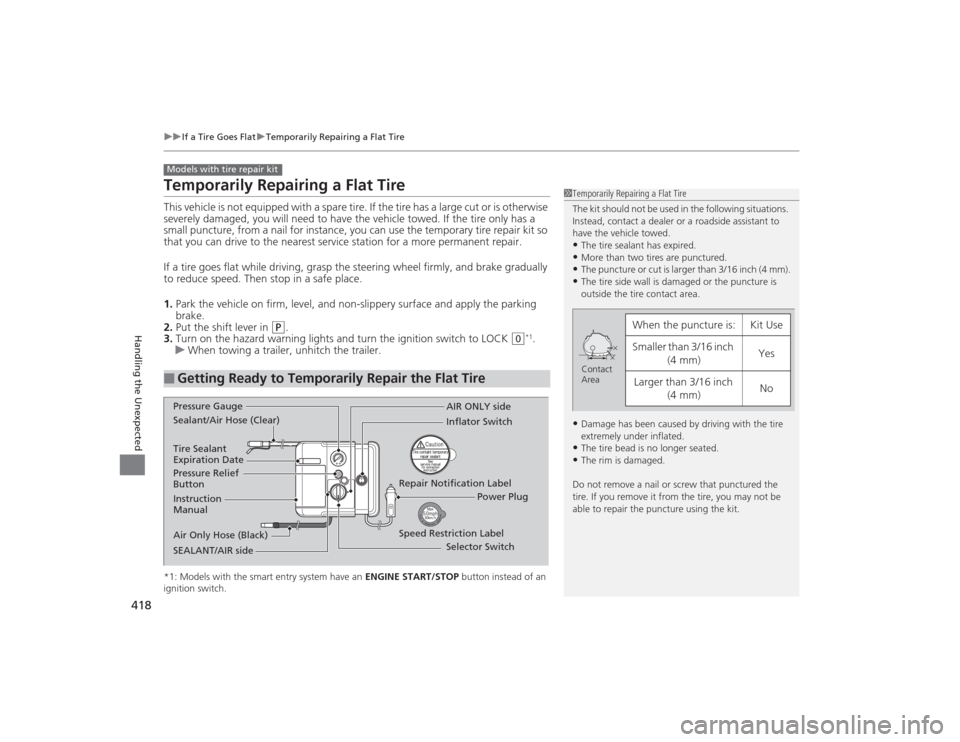
Instruction
Manual
Air Only Hose (Black) Speed Restriction Label Repair Notification Label
Pressure Relief
Button Inflator Switch
Selector Switch
SEALANT/AIR side Sealant/Air Hose (Clear) AIR ONLY side
Power Plug
Pressure Gauge
Tire Sealant
Expiration Date
Page 427 of 469

426Handling the Unexpected
Engine Does Not StartChecking the EngineIf the engine does not start, check the starter.
Starter condition
Checklist
Starter doesn’t turn or turns
over slowly.
The battery may be dead. Check
each of the items on the right and
respond accordingly.
Check for a message on the i-MID.●If the TO START, HOLD REMOTE NEAR START BUTTON message appears
2If the Smart Entry Remote Battery is Weak P. 427
uMake sure the smart entry remote is in its operating range.
2 ENGINE START/STOP Button Operating Range P. 132
Check brightness of the interior lights.
Turn on the interior lights and check the brightness.●If the interior lights are dim or do not come on at all
2Battery P. 400
●If the interior lights come on normally
2 Fuses P. 439
The starter turns over normally
but the engine doesn’t start.
There may be a problem with the
fuse. Check each of the items on
the right and respond accordingly. Review the engine start procedure.
Follow its instructions, and try to start the engine again.
2
Starting the Engine P. 313
Check the immobilizer system indicator.
When the immobilizer system indicator is blinking, the engine cannot be started.
2Immobilizer System P. 125
Check the fuel level.
There should be enough fuel in the tank.
2 Fuel Gauge P. 82
Check the fuse.
Check all fuses, or have the vehicle checked by a dealer.
2Inspecting and Changing Fuses P. 441
If the problem continues:
2Emergency Towing P. 442
1Checking the Engine
If you must start the vehicle immediately, use an
assisting vehicle to jump start it.
2 Jump Starting P. 429
Models with smart entry system
Page 428 of 469
427
uuEngine Does Not Start uIf the Smart Entry Remote Battery is Weak
Handling the Unexpected
If the Smart Entry Remote Battery is WeakIf the beeper sounds, the TO START, HOLD REMOTE NEAR START BUTTON
message appears on the i-MID, the indicator on the ENGINE START/STOP button
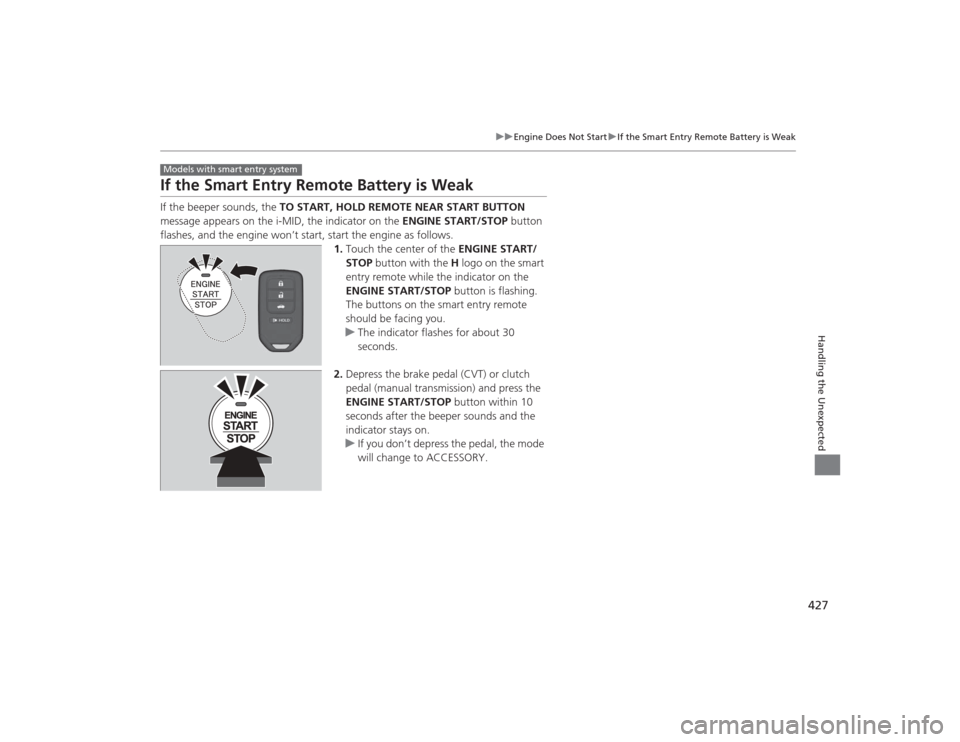
flashes, and the engine won’t start, start the engine as follows. 1.Touch the center of the ENGINE START/
STOP button with the H logo on the smart
entry remote while the indicator on the
ENGINE START/STOP button is flashing.
The buttons on the smart entry remote
should be facing you.
u The indicator flashes for about 30
seconds.
2. Depress the brake pedal (CVT) or clutch
pedal (manual transmission) and press the
ENGINE START/STOP button within 10
seconds after the beeper sounds and the
indicator stays on.
u If you don’t depress the pedal, the mode
will change to ACCESSORY.Models with smart entry system
Page 429 of 469
428
uuEngine Does Not Start uEmergency Engine Stop
Handling the Unexpected
Emergency Engine StopThe ENGINE START/STOP button may be used to stop the engine due to an
emergency situation even while driving. If you mus t stop the engine, do either of the
following operations:
• Press and hold the ENGINE START/STOP button for two seconds.
• Firmly press the ENGINE START/STOP button twice.
• The steering wheel will not lock.
The power mode changes to VEHICLE OFF with the shift lever in
(P
, and to
ACCESSORY with the shift lever in any position other than
(P
.
The power mode changes to VEHICLE OFF.
• Because turning off the engine also disables the power assist the engine provides
to the steering and braking systems, it will require significantly more physical
effort and time to steer and slow the vehicle. Downshift gears and use both feet
on the brake pedal, if necessary, to slow the vehicle and stop immediately in a
safe place.
Models with smart entry system
1Emergency Engine StopNOTICEDo not press the button while driving unless it is
absolutely necessary for the engine to be switched
off.
Automatic transmission (CVT) modelsManual transmission models
Page 440 of 469

439
Continued
Handling the Unexpected
FusesFuse LocationsIf any electrical devices are not working,
turn the ignition switch to LOCK
(0
*1 and
check to see if any applicable fuse is blown.
Located near the brake fluid reservoir. Push
the tabs to open the box.
Fuse locations are shown on the fuse box
cover. Locate the fuse in question by the
fuse number and box cover number.
■
Engine Compartment Fuse Box
■Circuit protected and fuse rating
Circuit Protected
Amps
1
EPS
70 A
−
(40 A)
ABS/VSA Motor
30 A
ABS/VSA FSR
30 A
Wiper Motor
*2
−*3
30 A
(30 A)
Main Fuse
100 A
2
IG Main
30 A
*2
50 A
*3
Fuse Box Main 60 AFuse Box Main 2
60 A
Headlight Main 30 A
ST MG Switch
*2
−*3
30 A
(30 A)
Rear Defogger 30 A IG Main 2
*2
−*3
30 A
(30 A)
Blower 40 A −(30 A)
Sub Fan Motor 20 A
Main Fan Motor 20 A
3
−
−
4 −
*2
Left Headlight Low Beam
*3
−
15 A
5
START DIAG
*2
ST MG
*3
7.5 A
7.5 A
6 −
*2
Right Headlight Low Beam
*3
−
15 A
7
−
−
8− −
*1:Models with the smart entry system have an ENGINE START/STOP button
instead of an ignition switch.
*2:Models with smart entry system
*3:Models without smart entry system9
−
−
10 − −
11
Oil Level
7.5 A
12 Fog Lights
*
(20 A)
13
Driver’s Power Seat Sliding
*
(20 A)
14 Hazard 10 A
15
FI Sub
15 A
16 IG Coil 15 A
17
Stop
15 A
18 Horn 10 A
19
Premium Amp
*
(20 A)
20 Right Headlight Low Beam
*2
Injection
*, *3
15 A
(15 A)
21
IGP
15 A
22 DBW 15 A
23
Left Headlight Low Beam
*2
Headlight Low Beam
*3
15 A
20 A
24 Driver’s Power Seat
Reclining
*
(20 A)
25
MG Clutch
7.5 A
26 Washer
*2
−*3
15 A
−
27
SMALL
20 A
28 Interior Lights 7.5 A
29
Backup
10 A
Circuit Protected
Amps
* Not available on all models